
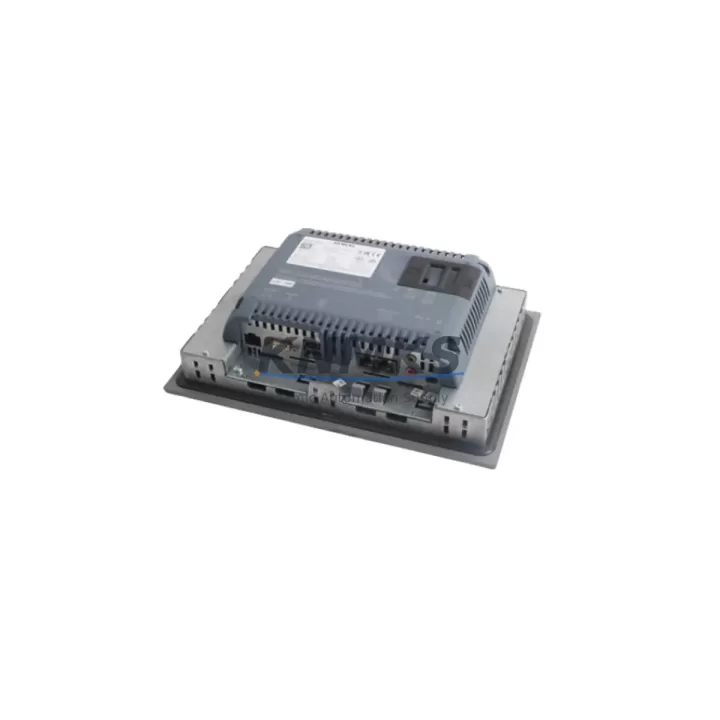
Overview
SIEMENS 6AV2124-2DC01-0AX0 Maintenance-Proven Spare Part for Factory Uptime
The SIEMENS 6AV2124-2DC01-0AX0 is a KTP400 Basic Color PN HMI panel from the SIMATIC HMI KTP400 series — a 4-inch widescreen TFT touch panel with PROFINET interface, engineered for demanding industrial environments. As a direct original spare, this unit is a critical component in maintaining continuous production across automotive assembly lines, food and beverage processing, water treatment facilities, chemical plants, and discrete manufacturing cells. Whether you are managing a scheduled annual overhaul, responding to an unplanned HMI failure, or building a strategic spare parts inventory for aging SIMATIC S7-300, S7-400, or S7-1200/1500 control systems, the 6AV2124-2DC01-0AX0 delivers the compatibility and reliability that maintenance engineers depend on.
At KNMKS, every 6AV2124-2DC01-0AX0 unit undergoes pre-shipment functional testing — including display verification, touch calibration, PROFINET communication check, and power-on self-test — before dispatch. Each unit is backed by a support terms confirmed by quotation and ships with full traceability documentation, giving procurement engineers the confidence to approve purchase orders for both emergency replacement and long-term buffer stock programs.
Spare Maintenance Table
| Parameter | Specification |
|---|---|
| Part Number / SKU | 6AV2124-2DC01-0AX0 |
| Brand | SIEMENS |
| Series | SIMATIC HMI KTP400 Basic |
| Display Size | 4″ Widescreen TFT Color |
| Resolution | 480 × 272 px |
| Touch Type | Resistive Touch + 4 Function Keys |
| Communication Interface | PROFINET (1× RJ45) |
| Supply Voltage | 24 V DC (20.4–28.8 V DC) |
| Power Consumption | Approx. 4.5 W |
| Operating Temperature | 0 °C to +50 °C |
| Protection Rating | IP65 (front panel) |
| Engineering Software | TIA Portal V13 SP1 and above |
| Compatible Controllers | SIMATIC S7-1200, S7-1500, S7-300, S7-400, ET 200SP CPU |
| Origin | Germany |
| Weight | Approx. 700 g |
| Support terms | 12 Months — Pre-shipment tested, fully functional |
Maintenance Planning for Continuous Operation
When a 6AV2124-2DC01-0AX0 KTP400 Basic panel fails or is flagged during a control cabinet inspection, experienced maintenance engineers know that the HMI is rarely the only component requiring attention. A thorough site assessment should include the 24 V DC power supply module feeding the HMI — units such as the SITOP PSU100S 6EP1334-2BA20 are commonly paired with KTP400 panels and should be checked for output voltage stability and ripple before the replacement panel is commissioned.
The PROFINET network switch or managed Ethernet switch connecting the HMI to the PLC backplane should be inspected for port integrity and cable condition. In S7-1200 and S7-1500 installations, the CPU communication module — for example the SIMATIC S7-1200 CPU 1214C (6ES7214-1AG40-0XB0) — should be verified for firmware compatibility with the TIA Portal project loaded on the replacement KTP400. Mismatched firmware versions are a leading cause of post-replacement commissioning delays.
For older S7-300 or S7-400 installations, the CP 343-1 or CP 443-1 PROFINET communication processor should be inspected alongside the HMI replacement. Additionally, the terminal block wiring at the 24 V DC input connector of the KTP400 should be checked for corrosion, loose crimps, or undersized conductors — a common finding in panels that have been in service for more than five years.
If the control cabinet houses signal isolators or relay output modules connected to the same 24 V rail, these should be tested under load to confirm the power budget remains within specification after the new HMI is added. Procurement engineers building annual maintenance kits for SIMATIC HMI installations are advised to include the KTP400 Basic front seal gasket and a spare PROFINET patch cable (Cat 6, industrial rated) alongside the 6AV2124-2DC01-0AX0 panel to ensure a complete, ready-to-deploy replacement kit.
Site Replacement Workflow
Step 1 — Backup the existing project: Before removing the failed KTP400, use TIA Portal to upload and archive the current HMI project from the panel (if the panel is still partially functional) or retrieve the project from the engineering workstation backup. Confirm the project version matches the TIA Portal version available on site.
Step 2 — Power isolation: Isolate the 24 V DC supply to the HMI at the circuit breaker or fuse terminal. Verify zero voltage at the HMI power connector using a calibrated multimeter before disconnecting cables.
Step 3 — Physical removal and installation: Remove the panel from the cabinet cutout (138 × 108 mm standard cutout for KTP400). Install the 6AV2124-2DC01-0AX0 replacement unit, reconnect the 24 V DC power connector and PROFINET RJ45 cable, and secure the panel clamps to the specified torque.
Step 4 — Project download and commissioning: Power on the panel, connect the TIA Portal engineering station via PROFINET, assign the correct device name and IP address, and download the archived HMI project. Perform a full functional test of all screen pages, alarm displays, and operator inputs before returning the line to production.
Step 5 — Documentation update: Record the replacement in the maintenance log, update the spare parts inventory system, and initiate a replenishment order to restore buffer stock levels. KNMKS supports long-term supply agreements for the 6AV2124-2DC01-0AX0 with lead times confirmed at order placement.
Spare Parts Support FAQ
Q1: Is the 6AV2124-2DC01-0AX0 a direct replacement for older KTP400 Basic PN variants?
Yes. The 6AV2124-2DC01-0AX0 is the current production variant of the KTP400 Basic Color PN and is backward compatible with TIA Portal projects created for earlier KTP400 Basic PN hardware revisions, provided the project is updated to the correct hardware version in TIA Portal before downloading.
Q2: What pre-shipment testing does KNMKS perform on this unit?
Every 6AV2124-2DC01-0AX0 dispatched by KNMKS undergoes power-on self-test, display and touch calibration verification, PROFINET port continuity check, and visual inspection for physical integrity. A test report is available upon request. All units are covered by a support terms confirmed by quotation from the date of shipment.
Q3: Can KNMKS support long-term or blanket purchase orders for this part?
Yes. KNMKS offers long-term supply agreements for the 6AV2124-2DC01-0AX0 with scheduled delivery windows of 12 to 36 months. This is particularly suited to multi-site maintenance programs and OEM service contracts where consistent spare parts availability is a contractual requirement. Contact admin@knmks.com to discuss volume pricing and delivery scheduling.
Q4: How do I confirm compatibility with my existing SIMATIC PLC and TIA Portal version?
The 6AV2124-2DC01-0AX0 is compatible with TIA Portal V13 SP1 and all subsequent versions. It communicates via PROFINET with SIMATIC S7-1200, S7-1500, S7-300 (via CP 343-1), and S7-400 (via CP 443-1) controllers. If you require compatibility confirmation for a specific project configuration, share your TIA Portal version and CPU model with our technical team at admin@knmks.com prior to ordering.
© 2026 KNMKS. All rights reserved.
Original Source: https://knmks.com
Contact: admin@knmks.com | +86 18359268345
Product Identification
- Brand / Ecosystem
-
SIEMENS
Siemens - Model / Series
-
6AV2124-2DC01-0AX0
SIMATIC Series - Product Family
- HMI & Displays
- Availability Status
- Available on request after model and quantity confirmation
- Inquiry Type
- B2B RFQ, replacement inquiry and project spare-part request
- Pre-Quote Check
- Exact SKU, brand, series, quantity, nameplate photos and destination country are checked before quotation
System Path
Where this product fits in the KNMKS automation structure.
Specification & Inquiry Focus
- Display range
- Operator panels and touch screens
- Common needs
- Screen size, interface and version matching
- Project support
- Retrofit, spare unit and panel replacement
Buyer Confirmation
Information KNMKS checks before replying.
- Exact model
- 6AV2124-2DC01-0AX0
- Brand / ecosystem
- SIEMENS
- Product family
- HMI & Displays
- Application note
- Replacement, maintenance, project build or spare-part list
- Useful photos
- Nameplate, installed unit, cabinet layout or connector side
- Delivery details
- Quantity, destination country and target schedule
Document Support
Files and notes can be confirmed during quotation.
- Product photos or nameplate confirmation when available
- Packing and delivery notes before quotation confirmation
- Support scope and delivery terms confirmed per inquiry
- Export document coordination for qualified B2B requests
Inquiry Support
- Panel size and interface confirmation
- Replacement unit inquiry for discontinued HMIs
- Protective packaging for display shipment
What to Send Us
- Brand and exact model number: SIEMENS 6AV2124-2DC01-0AX0
- Quantity and required delivery time
- Application, replacement requirement or nameplate photo
- Destination country and shipping preference
RFQ Preparation
This is a product inquiry page built for RFQ communication.
Fast Model Check
Send this model to KNMKS for confirmation.
Include quantity, destination country and photos if this is a maintenance replacement. The inquiry will be saved with a reference number after submission.
Brand & Compatibility Note
KNMKS displays automation product information for well-known industrial brand ecosystems and compatible replacement references. Brand names are used for product identification and compatibility reference only; final availability and commercial terms are confirmed per quotation.
 Manufacturing
 Machine Tools
 Packaging
 Energy & Power



 PLCs & Controllers
 Servo Systems
 Variable Frequency Drives
 Sensors