
Overview
Siemens 6AV2124-1QC02-0AX1 Migration-Ready HMI Panel for Legacy Control Systems
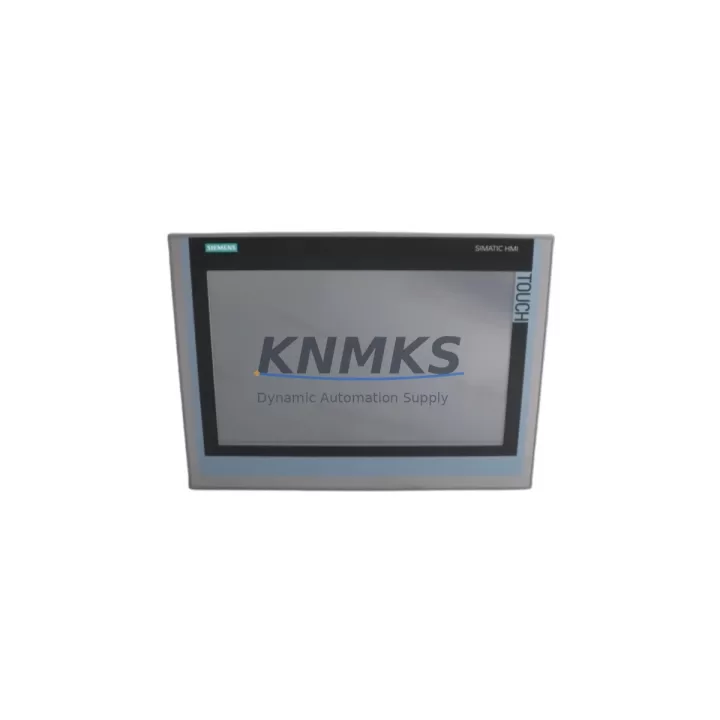
The Siemens 6AV2124-1QC02-0AX1 TP1500 Comfort is a 15-inch widescreen TFT touch panel engineered for demanding industrial environments. As a migration-ready replacement for discontinued or end-of-life HMI hardware across the SIMATIC S7-300, S7-400, S7-1200, and S7-1500 control platforms, this unit delivers a direct upgrade path without requiring a full control cabinet redesign. With a 1366 × 768 pixel resolution display, integrated PROFINET and MPI/PROFIBUS interfaces, and full TIA Portal V13 SP1 and above compatibility, the 6AV2124-1QC02-0AX1 is the preferred choice for plant engineers managing legacy panel replacements, control system modernization projects, and spare-part lifecycle extension programs.
KNMKS maintains verified stock of the 6AV2124-1QC02-0AX1 with pre-shipment functional testing, original factory packaging, and a support terms confirmed by quotation covering hardware defects. Each unit is inspected against Siemens factory specifications before dispatch, ensuring that your retrofit project begins with a confirmed-good component — not a field risk.
Migration Compatibility Table
| Parameter | Detail |
|---|---|
| SKU / Part Number | 6AV2124-1QC02-0AX1 |
| Series | SIMATIC TP1500 Comfort |
| Display | 15″ TFT Widescreen, 1366 × 768 px |
| Communication Interfaces | PROFINET (2× RJ45), MPI/PROFIBUS DP, USB Host × 2, USB Device × 1 |
| Compatible Controllers | SIMATIC S7-300, S7-400, S7-1200, S7-1500, WinCC Runtime |
| Engineering Software | TIA Portal V13 SP1 and above (WinCC Comfort) |
| Replaces / Upgrades From | 6AV6643-0CD01-1AX1 (TP1500 Basic), 6AV6545-0CC10-0AX0 (TP170C), legacy MP277 panels |
| Mounting Cutout | 398 × 298 mm (verify existing cabinet cutout before installation) |
| Power Supply | 24 V DC (20.4–28.8 V), max. 60 W — confirm PSU capacity before swap |
| Protection Rating | IP65 (front panel), IP20 (rear) |
| Operating Temperature | 0 °C to +50 °C |
| Country of Origin | Germany |
| Retrofit Recommendation | Direct replacement for TP1500 Comfort generation; verify TIA Portal project version and firmware before go-live |
| Commissioning Focus | Tag mapping, screen migration, PROFINET device name reassignment, IP address configuration |
| Support terms | 12 Months — hardware defects, DOA replacement, pre-shipment tested |
Retrofit Planning for Existing Automation Systems
Replacing an HMI in a live production environment involves more than a physical panel swap. When migrating from an older SIMATIC panel — such as a TP177B, MP277, or an early-generation TP1500 Basic — to the 6AV2124-1QC02-0AX1, engineers must account for several interdependent system elements before the new panel can be commissioned safely.
The first consideration is the power supply module. The 6AV2124-1QC02-0AX1 draws up to 60 W at 24 V DC. If the existing cabinet uses a SITOP PSU100S or a compact SITOP PSU200M, verify that the available current headroom on the 24 V rail is sufficient after accounting for all connected I/O modules and relay outputs. Undersized power supplies are a common cause of intermittent HMI resets during high-load screen transitions.
The PROFINET communication link must be re-established after the panel swap. The 6AV2124-1QC02-0AX1 uses a PROFINET device name that must match the configuration stored in the TIA Portal project. If the previous panel was configured as a PROFIBUS DP slave using an MPI/DP adapter, the migration to PROFINET requires updating the network topology in TIA Portal and reassigning the device name via the Primary Setup Tool or TIA Portal’s online device assignment function. In mixed-protocol cabinets where a SIMATIC ET 200SP distributed I/O rack or a CP 343-1 communication processor is already present, the PROFINET switch port assignment must be reviewed to avoid address conflicts.
For cabinets that include a SIMATIC S7-300 CPU 315-2 PN/DP or a CPU 317-2 PN/DP, the HMI connection is typically established via an integrated PROFINET port. The 6AV2124-1QC02-0AX1 connects directly to this port without requiring an additional communication module, simplifying the retrofit. However, if the existing CPU is an older S7-300 variant with only an MPI port, an MPI/PROFIBUS DP cable (such as a 6XV1830-0EH10 shielded bus cable) must be used, and the panel’s MPI address must be set to match the project configuration — typically address 1 for HMI devices.
Screen migration from WinCC flexible to WinCC Comfort (TIA Portal) is a structured process. Siemens provides a migration wizard within TIA Portal that converts WinCC flexible projects, but engineers should plan for manual rework of approximately 10–20% of screens, particularly those using custom scripts, recipe management views, or trend displays. The SIMATIC WinCC Comfort V16 or V17 runtime environment on the 6AV2124-1QC02-0AX1 supports all standard Comfort panel functions including alarm logging, recipe management, and user administration — but legacy VBA scripts from WinCC flexible are not directly portable and must be rewritten in VB.NET or replaced with structured scripting.
Installation space must be confirmed before ordering. The 6AV2124-1QC02-0AX1 requires a panel cutout of 398 × 298 mm with a minimum cabinet depth of 60 mm behind the mounting surface. If the existing cutout was sized for a smaller panel — such as a 12-inch TP1200 Comfort or a 10-inch TP1000 — a cabinet modification will be required. KNMKS recommends confirming the cutout dimensions and rear clearance during the pre-order planning phase to avoid on-site delays.
Downtime Control During System Migration
Minimizing unplanned downtime during an HMI retrofit is a primary concern for plant maintenance teams. The 6AV2124-1QC02-0AX1 supports a structured hot-swap preparation workflow that allows most of the migration work to be completed offline before the production line is stopped.
Begin by creating a full backup of the existing HMI project using the SIMATIC ProSave tool or the TIA Portal backup function. This backup preserves all tag configurations, alarm definitions, recipe data, and user management settings. Store the backup on a USB drive and verify its integrity before proceeding. If the existing panel is a legacy unit without a USB port, use the MPI/PROFIBUS upload function via a PC adapter such as the SIMATIC PC Adapter USB A2 (6ES7972-0CB20-0XA0) to extract the project data.
Once the project backup is confirmed, load the migrated TIA Portal project onto the new 6AV2124-1QC02-0AX1 in a staging environment — ideally connected to a test PLC or a PLCSIM Advanced simulation — and verify all screen navigation, alarm triggers, and recipe transfers before the panel is installed in the cabinet. This pre-commissioning step typically reduces on-site commissioning time by 60–70% and eliminates the most common sources of retrofit-related production delays.
During the physical swap, label all terminal connections on the existing panel before disconnection. The 6AV2124-1QC02-0AX1 uses standard M3 screw terminals for the 24 V DC power input and a standard RJ45 connector for PROFINET. If the existing cabinet uses a SIMATIC S7-400 with a CP 443-1 EX Advanced communication processor for PROFINET connectivity, verify that the CP firmware version supports the PROFINET conformance class required by the new panel. After physical installation, perform a PROFINET device name assignment, confirm the IP address, and execute a full alarm and I/O point check before returning the line to production.
KNMKS ships the 6AV2124-1QC02-0AX1 with all factory accessories including the mounting clamps, gasket seal, and power connector. Pre-shipment functional testing is performed on every unit, and a test report is available upon request. Standard lead time is 3–7 business days for in-stock units, with express options available for urgent maintenance requirements.
Retrofit Support FAQ
Q1: Is the 6AV2124-1QC02-0AX1 a direct replacement for the 6AV6643-0CD01-1AX1 TP1500 Basic?
The 6AV2124-1QC02-0AX1 (TP1500 Comfort) is a functional upgrade from the TP1500 Basic. The mounting cutout dimensions are identical, allowing a direct physical swap. However, the Comfort panel uses WinCC Comfort runtime, which requires a TIA Portal project — WinCC flexible projects from the Basic panel must be migrated using the TIA Portal migration wizard before the new panel can be commissioned.
Q2: What commissioning steps are required after installing the 6AV2124-1QC02-0AX1?
After physical installation, assign the PROFINET device name using TIA Portal or the Primary Setup Tool, configure the IP address, download the HMI project via PROFINET or USB, and perform a full I/O and alarm verification test. If connecting via MPI/PROFIBUS, set the MPI address on the panel to match the project configuration (default: address 1). Total commissioning time for a prepared project is typically 1–3 hours.
Q3: Does KNMKS provide pre-shipment testing and a support terms for the 6AV2124-1QC02-0AX1?
Yes. Every unit shipped by KNMKS undergoes a pre-shipment functional test covering display, touch response, communication ports, and power input. A support terms confirmed by quotation is provided covering hardware defects and DOA (dead-on-arrival) replacement. Test reports are available upon request. Contact admin@knmks.com for support requests or technical support documentation.
Q4: Can the 6AV2124-1QC02-0AX1 communicate with both PROFINET and PROFIBUS DP simultaneously?
Yes. The 6AV2124-1QC02-0AX1 supports simultaneous PROFINET and MPI/PROFIBUS DP communication, allowing it to connect to both a PROFINET-capable S7-1500 controller and a legacy S7-300 via MPI in a mixed-protocol cabinet. This makes it particularly suitable for phased migration projects where not all PLCs are upgraded at the same time.
© 2026 KNMKS. All rights reserved.
Original Source: https://knmks.com
Contact: admin@knmks.com | +86 18359268345
Product Identification
- Brand / Ecosystem
-
Siemens
Siemens - Model / Series
-
6AV2124-1QC02-0AX1
SIMATIC Series - Product Family
- HMI & Displays
- Availability Status
- Available on request after model and quantity confirmation
- Inquiry Type
- B2B RFQ, replacement inquiry and project spare-part request
- Pre-Quote Check
- Exact SKU, brand, series, quantity, nameplate photos and destination country are checked before quotation
System Path
Where this product fits in the KNMKS automation structure.
Specification & Inquiry Focus
- Display range
- Operator panels and touch screens
- Common needs
- Screen size, interface and version matching
- Project support
- Retrofit, spare unit and panel replacement
Buyer Confirmation
Information KNMKS checks before replying.
- Exact model
- 6AV2124-1QC02-0AX1
- Brand / ecosystem
- Siemens
- Product family
- HMI & Displays
- Application note
- Replacement, maintenance, project build or spare-part list
- Useful photos
- Nameplate, installed unit, cabinet layout or connector side
- Delivery details
- Quantity, destination country and target schedule
Document Support
Files and notes can be confirmed during quotation.
- Product photos or nameplate confirmation when available
- Packing and delivery notes before quotation confirmation
- Support scope and delivery terms confirmed per inquiry
- Export document coordination for qualified B2B requests
Inquiry Support
- Panel size and interface confirmation
- Replacement unit inquiry for discontinued HMIs
- Protective packaging for display shipment
What to Send Us
- Brand and exact model number: Siemens 6AV2124-1QC02-0AX1
- Quantity and required delivery time
- Application, replacement requirement or nameplate photo
- Destination country and shipping preference
RFQ Preparation
This is a product inquiry page built for RFQ communication.
Fast Model Check
Send this model to KNMKS for confirmation.
Include quantity, destination country and photos if this is a maintenance replacement. The inquiry will be saved with a reference number after submission.
Brand & Compatibility Note
KNMKS displays automation product information for well-known industrial brand ecosystems and compatible replacement references. Brand names are used for product identification and compatibility reference only; final availability and commercial terms are confirmed per quotation.
 Manufacturing
 Machine Tools
 Packaging
 Energy & Power



 PLCs & Controllers
 Servo Systems
 Variable Frequency Drives
 Sensors