
Overview
Siemens 6AV2124-0UC24-1AX0 Maintenance-Proven Spare Part for Factory Uptime
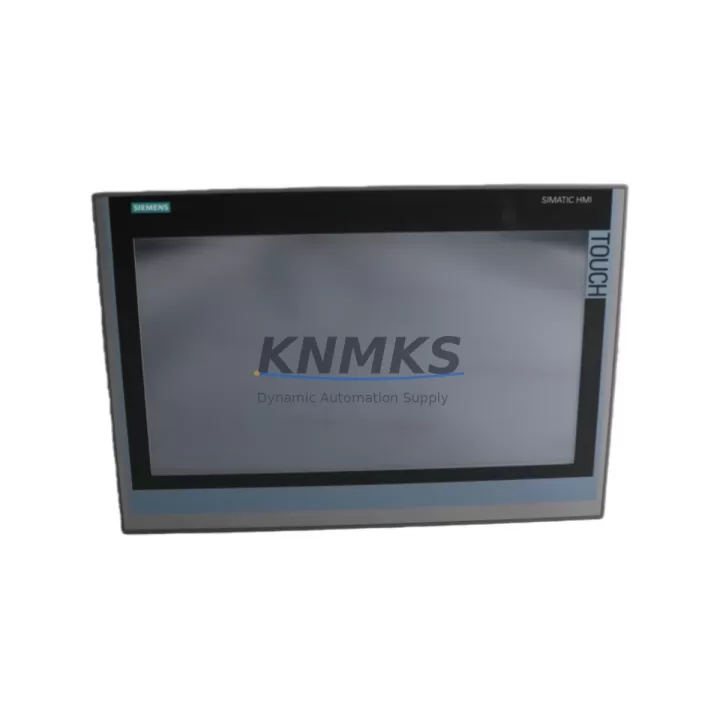
The Siemens 6AV2124-0UC24-1AX0 is a 12-inch widescreen SIMATIC Comfort Panel HMI designed for demanding industrial environments where continuous operation is non-negotiable. As a maintenance-proven spare part, this unit supports direct replacement in SIMATIC S7-1500, S7-300, and S7-400 PLC architectures, making it a critical component in the spare parts inventory of any plant engineer managing automation-intensive production lines. Whether you are responding to an unplanned HMI failure, executing a scheduled annual overhaul, or building a strategic buffer stock for aging SIMATIC installations, the 6AV2124-0UC24-1AX0 delivers the compatibility, reliability, and long-term supply assurance that maintenance and procurement teams require.
In high-availability manufacturing environments — including petrochemical processing, automotive assembly, energy distribution, and discrete manufacturing — HMI downtime directly translates to production loss. The 6AV2124-0UC24-1AX0 is engineered to minimize mean time to repair (MTTR) through plug-and-play compatibility with existing PROFINET and MPI/PROFIBUS communication backbones. Its 12″ TFT widescreen display with 1280×800 resolution ensures operator visibility in both low-light and high-ambient-light conditions, while the IP65-rated front panel provides protection against dust and water ingress in harsh plant environments.
Every unit shipped by KNMKS undergoes pre-dispatch functional testing, including power-on verification, display integrity check, and communication port validation. All units are covered by a support terms confirmed by quotation from the date of shipment, with long-term supply commitments available for customers managing multi-site or multi-year maintenance contracts.
Spare Maintenance Table
| SKU / Part Number | 6AV2124-0UC24-1AX0 / 6AV7424-7GA03-0AS0 |
| Brand / Series | Siemens / SIMATIC Comfort Panel |
| Display Size | 12″ Widescreen TFT, 1280×800 px |
| Protection Rating | IP65 (front panel) |
| Communication Interfaces | PROFINET (2× RJ45), MPI/PROFIBUS DP, USB, SD card |
| Compatible PLC Systems | SIMATIC S7-1500, S7-300, S7-400, WinCC Runtime |
| Supply Voltage | 24 V DC (20.4–28.8 V) |
| Operating Temperature | 0°C to +50°C |
| Storage Temperature | -20°C to +60°C |
| Origin | Germany |
| Mounting | Panel cutout installation, portrait/landscape configurable |
| Support terms | 12 Months from shipment date |
| Pre-Dispatch Testing | Power-on, display, communication port validation |
| Maintenance Recommendation | Replace every 7–10 years or upon touchscreen degradation, backlight failure, or communication fault |
Maintenance Planning for Continuous Operation
When replacing the 6AV2124-0UC24-1AX0 in a live control cabinet, a disciplined maintenance workflow extends beyond the HMI unit itself. Maintenance engineers should simultaneously inspect the 24 V DC power supply feeding the panel — units such as the Siemens SITOP PSU100S or equivalent regulated DIN-rail power supplies should be checked for output voltage stability and ripple, as an unstable supply is a leading cause of premature HMI failure and display artifacts.
The PROFINET patch cables and RJ45 connectors linking the HMI to the S7-1500 CPU or CP 1543-1 communications processor should be inspected for insulation damage, connector corrosion, and bend radius violations — particularly in cabinets subject to vibration. If the installation uses MPI or PROFIBUS DP, the bus termination resistors and the PROFIBUS connector (e.g., Siemens 6ES7972-0BB52-0XA0) should be verified for correct termination at both ends of the segment.
I/O signal integrity is equally important: any SM 321 digital input modules or SM 331 analog input modules in the same rack should be checked for channel faults that may have contributed to the HMI alarm history. Relay output modules such as the SM 322 should be inspected for contact wear if the HMI was used to control high-cycle switching loads. For installations using ET 200SP distributed I/O, the BaseUnit connections and I/O module seating should be confirmed after any panel replacement to avoid spurious faults on restart.
Where the control system includes a CP 343-1 or CP 443-1 Ethernet communications module for SCADA integration, firmware compatibility with the replacement HMI’s TIA Portal project version should be confirmed before commissioning. Fuse protection on the 24 V DC bus — typically 2A or 4A miniature circuit breakers — should be tested for correct trip characteristics. Finally, if the cabinet includes a Siemens SCALANCE X switch for network segmentation, port link status and VLAN configuration should be verified to ensure the replacement HMI is correctly addressed on the plant network.
Site Replacement Workflow
Replacing the 6AV2124-0UC24-1AX0 on-site follows a structured sequence to minimize downtime and eliminate configuration errors. Begin by exporting the current HMI project from TIA Portal (or SIMATIC WinCC flexible for legacy installations) and backing up the project to a secure network location before powering down the panel. Document the existing IP address, subnet mask, gateway, and device name assigned to the panel in the PROFINET topology.
After isolating the 24 V DC supply and disconnecting all communication cables, remove the panel from the cutout by releasing the mounting clamps. The replacement 6AV2124-0UC24-1AX0 should be installed in the same cutout without modification — the panel dimensions and mounting pattern are identical to the previous generation 6AV2124-0UC02-0AX0 and 6AV2124-0UC02-1AX0, enabling direct mechanical substitution in existing installations.
After mechanical installation, restore communication connections and power. Use TIA Portal’s “Download to Device” function to transfer the backed-up project to the new panel, assigning the same PROFINET device name and IP parameters. Perform a full functional test including all operator screens, alarm acknowledgment, trend displays, and recipe management before returning the line to production. This workflow typically achieves panel replacement within 2–4 hours, significantly reducing unplanned downtime costs.
Spare Parts Support FAQ
Q: Is the 6AV2124-0UC24-1AX0 a direct replacement for older SIMATIC Comfort Panel models?
A: Yes. The 6AV2124-0UC24-1AX0 is mechanically and electrically compatible with earlier 12″ Comfort Panel variants including the 6AV2124-0UC02-0AX0 series. The TIA Portal project can be migrated and downloaded to the replacement unit without hardware modification, making it suitable for both emergency replacement and planned lifecycle upgrades in existing SIMATIC installations.
Q: What pre-shipment testing does KNMKS perform on this unit?
A: Every 6AV2124-0UC24-1AX0 unit undergoes power-on verification, full display panel inspection for dead pixels and backlight uniformity, and communication port continuity testing prior to dispatch. Units are shipped in anti-static protective packaging with inspection documentation. A support terms confirmed by quotation is provided from the shipment date, covering manufacturing defects and functional failures under normal operating conditions.
Q: Can KNMKS support long-term or multi-unit procurement for maintenance contracts?
A: Yes. KNMKS maintains standing inventory and can support blanket purchase orders, scheduled delivery programs, and multi-site spare parts contracts for the 6AV2124-0UC24-1AX0 and related SIMATIC Comfort Panel series. Contact our sales team to discuss volume pricing, lead time commitments, and consignment stock arrangements tailored to your maintenance planning cycle.
Q: How do I verify compatibility before ordering if my installation uses an older TIA Portal version?
A: The 6AV2124-0UC24-1AX0 is supported from TIA Portal V13 SP1 onwards. If your installation uses an earlier WinCC flexible project, KNMKS technical support can advise on migration paths. We recommend confirming your current project version and CPU firmware level before ordering to ensure seamless commissioning. Our team can provide compatibility confirmation within one business day upon receipt of your system details.
© 2026 KNMKS. All rights reserved.
Original Source: https://knmks.com
Contact: admin@knmks.com | +86 18359268345
Product Identification
- Brand / Ecosystem
-
Siemens
Siemens - Model / Series
-
6AV2124-0UC24-1AX0/6AV7424-7GA03-0AS0
SIMATIC Series - Product Family
- HMI & Displays
- Availability Status
- Available on request after model and quantity confirmation
- Inquiry Type
- B2B RFQ, replacement inquiry and project spare-part request
- Pre-Quote Check
- Exact SKU, brand, series, quantity, nameplate photos and destination country are checked before quotation
System Path
Where this product fits in the KNMKS automation structure.
Specification & Inquiry Focus
- Display range
- Operator panels and touch screens
- Common needs
- Screen size, interface and version matching
- Project support
- Retrofit, spare unit and panel replacement
Buyer Confirmation
Information KNMKS checks before replying.
- Exact model
- 6AV2124-0UC24-1AX0/6AV7424-7GA03-0AS0
- Brand / ecosystem
- Siemens
- Product family
- HMI & Displays
- Application note
- Replacement, maintenance, project build or spare-part list
- Useful photos
- Nameplate, installed unit, cabinet layout or connector side
- Delivery details
- Quantity, destination country and target schedule
Document Support
Files and notes can be confirmed during quotation.
- Product photos or nameplate confirmation when available
- Packing and delivery notes before quotation confirmation
- Support scope and delivery terms confirmed per inquiry
- Export document coordination for qualified B2B requests
Inquiry Support
- Panel size and interface confirmation
- Replacement unit inquiry for discontinued HMIs
- Protective packaging for display shipment
What to Send Us
- Brand and exact model number: Siemens 6AV2124-0UC24-1AX0/6AV7424-7GA03-0AS0
- Quantity and required delivery time
- Application, replacement requirement or nameplate photo
- Destination country and shipping preference
RFQ Preparation
This is a product inquiry page built for RFQ communication.
Fast Model Check
Send this model to KNMKS for confirmation.
Include quantity, destination country and photos if this is a maintenance replacement. The inquiry will be saved with a reference number after submission.
Brand & Compatibility Note
KNMKS displays automation product information for well-known industrial brand ecosystems and compatible replacement references. Brand names are used for product identification and compatibility reference only; final availability and commercial terms are confirmed per quotation.
 Manufacturing
 Machine Tools
 Packaging
 Energy & Power



 PLCs & Controllers
 Servo Systems
 Variable Frequency Drives
 Sensors