
Overview
Siemens 6AV2124-0UC02-0AX1 Migration-Ready HMI Panel for Legacy Control Systems
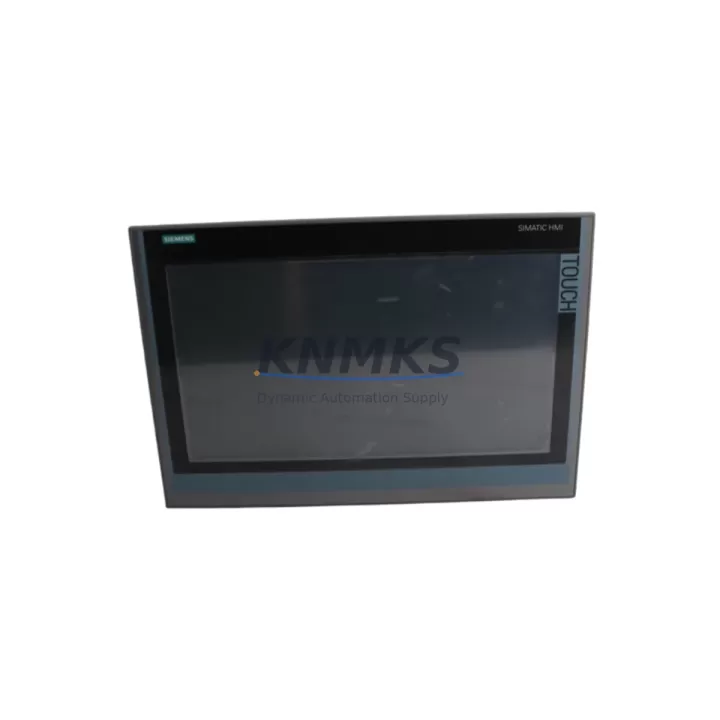
The Siemens 6AV2124-0UC02-0AX1 is a SIMATIC HMI Comfort Panel with a 12-inch widescreen TFT display, designed for demanding industrial environments where legacy HMI systems are reaching end-of-life or have been discontinued. This unit serves as a direct migration-ready replacement for older SIMATIC HMI panels including the TP1200 Comfort predecessor variants, offering engineers and maintenance teams a reliable path to modernize operator interfaces without requiring a full control system overhaul. Whether you are managing a scheduled retrofit, responding to an unplanned panel failure, or executing a phased upgrade across multiple production lines, the 6AV2124-0UC02-0AX1 provides the compatibility, connectivity, and display performance required to restore and sustain operational continuity.
This panel supports PROFINET and MPI/PROFIBUS communication protocols, making it compatible with a broad range of Siemens SIMATIC S7-300, S7-400, and S7-1500 controllers. For facilities running legacy S7-300 CPUs such as the CPU 315-2 DP or CPU 317-2 PN/DP, the 6AV2124-0UC02-0AX1 integrates directly into the existing communication architecture without requiring protocol conversion hardware. Engineers migrating from older OP270 or MP277 operator panels will find that the Comfort Panel platform supports project migration via TIA Portal, significantly reducing the time required to adapt existing HMI screen configurations, alarm lists, and tag mappings.
Before installation, engineers should verify the following parameters to ensure a smooth cutover: available 24 VDC power supply capacity at the control cabinet (minimum 4A recommended for the 12-inch variant), cutout dimensions in the control panel door (standard 304 × 228 mm for TP1200 Comfort), and the communication cable routing for PROFINET RJ45 or MPI/PROFIBUS DB9 connectors. If the existing installation uses a SIMATIC S7-300 with a CP 343-1 communication processor, the PROFINET configuration in STEP 7 or TIA Portal must be updated to reflect the new HMI device name and IP address assignment. Failure to update the device name in the PLC project will result in communication faults at startup.
For projects involving PROFIBUS DP migration, the panel’s integrated MPI/PROFIBUS interface allows direct connection to the DP master without additional hardware. However, engineers should confirm the PROFIBUS baud rate setting and station address assignment in the HMI project before commissioning. In multi-panel installations where a SIMATIC S7-400 CPU 414-3 PN/DP or CPU 416-3 PN/DP serves as the DP master, the GSD file for the 6AV2124-0UC02-0AX1 must be imported into the hardware configuration to ensure correct slot assignment and diagnostic reporting.
Migration Compatibility Table
| Parameter | Details |
|---|---|
| SKU / Part Number | 6AV2124-0UC02-0AX1 |
| Series | SIMATIC HMI Comfort Panel |
| Display Size | 12″ Widescreen TFT, 1280 × 800 px |
| Communication Interfaces | PROFINET (2× RJ45), MPI/PROFIBUS DP (DB9), USB, SD Card |
| Compatible Controllers | SIMATIC S7-300, S7-400, S7-1200, S7-1500, WinCC Runtime |
| Replaces / Upgrades From | OP270 12″, MP277 10″, TP1200 Comfort (earlier firmware), MP370 |
| Panel Cutout Dimensions | 304 × 228 mm (standard TP1200 Comfort cutout) |
| Power Supply | 24 VDC, 4A typical (verify existing PSU capacity before installation) |
| Installation Orientation | Horizontal or vertical (configure in WinCC Comfort project settings) |
| Engineering Software | TIA Portal V14 SP1 or higher (project migration from STEP 7 / WinCC flexible supported) |
| Firmware Compatibility | Firmware V14 and above; update via SD card or USB before commissioning |
| Pre-Shipment Testing | Power-on, display, and communication interface verified before dispatch |
| Support terms | support terms confirmed by quotation from date of shipment |
| Origin | Germany |
Retrofit Planning for Existing Automation Systems
Successful integration of the 6AV2124-0UC02-0AX1 into an existing automation system requires a structured pre-retrofit assessment. Begin by auditing the current control cabinet layout to confirm available mounting space and panel door cutout dimensions. In many legacy installations, the control cabinet was designed around older panel form factors such as the MP277 10-inch or OP270 12-inch, and the cutout may require minor modification to accommodate the TP1200 Comfort footprint. A stainless steel adapter frame is available for installations where the existing cutout is oversized.
Power supply verification is a critical step that is frequently overlooked during panel replacement projects. The SITOP PSU100S 24V/4A or SITOP PSU200M 24V/5A power supply modules are commonly used in S7-300 and S7-400 control cabinets and are generally sufficient to support the 6AV2124-0UC02-0AX1 alongside existing I/O modules. However, if the cabinet also houses a SIMATIC ET 200SP distributed I/O station or additional SM 321/SM 322 digital I/O modules on the S7-300 rack, the total current draw must be recalculated to confirm the PSU is not operating near its rated limit. Undersized power supplies are a leading cause of intermittent HMI communication faults in retrofit installations.
For projects involving communication protocol migration from PROFIBUS DP to PROFINET, the 6AV2124-0UC02-0AX1’s dual PROFINET ports support media redundancy protocol (MRP), which is particularly valuable in ring topology networks common in automotive and process industry installations. If the existing network uses a SCALANCE X208 or SCALANCE X216 managed switch, the PROFINET configuration can be extended to include the new HMI panel without disrupting other network participants. Engineers should also verify that the SIMATIC S7-1500 CPU or S7-300 CP 343-1 Advanced firmware supports the PROFINET device version declared in the TIA Portal hardware catalog for this panel variant.
Tag migration from WinCC flexible to WinCC Comfort (TIA Portal) is typically the most time-consuming element of an HMI retrofit. The TIA Portal migration wizard supports direct import of WinCC flexible projects, but engineers should plan for manual review of approximately 10–20% of tag connections, particularly those linked to legacy S7-300 DB blocks with symbolic addressing. Alarm configurations, trend views, and recipe management screens may also require manual adjustment after migration. Allocating dedicated commissioning time for HMI screen validation against the live PLC program is strongly recommended before returning the line to production.
Downtime Control During System Migration
Minimizing unplanned downtime during an HMI panel replacement is a primary concern for maintenance engineers and production managers. The 6AV2124-0UC02-0AX1 supports a structured hot-swap preparation workflow that allows the replacement panel to be pre-configured, tested, and validated offline before the production line is taken down for the physical swap. Using TIA Portal’s simulation mode, the new HMI project can be tested against a PLCSIM instance of the S7-1500 or S7-300 program to verify screen navigation, alarm acknowledgment, and setpoint entry functions before any live connection is made.
To protect the original PLC program logic during the migration, it is strongly recommended to create a full backup of the S7-300 or S7-400 CPU program using STEP 7 or TIA Portal before disconnecting the existing HMI panel. The CPU program backup should be stored on a dedicated engineering laptop and on a SIMATIC Micro Memory Card (MMC) as a secondary backup. This ensures that if any communication parameter changes during the HMI migration inadvertently affect the CPU configuration, the original program can be restored within minutes.
Physical installation of the 6AV2124-0UC02-0AX1 should be planned during a scheduled maintenance window. The panel mounting process typically requires 30–60 minutes, including cable routing, terminal connection verification, and IP address assignment via the panel’s startup dialog. Once the panel is powered and communicating with the PLC, a structured commissioning checklist should be followed: verify all process values are displaying correctly, confirm alarm triggers are functioning, test any recipe or batch management screens, and validate remote access via the integrated VNC server if used by the facility’s SCADA system. A signed commissioning record should be completed before the line is returned to automatic operation.
Retrofit Support FAQ
Q1: Is the 6AV2124-0UC02-0AX1 a direct drop-in replacement for the OP270 12″ or MP277 10″?
The 6AV2124-0UC02-0AX1 is functionally compatible with OP270 and MP277 installations in terms of communication protocols (MPI, PROFIBUS DP, PROFINET) and PLC connectivity. However, the physical panel cutout dimensions differ from the OP270 and MP277 form factors, so panel door modification or an adapter frame will typically be required. The HMI project must be migrated to TIA Portal WinCC Comfort format before commissioning on the new panel.
Q2: What firmware version is pre-installed, and how do I update it before commissioning?
Units are shipped with the firmware version current at the time of dispatch. Firmware updates can be applied via USB flash drive or SD card using the panel’s startup menu (ProSave tool or TIA Portal firmware update function). It is recommended to update to the latest compatible firmware version before connecting to the PLC to ensure full TIA Portal project compatibility and access to the latest communication driver features.
Q3: How is the unit tested before shipment, and what does the support terms confirmed by quotation cover?
Every 6AV2124-0UC02-0AX1 unit undergoes pre-shipment testing including power-on verification, display uniformity check, and communication interface continuity testing. The support terms confirmed by quotation cover manufacturing defects and component failures under normal operating conditions from the date of shipment. Support terms service is handled directly — contact admin@knmks.com with your order reference and fault description to initiate a support terms claim.
Q4: Can you confirm stock availability and lead time before I place an order?
Stock levels are maintained to support urgent replacement and retrofit projects. For current availability, confirmed lead time, and volume pricing for multi-unit retrofit programs, contact the sales team directly at admin@knmks.com or +86 18359268345. Orders are typically processed and dispatched within 1–3 business days for in-stock units, with express shipping options available for critical downtime situations.
© 2026 KNMKS. All rights reserved.
Original Source: https://knmks.com
Contact: admin@knmks.com | +86 18359268345
Product Identification
- Brand / Ecosystem
-
Siemens
Siemens - Model / Series
-
6AV2124-0UC02-0AX1
SIMATIC Series - Product Family
- HMI & Displays
- Availability Status
- Available on request after model and quantity confirmation
- Inquiry Type
- B2B RFQ, replacement inquiry and project spare-part request
- Pre-Quote Check
- Exact SKU, brand, series, quantity, nameplate photos and destination country are checked before quotation
System Path
Where this product fits in the KNMKS automation structure.
Specification & Inquiry Focus
- Display range
- Operator panels and touch screens
- Common needs
- Screen size, interface and version matching
- Project support
- Retrofit, spare unit and panel replacement
Buyer Confirmation
Information KNMKS checks before replying.
- Exact model
- 6AV2124-0UC02-0AX1
- Brand / ecosystem
- Siemens
- Product family
- HMI & Displays
- Application note
- Replacement, maintenance, project build or spare-part list
- Useful photos
- Nameplate, installed unit, cabinet layout or connector side
- Delivery details
- Quantity, destination country and target schedule
Document Support
Files and notes can be confirmed during quotation.
- Product photos or nameplate confirmation when available
- Packing and delivery notes before quotation confirmation
- Support scope and delivery terms confirmed per inquiry
- Export document coordination for qualified B2B requests
Inquiry Support
- Panel size and interface confirmation
- Replacement unit inquiry for discontinued HMIs
- Protective packaging for display shipment
What to Send Us
- Brand and exact model number: Siemens 6AV2124-0UC02-0AX1
- Quantity and required delivery time
- Application, replacement requirement or nameplate photo
- Destination country and shipping preference
RFQ Preparation
This is a product inquiry page built for RFQ communication.
Fast Model Check
Send this model to KNMKS for confirmation.
Include quantity, destination country and photos if this is a maintenance replacement. The inquiry will be saved with a reference number after submission.
Brand & Compatibility Note
KNMKS displays automation product information for well-known industrial brand ecosystems and compatible replacement references. Brand names are used for product identification and compatibility reference only; final availability and commercial terms are confirmed per quotation.
 Manufacturing
 Machine Tools
 Packaging
 Energy & Power



 PLCs & Controllers
 Servo Systems
 Variable Frequency Drives
 Sensors