
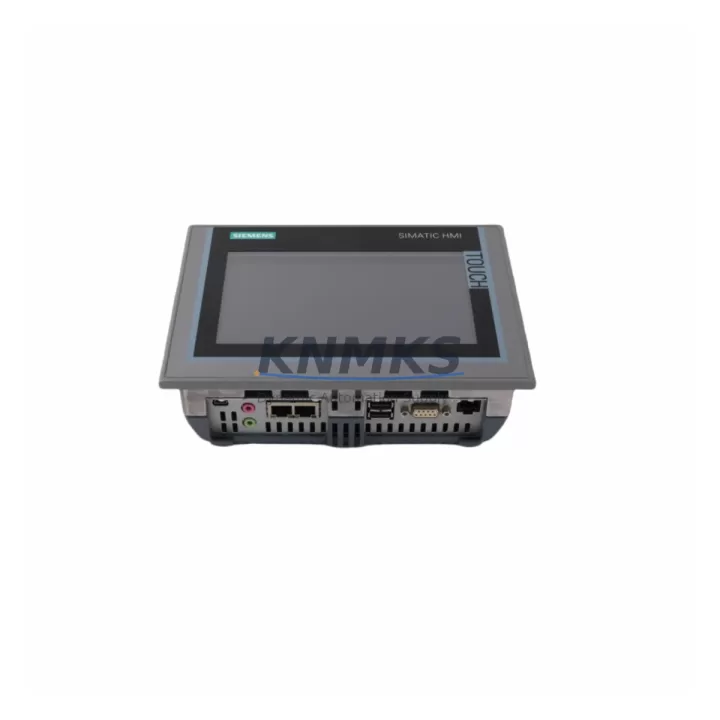
Overview
Siemens 6AV2124-0GC01-0AX0 Migration-Ready HMI Panel: Legacy System Modernization and Compatibility Upgrade
The Siemens 6AV2124-0GC01-0AX0 TP700 Comfort is a 7-inch widescreen HMI panel engineered for direct replacement of discontinued SIMATIC HMI models including the TP177B, TP270, and TP277 series. Designed for integration into existing SIMATIC S7-300, S7-400, S7-1200, and S7-1500 control architectures, this panel supports both PROFINET and PROFIBUS communication protocols, making it a versatile solution for legacy control cabinet upgrades, production line retrofits, and system modernization projects where minimizing downtime and preserving existing program logic are critical priorities.
For engineers managing aging automation infrastructure, the 6AV2124-0GC01-0AX0 addresses the most common retrofit challenges: panel cutout compatibility, communication protocol continuity, HMI screen migration, and firmware alignment. Its 800×480 resolution TFT display and capacitive touch interface deliver a significant operational upgrade over predecessor models while maintaining backward compatibility with WinCC Flexible projects through the TIA Portal migration wizard.
Migration Compatibility Table
| Parameter | 6AV2124-0GC01-0AX0 (TP700 Comfort) | Legacy: TP177B / TP270 / TP277 |
|---|---|---|
| Display Size | 7″ Widescreen TFT (800×480) | 5.7″ / 6″ STN/TFT |
| Panel Cutout | 214 × 158 mm (adapter plate may be required) | 197 × 141 mm (TP177B) / 202 × 148 mm (TP270) |
| Communication | PROFINET (RJ45) + MPI/PROFIBUS (RS-485) | MPI/PROFIBUS only |
| PLC Compatibility | S7-300, S7-400, S7-1200, S7-1500 | S7-300, S7-400 |
| Engineering Tool | TIA Portal V13 SP1 and above | WinCC Flexible 2008 SP3 |
| Project Migration | Via TIA Portal Migration Wizard | WinCC Flexible source required |
| Power Supply | 24 V DC (18–30 V), ~6 W typical | 24 V DC, ~5 W typical |
| Installation Depth | 46 mm behind panel | 52 mm (TP177B) / 55 mm (TP270) |
| Replacement Recommendation | Direct functional replacement with cutout adapter | — |
| Commissioning Focus | IP address, PLC connection tag remapping, screen resolution scaling | — |
| Support terms | support terms confirmed by quotation | Pre-Shipment Functional Test Included | |
Retrofit Planning for Existing Automation Systems
A successful retrofit using the 6AV2124-0GC01-0AX0 begins with a thorough audit of the existing control cabinet. Engineers should verify that the 24 V DC power supply rail — typically shared with the CPU module and distributed I/O — can sustain the additional 6 W draw without triggering the power supply’s overload protection. In cabinets running a SIMATIC S7-300 with a PS 307 power supply module, this is rarely an issue, but in compact installations where the power budget is tight, a load calculation is recommended before proceeding.
Terminal wiring for the power connector (2-pin plug-in terminal) is straightforward, but the communication interface change from MPI/PROFIBUS to PROFINET requires attention. If the existing S7-300 CPU does not have an integrated PROFINET port — common in older CPU 315 or CPU 317 variants — a CP 343-1 communications processor must be added to the rack to enable Ethernet connectivity. Alternatively, the MPI/PROFIBUS port on the TP700 Comfort can be used to maintain the existing serial communication link, preserving the original network topology without additional hardware.
For installations involving SIMATIC ET 200S or ET 200M distributed I/O racks connected via PROFIBUS DP, the communication chain remains intact when using the MPI/PROFIBUS interface on the new panel. However, if the retrofit scope includes migrating the I/O network to PROFINET — a common step when upgrading to S7-1500 CPUs — the IM 151-3 PN interface module for ET 200S or the IM 153-4 PN for ET 200M should be planned as part of the same project phase to avoid a second shutdown window.
The HMI project migration from WinCC Flexible to TIA Portal is the most time-intensive element of the retrofit. The TIA Portal Migration Wizard handles most screen objects, tag connections, and alarm configurations automatically, but engineers should budget time for manual review of any custom scripts, recipe management screens, or trend displays. Screen resolution scaling from 320×240 (TP177B) to 800×480 (TP700 Comfort) requires layout adjustments, particularly for navigation bars and status displays. A SIMATIC PC with TIA Portal V15.1 or later and the original WinCC Flexible project file are prerequisites for this step.
Where the existing cabinet includes a SIMATIC S7-300 CPU with a front connector and signal modules such as SM 321 digital input or SM 331 analog input modules, no changes to the I/O wiring are required. The module addresses and process image assignments remain valid in the migrated PLC program, significantly reducing commissioning risk. If the retrofit also involves replacing the CPU — for example, upgrading from a CPU 315-2 DP to a CPU 1515-2 PN — the hardware configuration must be rebuilt in TIA Portal, and all symbolic tag addresses should be verified against the new memory layout before the first program download.
Downtime Control During System Migration
Minimizing production downtime during an HMI replacement requires a structured pre-commissioning approach. The 6AV2124-0GC01-0AX0 should be fully configured, IP-addressed, and loaded with the migrated HMI project in a workshop environment before the scheduled maintenance window. Using a SIMATIC S7-PLCSIM Advanced simulation or a spare PLC for offline testing allows the complete HMI project — including all screen navigation, alarm acknowledgment, and setpoint entry functions — to be validated before the panel reaches the production floor.
During the physical swap, the original TP177B or TP270 panel should be powered down only after confirming that the PLC is in a safe state and that any active process sequences have been completed or paused. The panel cutout adapter, if required, should be pre-fitted to the cabinet door during a prior shift to avoid extending the main shutdown window. Once the 6AV2124-0GC01-0AX0 is mounted and powered, the PROFINET or PROFIBUS connection should be established and the PLC communication verified before releasing the system to operators.
Retaining a backup of the original WinCC Flexible project and the PLC program — including a memory card backup of the S7-300 CPU using a SIMATIC Micro Memory Card — provides a reliable rollback path if unexpected compatibility issues arise during commissioning. This backup strategy, combined with pre-shipment functional testing of the replacement panel, ensures that the retrofit can be completed within a single planned maintenance window in most installations.
Retrofit Support FAQ
Q: Can the 6AV2124-0GC01-0AX0 directly replace a TP177B 6″ without modifying the cabinet cutout?
A: The panel cutout dimensions differ — the TP700 Comfort requires a 214×158 mm opening versus the TP177B’s 197×141 mm. A cutout adapter plate is available and is the recommended approach to avoid reworking the cabinet door. The mounting depth of 46 mm is shallower than the TP177B’s 52 mm, so rear clearance is not a concern in most installations.
Q: Is the existing PROFIBUS wiring reusable when migrating to the TP700 Comfort?
A: Yes. The 6AV2124-0GC01-0AX0 includes an MPI/PROFIBUS port (RS-485, 9-pin Sub-D) that is fully compatible with existing PROFIBUS DP networks. The bus termination resistors and cable shielding requirements remain unchanged. If the retrofit plan includes a future migration to PROFINET, the PROFINET port can be activated independently without disrupting the PROFIBUS connection.
Q: What is the lead time and support terms coverage for this unit?
A: Units are available from stock with standard lead times of 3–7 business days for international shipments. Every 6AV2124-0GC01-0AX0 supplied by KNMKS undergoes a pre-shipment functional test covering power-on, display, touch calibration, and communication port verification. A support terms confirmed by quotation is provided from the date of shipment, covering manufacturing defects and functional failures under normal operating conditions.
Q: Can the migrated TIA Portal project run on both S7-1200 and S7-1500 PLCs without modification?
A: The HMI project itself is PLC-independent and will communicate with any S7-1200 or S7-1500 CPU via PROFINET once the correct IP address and device name are configured. However, if the PLC program is also being migrated — for example, from a S7-300 to a S7-1500 — the tag interface between the PLC and HMI must be re-verified in TIA Portal, as data block structures and symbolic addressing conventions differ between the two CPU families.
© 2026 KNMKS. All rights reserved.
Original Source: https://knmks.com
Contact: admin@knmks.com | +86 18359268345
Product Identification
- Brand / Ecosystem
-
Siemens
Siemens - Model / Series
-
6AV2124-0GC01-0AX0
SIMATIC Series - Product Family
- HMI & Displays
- Availability Status
- Available on request after model and quantity confirmation
- Inquiry Type
- B2B RFQ, replacement inquiry and project spare-part request
- Pre-Quote Check
- Exact SKU, brand, series, quantity, nameplate photos and destination country are checked before quotation
System Path
Where this product fits in the KNMKS automation structure.
Specification & Inquiry Focus
- Display range
- Operator panels and touch screens
- Common needs
- Screen size, interface and version matching
- Project support
- Retrofit, spare unit and panel replacement
Buyer Confirmation
Information KNMKS checks before replying.
- Exact model
- 6AV2124-0GC01-0AX0
- Brand / ecosystem
- Siemens
- Product family
- HMI & Displays
- Application note
- Replacement, maintenance, project build or spare-part list
- Useful photos
- Nameplate, installed unit, cabinet layout or connector side
- Delivery details
- Quantity, destination country and target schedule
Document Support
Files and notes can be confirmed during quotation.
- Product photos or nameplate confirmation when available
- Packing and delivery notes before quotation confirmation
- Support scope and delivery terms confirmed per inquiry
- Export document coordination for qualified B2B requests
Inquiry Support
- Panel size and interface confirmation
- Replacement unit inquiry for discontinued HMIs
- Protective packaging for display shipment
What to Send Us
- Brand and exact model number: Siemens 6AV2124-0GC01-0AX0
- Quantity and required delivery time
- Application, replacement requirement or nameplate photo
- Destination country and shipping preference
RFQ Preparation
This is a product inquiry page built for RFQ communication.
Fast Model Check
Send this model to KNMKS for confirmation.
Include quantity, destination country and photos if this is a maintenance replacement. The inquiry will be saved with a reference number after submission.
Brand & Compatibility Note
KNMKS displays automation product information for well-known industrial brand ecosystems and compatible replacement references. Brand names are used for product identification and compatibility reference only; final availability and commercial terms are confirmed per quotation.
 Manufacturing
 Machine Tools
 Packaging
 Energy & Power



 PLCs & Controllers
 Servo Systems
 Variable Frequency Drives
 Sensors