
Overview
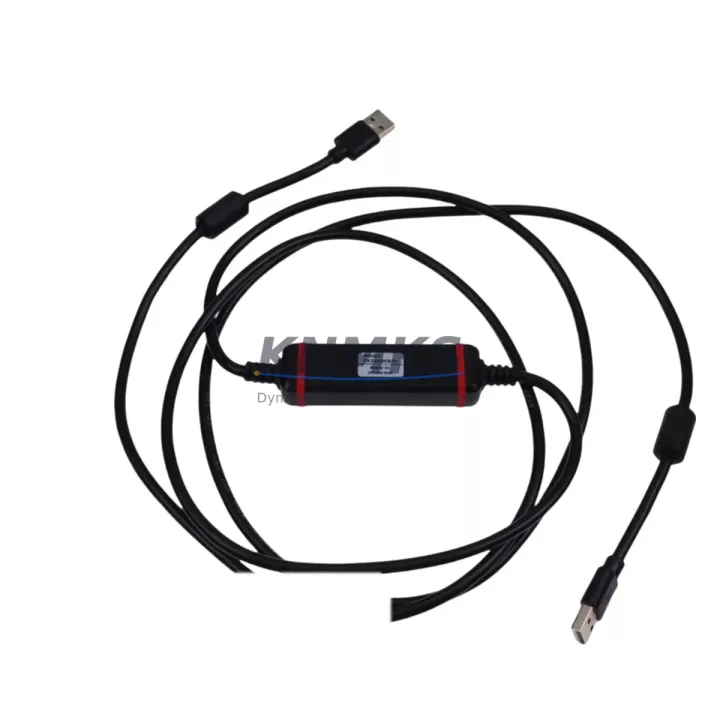
Schneider CA3-USBCB-01 Migration-Ready USB Config Cable for Legacy Control Systems
The Schneider Electric CA3-USBCB-01 is a dedicated USB configuration cable engineered for the TeSys U intelligent motor starter platform. As legacy motor management systems approach end-of-life and plant engineers accelerate control cabinet modernization programs, the CA3-USBCB-01 serves as a critical interface tool — enabling direct USB communication between a PC running PowerSuite or SoMove configuration software and the TeSys U controller module. Whether you are replacing a discontinued RS-232 serial link, migrating from an older LUCM multifunction control unit, or commissioning a new TeSys U installation in a retrofit panel, this cable provides the verified, plug-and-play connectivity required to read parameters, upload motor protection settings, and validate configuration before energizing the starter.
In brownfield retrofit projects, the CA3-USBCB-01 is typically deployed alongside the LUCA1XBL or LUCA12BL advanced control unit to reconfigure protection thresholds after a motor or load change. Engineers replacing legacy LUCM12BL multifunction units with current-generation equivalents rely on this cable to clone parameter sets and verify that overload class, FLA setting, and communication address are correctly transferred before the new module goes live. The cable is equally essential when integrating TeSys U starters into a Modbus RTU or CANopen fieldbus network — particularly when the existing network was previously managed through a BCPM bus communication module that has been superseded or relocated within the control cabinet.
For maintenance teams managing a fleet of TeSys U starters across multiple production lines, the CA3-USBCB-01 eliminates the need for proprietary RS-232 adapters and simplifies the toolchain to a single USB-A to mini-USB connection. This is especially valuable during planned shutdowns where technicians must reconfigure multiple starters in sequence — reducing per-unit commissioning time and minimizing the risk of parameter entry errors that could cause nuisance tripping or motor damage after restart. The cable is also used during I/O expansion projects where additional LUF series communication modules are added to an existing TeSys U rack, requiring address reassignment and network topology updates via software.
When planning a control cabinet upgrade that involves replacing a Zelio Logic or Twido PLC with a current Modicon M221 or M241 controller, the CA3-USBCB-01 is often part of the commissioning toolkit used to independently verify TeSys U starter parameters before the new PLC program is loaded and tested. This decoupled verification approach — configuring and confirming each starter module before integrating it into the new control logic — is a proven method for reducing overall system downtime and isolating commissioning faults to individual components rather than the entire control loop.
All units are tested prior to shipment, supplied with a support terms confirmed by quotation, and available from in-stock inventory for immediate global dispatch. Lead times for critical retrofit projects can be confirmed at the time of order.
Migration Compatibility Table
| Parameter | Detail |
|---|---|
| SKU / Part Number | CA3-USBCB-01 |
| Compatible Platform | TeSys U Intelligent Motor Starter (LUCA / LUCM / LUCC series control units) |
| Interface Type | USB-A (PC side) to Mini-USB (TeSys U control unit side) |
| Compatible Software | PowerSuite, SoMove (Schneider Electric configuration tools) |
| Communication Protocol | USB (virtual COM port); supports Modbus RTU parameter upload/download |
| Replaces / Supersedes | Legacy RS-232 serial configuration cables; older proprietary Schneider config interfaces |
| Installation Requirement | PC with USB-A port; Windows OS with SoMove or PowerSuite installed; no external power required |
| Retrofit Use Case | Parameter cloning during LUCM replacement; address assignment for LUF bus modules; pre-commissioning verification |
| Commissioning Notes | Verify FLA setting, overload class, and communication address before energizing; confirm firmware version compatibility with SoMove |
| Support terms | 12 Months from date of shipment |
| Origin | China (CN) |
| Stock Status | availability confirmed by RFQ — available for immediate dispatch |
Retrofit Planning for Existing Automation Systems
A successful TeSys U retrofit begins well before the cable is plugged in. The first step is auditing the existing control unit type — whether it is a LUCA1XBL basic control unit, a LUCM12BL multifunction unit with integrated Modbus, or a LUCC series unit with CANopen support. Each variant stores a different parameter set, and the CA3-USBCB-01 connected to SoMove allows the engineer to export the full configuration as a file before any hardware is removed from the panel.
During cabinet upgrades that also involve replacing the power base — for example, moving from a LUFP7 Profibus DP communication module to a LUF Modbus module to align with a new plant-wide network standard — the CA3-USBCB-01 is used to pre-load the new module address and baud rate settings before installation. This eliminates the need for on-panel DIP switch configuration and reduces the risk of address conflicts on the fieldbus segment.
For projects involving I/O expansion — such as adding a LUFW10 I/O extension module to an existing TeSys U starter to capture additional run/fault feedback signals for a new SCADA system — the cable is used to update the control unit’s I/O mapping and verify that the new signal assignments do not conflict with existing interlocks. Similarly, when a Zelio Soft 2 soft starter is being replaced by a TeSys U unit in the same panel footprint, the CA3-USBCB-01 is essential for setting the motor protection parameters to match the original thermal model before the first test run.
Engineers working on signal isolation upgrades — inserting isolators between TeSys U analog outputs and a legacy DCS analog input card — will also use the CA3-USBCB-01 to confirm that the TeSys U output scaling matches the isolator input range, preventing signal saturation or loss of resolution in the process variable feedback loop. The cable is a low-cost, high-value tool that belongs in every field engineer’s retrofit kit alongside a Modicon programming cable and a Twido USB adapter for mixed-platform panel work.
Downtime Control During System Migration
Minimizing downtime during a TeSys U migration requires a structured pre-commissioning workflow. Before the scheduled shutdown window opens, the CA3-USBCB-01 should be used to export the full parameter set from every TeSys U control unit that will be replaced or reconfigured. These files are stored on the engineer’s laptop and serve as both a backup and a reference for the new configuration. If the replacement unit is a like-for-like swap — for example, replacing a failed LUCM12BL with a new unit of the same type — the saved file can be imported directly via SoMove in under two minutes, restoring all motor protection settings, communication addresses, and I/O assignments without manual re-entry.
For more complex migrations — such as upgrading from a basic LUCA control unit to a multifunction LUCM unit to gain Modbus visibility — the engineer uses the CA3-USBCB-01 to configure the new unit on the bench before the shutdown begins. This bench pre-commissioning approach means that the new unit arrives at the panel already configured, tested, and ready to install. The only on-site steps are physical installation, terminal wiring verification, and a brief online test via SoMove to confirm communication with the PLC or SCADA host.
Protecting the original program logic during a migration is equally important. When the TeSys U starter is integrated into a Modicon M221 PLC program via Modbus RTU, the PLC ladder logic references specific Modbus register addresses for run command, fault reset, and current feedback. Before replacing or reconfiguring any TeSys U unit, the engineer should document these register mappings and verify that the new unit’s address and register map are identical to the original. The CA3-USBCB-01 and SoMove provide a direct read of the current register configuration, eliminating guesswork and ensuring that the PLC program does not require modification after the hardware swap — a critical requirement for maintaining control continuity and avoiding unplanned process interruptions.
Retrofit Support FAQ
Q1: Is the CA3-USBCB-01 compatible with all TeSys U control unit variants?
The CA3-USBCB-01 is compatible with the full range of TeSys U control units that feature a mini-USB configuration port, including LUCA, LUCM, and LUCC series units. Compatibility with SoMove and PowerSuite software is required on the PC side. Always verify the firmware version of the control unit against the SoMove release notes before performing a parameter upload on a unit that has not been previously configured with the current software version.
Q2: Can this cable be used to clone parameters from a failed unit to a replacement?
Yes — provided the original unit is still partially functional and can establish a USB connection. If the original unit has failed completely, parameters should be restored from a previously exported SoMove configuration file. For this reason, it is strongly recommended to export and archive the configuration of every TeSys U unit during initial commissioning or at each scheduled maintenance interval.
Q3: What pre-shipment testing is performed on the CA3-USBCB-01?
Each unit undergoes electrical continuity testing and USB enumeration verification before dispatch. Units are confirmed to establish a stable virtual COM port connection on a Windows test system running SoMove. A support terms confirmed by quotation cover defects in materials and workmanship from the date of shipment.
Q4: What is the typical lead time and are units available from stock?
Units are available from in-stock inventory and can be dispatched within 1–2 business days of order confirmation. For urgent retrofit or breakdown supply requirements, please contact the sales team directly to confirm availability and arrange priority dispatch. Stock levels are maintained across regional warehouses to support global maintenance programs.
© 2026 KNMKS. All rights reserved.
Original Source: https://knmks.com
Contact: admin@knmks.com | +86 18359268345
Product Identification
- Brand / Ecosystem
-
Schneider Electric
Assorted Brands - Model / Series
-
CA3-USBCB-01
Assorted Series - Product Family
- Cables & Connectors
- Availability Status
- Available on request after model and quantity confirmation
- Inquiry Type
- B2B RFQ, replacement inquiry and project spare-part request
- Pre-Quote Check
- Exact SKU, brand, series, quantity, nameplate photos and destination country are checked before quotation
System Path
Where this product fits in the KNMKS automation structure.
Specification & Inquiry Focus
- Cable range
- Sensor, servo, network and circular connectors
- Common needs
- Length, pin count, shielding and plug type
- Project support
- Machine wiring and installation kits
Buyer Confirmation
Information KNMKS checks before replying.
- Exact model
- CA3-USBCB-01
- Brand / ecosystem
- Schneider Electric
- Product family
- Cables & Connectors
- Application note
- Replacement, maintenance, project build or spare-part list
- Useful photos
- Nameplate, installed unit, cabinet layout or connector side
- Delivery details
- Quantity, destination country and target schedule
Document Support
Files and notes can be confirmed during quotation.
- Product photos or nameplate confirmation when available
- Packing and delivery notes before quotation confirmation
- Support scope and delivery terms confirmed per inquiry
- Export document coordination for qualified B2B requests
Inquiry Support
- Cable length and connector type confirmation
- Servo, sensor and network cable inquiry
- Accessory kits for installation teams
What to Send Us
- Brand and exact model number: Schneider Electric CA3-USBCB-01
- Quantity and required delivery time
- Application, replacement requirement or nameplate photo
- Destination country and shipping preference
RFQ Preparation
This is a product inquiry page built for RFQ communication.
Fast Model Check
Send this model to KNMKS for confirmation.
Include quantity, destination country and photos if this is a maintenance replacement. The inquiry will be saved with a reference number after submission.
Brand & Compatibility Note
KNMKS displays automation product information for well-known industrial brand ecosystems and compatible replacement references. Brand names are used for product identification and compatibility reference only; final availability and commercial terms are confirmed per quotation.
 Manufacturing
 Machine Tools
 Packaging
 Energy & Power
 PLCs & Controllers
 HMI & Displays
 Servo Systems
 Variable Frequency Drives