
Overview
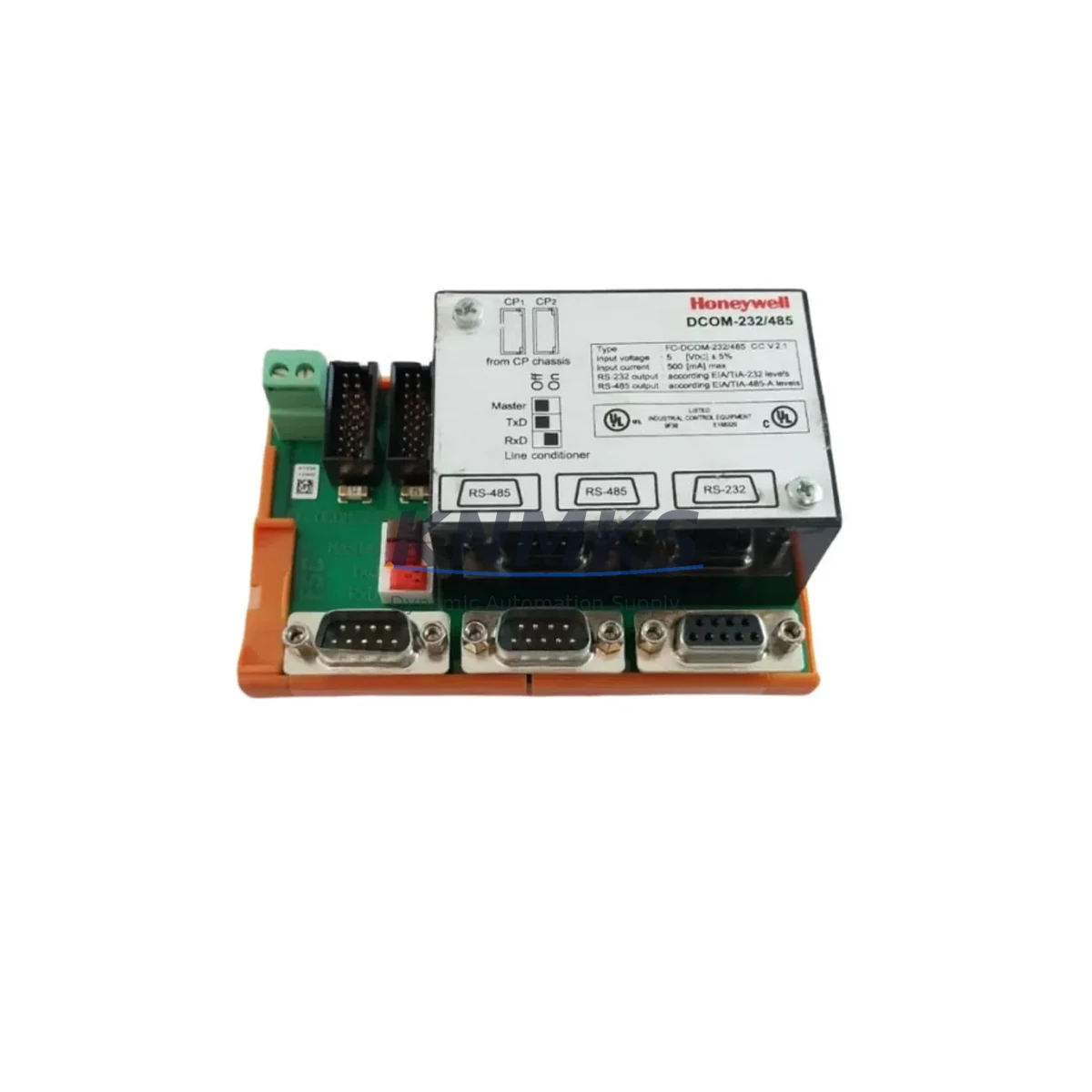
Honeywell FS-DCOM-232/485 Spare Part for Factory Uptime
The Honeywell FS-DCOM-232/485 is a dual-port serial communication module engineered for the FS Series Fire Alarm Control Panel (FACP) platform. Providing simultaneous RS-232 and RS-485 connectivity, this module serves as the critical data bridge between the FACP and building management systems, annunciators, and third-party monitoring equipment. For maintenance engineers managing life-safety infrastructure, keeping a verified OEM spare of the FS-DCOM-232/485 on the shelf is not optional — it is a fundamental element of any responsible uptime strategy.
When a serial communication fault is logged on an FS Series panel, the window for safe, controlled replacement is narrow. Unplanned downtime in fire alarm systems carries regulatory, safety, and operational consequences. Sourcing a pre-tested, original Honeywell FS-DCOM-232/485 from a stocked supplier eliminates the lead-time risk that comes with last-minute procurement and ensures the replacement module is fully compatible with the existing panel firmware and wiring topology.
Spare Maintenance Table
| Parameter | Specification |
|---|---|
| Part Number | FS-DCOM-232/485 |
| Brand | Honeywell |
| Series | FS Series FACP |
| Module Type | Dual Serial Communication Module |
| Interface Ports | RS-232 + RS-485 (simultaneous) |
| Communication Protocol | Serial ASCII / proprietary Honeywell FS protocol |
| Compatibility | Honeywell FS Series FACP (FS-250, FS-250E, FS-1000 and compatible variants) |
| Operating Voltage | Powered via FS Series backplane (24 VDC nominal) |
| Operating Temperature | 0°C to +49°C (32°F to 120°F) |
| Mounting | FS Series panel backplane slot (plug-in module) |
| Application | BMS integration, remote annunciator, third-party monitoring, data logging |
| Condition | Original OEM, new or refurbished-to-spec, pre-shipment tested |
| Support terms | 12 Months from date of shipment |
| Lead Time | In-stock units ship within 1–3 business days |
| Origin | USA |
Maintenance Planning for Continuous Operation
Replacing the FS-DCOM-232/485 in the field is rarely an isolated task. A thorough maintenance engineer will treat this module swap as an opportunity to audit the surrounding communication and power infrastructure within the FS Series control cabinet.
Begin with the FS Series main CPU board — confirm firmware version compatibility before inserting the replacement module, as mismatched firmware can prevent the serial port from initializing correctly. Next, inspect the 24 VDC power supply module that feeds the backplane; a degraded supply rail is a common root cause of intermittent communication faults that are incorrectly attributed to the DCOM module itself.
Check the RS-485 field wiring for correct termination resistance (typically 120 Ω at each end of the bus) and verify that the RS-232 cable connecting to the BMS workstation or data logger is properly shielded and within the 15-meter distance limit. Damaged or improperly terminated cables will cause the replacement module to exhibit the same fault symptoms as the failed unit.
If the panel communicates with a Honeywell FS-ANNCPU annunciator or a Honeywell FS-ACM audio control module, verify that those modules are also functioning correctly — a fault in either can generate misleading serial communication errors on the DCOM port. Similarly, inspect any FS Series I/O expansion modules installed in adjacent backplane slots; a failing I/O module can corrupt the backplane data bus and affect communication module performance.
For panels integrated into a wider building automation network, confirm that the RS-485 network isolator (if installed) is passing data correctly and that the terminal block wiring at the DCOM module connector is secure and free of corrosion. Finally, check the panel enclosure fusing — a blown fuse on the auxiliary power circuit can silently starve the communication module without triggering a panel fault.
Site Replacement Workflow
Step 1 — Pre-Replacement Verification
Before removing the failed FS-DCOM-232/485, document the current serial port configuration: baud rate, parity, stop bits, and any address settings stored in the panel programming. Photograph the wiring connections at the RS-232 and RS-485 terminals.
Step 2 — Safe Isolation
Follow site-specific LOTO (Lockout/Tagout) procedures. Notify the monitoring station and building management that the FACP will be in test mode during the replacement. Disable remote monitoring outputs to prevent false alarm transmission.
Step 3 — Module Removal
Power down the FS Series panel per Honeywell service documentation. Remove the FS-DCOM-232/485 from the backplane slot. Inspect the backplane connector for bent pins or corrosion before inserting the replacement.
Step 4 — Replacement Installation
Insert the new FS-DCOM-232/485 into the correct backplane slot. Reconnect RS-232 and RS-485 field wiring per the documented terminal assignments. Restore panel power and allow the CPU to complete its initialization sequence.
Step 5 — Functional Verification
Confirm that the panel CPU recognizes the new module (no module fault LED). Verify serial communication with the connected BMS or annunciator by triggering a test event and confirming data receipt at the remote system. Restore normal monitoring mode and notify the monitoring station.
Step 6 — Documentation
Record the replacement in the panel maintenance log: date, technician name, old module serial number, new module part number and serial number, and post-replacement test results.
Spare Parts Support FAQ
Q1: Is the FS-DCOM-232/485 compatible with all FS Series panel variants?
The FS-DCOM-232/485 is designed for the Honeywell FS Series FACP platform, including the FS-250, FS-250E, and FS-1000 variants. Compatibility with specific panel firmware versions should be confirmed against the Honeywell FS Series installation documentation before installation. Contact our technical team with your panel model and firmware version for pre-purchase compatibility verification.
Q2: What pre-shipment testing is performed on the FS-DCOM-232/485?
Each unit undergoes functional verification prior to shipment, including power-on initialization testing and serial port continuity checks. Units are inspected for physical integrity, connector condition, and correct part number labeling. A support terms confirmed by quotation from the date of shipment covers defects in materials and workmanship under normal operating conditions.
Q3: Can you support long-term or blanket purchase orders for the FS-DCOM-232/485?
Yes. For facilities managers and maintenance contractors managing multiple FS Series installations, we support scheduled delivery agreements and buffer stock programs. Long-term supply arrangements help eliminate emergency procurement lead times and ensure a verified spare is always available when needed. Contact our sales team to discuss volume pricing and delivery scheduling.
Q4: What is your policy if the replacement module does not resolve the communication fault?
If the FS-DCOM-232/485 replacement does not restore normal serial communication, our technical support team can assist with fault isolation — including review of panel programming, wiring topology, and connected device compatibility. Units returned within the confirmed support period due to confirmed manufacturing defects are replaced at no charge. We recommend retaining the original failed module until the replacement has been fully verified in service.
© 2026 KNMKS. All rights reserved.
Original Source: https://knmks.com
Contact: admin@knmks.com | +86 18359268345
Product Identification
- Brand / Ecosystem
-
Honeywell
Honeywell - Model / Series
- FS-DCOM-232/485
- Product Family
- PLCs & Controllers
- Availability Status
- Available on request after model and quantity confirmation
- Inquiry Type
- B2B RFQ, replacement inquiry and project spare-part request
- Pre-Quote Check
- Exact SKU, brand, series, quantity, nameplate photos and destination country are checked before quotation
System Path
Where this product fits in the KNMKS automation structure.
Specification & Inquiry Focus
- Control platform
- PLC, PAC and modular controllers
- Common needs
- CPU, rack, power and I/O expansion
- Project support
- Replacement, cabinet build and maintenance
Buyer Confirmation
Information KNMKS checks before replying.
- Exact model
- FS-DCOM-232/485
- Brand / ecosystem
- Honeywell
- Product family
- PLCs & Controllers
- Application note
- Replacement, maintenance, project build or spare-part list
- Useful photos
- Nameplate, installed unit, cabinet layout or connector side
- Delivery details
- Quantity, destination country and target schedule
Document Support
Files and notes can be confirmed during quotation.
- Product photos or nameplate confirmation when available
- Packing and delivery notes before quotation confirmation
- Support scope and delivery terms confirmed per inquiry
- Export document coordination for qualified B2B requests
Inquiry Support
- Model cross-checking before quotation
- CPU, power, rack and expansion module matching
- Support for replacement and project inquiry
What to Send Us
- Brand and exact model number: Honeywell FS-DCOM-232/485
- Quantity and required delivery time
- Application, replacement requirement or nameplate photo
- Destination country and shipping preference
RFQ Preparation
This is a product inquiry page built for RFQ communication.
Fast Model Check
Send this model to KNMKS for confirmation.
Include quantity, destination country and photos if this is a maintenance replacement. The inquiry will be saved with a reference number after submission.
Brand & Compatibility Note
KNMKS displays automation product information for well-known industrial brand ecosystems and compatible replacement references. Brand names are used for product identification and compatibility reference only; final availability and commercial terms are confirmed per quotation.
 Manufacturing
 Machine Tools
 Packaging
 Energy & Power



 HMI & Displays
 Servo Systems
 Variable Frequency Drives
 Sensors