
Overview
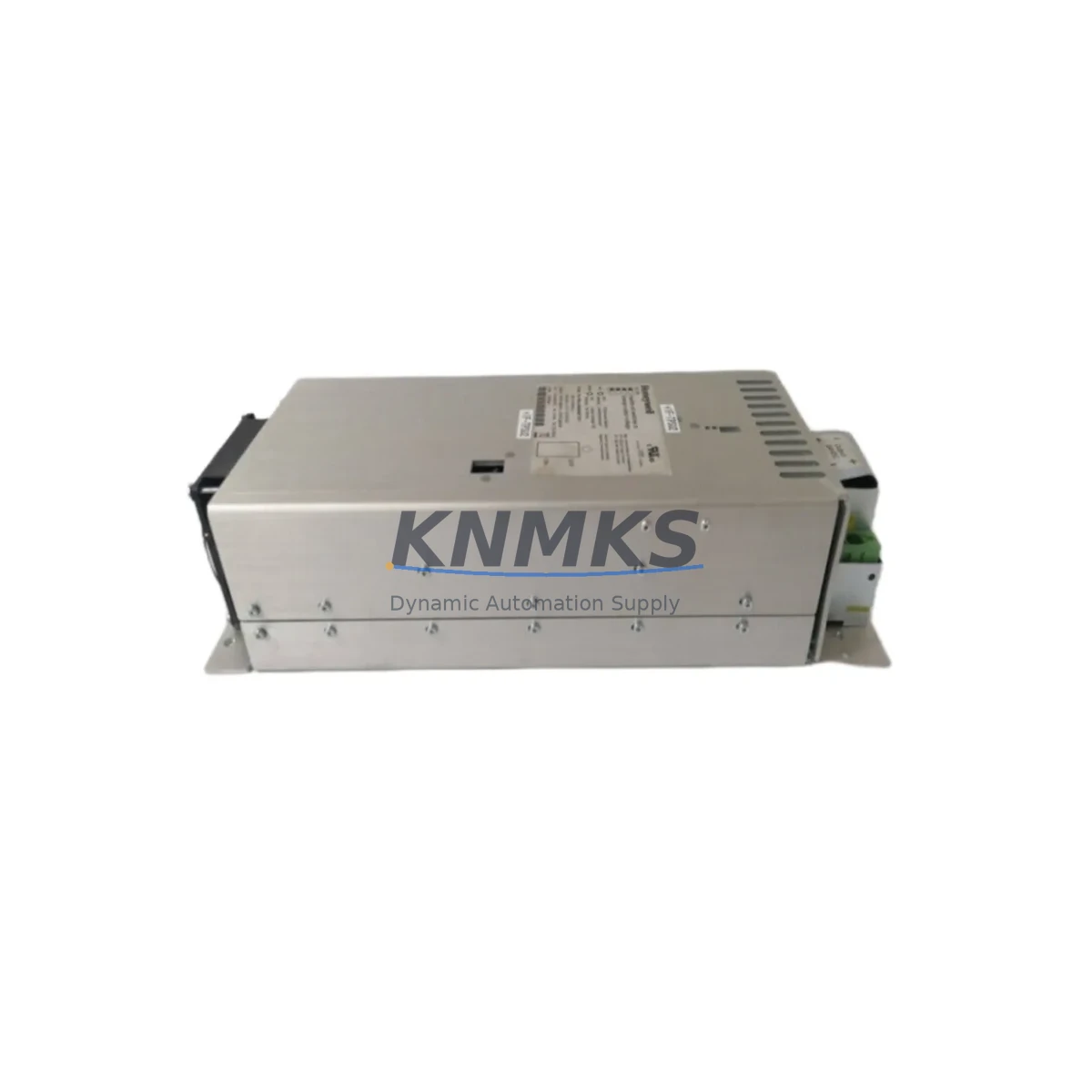
Honeywell FC-PSU-UNI2450 Migration-Ready Power Supply for Legacy Control Systems
The Honeywell FC-PSU-UNI2450 is a universal 24 VDC, 50 W power supply module engineered for direct integration into HC900 hybrid controller racks and ControlEdge process automation platforms. As legacy DCS and hybrid control systems approach end-of-support milestones, the FC-PSU-UNI2450 provides a validated, drop-in retrofit path that eliminates the need for full panel redesign. Its standardized backplane connector, DIN-rail mounting footprint, and wide-input AC range (100–240 VAC, 50/60 Hz) make it the preferred replacement for aging PSU modules across both brownfield upgrades and emergency spare-part scenarios.
Engineers planning a control system migration must verify several critical parameters before swapping the power supply module. First, confirm that the existing rack’s total load budget — including all I/O modules, communication cards, and the HC900 controller CPU — does not exceed the 50 W output rating of the FC-PSU-UNI2450. When the rack is populated with high-density analog input modules such as the FC-AI-16 or digital output modules like the FC-DO-16, the aggregate current draw on the 24 VDC bus must be recalculated against the new PSU’s derating curve at the site’s maximum ambient temperature. Second, inspect the terminal block wiring on the existing PSU: the FC-PSU-UNI2450 uses the same screw-terminal layout as its predecessor, but wire gauge and torque specifications should be re-confirmed against the HC900 installation manual to prevent loose connections after reassembly.
Backplane interface compatibility is a non-negotiable checkpoint. The FC-PSU-UNI2450 seats into the HC900 rack’s PSU slot via a keyed backplane connector that prevents incorrect insertion, but technicians should visually inspect the connector pins for corrosion or mechanical damage before seating the replacement module. Module addressing is handled automatically by the HC900 controller CPU — no DIP switch or rotary address setting is required on the PSU itself — which simplifies the swap procedure and reduces the risk of address conflicts with other rack-resident modules.
Migration Compatibility Table
| Parameter | FC-PSU-UNI2450 (Replacement) | Legacy PSU (Typical) | Retrofit Note |
|---|---|---|---|
| Output Voltage | 24 VDC | 24 VDC | Direct match; no bus reconfiguration required |
| Output Power | 50 W | 45–50 W (model-dependent) | Verify rack load budget before installation |
| AC Input Range | 100–240 VAC, 50/60 Hz | 100–240 VAC | Universal input; no transformer change needed |
| Backplane Connector | HC900 keyed backplane | HC900 keyed backplane | Mechanically compatible; inspect pins for wear |
| Mounting | DIN-rail / rack slot | DIN-rail / rack slot | Same footprint; no panel modification required |
| Module Addressing | Auto (CPU-assigned) | Auto (CPU-assigned) | No manual address setting; plug-and-replace |
| Communication Link | Backplane power bus only | Backplane power bus only | No Modbus/Ethernet port on PSU; no protocol change |
| Firmware Dependency | HC900 firmware ≥ R310 | HC900 firmware ≥ R310 | Confirm controller firmware version before swap |
| Replacement Recommendation | Direct drop-in replacement for HC900 PSU slot | No rewiring or rack modification required | |
| Support terms | support terms confirmed by quotation — pre-shipment tested, serialized, traceable | ||
Retrofit Planning for Existing Automation Systems
A successful HC900 power supply retrofit begins well before the maintenance window opens. The site engineer should pull the current HC900 configuration file from the HC Designer programming software and document all rack-resident modules: CPU, I/O cards, and any installed FC-COMM-ETH Ethernet communication modules or FC-COMM-RS485 serial communication cards. This inventory establishes the baseline power budget and confirms that the FC-PSU-UNI2450’s 50 W output is sufficient for the populated rack.
If the control cabinet houses a redundant PSU configuration — common in continuous-process applications — both the primary and secondary PSU slots must be evaluated. The FC-PSU-UNI2450 supports hot-standby redundancy when paired with a second FC-PSU-UNI2450 in the redundant slot, allowing one unit to be replaced without interrupting the 24 VDC bus. This is particularly valuable in applications where the HC900 rack also powers field-side signal isolators or loop-powered transmitters through the backplane’s auxiliary power terminals.
Terminal wiring documentation is equally critical. Before removing the legacy PSU, photograph or sketch the AC input terminal connections, including the protective earth (PE) conductor routing. The FC-PSU-UNI2450 uses the same three-terminal AC input block (L, N, PE), so rewiring is straightforward, but the PE conductor must be re-torqued to specification to maintain IEC 61010 safety compliance. After reinstallation, verify that the HC900 controller CPU — typically an FC-CPU-0 or FC-CPU-1 variant — recognizes the new PSU module in the HC Designer hardware configuration view before closing the cabinet.
For sites also upgrading I/O capacity during the same maintenance window, the FC-AI-16 analog input module and FC-DI-32 digital input module can be added to vacant rack slots without requiring a PSU upgrade, provided the total rack load remains within the 50 W budget. If the upgrade includes adding an FC-COMM-ETH module for Modbus TCP or OPC-UA connectivity — a common requirement when migrating from legacy serial SCADA to Ethernet-based historian systems — the additional 3–5 W draw of the communication module must be factored into the power budget calculation before finalizing the retrofit BOM.
Downtime Control During System Migration
Minimizing unplanned downtime during a PSU swap requires a structured pre-outage checklist. At least 48 hours before the maintenance window, upload the current HC900 configuration to a backup file using HC Designer and store it on an offline engineering workstation. This preserves all PID loop tuning parameters, alarm setpoints, I/O tag assignments, and HMI faceplate bindings — ensuring that if the controller CPU requires a cold restart after the PSU replacement, the program can be reloaded without manual re-entry of process parameters.
During the outage, follow a controlled power-down sequence: first, place all PID loops in manual mode from the operator HMI (typically a Honeywell Station or third-party SCADA client connected via Modbus TCP), then issue a controlled shutdown command to the HC900 CPU before removing AC power from the cabinet. This sequence prevents the controller from logging spurious I/O faults or triggering downstream safety interlocks caused by an uncontrolled power loss.
After seating the FC-PSU-UNI2450 and restoring AC power, allow the HC900 CPU a full boot cycle (typically 30–60 seconds) before attempting to reconnect the SCADA or DCS host. Verify that all I/O module status LEDs return to their normal run-state indication and that the HC Designer diagnostics page shows no module faults. Only after confirming a clean hardware status should the operator return PID loops to automatic mode and resume normal process control. This disciplined restart sequence typically limits the total controlled outage to under 30 minutes for a single-PSU swap, even in complex multi-rack configurations.
Retrofit Support FAQ
Q1: Is the FC-PSU-UNI2450 a direct replacement for all HC900 power supply variants?
The FC-PSU-UNI2450 is designed as a universal replacement for the standard 50 W PSU slot in HC900 hybrid controller racks. It is mechanically and electrically compatible with the HC900 rack backplane. For ControlEdge HC900 configurations using a higher-wattage redundant PSU option, confirm the output rating of the installed unit before ordering. If the existing PSU is rated above 50 W, contact your automation supplier to identify the appropriate higher-capacity replacement module.
Q2: What pre-shipment testing is performed on the FC-PSU-UNI2450?
Each FC-PSU-UNI2450 unit undergoes functional power-on testing, output voltage verification at full load, and insulation resistance testing before dispatch. Units are serialized and the test record is retained for traceability. The module ships with a support terms confirmed by quotation covering manufacturing defects and functional failures under normal operating conditions.
Q3: Can the FC-PSU-UNI2450 be installed while the HC900 rack is energized (hot-swap)?
Hot-swap capability depends on whether the rack is configured for PSU redundancy. In a single-PSU configuration, the rack must be de-energized before replacing the PSU to avoid backplane damage. In a dual-PSU redundant configuration, the standby PSU can typically be replaced while the primary PSU maintains the 24 VDC bus — but this procedure should be validated against the specific HC900 firmware version and rack configuration documented in the HC900 Hardware Installation Guide.
Q4: What is the lead time and stock availability for the FC-PSU-UNI2450?
The FC-PSU-UNI2450 is maintained in forward stock to support emergency replacement and planned retrofit projects. Standard orders ship within 3–5 business days. For bulk retrofit projects requiring multiple units across several racks, contact the sales team to confirm available inventory and arrange consolidated dispatch. All units are covered by a support terms confirmed by quotation from the date of shipment.
© 2026 KNMKS. All rights reserved.
Original Source: https://knmks.com
Contact: admin@knmks.com | +86 18359268345
Product Identification
- Brand / Ecosystem
-
Honeywell
Honeywell - Model / Series
-
FC-PSU-UNI2450
Legacy Control Series - Product Family
- Power Supplies
- Availability Status
- Available on request after model and quantity confirmation
- Inquiry Type
- B2B RFQ, replacement inquiry and project spare-part request
- Pre-Quote Check
- Exact SKU, brand, series, quantity, nameplate photos and destination country are checked before quotation
System Path
Where this product fits in the KNMKS automation structure.
Specification & Inquiry Focus
- Power range
- DIN rail and switching power supplies
- Common needs
- Voltage, current and mounting style
- Project support
- Control cabinet and panel-builder inquiries
Buyer Confirmation
Information KNMKS checks before replying.
- Exact model
- FC-PSU-UNI2450
- Brand / ecosystem
- Honeywell
- Product family
- Power Supplies
- Application note
- Replacement, maintenance, project build or spare-part list
- Useful photos
- Nameplate, installed unit, cabinet layout or connector side
- Delivery details
- Quantity, destination country and target schedule
Document Support
Files and notes can be confirmed during quotation.
- Product photos or nameplate confirmation when available
- Packing and delivery notes before quotation confirmation
- Support scope and delivery terms confirmed per inquiry
- Export document coordination for qualified B2B requests
Inquiry Support
- 24VDC and cabinet power selection support
- Stable power support for PLC and HMI systems
- Batch inquiry support for panel builders
What to Send Us
- Brand and exact model number: Honeywell FC-PSU-UNI2450
- Quantity and required delivery time
- Application, replacement requirement or nameplate photo
- Destination country and shipping preference
RFQ Preparation
This is a product inquiry page built for RFQ communication.
Fast Model Check
Send this model to KNMKS for confirmation.
Include quantity, destination country and photos if this is a maintenance replacement. The inquiry will be saved with a reference number after submission.
Brand & Compatibility Note
KNMKS displays automation product information for well-known industrial brand ecosystems and compatible replacement references. Brand names are used for product identification and compatibility reference only; final availability and commercial terms are confirmed per quotation.
 Manufacturing
 Machine Tools
 Packaging
 Energy & Power
 PLCs & Controllers
 HMI & Displays
 Servo Systems
 Variable Frequency Drives