
Overview
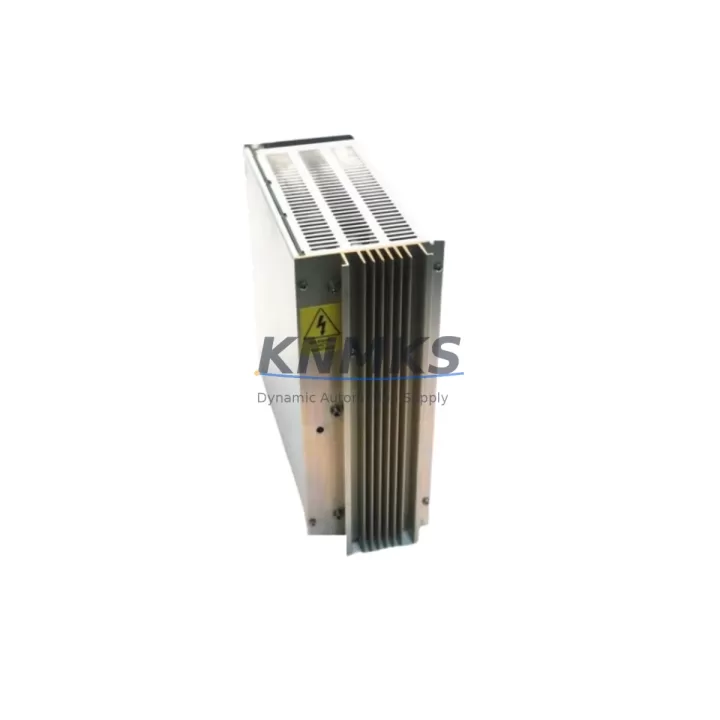
ABB DSQC258 Migration-Ready Power Supply for Legacy Control Systems
The ABB DSQC258 is a proven power supply module designed for ABB S3 and S4 series robot controllers, widely deployed across automotive assembly lines, foundry automation, and general-purpose industrial robotics. As ABB progressively phases out legacy S3/S4 hardware, procurement teams and maintenance engineers face increasing pressure to source verified replacement units that can be installed without re-engineering the control cabinet. The DSQC258 addresses this need directly: it is a direct form-fit-function replacement for the original power supply position in the S3/S4 controller rack, requiring no modification to the backplane connector, no firmware re-flashing, and no changes to the existing I/O wiring harness.
When planning a retrofit or emergency replacement, engineers must confirm several critical parameters before committing to a swap. The DSQC258 operates on a nominal AC input range compatible with standard industrial supply voltages; verify your cabinet’s incoming line voltage and confirm the breaker rating matches the module’s inrush current specification. Terminal block assignments on the DSQC258 follow the original ABB S3/S4 wiring diagram — cross-reference the existing cable labels against the module’s connector pinout before powering up. The backplane interface uses the standard S3/S4 rack slot format, so physical installation is straightforward, but confirm that the rack’s backplane bus is free of corrosion or damaged contacts before seating the module.
For sites running ABB S4C or S4C+ controllers alongside older S3 cabinets, the DSQC258 is frequently paired with the DSQC256 processor board and the DSQC249 I/O unit during staged upgrades. In multi-robot cells where the IRC5 controller has already been introduced on newer arms, the legacy S3/S4 cabinets often remain in service for auxiliary axes or peripheral handling equipment. In these mixed environments, maintaining a verified stock of DSQC258 units significantly reduces unplanned downtime risk. The module’s DC output rails supply both the processor board and the I/O bus; a degraded power supply is one of the most common root causes of intermittent fault codes and unexplained program halts in aging S3/S4 systems.
Communication protocol migration is another consideration during S3/S4 modernization projects. Many legacy cells rely on DeviceNet or Interbus-S fieldbus cards installed in the S3/S4 rack alongside the DSQC258. When upgrading the communication layer to PROFIBUS-DP or Ethernet/IP as part of a broader plant-wide migration to a SCADA or MES platform, the power supply must remain stable throughout the transition period. The DSQC258’s regulated DC outputs ensure that newly installed fieldbus interface modules — such as the DSQC352 DeviceNet board or a PROFIBUS adapter — receive clean, stable power during commissioning and protocol switchover testing.
HMI screen compatibility is a practical concern that is often overlooked during power supply replacements. If the robot cell uses a legacy ABB TP (Teach Pendant) connected to the S3/S4 controller, verify that the pendant’s power feed is correctly routed through the controller’s internal distribution after the DSQC258 is installed. In cells where the original pendant has been replaced with a third-party HMI panel or a PC-based supervisory interface, confirm that the 24 VDC auxiliary output from the DSQC258 is correctly terminated and that no floating grounds exist in the updated wiring scheme.
Installation space in legacy control cabinets is frequently constrained. The DSQC258 occupies a single slot in the S3/S4 rack and does not require additional mounting hardware beyond the standard rack retention mechanism. For cabinets where thermal management has become a concern due to added components over the years, ensure adequate airflow around the module and verify that the cabinet’s cooling fan — often a separate serviceable component — is operational before commissioning the replacement power supply.
Every DSQC258 unit shipped from our inventory undergoes pre-shipment functional testing, including output voltage verification across all DC rails under load, insulation resistance check, and visual inspection of connector contacts and PCB condition. Units are supplied with a support terms confirmed by quotation covering manufacturing defects and functional failures under normal operating conditions. Stock is maintained to support both emergency single-unit orders and planned multi-unit procurement for scheduled maintenance windows or multi-site retrofit programs.
Migration Compatibility Table
| Parameter | Details |
|---|---|
| Compatible Controllers | ABB S3, S4, S4C, S4C+ |
| Rack Interface | Standard S3/S4 backplane slot — direct drop-in, no adapter required |
| DC Output Rails | +5 VDC, +15 VDC, −15 VDC, +24 VDC (verify against original spec sheet for your controller variant) |
| AC Input | Compatible with standard industrial single-phase supply; confirm cabinet breaker rating before installation |
| Terminal Wiring | Follows original ABB S3/S4 wiring diagram; cross-reference cable labels before power-up |
| Communication Compatibility | Supports co-installation with DeviceNet (DSQC352), PROFIBUS, and Interbus-S fieldbus cards in the same rack |
| HMI / Teach Pendant | Verify 24 VDC auxiliary output routing for legacy ABB TP or third-party HMI panels |
| Firmware | No firmware update required for direct replacement in S3/S4 systems |
| Installation Space | Single rack slot; no additional mounting hardware required |
| Replacement Recommendation | Direct replacement for failed or degraded DSQC258 units; suitable for planned maintenance stock |
| Pre-Shipment Testing | Output voltage verification, insulation resistance check, connector and PCB inspection |
| Support terms | support terms confirmed by quotation — manufacturing defects and functional failures under normal operating conditions |
Retrofit Planning for Existing Automation Systems
A successful DSQC258 retrofit begins with a thorough audit of the existing control cabinet. Start by documenting the current wiring layout, including the terminal assignments for the AC input feed, the DC distribution bus, and any auxiliary 24 VDC loads such as solenoid valve drivers or safety relay coils. In S3/S4 cabinets that have been in service for more than a decade, it is common to find undocumented field modifications — additional loads tapped from the power supply’s output rails, non-standard cable routing, or replaced connectors that may not match the original pinout exactly.
During the retrofit, the DSQC258 is typically replaced in conjunction with other aging components. The DSQC256 processor board is a frequent co-replacement item, particularly when the system is exhibiting memory fault codes or program corruption symptoms. The DSQC249 I/O unit should be inspected for contact wear and terminal corrosion at the same time, as degraded I/O connections can mask power supply issues and complicate fault diagnosis. If the cabinet includes a DSQC209 axis computer or a DSQC236 drive unit, verify that these modules are receiving correct supply voltages from the new DSQC258 before closing the cabinet and resuming production.
For sites planning a phased migration from S3/S4 to IRC5 or OmniCore architecture, the DSQC258 replacement extends the operational life of the legacy system during the transition period, allowing the new controller platform to be commissioned on one robot while the remaining arms continue production on the existing hardware. This staged approach minimizes capital expenditure and avoids the need for a full-line shutdown during the migration window.
Downtime Control During System Migration
Minimizing unplanned downtime during a power supply replacement requires preparation before the maintenance window opens. Back up the robot program, system parameters, and calibration data to an external storage device before removing the DSQC258. In S3/S4 systems, program memory is battery-backed on the processor board, but a power supply swap that involves even a brief interruption to the backup battery circuit can result in data loss if the battery is already weakened.
Prepare the replacement DSQC258 unit for installation before powering down the cabinet. Verify the output voltages on the bench using a calibrated multimeter if possible, and confirm that all connector contacts are clean and undamaged. During the swap, work systematically: disconnect the AC input first, then the DC output connectors in sequence, noting the position of each cable. Reinstall in reverse order, torque all terminal screws to specification, and perform a visual check before applying power.
After power-up, verify that all DC output rails are within specification before releasing the system to the controller. Check for fault codes on the teach pendant or HMI, confirm that all I/O channels are responding correctly, and run a dry-cycle test of the robot program before resuming production. Document the replacement in the cabinet’s maintenance log, including the date, the replaced module’s serial number, and the post-installation voltage readings. This record supports support requests and provides a reference baseline for future maintenance intervals.
Retrofit Support FAQ
Q: Is the DSQC258 a direct replacement for all S3 and S4 controller variants?
A: The DSQC258 is compatible with the standard S3 and S4 rack format. For S4C and S4C+ variants, verify the specific power supply part number against your controller’s documentation, as some later S4C+ configurations used an updated power supply module. Contact us with your controller serial number if you need confirmation before ordering.
Q: What pre-shipment testing is performed on each unit?
A: Every DSQC258 is tested for output voltage accuracy across all DC rails under load, insulation resistance between input and output circuits, and physical inspection of PCB condition and connector contacts. A test record is available on request.
Q: Can the DSQC258 be installed without modifying the existing wiring?
A: Yes, provided the existing wiring follows the original ABB S3/S4 wiring diagram. Cross-reference all terminal labels against the module’s connector pinout before power-up. If field modifications have been made to the original wiring, document these before the swap and verify compatibility with the replacement unit’s pinout.
Q: What does the support terms confirmed by quotation cover?
A: The support terms covers manufacturing defects and functional failures under normal industrial operating conditions for 12 months from the date of shipment. It does not cover damage resulting from incorrect installation, overvoltage events, or physical mishandling. Support requests are processed promptly with replacement units dispatched from stock.
© 2026 KNMKS. All rights reserved.
Original Source: https://knmks.com
Contact: admin@knmks.com | +86 18359268345
Product Identification
- Brand / Ecosystem
-
ABB
ABB - Model / Series
-
DSQC258
Legacy Control Series - Product Family
- Power Supplies
- Availability Status
- Available on request after model and quantity confirmation
- Inquiry Type
- B2B RFQ, replacement inquiry and project spare-part request
- Pre-Quote Check
- Exact SKU, brand, series, quantity, nameplate photos and destination country are checked before quotation
System Path
Where this product fits in the KNMKS automation structure.
Specification & Inquiry Focus
- Power range
- DIN rail and switching power supplies
- Common needs
- Voltage, current and mounting style
- Project support
- Control cabinet and panel-builder inquiries
Buyer Confirmation
Information KNMKS checks before replying.
- Exact model
- DSQC258
- Brand / ecosystem
- ABB
- Product family
- Power Supplies
- Application note
- Replacement, maintenance, project build or spare-part list
- Useful photos
- Nameplate, installed unit, cabinet layout or connector side
- Delivery details
- Quantity, destination country and target schedule
Document Support
Files and notes can be confirmed during quotation.
- Product photos or nameplate confirmation when available
- Packing and delivery notes before quotation confirmation
- Support scope and delivery terms confirmed per inquiry
- Export document coordination for qualified B2B requests
Inquiry Support
- 24VDC and cabinet power selection support
- Stable power support for PLC and HMI systems
- Batch inquiry support for panel builders
What to Send Us
- Brand and exact model number: ABB DSQC258
- Quantity and required delivery time
- Application, replacement requirement or nameplate photo
- Destination country and shipping preference
RFQ Preparation
This is a product inquiry page built for RFQ communication.
Fast Model Check
Send this model to KNMKS for confirmation.
Include quantity, destination country and photos if this is a maintenance replacement. The inquiry will be saved with a reference number after submission.
Brand & Compatibility Note
KNMKS displays automation product information for well-known industrial brand ecosystems and compatible replacement references. Brand names are used for product identification and compatibility reference only; final availability and commercial terms are confirmed per quotation.
 Manufacturing
 Machine Tools
 Packaging
 Energy & Power
 PLCs & Controllers
 HMI & Displays
 Servo Systems
 Variable Frequency Drives