
Overview
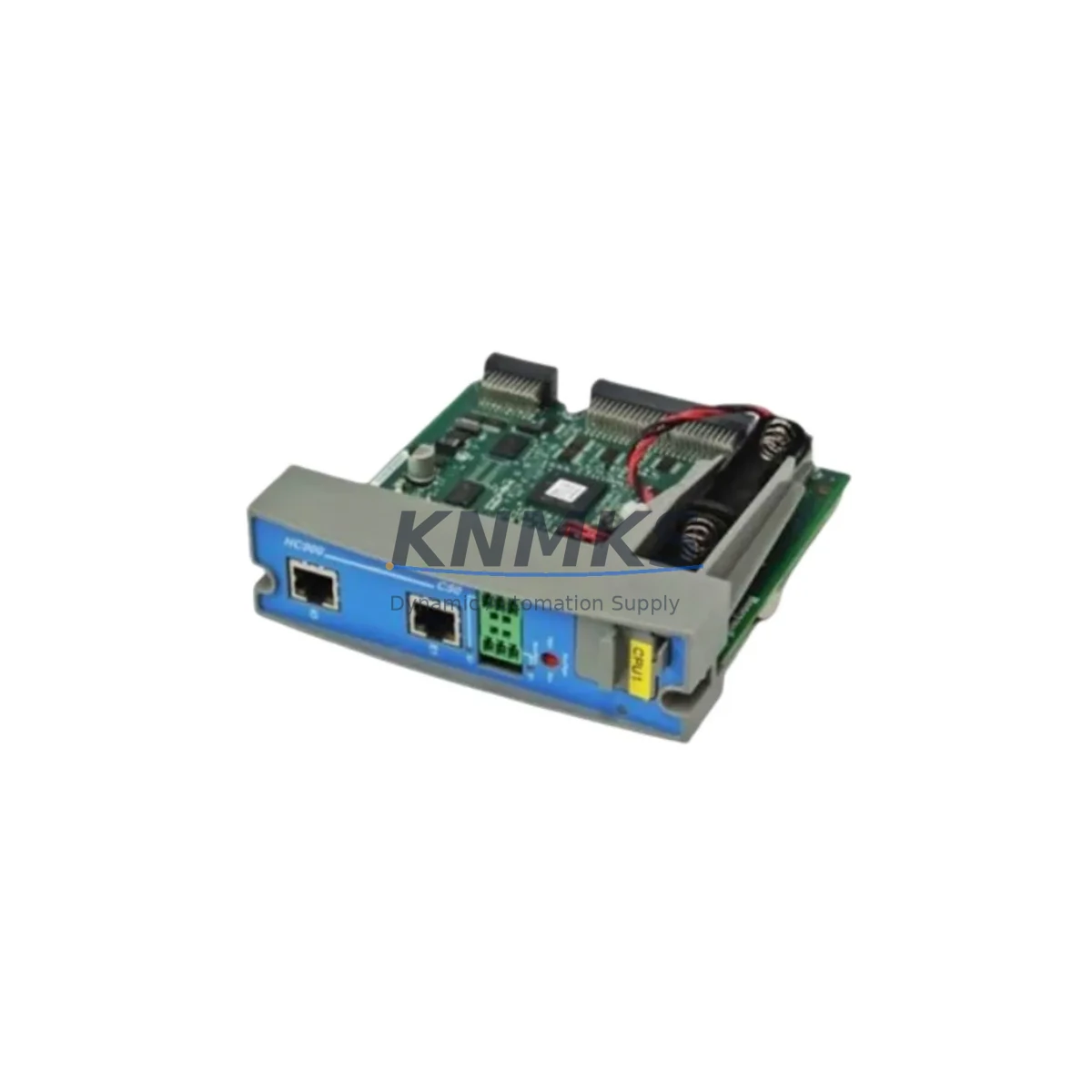
Honeywell 900S75S-0360-00 Migration-Ready I/O Scanner for Legacy Control Systems
The Honeywell 900S75S-0360-00 is a 2-Port I/O Scanner Module designed for the HC900 Hybrid Controller platform — one of Honeywell’s most widely deployed process control architectures in refining, chemical, power generation, and batch manufacturing environments. As HC900 systems age and original spare parts become increasingly scarce, the 900S75S-0360-00 serves as a critical migration-ready replacement that allows facilities to extend the operational life of their existing control infrastructure without committing to a full DCS overhaul.
This module manages I/O rack communication within the HC900 chassis, scanning field signals from connected I/O modules and relaying real-time data to the HC900 Controller. Its role is central to system integrity: a failed or degraded I/O Scanner directly impacts loop control, alarm response, and process visibility. For plants operating with aging HC900 hardware, maintaining a verified replacement unit in inventory is a standard risk mitigation practice.
Migration Compatibility Table
| Parameter | Details |
|---|---|
| Part Number | 900S75S-0360-00 |
| Platform | Honeywell HC900 Hybrid Controller |
| Module Function | 2-Port I/O Scanner — manages I/O rack-to-controller communication |
| Chassis Compatibility | HC900 4-slot, 12-slot rack configurations |
| Backplane Interface | HC900 proprietary backplane bus — direct slot insertion, no adapter required |
| Communication Protocol | HC900 internal I/O bus; compatible with Ethernet-based controller variants |
| Replacement Scope | Direct drop-in for same SKU; verify firmware revision compatibility with controller |
| Wiring Adaptation | No field wiring changes required — backplane-mounted, no terminal block |
| Installation Space | Standard HC900 module slot — confirm rack slot availability before ordering |
| Firmware Verification | Match firmware version to HC900 Controller revision; confirm via HC Designer software |
| Commissioning Note | Module address auto-assigned by rack slot position; no manual DIP switch configuration |
| Pre-Shipment Testing | Functional test performed prior to dispatch |
| Support terms | support terms confirmed by quotation from shipment date |
| Country of Origin | United States |
Retrofit Planning for Existing Automation Systems
Replacing the 900S75S-0360-00 in an active HC900 system requires careful pre-outage planning. The I/O Scanner occupies a dedicated slot in the HC900 rack and communicates directly with the HC900 Controller Module (such as the 900C75S-0100-00 or 900C75S-0200-00 series) via the backplane. Before scheduling a replacement window, engineers should confirm the controller firmware version using HC Designer to ensure the replacement scanner module is compatible — mismatched firmware revisions can cause rack initialization failures or I/O scan errors on startup.
In multi-rack HC900 configurations, each rack requires its own I/O Scanner. Plants with expanded I/O architectures often operate two or more racks, each housing a dedicated scanner alongside HC900 Analog Input Modules (900G32-0101-00 series), Digital Output Modules, and Thermocouple Input Modules. When planning a retrofit, it is advisable to audit all scanner modules across all racks simultaneously — a phased replacement approach reduces the risk of cascading failures during production.
For facilities migrating from older HC900 revisions to current hardware, the HC900 Power Supply Module (900P01-0100-00 or equivalent) should be inspected as part of the same maintenance window. Aging power supplies are a common root cause of intermittent I/O Scanner faults, and replacing a scanner without verifying power rail stability can result in repeat failures. Similarly, the HC900 Rack Chassis backplane connectors should be inspected for oxidation or mechanical wear before inserting the replacement module.
Communication continuity is another key consideration. In HC900 systems integrated with Honeywell Experion PKS or third-party SCADA platforms via Modbus TCP or OPC, the I/O Scanner replacement must be coordinated with the control room team to avoid false alarms or historian data gaps. The HC900 Ethernet Communication Module (where fitted) maintains the upper-level network link independently of the I/O Scanner, but process values will be interrupted during the scanner swap window. Pre-staging the replacement module, preparing a rollback plan, and briefing the DCS operator are standard steps in a controlled migration.
For plants also managing HMI refresh as part of a broader control system upgrade, HC900 tag structures and faceplate configurations in Honeywell HC900 Designer or connected HMI platforms (such as Wonderware InTouch or iFIX) should be validated post-replacement to confirm that I/O addresses and loop tags remain correctly mapped. Signal isolators on critical analog loops should also be verified to ensure signal integrity is maintained after the module swap.
Downtime Control During System Migration
Minimizing unplanned downtime during an HC900 I/O Scanner replacement is achievable with structured preparation. The recommended approach is a cold-swap procedure during a scheduled maintenance window: power down the affected rack, extract the failed or degraded 900S75S-0360-00, insert the replacement unit into the same slot, restore power, and allow the HC900 Controller to re-initialize the rack. Total physical swap time is typically under 15 minutes for a prepared technician.
To protect existing program logic, the HC900 configuration file should be backed up from HC Designer prior to any hardware intervention. The controller retains its program in non-volatile memory, and a rack re-initialization does not overwrite controller logic — however, having a verified backup eliminates risk in the event of an unexpected controller reset during the swap. All loop setpoints, alarm limits, and PID tuning parameters are preserved in the controller and do not require re-entry after the scanner replacement.
For facilities that cannot tolerate a full rack shutdown, a partial migration strategy may be applicable depending on the HC900 configuration: non-critical I/O loops can be placed in manual mode at the DCS or HMI level, allowing the rack to be taken offline while critical loops are managed manually by field operators. This approach requires coordination between the control engineer, operations team, and safety officer, and should be documented in the site’s Management of Change (MOC) procedure.
Post-replacement commissioning should include a full I/O scan verification — confirming that all field signals are correctly read by the new scanner, that analog values are within expected ranges, and that no diagnostic alarms are active in the HC900 Controller. A 30-minute observation period under normal operating conditions is recommended before returning the system to automatic control.
Retrofit Support FAQ
Q1: Is the 900S75S-0360-00 a direct replacement for all HC900 I/O Scanner variants?
The 900S75S-0360-00 is the standard 2-Port I/O Scanner for the HC900 platform. It is a direct replacement for units with the same part number. If your existing scanner carries a different suffix or revision code, confirm compatibility with the HC900 Controller firmware version in use. Our technical team can assist with cross-reference verification prior to shipment.
Q2: What pre-shipment testing is performed on this module?
Each 900S75S-0360-00 unit undergoes functional testing prior to dispatch to verify backplane communication integrity and module initialization behavior. A test report is available upon request. All units ship with a support terms confirmed by quotation covering manufacturing defects and functional failures under normal operating conditions.
Q3: Can this module be used in an HC900 system that has been upgraded to a newer controller revision?
Yes, in most cases. The I/O Scanner is designed to operate across multiple HC900 Controller revisions. However, firmware compatibility should always be confirmed using HC Designer before installation. If the controller has been upgraded to a significantly newer firmware version, a scanner firmware update may be required — this is typically performed via the HC Designer software tool connected to the controller.
Q4: What is the typical lead time and do you maintain stock?
We maintain inventory of the 900S75S-0360-00 to support urgent replacement and planned maintenance requirements. Standard lead time for in-stock units is 3–7 business days for international shipments. For facilities requiring long-term supply agreements or multi-unit procurement for multi-site HC900 installations, please contact our sales team to discuss volume pricing and reserved inventory arrangements.
© 2026 KNMKS. All rights reserved.
Original Source: https://knmks.com
Contact: admin@knmks.com | +86 18359268345
Product Identification
- Brand / Ecosystem
-
Honeywell
Honeywell - Model / Series
- 900S75S-0360-00
- Product Family
- PLCs & Controllers
- Availability Status
- Available on request after model and quantity confirmation
- Inquiry Type
- B2B RFQ, replacement inquiry and project spare-part request
- Pre-Quote Check
- Exact SKU, brand, series, quantity, nameplate photos and destination country are checked before quotation
System Path
Where this product fits in the KNMKS automation structure.
Specification & Inquiry Focus
- Control platform
- PLC, PAC and modular controllers
- Common needs
- CPU, rack, power and I/O expansion
- Project support
- Replacement, cabinet build and maintenance
Buyer Confirmation
Information KNMKS checks before replying.
- Exact model
- 900S75S-0360-00
- Brand / ecosystem
- Honeywell
- Product family
- PLCs & Controllers
- Application note
- Replacement, maintenance, project build or spare-part list
- Useful photos
- Nameplate, installed unit, cabinet layout or connector side
- Delivery details
- Quantity, destination country and target schedule
Document Support
Files and notes can be confirmed during quotation.
- Product photos or nameplate confirmation when available
- Packing and delivery notes before quotation confirmation
- Support scope and delivery terms confirmed per inquiry
- Export document coordination for qualified B2B requests
Inquiry Support
- Model cross-checking before quotation
- CPU, power, rack and expansion module matching
- Support for replacement and project inquiry
What to Send Us
- Brand and exact model number: Honeywell 900S75S-0360-00
- Quantity and required delivery time
- Application, replacement requirement or nameplate photo
- Destination country and shipping preference
RFQ Preparation
This is a product inquiry page built for RFQ communication.
Fast Model Check
Send this model to KNMKS for confirmation.
Include quantity, destination country and photos if this is a maintenance replacement. The inquiry will be saved with a reference number after submission.
Brand & Compatibility Note
KNMKS displays automation product information for well-known industrial brand ecosystems and compatible replacement references. Brand names are used for product identification and compatibility reference only; final availability and commercial terms are confirmed per quotation.
 Manufacturing
 Machine Tools
 Packaging
 Energy & Power



 HMI & Displays
 Servo Systems
 Variable Frequency Drives
 Sensors