
Overview
Honeywell 900R12-0001 Maintenance-Proven Spare Part for Factory Uptime
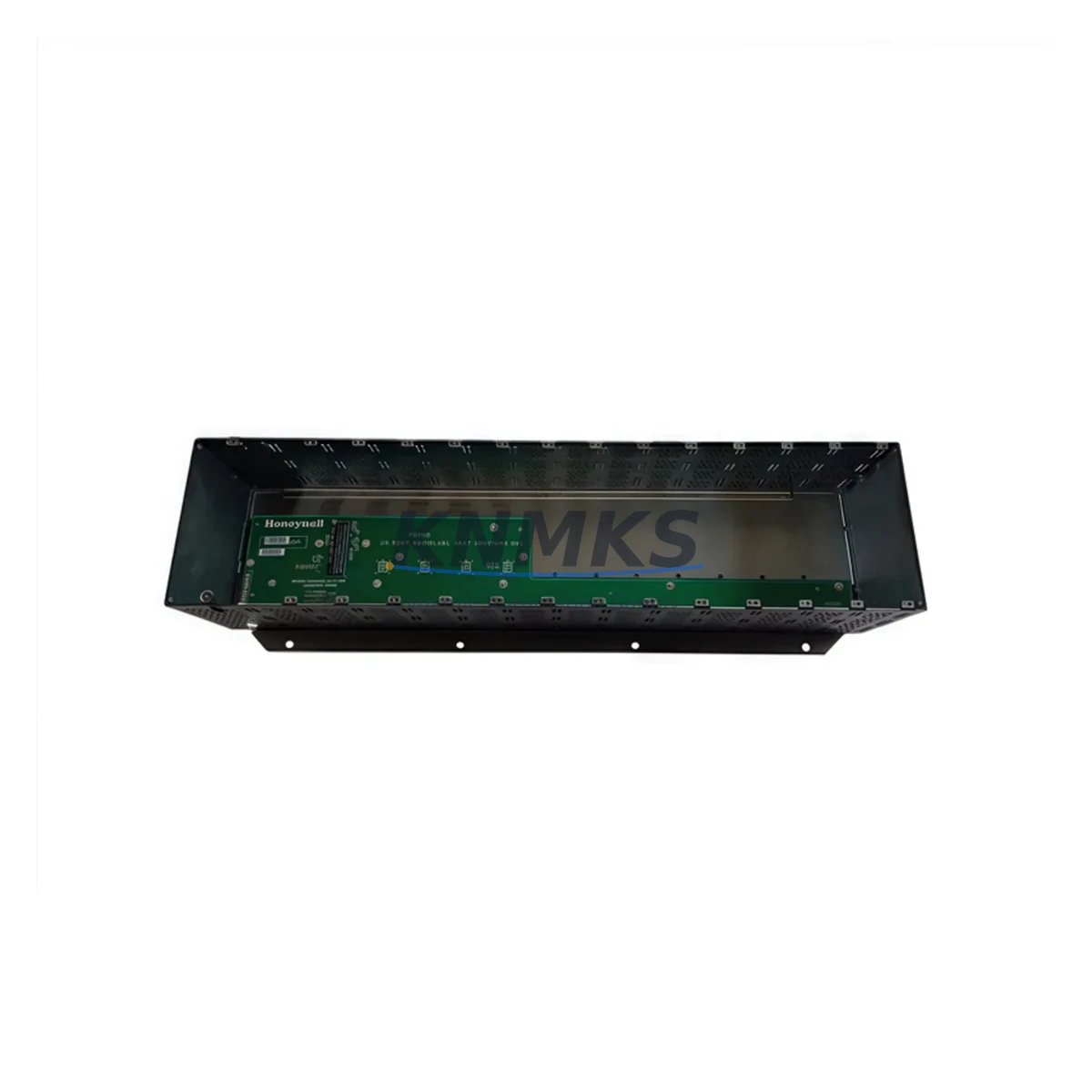
The Honeywell 900R12-0001 is a 12-slot backplane rack designed for the HC900 Hybrid Controller system — one of the most widely deployed process automation platforms in chemical, oil & gas, power generation, and continuous manufacturing environments. For maintenance engineers managing aging DCS infrastructure, this backplane rack is a critical structural and electrical component: it houses and interconnects all HC900 I/O modules, the controller module, and communication cards within a single control cabinet assembly. When this rack fails or shows signs of degradation — intermittent module faults, backplane communication errors, or physical damage from vibration and heat cycling — the entire HC900 node goes offline, triggering unplanned downtime that can cost thousands of dollars per hour in lost production.
Sourced as an original Honeywell spare, the 900R12-0001 is verified compatible with the full HC900 controller family. It supports direct drop-in replacement without firmware changes or system reconfiguration, making it the preferred choice for both emergency breakdown recovery and planned annual maintenance shutdowns. Each unit shipped by KNMKS undergoes pre-dispatch inspection and is covered by a support terms confirmed by quotation, giving procurement engineers the confidence to stock this part as a long-term supply item.
Spare Maintenance Table
| Parameter | Specification |
|---|---|
| Part Number / SKU | 900R12-0001 |
| Brand | Honeywell |
| Series | HC900 Hybrid Controller |
| Product Type | PLC / DCS Backplane Rack |
| Slot Count | 12 Slots |
| Compatible Controllers | HC900 C30, C50, C70, C70R Controller Modules |
| Compatible I/O Modules | All HC900 series analog, digital, and specialty I/O modules |
| Backplane Bus | Proprietary HC900 internal communication bus |
| Mounting | DIN rail / panel mount (standard HC900 enclosure) |
| Operating Temperature | 0°C to 60°C |
| Relative Humidity | 5% to 95% non-condensing |
| Power Supply Compatibility | HC900 series power supply modules (e.g. 900P01-0001, 900P02-0001) |
| Origin | United States |
| Condition | Original / New Surplus |
| Support terms | 12 Months |
| Pre-Dispatch Testing | Yes — functional inspection before shipment |
| Lead Time | availability confirmed by RFQ — ships within 1–3 business days |
Maintenance Planning for Continuous Operation
When a maintenance team identifies a failing 900R12-0001 backplane rack during a control cabinet inspection or after a module communication fault alarm, the replacement workflow extends well beyond swapping the rack itself. A thorough site assessment should treat the backplane failure as a trigger for a broader cabinet health review.
Begin with the power supply modules. The HC900 power supply — such as the 900P01-0001 or 900P02-0001 — feeds the backplane directly. A degraded power supply can cause intermittent backplane faults that mimic rack failure; always verify output voltage stability and ripple before concluding the rack is the root cause. If the power supply is more than five years old or shows signs of capacitor aging, replace it concurrently with the rack to avoid a repeat callout.
Next, inspect all I/O modules seated in the rack. HC900 analog input modules (such as the 900G32-0101 AI module) and digital output modules should be reseated and their connector pins inspected for oxidation or mechanical wear. Backplane connector damage is a common secondary failure mode when a rack has been subjected to vibration or thermal cycling over many years. Any module showing intermittent channel faults should be flagged for replacement during the same maintenance window.
The HC900 controller module itself — whether a C50 or C70 variant — should have its firmware version confirmed against the current Honeywell release. A rack replacement is an ideal opportunity to perform a controller firmware update, which can be done offline before the new rack is commissioned. Communication modules, including Ethernet and serial interface cards, should also be inspected: connector integrity, LED status indicators, and cable terminations at the 900CS-0001 or equivalent communication scanner should all be verified.
For facilities running redundant HC900 configurations, the redundancy cable and the secondary controller module must be tested after the rack swap to confirm failover behavior is intact. Redundancy faults that appear post-maintenance are frequently caused by cable seating issues introduced during the rack removal process.
Finally, review the terminal blocks and field wiring connections at the I/O module level. Loose terminations are a leading cause of signal drift and nuisance alarms in the weeks following a major rack replacement. A torque check on all field terminals, combined with an insulation resistance test on critical analog loops, will confirm the installation is ready for return to service. Fuse holders and individual channel fuses on protected I/O circuits should also be inspected and replaced as part of the annual maintenance cycle.
Site Replacement Workflow
Step 1 — Pre-Replacement Preparation: Download and save the full HC900 configuration database from the existing controller before any hardware is disturbed. Confirm the replacement 900R12-0001 rack matches the slot count and form factor of the installed unit. Verify the new rack’s backplane connector condition visually before installation.
Step 2 — Safe Isolation: Follow site lockout/tagout (LOTO) procedures. De-energize the HC900 power supply and confirm zero voltage at the backplane power input terminals. Label all I/O module positions before removal to ensure correct reinstallation sequence.
Step 3 — Module Removal and Transfer: Remove I/O modules in sequence, storing them in anti-static bags. Remove the controller module last. Inspect each module’s backplane connector for bent pins or contamination. Clean connectors with appropriate contact cleaner if required.
Step 4 — Rack Installation: Mount the new 900R12-0001 rack in the enclosure. Reinstall the power supply connections and verify torque on all mounting hardware. Reinstall modules in their original positions, confirming each module seats fully and its locking tab engages.
Step 5 — Power-Up and Verification: Restore power and observe the controller boot sequence. Confirm all I/O modules are recognized by the controller (no missing module alarms). Reload the saved configuration database if required. Perform a full I/O loop check on critical channels before returning the system to automatic control.
Step 6 — Documentation: Record the replacement date, new rack serial number, and any concurrent component replacements in the site maintenance management system (CMMS). Update the spare parts inventory to trigger reorder of a replacement 900R12-0001 for the next maintenance cycle.
Spare Parts Support FAQ
Q1: Is the 900R12-0001 compatible with all HC900 controller variants, including redundant configurations?
Yes. The 900R12-0001 12-slot backplane rack is compatible with the full HC900 controller family, including C30, C50, C70, and C70R (redundant) controller modules. It supports both simplex and redundant system architectures without hardware modification.
Q2: What is the recommended spare parts stocking strategy for the 900R12-0001 in a multi-node HC900 installation?
For facilities operating three or more HC900 nodes, maintaining one 900R12-0001 rack in local inventory is strongly recommended. Backplane rack failures are low-frequency but high-impact events; the cost of a single unplanned shutdown typically exceeds the cost of stocking a spare by a significant margin. KNMKS supports long-term supply agreements for customers requiring guaranteed availability over multi-year maintenance contracts.
Q3: How does KNMKS verify the condition of the 900R12-0001 before shipment?
Each 900R12-0001 unit undergoes a pre-dispatch inspection covering physical condition of the backplane connector, slot guides, mounting hardware, and labeling. Units sourced as new surplus are inspected for storage condition and packaging integrity. All units are covered by a support terms confirmed by quotation from the date of shipment. If a unit fails within the confirmed support period, KNMKS provides replacement or documented resolution support.
Q4: Can the 900R12-0001 replace older HC900 rack variants that may have different revision levels?
In most cases, yes. Honeywell has maintained backward compatibility across HC900 rack revisions. However, customers are advised to confirm the rack revision level against their installed HC900 system documentation before ordering, particularly for very early HC900 installations. KNMKS technical support can assist with compatibility verification based on your system’s controller firmware version and I/O module types — contact admin@knmks.com with your system details.
© 2026 KNMKS. All rights reserved.
Original Source: https://knmks.com
Contact: admin@knmks.com | +86 18359268345
Product Identification
- Brand / Ecosystem
-
Honeywell
Honeywell - Model / Series
- 900R12-0001
- Product Family
- PLCs & Controllers
- Availability Status
- Available on request after model and quantity confirmation
- Inquiry Type
- B2B RFQ, replacement inquiry and project spare-part request
- Pre-Quote Check
- Exact SKU, brand, series, quantity, nameplate photos and destination country are checked before quotation
System Path
Where this product fits in the KNMKS automation structure.
Specification & Inquiry Focus
- Control platform
- PLC, PAC and modular controllers
- Common needs
- CPU, rack, power and I/O expansion
- Project support
- Replacement, cabinet build and maintenance
Buyer Confirmation
Information KNMKS checks before replying.
- Exact model
- 900R12-0001
- Brand / ecosystem
- Honeywell
- Product family
- PLCs & Controllers
- Application note
- Replacement, maintenance, project build or spare-part list
- Useful photos
- Nameplate, installed unit, cabinet layout or connector side
- Delivery details
- Quantity, destination country and target schedule
Document Support
Files and notes can be confirmed during quotation.
- Product photos or nameplate confirmation when available
- Packing and delivery notes before quotation confirmation
- Support scope and delivery terms confirmed per inquiry
- Export document coordination for qualified B2B requests
Inquiry Support
- Model cross-checking before quotation
- CPU, power, rack and expansion module matching
- Support for replacement and project inquiry
What to Send Us
- Brand and exact model number: Honeywell 900R12-0001
- Quantity and required delivery time
- Application, replacement requirement or nameplate photo
- Destination country and shipping preference
RFQ Preparation
This is a product inquiry page built for RFQ communication.
Fast Model Check
Send this model to KNMKS for confirmation.
Include quantity, destination country and photos if this is a maintenance replacement. The inquiry will be saved with a reference number after submission.
Brand & Compatibility Note
KNMKS displays automation product information for well-known industrial brand ecosystems and compatible replacement references. Brand names are used for product identification and compatibility reference only; final availability and commercial terms are confirmed per quotation.
 Manufacturing
 Machine Tools
 Packaging
 Energy & Power



 HMI & Displays
 Servo Systems
 Variable Frequency Drives
 Sensors