
Overview
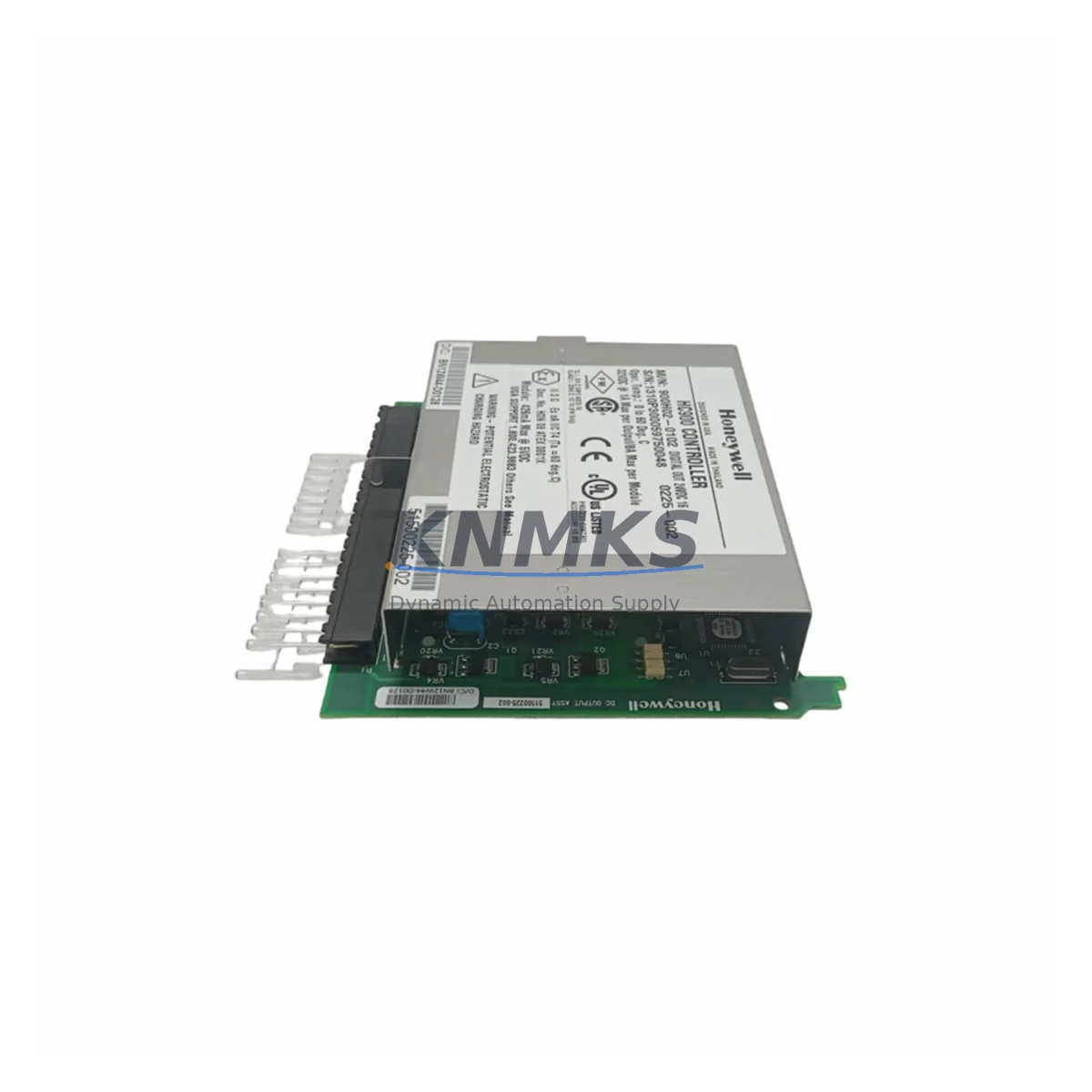
Honeywell 900H02-0102 Maintenance-Proven Spare Part for Factory Uptime
The Honeywell 900H02-0102 is a 16-channel digital output module designed for the HC900 Hybrid Controller platform — one of Honeywell’s most widely deployed process automation systems in refining, chemical, power generation, and discrete manufacturing environments. As a maintenance-proven spare part, the 900H02-0102 supports rapid field replacement, minimizes unplanned downtime, and ensures continuous process control without requiring system reconfiguration or software re-engineering.
Sourced as an original Honeywell component, each unit is pre-tested prior to shipment and backed by a support terms confirmed by quotation. Multi-region stock availability enables fast global dispatch for both emergency replacements and scheduled outage windows. Whether you are managing a routine annual inspection, responding to an unexpected module failure, or building a strategic spare parts inventory for your HC900 control system, the 900H02-0102 delivers the compatibility, reliability, and supply continuity that maintenance and procurement engineers depend on.
Spare Maintenance Table
| Parameter | Specification |
|---|---|
| Part Number / SKU | 900H02-0102 |
| Brand | Honeywell |
| Series / Platform | HC900 Hybrid Controller |
| Module Type | Digital Output Module |
| Output Channels | 16 Channels |
| Output Type | Relay / Solid-State (per HC900 DO specification) |
| Backplane Compatibility | HC900 Rack / Backplane (4-slot, 8-slot, 12-slot) |
| Communication Interface | HC900 internal rack bus |
| Operating Voltage | 24 VDC (rack-supplied) |
| Operating Temperature | 0°C to 60°C |
| Mounting | Plug-in module, hot-swap capable (rack power-off recommended) |
| Origin | United States |
| Application Environment | Process control, refining, chemical, power generation, discrete manufacturing |
| Maintenance Recommendation | Inspect output status LEDs, verify field wiring continuity, confirm DO channel mapping in HC900 Designer software |
| Support terms | 12 Months — covers manufacturing defects and functional failure under normal operating conditions |
| Pre-Shipment Testing | Yes — each unit functionally verified before dispatch |
| Stock Availability | Multi-region; supports emergency and scheduled replacement orders |
Maintenance Planning for Continuous Operation
When replacing the 900H02-0102 digital output module in an HC900 system, a disciplined maintenance approach requires inspecting the surrounding electrical and control infrastructure to prevent repeat failures and ensure full system restoration. Maintenance engineers should begin by verifying the HC900 rack power supply — typically the 900P01-0001 or equivalent HC900 power supply module — to confirm stable 24 VDC output before re-seating the replacement DO module. A degraded or undersized power supply is a common root cause of premature module failure in high-channel-count racks.
Field wiring connected to the 900H02-0102 output terminals should be inspected for insulation wear, loose terminations, and correct fusing. Each output channel circuit should be protected by appropriately rated fuses or circuit breakers; blown fuses on the field side are frequently misdiagnosed as module failures. Terminal blocks and wiring ducts adjacent to the module should be checked for heat discoloration or corrosion, particularly in high-ambient-temperature enclosures.
The HC900 backplane and rack assembly should be inspected for connector pin integrity and backplane bus continuity. If the rack has been in service for more than five years, consider scheduling a backplane inspection alongside the module replacement. The HC900 CPU module (such as the 900C52-0143 or 900C32-0143) should be checked for firmware currency and active fault logs — unresolved CPU faults can mask DO module status and complicate post-replacement verification.
For systems using HC900 communication modules (such as the 900RMT-0001 remote I/O module or Ethernet communication cards), verify that the replacement module is correctly recognized on the rack bus and that the HC900 Designer configuration reflects the correct slot assignment. Signal isolation barriers or interposing relays connected to the DO outputs should also be tested for correct switching response after module replacement. Where the HC900 system interfaces with a Honeywell Experion PKS DCS or a third-party SCADA, confirm that the output channel tags are correctly mapped and that the supervisory system is receiving expected status feedback before returning the process to automatic control.
Site Replacement Workflow
Step 1 — Preparation: Obtain the 900H02-0102 replacement unit and confirm the part number matches the installed module. Download the current HC900 configuration backup from the CPU module using HC900 Designer software before any hardware change.
Step 2 — Safe Isolation: Place the affected output channels in manual or safe state via the HC900 operator interface or Experion PKS console. Notify process operators of the planned replacement window. De-energize field loads connected to the DO module outputs where safe to do so.
Step 3 — Module Removal: With rack power off (recommended) or following HC900 hot-swap procedures if applicable, carefully extract the 900H02-0102 from its rack slot. Note the slot position for correct reinstallation of the replacement unit.
Step 4 — Replacement Installation: Insert the new 900H02-0102 into the correct rack slot. Restore rack power and observe the module status LED — a solid green LED indicates successful initialization and rack bus communication.
Step 5 — Configuration Verification: Open HC900 Designer and confirm the replacement module is recognized in the correct slot with the expected channel configuration. Download configuration to the CPU if required. Verify all 16 output channels are mapped correctly and test each channel output against field device response.
Step 6 — Return to Service: Return output channels to automatic control. Monitor the HC900 fault log and Experion PKS alarm summary for a minimum of 30 minutes post-replacement to confirm stable operation. Document the replacement in the site maintenance log with the new module serial number and installation date.
Spare Parts Support FAQ
Q1: Is the 900H02-0102 a direct plug-and-play replacement for the existing module in my HC900 rack?
Yes. The 900H02-0102 is a form-fit-function replacement for the HC900 16-channel digital output module. No hardware modification or software re-engineering is required. The HC900 CPU will automatically recognize the replacement module in the same rack slot, provided the configuration file already includes the correct slot assignment for a DO module of this type.
Q2: How do I verify compatibility before ordering if my HC900 system is an older revision?
Confirm the rack type (4-slot, 8-slot, or 12-slot HC900 rack) and the CPU firmware version using HC900 Designer. The 900H02-0102 is compatible across HC900 rack generations. If you have the existing module’s label or the HC900 configuration file, share the slot type and channel count with our technical team at admin@knmks.com for pre-order compatibility confirmation.
Q3: What does the support terms confirmed by quotation cover, and what is the process for a support terms claim?
The support terms confirmed by quotation cover manufacturing defects and functional failure under normal operating and storage conditions. It does not cover damage resulting from incorrect installation, overvoltage events, or physical mishandling. To initiate a support terms claim, contact admin@knmks.com with the order reference, installation date, and a description of the observed failure. Replacement or repair will be coordinated within the confirmed support period.
Q4: Can KNMKS support long-term supply agreements for the 900H02-0102 and other HC900 spare modules?
Yes. KNMKS maintains multi-region stock of HC900 spare modules and can support scheduled procurement agreements for maintenance teams managing multiple HC900 systems or planning multi-year outage schedules. Long-term supply agreements help lock in availability and pricing for critical spare parts, reducing procurement risk for end-of-production or limited-availability components. Contact admin@knmks.com or call +86 18359268345 to discuss your requirements.
© 2026 KNMKS. All rights reserved.
Original Source: https://knmks.com
Contact: admin@knmks.com | +86 18359268345
Product Identification
- Brand / Ecosystem
-
Honeywell
Honeywell - Model / Series
- 900H02-0102
- Product Family
- PLCs & Controllers
- Availability Status
- Available on request after model and quantity confirmation
- Inquiry Type
- B2B RFQ, replacement inquiry and project spare-part request
- Pre-Quote Check
- Exact SKU, brand, series, quantity, nameplate photos and destination country are checked before quotation
System Path
Where this product fits in the KNMKS automation structure.
Specification & Inquiry Focus
- Control platform
- PLC, PAC and modular controllers
- Common needs
- CPU, rack, power and I/O expansion
- Project support
- Replacement, cabinet build and maintenance
Buyer Confirmation
Information KNMKS checks before replying.
- Exact model
- 900H02-0102
- Brand / ecosystem
- Honeywell
- Product family
- PLCs & Controllers
- Application note
- Replacement, maintenance, project build or spare-part list
- Useful photos
- Nameplate, installed unit, cabinet layout or connector side
- Delivery details
- Quantity, destination country and target schedule
Document Support
Files and notes can be confirmed during quotation.
- Product photos or nameplate confirmation when available
- Packing and delivery notes before quotation confirmation
- Support scope and delivery terms confirmed per inquiry
- Export document coordination for qualified B2B requests
Inquiry Support
- Model cross-checking before quotation
- CPU, power, rack and expansion module matching
- Support for replacement and project inquiry
What to Send Us
- Brand and exact model number: Honeywell 900H02-0102
- Quantity and required delivery time
- Application, replacement requirement or nameplate photo
- Destination country and shipping preference
RFQ Preparation
This is a product inquiry page built for RFQ communication.
Fast Model Check
Send this model to KNMKS for confirmation.
Include quantity, destination country and photos if this is a maintenance replacement. The inquiry will be saved with a reference number after submission.
Brand & Compatibility Note
KNMKS displays automation product information for well-known industrial brand ecosystems and compatible replacement references. Brand names are used for product identification and compatibility reference only; final availability and commercial terms are confirmed per quotation.
 Manufacturing
 Machine Tools
 Packaging
 Energy & Power



 HMI & Displays
 Servo Systems
 Variable Frequency Drives
 Sensors