
Overview
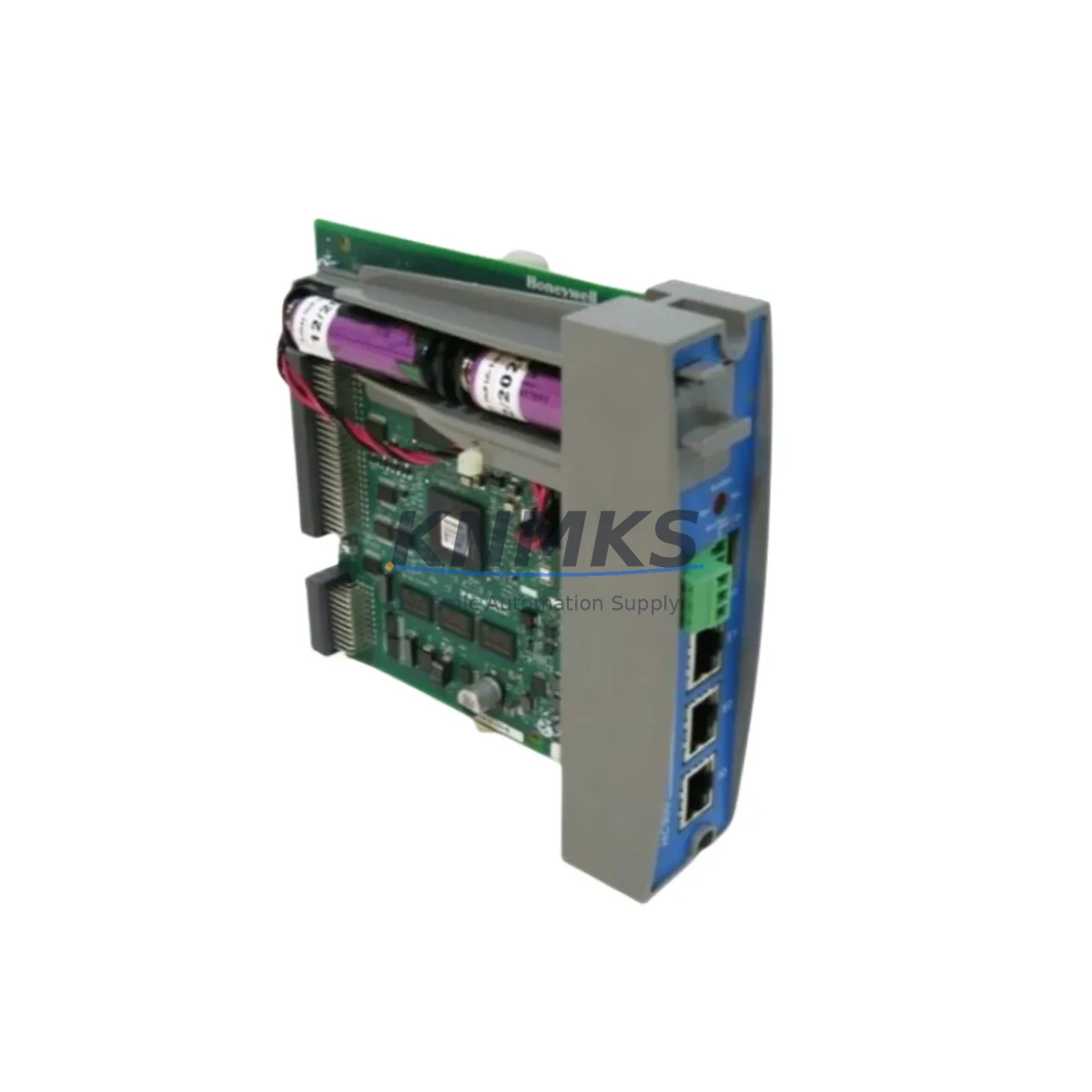
Honeywell 900C75S-0360-00 Migration-Ready Redundant CPU for Legacy Control Systems
The Honeywell 900C75S-0360-00 is a redundant CPU controller module engineered for the HC900 Hybrid Controller platform, purpose-built to address the growing demand for legacy system migration, discontinued spare part replacement, and control cabinet modernization. As aging DCS and hybrid control architectures reach end-of-support milestones, the 900C75S-0360-00 provides a validated, drop-in upgrade path that preserves existing I/O wiring, backplane interfaces, and control logic — dramatically reducing retrofit risk and unplanned downtime.
This module supports dual-redundant CPU operation within the HC900 rack architecture, enabling seamless bumpless transfer between primary and secondary controllers. For facilities running legacy Honeywell HC900 configurations with older 900C50 or 900C30 CPU variants, the 900C75S-0360-00 delivers expanded memory capacity, faster scan cycle performance, and enhanced communication stack support — all within the same physical form factor and backplane pinout.
Before initiating a retrofit, engineers must verify several critical parameters: confirm available rack slot positions and backplane revision compatibility; audit terminal block wiring assignments against the existing I/O module map; validate power supply headroom on the 900P01 or 900P02 power module to support the updated CPU load profile; and review firmware version alignment across all installed 900-series modules. Mismatched firmware between the CPU and co-installed modules such as the 900H01-0001 HART Communication Module or 900TCK-0001 thermocouple input cards can cause initialization faults that delay commissioning.
Communication protocol continuity is a primary concern during HC900 CPU upgrades. The 900C75S-0360-00 maintains native Modbus TCP/IP and OPC-DA server compatibility, ensuring that existing SCADA historian links, HMI tag databases, and third-party DCS integration points remain intact post-swap. Where legacy serial Modbus RTU links are in use — common in older field device networks — the 900C75S-0360-00 supports continued operation through the HC900’s onboard serial ports, eliminating the need for protocol converter hardware during the transition phase.
HMI screen integrity is another migration checkpoint that is frequently underestimated. Control Room operators relying on Honeywell Station or third-party SCADA displays built around HC900 tag structures will find that the 900C75S-0360-00 preserves the existing controller database schema, meaning tag names, loop references, and alarm setpoints do not require manual re-entry. This is particularly valuable in batch process environments where recipe parameters and sequence logic are embedded in the controller program rather than the HMI layer.
For installations requiring I/O expansion during the upgrade cycle, the 900C75S-0360-00 supports the full range of HC900 I/O modules including analog input cards, discrete output modules, and specialty function blocks. Engineers planning concurrent I/O expansion should pre-stage additional rack assemblies and confirm module address assignments before the maintenance window to avoid address conflicts that can prevent the CPU from completing its startup scan.
Migration Compatibility Table
| Parameter | Details |
|---|---|
| Replaces / Upgrades From | Honeywell 900C50-0360-00, 900C30-0360-00 (HC900 CPU variants) |
| Platform Compatibility | Honeywell HC900 Hybrid Controller (all rack sizes) |
| Backplane Interface | HC900 standard backplane — direct slot replacement, no adapter required |
| Communication Protocols | Modbus TCP/IP, Modbus RTU, OPC-DA, Ethernet (10/100 Mbps) |
| Redundancy Mode | Hot-standby redundant CPU pair; bumpless transfer on primary fault |
| Installation Requirement | Dedicated CPU slot (Slot 0); redundant unit occupies Slot 1 |
| Firmware Compatibility | Verify HC900 Designer software version alignment before download |
| Power Supply Compatibility | 900P01, 900P02 — confirm available wattage headroom before installation |
| Commissioning Note | Upload existing .cdb configuration file; verify all I/O module addresses post-restart |
| Support terms | support terms confirmed by quotation | Pre-shipment functional test included |
Retrofit Planning for Existing Automation Systems
A successful HC900 CPU retrofit begins well before the maintenance window opens. The first step is a full audit of the existing rack assembly: document every installed module by slot position, including analog input cards, discrete I/O modules, and any specialty function modules such as the 900H01-0001 HART Communication Module. Cross-reference these against the current .cdb configuration file exported from HC900 Designer to confirm that the software map matches the physical hardware layout.
Power budget verification is non-negotiable. The 900C75S-0360-00 draws a defined load from the rack power bus; when paired with a redundant CPU in Slot 1, the combined draw must remain within the rated output of the installed 900P01 or 900P02 power supply module. If the existing power module is already operating near capacity due to a fully populated I/O rack, a power supply upgrade should be scheduled concurrently with the CPU swap.
Terminal block wiring on HC900 I/O modules is field-wired and does not require disconnection during a CPU replacement — a significant advantage over controller platforms that integrate I/O terminations directly on the CPU card. This means the 900C75S-0360-00 can be installed with field wiring intact, reducing the risk of miswiring during reassembly. However, engineers should inspect terminal torque values and conductor insulation condition as part of the retrofit inspection, particularly on installations that have been in service for more than five years.
Where the retrofit scope includes adding new I/O capacity — for example, integrating additional thermocouple inputs via 900TCK-0001 cards or expanding discrete outputs — module address assignments must be pre-configured in HC900 Designer before the new hardware is installed. Attempting to add modules to a live rack without pre-assigning addresses can trigger CPU fault states that require a full controller restart, extending the planned outage window.
Signal isolation requirements should also be reviewed during retrofit planning. In mixed-signal environments where analog inputs share common ground references with high-voltage discrete circuits, signal isolators installed upstream of the HC900 I/O cards protect both the module inputs and the CPU backplane from transient damage. This is especially relevant in retrofit scenarios where new field devices are being integrated alongside legacy instrumentation that may not meet current isolation standards.
Downtime Control During System Migration
Minimizing production downtime during an HC900 CPU migration requires a structured pre-outage preparation protocol. Before the maintenance window begins, export and archive the complete controller configuration using HC900 Designer, including all loop parameters, sequence logic, alarm limits, and communication settings. Store this backup on an isolated engineering workstation — not on the plant network — to ensure it remains accessible even if network infrastructure is affected during the changeover.
The hot-standby redundancy architecture of the 900C75S-0360-00 pair enables a controlled switchover sequence that can be executed without interrupting the process. In a properly configured redundant system, the primary CPU can be removed and replaced while the secondary unit maintains control, provided the secondary has been synchronized and is confirmed healthy prior to the swap. This bumpless transfer capability is the single most effective tool for protecting process continuity during CPU maintenance.
For non-redundant installations being upgraded to redundant operation for the first time, the migration requires a planned outage to install the second CPU unit and configure the redundancy parameters. In these cases, outage duration can be compressed by pre-staging the replacement 900C75S-0360-00 with the correct firmware version, pre-loading the configuration file, and completing all bench-level functional tests before the unit arrives on site. KNMKS performs pre-shipment functional testing on all CPU modules, providing a test report that confirms the unit is ready for immediate installation.
Post-installation commissioning should follow a structured checklist: confirm CPU-to-CPU synchronization status, verify all I/O module communication links are active, validate loop outputs against expected values in manual mode before returning to automatic, and confirm SCADA/HMI communication links are re-established. Document the as-found and as-left configuration states for the site maintenance record.
Retrofit Support FAQ
Q: Is the 900C75S-0360-00 a direct replacement for the 900C50-0360-00?
A: Yes. The 900C75S-0360-00 occupies the same backplane slot and uses the same physical connector as the 900C50-0360-00. The existing .cdb configuration file can be uploaded directly after installation. Verify that the HC900 Designer software version used for the upload is compatible with the firmware pre-loaded on the replacement unit.
Q: What firmware version is pre-installed, and how do I update it?
A: Units are shipped with a current production firmware version. Firmware updates are performed via the HC900 Designer utility over the Ethernet port. Always match the firmware version across both CPUs in a redundant pair before enabling redundancy mode to prevent synchronization errors.
Q: Can I install the 900C75S-0360-00 without disconnecting field wiring?
A: Yes. HC900 I/O module terminal blocks are independent of the CPU slot. Field wiring on analog and discrete I/O modules does not need to be disturbed during a CPU swap. Confirm that the rack power supply is de-energized before removing or inserting the CPU module.
Q: What does the support terms confirmed by quotation cover, and is a test report included?
A: The support terms confirmed by quotation cover manufacturing defects and functional failures under normal operating conditions from the date of shipment. Every unit undergoes pre-shipment functional testing; a test report is included with the shipment. For support requests or technical support, contact admin@knmks.com or +86 18359268345.
© 2026 KNMKS. All rights reserved.
Original Source: https://knmks.com
Contact: admin@knmks.com | +86 18359268345
Product Identification
- Brand / Ecosystem
-
HONEYWELL
Honeywell - Model / Series
- 900C75S-0360-00
- Product Family
- PLCs & Controllers
- Availability Status
- Available on request after model and quantity confirmation
- Inquiry Type
- B2B RFQ, replacement inquiry and project spare-part request
- Pre-Quote Check
- Exact SKU, brand, series, quantity, nameplate photos and destination country are checked before quotation
System Path
Where this product fits in the KNMKS automation structure.
Specification & Inquiry Focus
- Control platform
- PLC, PAC and modular controllers
- Common needs
- CPU, rack, power and I/O expansion
- Project support
- Replacement, cabinet build and maintenance
Buyer Confirmation
Information KNMKS checks before replying.
- Exact model
- 900C75S-0360-00
- Brand / ecosystem
- HONEYWELL
- Product family
- PLCs & Controllers
- Application note
- Replacement, maintenance, project build or spare-part list
- Useful photos
- Nameplate, installed unit, cabinet layout or connector side
- Delivery details
- Quantity, destination country and target schedule
Document Support
Files and notes can be confirmed during quotation.
- Product photos or nameplate confirmation when available
- Packing and delivery notes before quotation confirmation
- Support scope and delivery terms confirmed per inquiry
- Export document coordination for qualified B2B requests
Inquiry Support
- Model cross-checking before quotation
- CPU, power, rack and expansion module matching
- Support for replacement and project inquiry
What to Send Us
- Brand and exact model number: HONEYWELL 900C75S-0360-00
- Quantity and required delivery time
- Application, replacement requirement or nameplate photo
- Destination country and shipping preference
RFQ Preparation
This is a product inquiry page built for RFQ communication.
Fast Model Check
Send this model to KNMKS for confirmation.
Include quantity, destination country and photos if this is a maintenance replacement. The inquiry will be saved with a reference number after submission.
Brand & Compatibility Note
KNMKS displays automation product information for well-known industrial brand ecosystems and compatible replacement references. Brand names are used for product identification and compatibility reference only; final availability and commercial terms are confirmed per quotation.
 Manufacturing
 Machine Tools
 Packaging
 Energy & Power



 HMI & Displays
 Servo Systems
 Variable Frequency Drives
 Sensors