
Overview
Honeywell 900C50-0460 Maintenance-Proven Spare Part for Factory Uptime
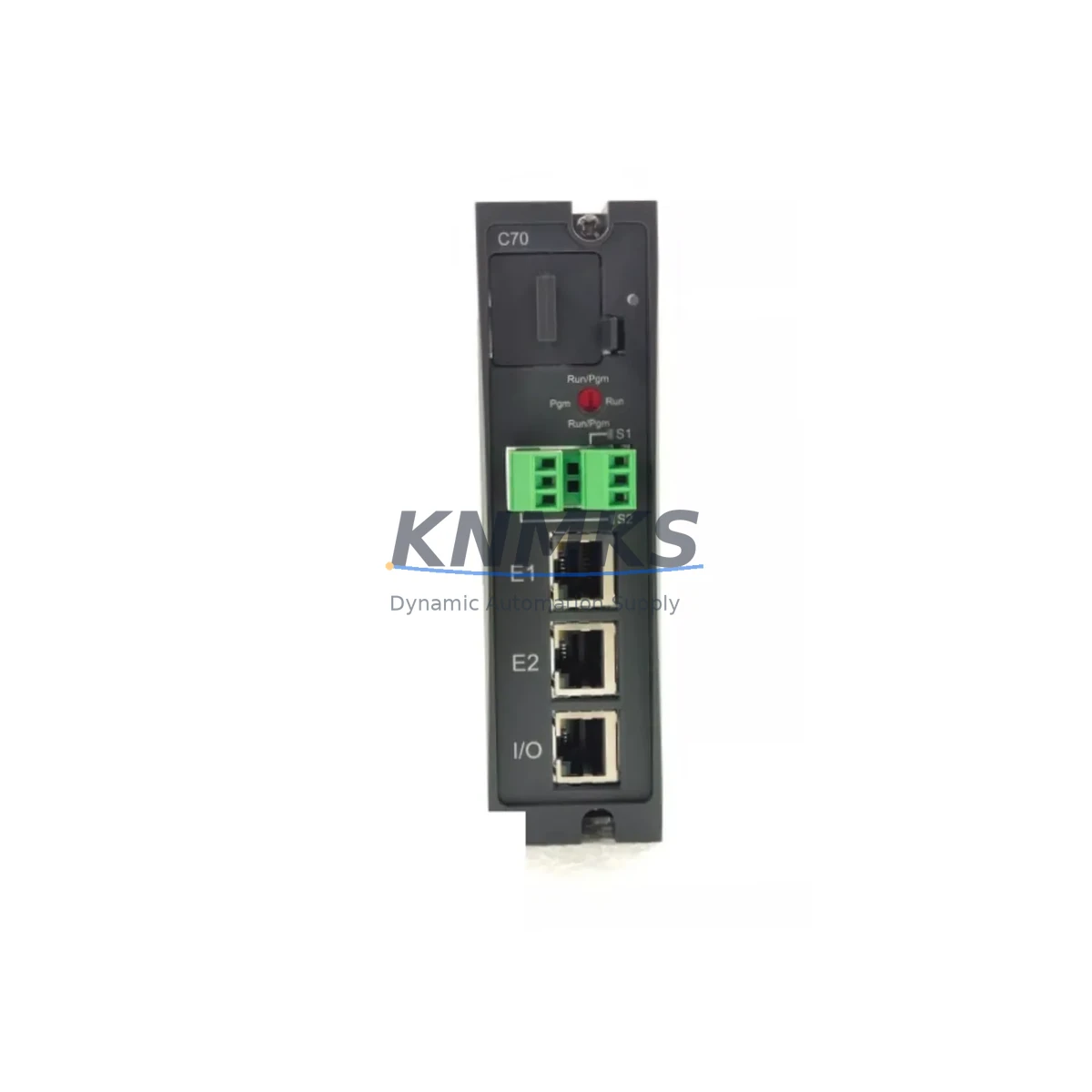
The Honeywell 900C50-0460 is the C50 CPU Controller module within the HC900 Hybrid Controller platform — a cornerstone component for process automation in refining, chemical, power generation, and general manufacturing environments. When this CPU module fails or degrades, the entire HC900 rack loses its execution core, halting scan cycles, I/O polling, and communications to SCADA or DCS supervisory layers. Maintaining a verified spare of the 900C50-0460 in your site inventory is the single most effective measure to contain unplanned downtime to under two hours rather than days waiting on OEM lead times.
Our stock of the 900C50-0460 is sourced from authorized channels, subjected to pre-shipment functional verification, and dispatched with a support terms confirmed by quotation covering manufacturing defects and operational failure under normal industrial conditions. Each unit ships with protective anti-static packaging and is traceable to batch documentation for quality assurance purposes.
Spare Maintenance Table
| Parameter | Specification |
|---|---|
| SKU / Part Number | 900C50-0460 |
| Brand | Honeywell |
| Series | HC900 Hybrid Controller |
| Module Type | C50 CPU Controller |
| Product Category | DCS CPU Controller |
| Processor | 32-bit RISC, dual-redundancy capable |
| Memory | Onboard flash for program and configuration retention |
| Communication Ports | Ethernet (10/100 Mbps), RS-485 serial |
| Supported I/O Modules | HC900 analog, digital, and specialty I/O racks |
| Backplane Interface | HC900 standard rack backplane |
| Power Supply Compatibility | HC900 24 VDC rack power supply modules |
| Operating Temperature | 0°C to 60°C |
| Humidity | 5% to 95% RH, non-condensing |
| Mounting | HC900 rack slot 0 (CPU slot) |
| Origin | United States |
| Condition | Original, pre-shipment tested |
| Support terms | 12 months from shipment date |
| Shipping | Global dispatch, anti-static packaging |
Maintenance Planning for Continuous Operation
Replacing the 900C50-0460 CPU is rarely an isolated task. The HC900 platform integrates tightly with surrounding rack components, and a thorough site replacement protocol must account for the full electrical and communication ecosystem to avoid secondary failures after the CPU is restored.
Begin with the HC900 rack power supply module (such as the 900P01-0001 or equivalent 24 VDC supply). CPU modules are sensitive to supply ripple and voltage sag; a degraded power supply is frequently the root cause of CPU soft faults and watchdog resets. Inspect and, if in doubt, replace the power supply concurrently with the CPU to eliminate this variable.
Next, audit the HC900 analog input and output modules seated in the same rack. After a CPU swap, I/O modules re-initialize their channel configurations from the CPU’s loaded program. Any module with marginal calibration or failing channel isolation may generate spurious alarms during the first scan cycle, masking the true system state. Verify channel-by-channel signal integrity using a calibrated loop tester before returning the rack to service.
The HC900 digital I/O modules — particularly those driving interlock relays and motor starters — should be inspected for contact wear and coil resistance. A CPU replacement is an ideal opportunity to perform a full interlock function test while the process is already in a safe, offline state.
Communication continuity is equally critical. The 900C50-0460 manages Ethernet connectivity to the supervisory SCADA layer and RS-485 links to field devices. Inspect Ethernet patch cables, managed switches, and RS-485 termination resistors in the communication loop. A marginal cable or unterminated RS-485 segment can cause intermittent communication faults that are difficult to diagnose once the process is back online.
For sites running redundant HC900 configurations, the 900RCM-0001 redundancy communication module should be verified for firmware compatibility with the replacement CPU. Mismatched firmware between primary and secondary CPUs is a known cause of redundancy switchover failures. Confirm firmware revision alignment before commissioning the replacement unit.
Finally, review the HC900 configuration backup stored on your engineering workstation or portable media. The 900C50-0460 loads its control strategy from onboard flash; if the replacement unit ships without a pre-loaded configuration, you will need a verified, version-controlled backup to restore normal operation. Establish a quarterly configuration backup discipline as part of your preventive maintenance schedule.
Site Replacement Workflow
Step 1 — Pre-replacement verification: Confirm the replacement 900C50-0460 firmware revision matches your site’s qualified version. Download the current configuration from the existing CPU using Honeywell HC900 Designer software before powering down, even if a backup exists — this captures any unsaved runtime changes.
Step 2 — Safe shutdown: Place the HC900 rack in a safe state by transferring control to manual or backup systems where applicable. De-energize the rack via the main power supply disconnect. Follow your site’s lockout/tagout (LOTO) procedure before opening the control cabinet.
Step 3 — Module extraction: The 900C50-0460 is seated in slot 0 of the HC900 rack. Release the module latch, extract the CPU with both hands, and place it in an anti-static bag immediately. Inspect the backplane connector for bent pins or contamination before inserting the replacement.
Step 4 — Replacement insertion and configuration load: Insert the new 900C50-0460 firmly until the latch engages. Restore rack power and allow the CPU to complete its self-test sequence (indicated by status LEDs). Load the verified configuration file via HC900 Designer. Confirm program checksum matches the pre-shutdown backup.
Step 5 — I/O and communication verification: Perform a full I/O scan verification — confirm all analog channels read within calibrated range and all digital outputs respond correctly to forced test commands. Verify Ethernet communication to the SCADA host and RS-485 links to field devices. Clear any latched alarms generated during the restart sequence.
Step 6 — Return to service: Transfer control back to automatic mode. Monitor the first 30 minutes of operation for anomalous scan time deviations, communication retries, or unexpected I/O state changes. Document the replacement in your site maintenance log with the new unit’s serial number and firmware revision.
This workflow is applicable whether you are replacing a failed 900C50-0460 in an emergency or performing a planned swap during a scheduled annual shutdown. The same procedure supports migration from earlier HC900 CPU revisions, ensuring backward compatibility with existing I/O modules and communication infrastructure.
Spare Parts Support FAQ
Q1: Is the 900C50-0460 compatible with all HC900 rack configurations?
The 900C50-0460 C50 CPU is designed for the HC900 standard rack and is compatible with the full range of HC900 analog, digital, and specialty I/O modules. Compatibility with redundancy configurations requires matching the 900RCM redundancy module firmware. Always verify firmware revision alignment before installation in a redundant system.
Q2: What pre-shipment testing is performed on each unit?
Each 900C50-0460 unit undergoes functional power-on verification, communication port integrity testing, and visual inspection for connector and board condition before dispatch. Units that do not pass all checks are quarantined and not shipped. Test records are retained for quality traceability.
Q3: How should the 900C50-0460 be stored as a long-term spare?
Store the unit in its original anti-static packaging in a climate-controlled environment between 0°C and 40°C with relative humidity below 75% non-condensing. Avoid proximity to strong magnetic fields or high-vibration areas. Inspect the unit annually for connector oxidation and re-verify functionality if stored for more than 24 months before deployment.
Q4: What is covered under the support terms confirmed by quotation?
The support terms confirmed by quotation cover manufacturing defects and operational failure under normal industrial operating conditions from the date of shipment. It does not cover damage resulting from incorrect installation, overvoltage events, physical impact, or unauthorized modification. Support requests are supported by our technical team with replacement or repair at no additional cost within the confirmed support period.
© 2026 KNMKS. All rights reserved.
Original Source: https://knmks.com
Contact: admin@knmks.com | +86 18359268345
Product Identification
- Brand / Ecosystem
-
Honeywell
Honeywell - Model / Series
- 900C50-0460
- Product Family
- PLCs & Controllers
- Availability Status
- Available on request after model and quantity confirmation
- Inquiry Type
- B2B RFQ, replacement inquiry and project spare-part request
- Pre-Quote Check
- Exact SKU, brand, series, quantity, nameplate photos and destination country are checked before quotation
System Path
Where this product fits in the KNMKS automation structure.
Specification & Inquiry Focus
- Control platform
- PLC, PAC and modular controllers
- Common needs
- CPU, rack, power and I/O expansion
- Project support
- Replacement, cabinet build and maintenance
Buyer Confirmation
Information KNMKS checks before replying.
- Exact model
- 900C50-0460
- Brand / ecosystem
- Honeywell
- Product family
- PLCs & Controllers
- Application note
- Replacement, maintenance, project build or spare-part list
- Useful photos
- Nameplate, installed unit, cabinet layout or connector side
- Delivery details
- Quantity, destination country and target schedule
Document Support
Files and notes can be confirmed during quotation.
- Product photos or nameplate confirmation when available
- Packing and delivery notes before quotation confirmation
- Support scope and delivery terms confirmed per inquiry
- Export document coordination for qualified B2B requests
Inquiry Support
- Model cross-checking before quotation
- CPU, power, rack and expansion module matching
- Support for replacement and project inquiry
What to Send Us
- Brand and exact model number: Honeywell 900C50-0460
- Quantity and required delivery time
- Application, replacement requirement or nameplate photo
- Destination country and shipping preference
RFQ Preparation
This is a product inquiry page built for RFQ communication.
Fast Model Check
Send this model to KNMKS for confirmation.
Include quantity, destination country and photos if this is a maintenance replacement. The inquiry will be saved with a reference number after submission.
Brand & Compatibility Note
KNMKS displays automation product information for well-known industrial brand ecosystems and compatible replacement references. Brand names are used for product identification and compatibility reference only; final availability and commercial terms are confirmed per quotation.
 Manufacturing
 Machine Tools
 Packaging
 Energy & Power



 HMI & Displays
 Servo Systems
 Variable Frequency Drives
 Sensors