
Overview
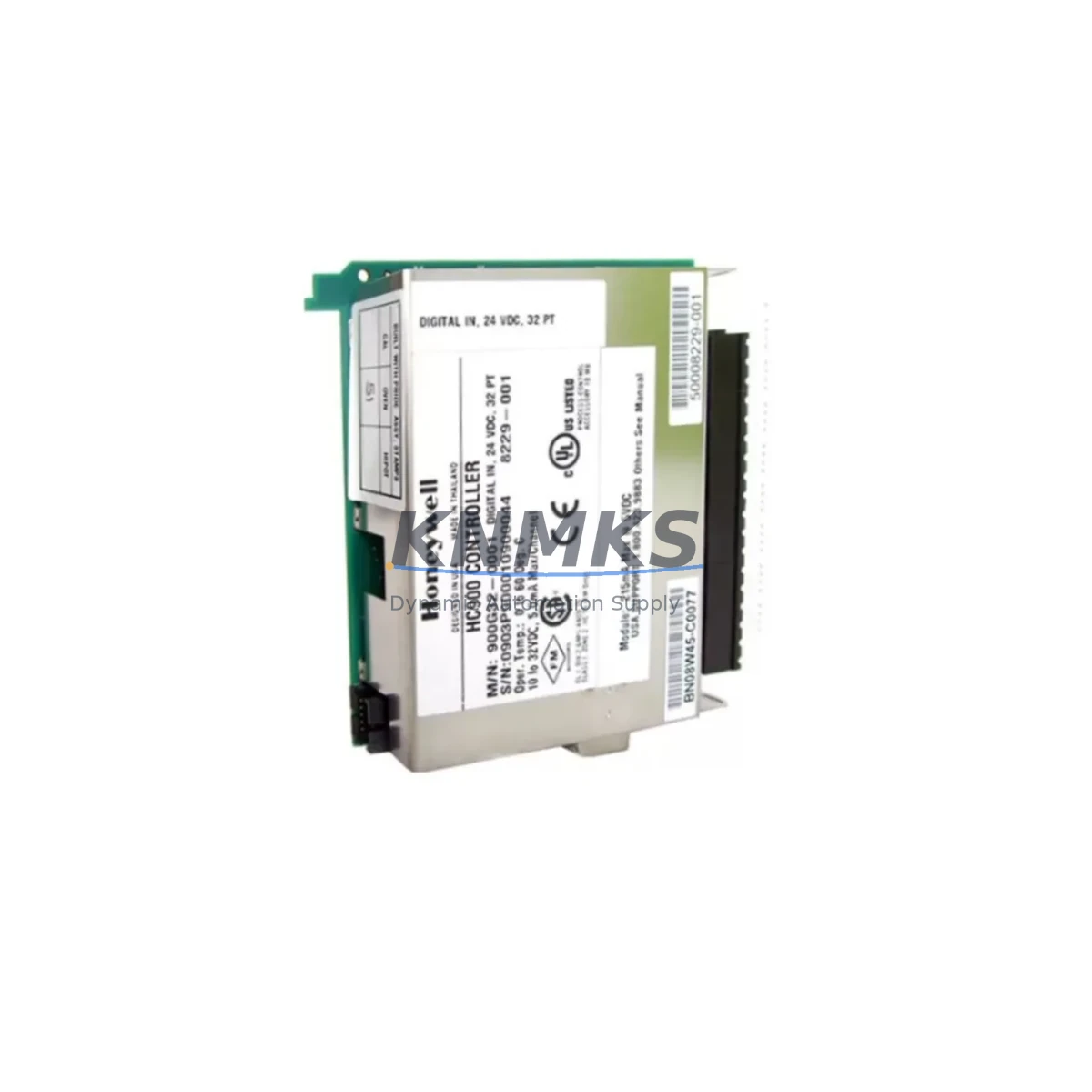
Honeywell 900B16-0202 Maintenance-Proven Spare Part for Factory Uptime
The Honeywell 900B16-0202 is a 16-channel Analog Output Module designed for the ControlEdge HC900 Hybrid Controller platform. In process-critical environments — refining, chemical processing, power generation, and advanced manufacturing — this module governs analog signal transmission to final control elements including control valves, variable-speed drives, and positioners. When this module degrades or fails, the downstream impact is immediate: loop instability, process deviation, and unplanned shutdown. Maintaining a verified spare on the shelf is not optional — it is a fundamental requirement of any credible maintenance strategy.
KNMKS stocks the 900B16-0202 as an original, pre-tested spare with full functional verification prior to dispatch. Each unit is covered by a support terms confirmed by quotation and ships with documentation supporting traceability and incoming inspection. Lead times are contained, and multi-unit orders for buffer stock programs are supported with consistent supply.
Spare Maintenance Table
| Parameter | Specification |
|---|---|
| Part Number | 900B16-0202 |
| Series / Platform | Honeywell ControlEdge HC900 Hybrid Controller |
| Module Type | 16-Channel Analog Output Module |
| Output Signal | 4–20 mA (current output, individually isolated channels) |
| Channel Count | 16 channels |
| Resolution | 12-bit D/A conversion |
| Output Range | 0–20 mA / 4–20 mA selectable per channel |
| Load Impedance | 0–750 Ω per channel |
| Power Consumption | Supplied via HC900 backplane (5 VDC / 24 VDC) |
| Isolation | Channel-to-channel and channel-to-backplane isolation |
| Compatibility | HC900 C30, C50, C70, C75 Controllers; all HC900 rack configurations |
| Installation | Plug-in module; HC900 I/O rack slot; no tools required for insertion |
| Operating Temperature | 0°C to 55°C |
| Humidity | 5% to 95% RH, non-condensing |
| Certifications | CE, UL, cUL (per HC900 platform certification) |
| Support terms | 12 months from date of dispatch — KNMKS guarantee |
| Condition | Original, pre-shipment tested, fully functional |
Maintenance Planning for Continuous Operation
The 900B16-0202 sits at the intersection of the HC900 controller’s process output capability and the field instrumentation it drives. When planning a replacement or conducting a scheduled inspection, maintenance engineers should treat this module as part of a broader electrical circuit review — not an isolated swap.
Begin with the HC900 backplane and rack assembly. The 900B16-0202 draws power and communicates via the backplane bus; any backplane connector wear, corrosion, or intermittent contact will manifest as erratic analog output behavior that may be misdiagnosed as a module fault. Inspect the rack for physical damage, verify slot seating, and check the backplane power distribution before condemning the module.
The HC900 Power Supply Module — typically the 900P01-0001 or 900P02-0001 depending on rack configuration — must be verified for output voltage stability. A degraded power supply delivering marginal 24 VDC to the I/O bus will cause analog output drift and channel-level faults. Replace or test the power supply in parallel with the analog output module if symptoms are intermittent.
Field wiring termination is a frequent source of analog output errors. Inspect the terminal blocks connected to the 900B16-0202 output channels for loose terminations, oxidized contacts, and incorrect shielding. In high-noise environments, signal cable shielding continuity and grounding at a single point are critical to maintaining 4–20 mA loop integrity. Signal isolators or loop-powered isolators may be required in circuits sharing conduit with high-voltage power wiring.
For loops driving control valves or positioners, verify that the field device input impedance remains within the 0–750 Ω specification. Positioner electronics that have degraded over time may present elevated impedance, causing the analog output channel to saturate or fault. The 900B16-0202 replacement should be accompanied by a loop calibration check using a precision current source and loop calibrator.
In HC900 systems with redundant controller configurations, the 900C52-0150 or equivalent redundancy module should be inspected to confirm that failover logic is intact and that the replacement analog output module is recognized correctly by both primary and secondary controllers after insertion. Communication module status — particularly the HC900 Ethernet Communication Module (900CS-0001) — should be verified to confirm that the SCADA or DCS host is receiving updated analog output values post-replacement.
For sites running legacy HC900 firmware, confirm that the 900B16-0202 firmware revision is compatible with the installed controller version before energizing. Firmware mismatches between I/O modules and the C70 or C75 controller can result in module non-recognition and loop dropout.
Site Replacement Workflow
Step 1 — Pre-Replacement Verification: Confirm the installed module part number (900B16-0202) against the HC900 rack label and the controller configuration database. Document all 16 channel assignments, engineering unit ranges, and loop tag numbers before removal.
Step 2 — Loop Isolation: Place all affected control loops in manual mode at the DCS or SCADA workstation. Notify operations of the planned output interruption. For critical loops driving safety-instrumented systems, coordinate with the SIS engineer before proceeding.
Step 3 — Module Removal: De-energize the rack slot if the HC900 configuration supports hot-swap; otherwise, follow the site-specific lockout/tagout procedure. Disconnect field wiring terminal blocks from the module face. Extract the 900B16-0202 from the rack slot using the module ejector lever.
Step 4 — Replacement Installation: Insert the new 900B16-0202 into the same rack slot. Reconnect field wiring terminal blocks, verifying channel-to-tag mapping against the documented loop list. Re-energize the slot and confirm module status LED indication (green = healthy).
Step 5 — Loop Calibration and Return to Auto: Using a loop calibrator, verify 4 mA (0%) and 20 mA (100%) output accuracy for each active channel. Confirm that the DCS or SCADA is receiving correct process variable feedback. Return loops to automatic control sequentially, monitoring for stability before proceeding to the next loop.
Step 6 — Documentation: Record the replacement in the site CMMS (Computerized Maintenance Management System), including the new module serial number, installation date, and post-replacement calibration results. Update the spare parts inventory to trigger reorder of a replacement buffer unit.
Spare Parts Support FAQ
Q1: Is the 900B16-0202 compatible with all HC900 controller variants?
The 900B16-0202 is compatible with HC900 C30, C50, C70, and C75 controllers across all standard rack configurations. Compatibility is determined by the HC900 platform architecture, not the specific controller model. Confirm the rack slot type (standard I/O vs. high-density) matches the module form factor before ordering.
Q2: How is the module tested before shipment?
Each 900B16-0202 unit supplied by KNMKS undergoes functional verification prior to dispatch, including channel-level analog output accuracy checks and backplane communication confirmation. Units are shipped with a test record and are covered by a support terms confirmed by quotation from the date of dispatch. Failed units within the confirmed support period are replaced or refunded.
Q3: Can KNMKS support long-term supply for buffer stock programs?
Yes. KNMKS supports multi-unit orders and scheduled replenishment programs for the 900B16-0202 and related HC900 I/O modules. For sites maintaining a 12-month spare buffer, we recommend holding a minimum of one 900B16-0202 per HC900 rack in service. Contact our team to discuss volume pricing and forward-stock arrangements.
Q4: What should I do if the replacement module is not recognized by the HC900 controller?
If the HC900 controller does not recognize the 900B16-0202 after installation, first verify that the module is fully seated in the rack slot and that the backplane connector is clean and undamaged. Check the controller firmware version for compatibility with the module hardware revision. If the issue persists, use the HC900 Configuration Studio software to force a module re-scan. Contact KNMKS technical support with the controller firmware version and module hardware revision for further diagnosis.
© 2026 KNMKS. All rights reserved.
Original Source: https://knmks.com
Contact: admin@knmks.com | +86 18359268345
Product Identification
- Brand / Ecosystem
-
Honeywell
Honeywell - Model / Series
- 900B16-0202 HC900
- Product Family
- PLCs & Controllers
- Availability Status
- Available on request after model and quantity confirmation
- Inquiry Type
- B2B RFQ, replacement inquiry and project spare-part request
- Pre-Quote Check
- Exact SKU, brand, series, quantity, nameplate photos and destination country are checked before quotation
System Path
Where this product fits in the KNMKS automation structure.
Specification & Inquiry Focus
- Control platform
- PLC, PAC and modular controllers
- Common needs
- CPU, rack, power and I/O expansion
- Project support
- Replacement, cabinet build and maintenance
Buyer Confirmation
Information KNMKS checks before replying.
- Exact model
- 900B16-0202 HC900
- Brand / ecosystem
- Honeywell
- Product family
- PLCs & Controllers
- Application note
- Replacement, maintenance, project build or spare-part list
- Useful photos
- Nameplate, installed unit, cabinet layout or connector side
- Delivery details
- Quantity, destination country and target schedule
Document Support
Files and notes can be confirmed during quotation.
- Product photos or nameplate confirmation when available
- Packing and delivery notes before quotation confirmation
- Support scope and delivery terms confirmed per inquiry
- Export document coordination for qualified B2B requests
Inquiry Support
- Model cross-checking before quotation
- CPU, power, rack and expansion module matching
- Support for replacement and project inquiry
What to Send Us
- Brand and exact model number: Honeywell 900B16-0202 HC900
- Quantity and required delivery time
- Application, replacement requirement or nameplate photo
- Destination country and shipping preference
RFQ Preparation
This is a product inquiry page built for RFQ communication.
Fast Model Check
Send this model to KNMKS for confirmation.
Include quantity, destination country and photos if this is a maintenance replacement. The inquiry will be saved with a reference number after submission.
Brand & Compatibility Note
KNMKS displays automation product information for well-known industrial brand ecosystems and compatible replacement references. Brand names are used for product identification and compatibility reference only; final availability and commercial terms are confirmed per quotation.
 Manufacturing
 Machine Tools
 Packaging
 Energy & Power



 HMI & Displays
 Servo Systems
 Variable Frequency Drives
 Sensors