
Overview
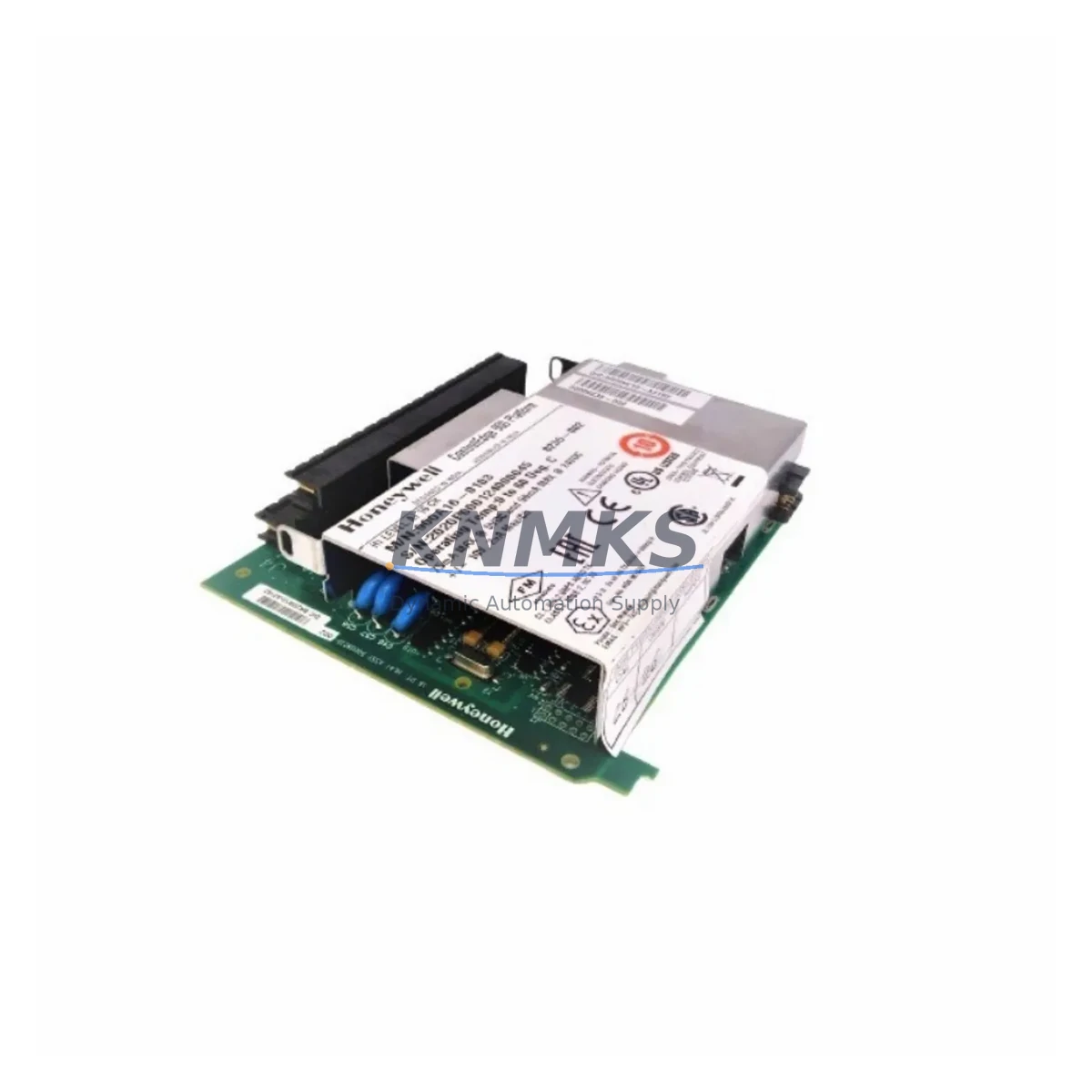
Honeywell 900A16-0106 Spare Part for HC900 Uptime: Maintenance-Proven Analog Input Module for Continuous Factory Operation
The Honeywell 900A16-0106 is a 16-channel analog input module designed for the HC900 Hybrid Controller platform — one of Honeywell’s most widely deployed DCS architectures in refining, chemical processing, power generation, and discrete manufacturing. As a maintenance-proven spare part, the 900A16-0106 supports uninterrupted signal acquisition from field transmitters, thermocouples, RTDs, and 4–20 mA process loops, making it a critical component in any HC900-based control cabinet. Holding verified stock of this module is a foundational element of any serious spare parts strategy for facilities running HC900 systems.
When a 900A16-0106 fails or degrades in service, the consequences extend beyond the module itself. Loss of analog input channels can blind the controller to critical process variables — temperature, pressure, flow, and level — triggering interlock trips, unplanned shutdowns, or unsafe operating conditions. Rapid replacement with a pre-tested, original spare is the fastest path to restoring full process visibility and resuming normal operation.
Spare Maintenance Table
| Parameter | Specification |
|---|---|
| Part Number | 900A16-0106 |
| Brand | Honeywell |
| Series | HC900 Hybrid Controller |
| Module Type | Analog Input Module |
| Channels | 16-Channel |
| Input Signal Types | 4–20 mA, 0–10 V, Thermocouple, RTD (configurable per channel) |
| Resolution | 16-bit A/D conversion |
| Isolation | Channel-to-channel and channel-to-backplane isolation |
| Communication | HC900 backplane bus |
| Operating Temperature | 0°C to 60°C |
| Mounting | HC900 rack/backplane slot |
| Origin | USA |
| Compatibility | HC900 C30, C50, C70, C75 Controllers; HC900 I/O Racks |
| Application | Refining, Chemical, Power, Discrete Manufacturing |
| Pre-Shipment Testing | Yes — functional and signal integrity verified |
| Support terms | 12 Months |
| Availability | availability confirmed by RFQ — Global Dispatch |
Maintenance Planning for Continuous Operation
Replacing the 900A16-0106 in an HC900 cabinet is rarely an isolated task. Maintenance engineers and procurement teams should treat this module replacement as an opportunity to inspect and verify the health of adjacent components that share the same electrical circuits and backplane infrastructure.
Begin with the HC900 backplane and rack assembly. A degraded backplane connector or cracked rack chassis can cause intermittent signal errors that mimic module failure. Inspect the backplane bus contacts for oxidation or mechanical damage before seating the replacement 900A16-0106. If the rack is a legacy unit with high operating hours, consider stocking a spare HC900 I/O rack as a contingency.
Next, verify the HC900 power supply module — typically the 900P01-0001 or 900P02-0001 depending on your configuration. Analog input modules are sensitive to power rail stability; a power supply operating near end-of-life can introduce noise or voltage sag that degrades A/D conversion accuracy even after a module swap. Confirm output voltage is within specification under load before commissioning the replacement module.
Field wiring terminations at the HC900 terminal assembly or marshalling panel should be inspected for loose connections, corroded terminals, or incorrect shielding. Poor termination is a leading cause of analog signal drift and channel-to-channel crosstalk. Retighten all screw terminals and verify shield grounding continuity at the cabinet entry point.
For facilities using signal isolators or signal conditioners between field transmitters and the 900A16-0106 input channels, verify that isolator output ranges match the module’s configured input type. A mismatch between a 0–5 V isolator output and a 4–20 mA channel configuration will produce erroneous readings that are difficult to diagnose without a systematic check.
If the HC900 system includes a 900C52-0143 or 900C30-0143 controller module, confirm that firmware is current and that the I/O configuration database reflects the correct channel assignments for the replacement 900A16-0106. Configuration mismatches after a module swap can cause the controller to report channel faults even when the hardware is functioning correctly.
Finally, review the status of any HC900 communication modules — such as the 900CS-0001 Ethernet module — that relay analog process data to SCADA or historian systems. A module replacement is an appropriate time to verify that data paths are intact and that the SCADA system is receiving valid engineering-unit values from all 16 channels.
Site Replacement Workflow
Step 1 — Pre-Replacement Verification: Before removing the 900A16-0106, document the current channel configuration using HC Designer software. Export the I/O configuration file and confirm channel assignments, signal types, and engineering unit ranges for all 16 channels. This record is essential for validating the replacement module after installation.
Step 2 — Safe Isolation: Place the HC900 controller in manual mode or transfer control to a redundant controller if available. De-energize the I/O rack slot using the rack’s slot-level isolation procedure. Do not remove the module under live backplane power unless the rack design explicitly supports hot-swap for this module type.
Step 3 — Module Removal and Inspection: Remove the 900A16-0106 by releasing the module locking lever and sliding it clear of the backplane connector. Inspect the backplane connector pins for damage or contamination. Clean with appropriate contact cleaner if required.
Step 4 — Replacement Module Installation: Insert the pre-tested replacement 900A16-0106 into the same rack slot. Ensure the module is fully seated and the locking lever is engaged. Re-energize the slot and confirm the module status LED indicates normal operation.
Step 5 — Configuration Validation: Using HC Designer, verify that the controller has recognized the replacement module and that all 16 channel configurations are intact. Compare live process values against known reference signals or field transmitter outputs to confirm signal accuracy across all channels.
Step 6 — Return to Automatic Control: Once all channels are validated, return the controller to automatic mode. Document the replacement in the site maintenance log, including the module serial number, installation date, and post-replacement test results.
Spare Parts Support FAQ
Q: Is the 900A16-0106 compatible with all HC900 controller variants?
A: The 900A16-0106 is compatible with HC900 C30, C50, C70, and C75 controller platforms when installed in standard HC900 I/O racks. Verify your rack model and firmware version against Honeywell’s HC900 compatibility matrix before installation. Our technical team can assist with compatibility confirmation prior to shipment.
Q: What pre-shipment testing is performed on the 900A16-0106?
A: Each unit undergoes functional verification including backplane communication check, channel signal integrity test across all 16 inputs, and power consumption validation. Test results are documented and available upon request. All units ship with a support terms confirmed by quotation covering manufacturing defects and functional failures.
Q: How many 900A16-0106 units should we hold in our spare parts inventory?
A: For facilities with multiple HC900 racks, a minimum of one spare 900A16-0106 per four installed units is a common industry benchmark. Sites with critical continuous processes or long lead-time procurement environments should consider holding two or more units. We support long-term supply agreements to ensure consistent availability without repeated spot-market procurement.
Q: Can the 900A16-0106 replace older or discontinued Honeywell analog input modules?
A: The 900A16-0106 is the current production analog input module for the HC900 platform and is the direct replacement for earlier HC900 analog input variants. For migration from legacy Honeywell systems such as TDC 3000 or PlantScape, a system-level I/O mapping review is required. Contact our engineering support team for migration compatibility assessment.
© 2026 KNMKS. All rights reserved.
Original Source: https://knmks.com
Contact: admin@knmks.com | +86 18359268345
Product Identification
- Brand / Ecosystem
-
Honeywell
Honeywell - Model / Series
- 900A16-0106
- Product Family
- PLCs & Controllers
- Availability Status
- Available on request after model and quantity confirmation
- Inquiry Type
- B2B RFQ, replacement inquiry and project spare-part request
- Pre-Quote Check
- Exact SKU, brand, series, quantity, nameplate photos and destination country are checked before quotation
System Path
Where this product fits in the KNMKS automation structure.
Specification & Inquiry Focus
- Control platform
- PLC, PAC and modular controllers
- Common needs
- CPU, rack, power and I/O expansion
- Project support
- Replacement, cabinet build and maintenance
Buyer Confirmation
Information KNMKS checks before replying.
- Exact model
- 900A16-0106
- Brand / ecosystem
- Honeywell
- Product family
- PLCs & Controllers
- Application note
- Replacement, maintenance, project build or spare-part list
- Useful photos
- Nameplate, installed unit, cabinet layout or connector side
- Delivery details
- Quantity, destination country and target schedule
Document Support
Files and notes can be confirmed during quotation.
- Product photos or nameplate confirmation when available
- Packing and delivery notes before quotation confirmation
- Support scope and delivery terms confirmed per inquiry
- Export document coordination for qualified B2B requests
Inquiry Support
- Model cross-checking before quotation
- CPU, power, rack and expansion module matching
- Support for replacement and project inquiry
What to Send Us
- Brand and exact model number: Honeywell 900A16-0106
- Quantity and required delivery time
- Application, replacement requirement or nameplate photo
- Destination country and shipping preference
RFQ Preparation
This is a product inquiry page built for RFQ communication.
Fast Model Check
Send this model to KNMKS for confirmation.
Include quantity, destination country and photos if this is a maintenance replacement. The inquiry will be saved with a reference number after submission.
Brand & Compatibility Note
KNMKS displays automation product information for well-known industrial brand ecosystems and compatible replacement references. Brand names are used for product identification and compatibility reference only; final availability and commercial terms are confirmed per quotation.
 Manufacturing
 Machine Tools
 Packaging
 Energy & Power



 HMI & Displays
 Servo Systems
 Variable Frequency Drives
 Sensors