
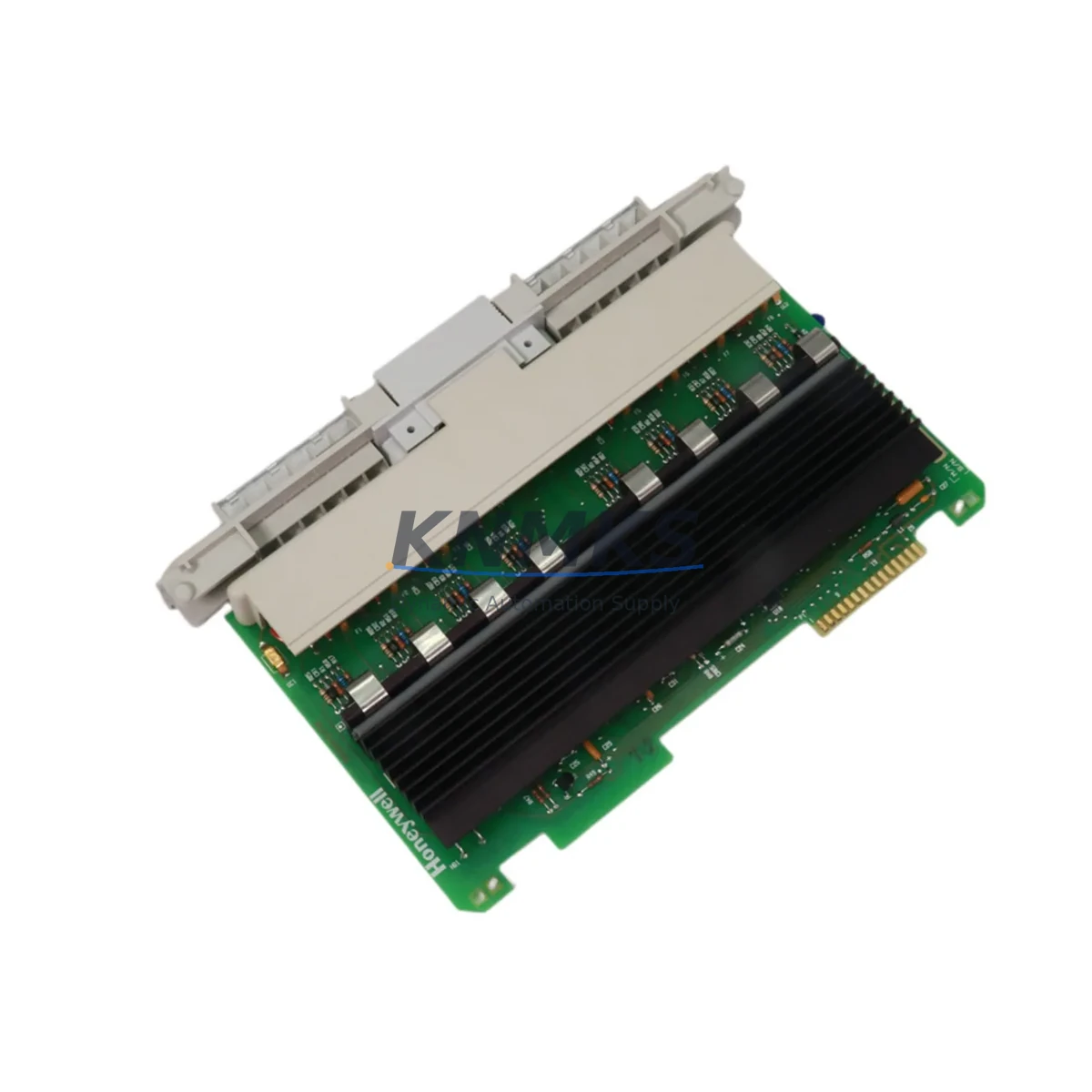
Overview
HONEYWELL 621-2100R Maintenance-Proven Spare Part for Factory Uptime
The HONEYWELL 621-2100R is a Discrete Output Module engineered for the Honeywell 620 Series Programmable Logic Controller platform — one of the most widely deployed process automation architectures in continuous manufacturing, chemical processing, and utility control environments. As original production lines age and OEM support windows narrow, maintaining a verified stock of the 621-2100R becomes a cornerstone of any credible spare parts strategy. This module delivers reliable digital output switching, direct backplane compatibility with the 620 Series rack, and the signal integrity required to drive field devices including solenoid valves, motor starters, and relay coils without introducing latency or logic errors into the control loop.
For maintenance engineers managing aging 620 Series control cabinets, the 621-2100R represents a critical single point of failure if left unspared. Output module degradation is among the most common causes of unplanned downtime in legacy PLC systems — often presenting as intermittent field device faults, output channel lockouts, or nuisance trips that consume diagnostic hours before the root cause is isolated. Stocking a tested, original-specification 621-2100R eliminates that diagnostic uncertainty and compresses mean time to repair (MTTR) from hours to minutes.
Every unit supplied by KNMKS is functionally tested prior to shipment, verified against original Honeywell specifications, and backed by a support terms confirmed by quotation covering manufacturing defects and operational failure under normal service conditions.
Spare Maintenance Table
| Part Number | 621-2100R |
| Brand | HONEYWELL |
| Series | 620 Series PLC |
| Module Type | Discrete Output Module |
| Output Channels | 16-point discrete output (typical for 621-series) |
| Output Voltage | 24 VDC / 120 VAC (field-side, configuration-dependent) |
| Backplane Compatibility | Honeywell 620 Series rack / backplane |
| Installation | Direct module slot insertion — no tools required |
| Operating Temperature | 0°C to 60°C (32°F to 140°F) |
| Application Environment | Industrial process control, utilities, chemical, manufacturing |
| Maintenance Recommendation | Inspect output channel status LEDs quarterly; replace on first confirmed channel failure |
| Pre-Shipment Testing | Functional output verification on all channels |
| Support terms | 12 Months — manufacturing defects and operational failure |
| Condition | Original / Surplus New / Refurbished (specify at inquiry) |
| Lead Time | In-stock: ships within 2 business days |
Maintenance Planning for Continuous Operation
Replacing a 621-2100R output module in a live 620 Series cabinet is rarely an isolated task. A disciplined maintenance engineer will treat the module swap as an opportunity to audit the surrounding electrical environment and prevent secondary failures from undermining the repair. Before returning the system to service, the following components and subsystems should be inspected or tested in parallel:
Power Supply Module (e.g., Honeywell 621-0020 or equivalent 620 Series PSU): Output module failures are frequently preceded by power rail instability. Verify DC bus voltage under load and check for ripple or sag that could stress replacement modules prematurely.
Backplane and Rack Assembly: Inspect the 620 Series rack backplane connector pins for oxidation, mechanical damage, or intermittent contact. A degraded backplane can cause the replacement 621-2100R to exhibit the same fault symptoms as the failed unit, leading to misdiagnosis.
I/O Wiring and Terminal Blocks: Check field-side wiring terminations at the output module’s terminal strip. Loose or corroded terminals are a leading cause of output channel faults that are incorrectly attributed to module failure. Torque all terminals to specification and inspect for insulation breakdown.
Fusing and Overcurrent Protection: Each output channel or output group should be protected by appropriately rated fuses or circuit breakers. Verify that field-side fuses have not blown silently — a common scenario when an output module has been driving an overloaded or shorted field device.
Relay and Solenoid Loads: Inductive loads driven by the 621-2100R output channels — including solenoid valves, motor contactors, and relay coils — should be checked for coil resistance and suppression diode integrity. A failed suppression diode on an inductive load can generate voltage spikes that damage output transistors on the replacement module.
Communication and CPU Module (e.g., Honeywell 621-1100 or 621-1200 series processor): Confirm that the CPU module is correctly addressing the output module slot after replacement. Verify I/O configuration in the PLC program and check for any latched fault codes that may prevent output enable after module swap.
Maintaining a coordinated spare kit — including the 621-2100R output module, a matched power supply unit, spare terminal blocks, and a set of field-side fuses — reduces cabinet downtime from multi-hour diagnostic events to sub-30-minute swap procedures.
Site Replacement Workflow
Step 1 — Isolate and Document: Before removing the 621-2100R, record the current output channel status from the HMI or operator panel. Note which channels are active, faulted, or disabled. This baseline prevents post-replacement confusion about pre-existing field device states.
Step 2 — De-energize Field Circuits: Switch off field-side power to the output module’s load circuits. Do not rely solely on the PLC output disable command — physically isolate field power at the distribution panel or local disconnect to protect personnel and field devices during module removal.
Step 3 — Remove the Failed Module: Disengage the module locking mechanism, disconnect field wiring at the terminal strip (label all wires before removal), and extract the 621-2100R from the rack slot. Inspect the backplane connector for damage before inserting the replacement.
Step 4 — Install the Replacement 621-2100R: Seat the replacement module firmly into the rack slot until the backplane connector is fully engaged. Reconnect field wiring per the original labeling. Verify terminal torque values.
Step 5 — Power-Up and Verify: Restore field-side power and re-enable PLC outputs. Confirm that all previously active output channels are responding correctly via the HMI and field device status indicators. Clear any latched fault codes in the CPU module.
Step 6 — Log and Replenish: Record the replacement event in the maintenance log with date, technician, and module serial number. Immediately initiate a replenishment order for the consumed spare to maintain minimum stock levels. KNMKS supports long-term supply agreements for the 621-2100R to ensure continuity for facilities managing multiple 620 Series installations.
Spare Parts Support FAQ
Q1: Is the HONEYWELL 621-2100R still available as a new or surplus-new unit?
Yes. KNMKS maintains stock of the 621-2100R in original-new and surplus-new condition. All units are functionally tested before shipment. Condition is confirmed at the time of inquiry. Contact admin@knmks.com for current availability and lead time.
Q2: What is the recommended minimum stock quantity for a facility running multiple 620 Series racks?
Industry best practice for critical output modules in legacy PLC systems is a minimum of one spare per active rack, with an additional buffer unit for facilities with more than three racks. For high-cycle or high-temperature environments, a two-unit minimum per rack is advisable. KNMKS can support blanket purchase orders to lock in pricing and ensure long-term supply.
Q3: How is compatibility with my specific 620 Series rack configuration verified before shipment?
Compatibility is verified against the Honeywell 620 Series hardware documentation using the customer-supplied rack model number and slot configuration. If you provide your system’s CPU module part number (e.g., 621-1100 or 621-1200 series) and rack assembly number, KNMKS will confirm fit and function before processing the order.
Q4: What does the support terms confirmed by quotation cover, and what is the claims process?
The support terms confirmed by quotation cover manufacturing defects and operational failure under normal industrial service conditions. It does not cover damage resulting from incorrect installation, overvoltage events, or physical mishandling. To initiate a support terms claim, contact admin@knmks.com with the order number, fault description, and photographic evidence of the failure. Replacement or credit is processed within 5 business days of claim approval.
© 2026 KNMKS. All rights reserved.
Original Source: https://knmks.com
Contact: admin@knmks.com | +86 18359268345
Product Identification
- Brand / Ecosystem
-
HONEYWELL
Honeywell - Model / Series
- 621-2100R
- Product Family
- PLCs & Controllers
- Availability Status
- Available on request after model and quantity confirmation
- Inquiry Type
- B2B RFQ, replacement inquiry and project spare-part request
- Pre-Quote Check
- Exact SKU, brand, series, quantity, nameplate photos and destination country are checked before quotation
System Path
Where this product fits in the KNMKS automation structure.
Specification & Inquiry Focus
- Control platform
- PLC, PAC and modular controllers
- Common needs
- CPU, rack, power and I/O expansion
- Project support
- Replacement, cabinet build and maintenance
Buyer Confirmation
Information KNMKS checks before replying.
- Exact model
- 621-2100R
- Brand / ecosystem
- HONEYWELL
- Product family
- PLCs & Controllers
- Application note
- Replacement, maintenance, project build or spare-part list
- Useful photos
- Nameplate, installed unit, cabinet layout or connector side
- Delivery details
- Quantity, destination country and target schedule
Document Support
Files and notes can be confirmed during quotation.
- Product photos or nameplate confirmation when available
- Packing and delivery notes before quotation confirmation
- Support scope and delivery terms confirmed per inquiry
- Export document coordination for qualified B2B requests
Inquiry Support
- Model cross-checking before quotation
- CPU, power, rack and expansion module matching
- Support for replacement and project inquiry
What to Send Us
- Brand and exact model number: HONEYWELL 621-2100R
- Quantity and required delivery time
- Application, replacement requirement or nameplate photo
- Destination country and shipping preference
RFQ Preparation
This is a product inquiry page built for RFQ communication.
Fast Model Check
Send this model to KNMKS for confirmation.
Include quantity, destination country and photos if this is a maintenance replacement. The inquiry will be saved with a reference number after submission.
Brand & Compatibility Note
KNMKS displays automation product information for well-known industrial brand ecosystems and compatible replacement references. Brand names are used for product identification and compatibility reference only; final availability and commercial terms are confirmed per quotation.
 Manufacturing
 Machine Tools
 Packaging
 Energy & Power



 HMI & Displays
 Servo Systems
 Variable Frequency Drives
 Sensors