
Overview
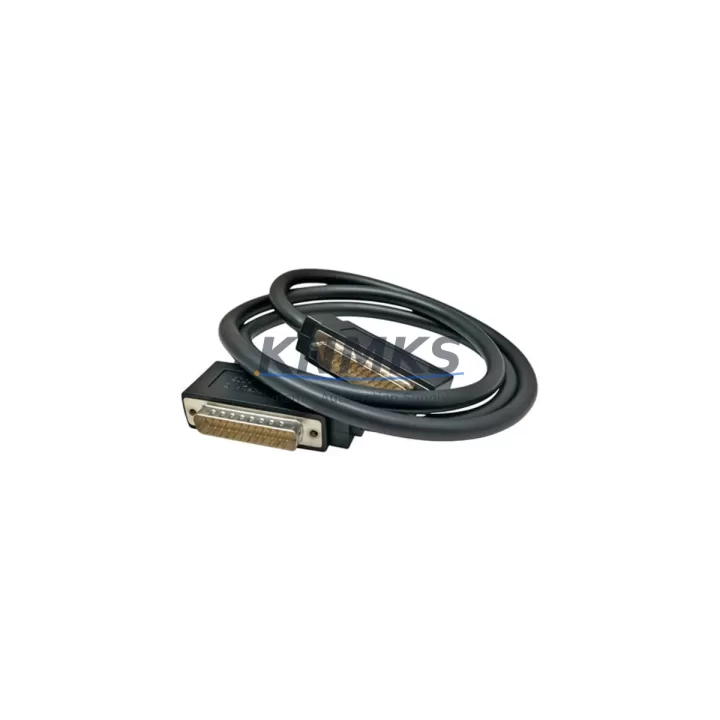
GE IC693CBL300 Migration-Ready Bus Extension Cable: Legacy System Retrofit & Compatibility Upgrade
The GE IC693CBL300 is a bus extension cable engineered for the GE Series 90-30 PLC platform, providing a reliable, drop-in solution for engineers managing legacy control system retrofits, discontinued spare part replacements, and control cabinet modernization projects. Whether you are extending an existing rack configuration, recovering a failed automation line, or migrating from an end-of-life control architecture, the IC693CBL300 delivers the physical and electrical compatibility required to maintain system continuity without rewriting control logic or redesigning panel layouts.
In retrofit scenarios, the IC693CBL300 connects the main rack to expansion racks within the Series 90-30 backplane architecture. Before installation, engineers must verify the total bus load across all connected modules — including CPU modules such as the IC693CPU374 or IC693CPU364, power supply units like the IC693PWR321 or IC693PWR330, and any installed I/O modules across the IC693MDL series. Exceeding the bus current capacity of the rack is a common cause of intermittent faults during system upgrades, and the IC693CBL300 must be matched to the correct rack slot configuration and cable length for the physical installation space available in the control cabinet.
Terminal wiring compatibility is another critical checkpoint. When replacing a failed or obsolete cable in an existing panel, technicians should document all existing rack addresses and module slot assignments before disconnecting the old cable. The IC693CBL300 supports the standard Series 90-30 backplane interface, but module addressing must be re-confirmed in the PLC programming software — typically Proficy Machine Edition — after reconnection to ensure that the CPU correctly enumerates all I/O modules on the extended rack. Any mismatch in rack addressing will prevent the controller from recognizing downstream modules and may trigger a hardware fault on startup.
For systems that also incorporate communication modules such as the IC693CMM321 Ethernet Interface or IC693CMM311 for legacy serial protocols, the bus extension cable must not introduce signal degradation across the backplane. Firmware version compatibility between the CPU and communication modules should be verified prior to commissioning, particularly in installations where the CPU or communication module has been upgraded independently. HMI screens connected via the communication network should be tested for correct tag mapping after any rack reconfiguration involving the IC693CBL300.
Installation space confirmation is essential in dense control cabinets. The IC693CBL300 is available in a standard length suited for adjacent or near-adjacent rack mounting. Engineers retrofitting older panels should measure the physical distance between rack mounting positions and confirm that the cable routing does not create excessive bend radius or interference with other wiring harnesses. In applications where the expansion rack must be mounted in a separate enclosure section, cable management and strain relief should be planned before final installation.
Downtime during cable replacement can be minimized by pre-staging the replacement IC693CBL300, verifying the PLC program backup is current, and preparing a rack address map before taking the system offline. With proper preparation, a trained technician can complete the cable swap, rack re-enumeration, and I/O verification within a single planned maintenance window, restoring full production control without requiring program modifications.
The IC693CBL300 is supplied with a support terms confirmed by quotation covering manufacturing defects and is subject to pre-shipment functional testing to confirm connector integrity and cable continuity. Stock availability is maintained to support urgent replacement requirements for production-critical systems.
Migration Compatibility Table
| Parameter | IC693CBL300 Specification | Retrofit Notes |
|---|---|---|
| Compatible Platform | GE Series 90-30 PLC | Verify rack model before ordering |
| Interface Type | Series 90-30 Backplane Bus Connector | Not compatible with Series 90-70 or VersaMax racks |
| Installation Requirement | Adjacent or near-adjacent rack mounting | Confirm physical distance and cable routing path |
| Communication Compatibility | Supports IC693CMM321, IC693CMM311 in extended rack | Verify firmware version alignment post-installation |
| Replacement Recommendation | Direct drop-in for failed or obsolete bus extension cables | Document rack addresses before disconnecting old cable |
| Commissioning Focus | Rack address re-enumeration, I/O module recognition, HMI tag verification | Use Proficy Machine Edition for post-swap validation |
| Support terms | 12 Months | Covers manufacturing defects; pre-shipment tested |
Retrofit Planning for Existing Automation Systems
A successful Series 90-30 retrofit involving the IC693CBL300 requires a systematic review of the entire rack assembly. The CPU module — typically an IC693CPU374 or IC693CPU364 — must be confirmed as compatible with the firmware loaded on all expansion rack modules. Power supply modules such as the IC693PWR321 must be assessed for total current capacity across all installed I/O cards, including discrete input modules, analog output modules, and any specialty function modules in the IC693MDL range. If the retrofit also involves upgrading the communication infrastructure, the IC693CMM321 Ethernet Interface module may need to be reconfigured with updated IP addressing to match the new network topology. In applications where legacy serial communication is still in use, the IC693CMM311 should be retained and its baud rate and protocol settings verified against the connected HMI or SCADA system. Programming cables used for firmware updates or program downloads — such as the IC690USB901 USB-to-serial adapter — should be on hand during commissioning to allow rapid program verification and fault diagnostics without requiring additional equipment sourcing delays.
Downtime Control During System Migration
Minimizing production downtime during a Series 90-30 bus extension cable replacement begins with thorough pre-migration preparation. Before taking the system offline, engineers should create a verified backup of the current PLC program using Proficy Machine Edition and document all rack slot assignments, module addresses, and I/O force tables. The replacement IC693CBL300 should be physically inspected and connector integrity confirmed before the maintenance window begins. During the swap, the original rack address configuration should be restored exactly as documented to prevent the CPU from generating hardware configuration faults on restart. After reconnection, a controlled power-up sequence — starting with the power supply module before enabling the CPU — allows the system to enumerate all modules in sequence and report any addressing conflicts before the program enters RUN mode. HMI screens should be monitored during the first scan cycle to confirm that all process values are updating correctly and that no communication alarms are active. With this structured approach, most IC693CBL300 replacement projects can be completed within a single planned shutdown, preserving production schedule integrity and reducing the risk of extended unplanned outages.
Retrofit Support FAQ
Q: Is the IC693CBL300 a direct replacement for the original GE Series 90-30 bus extension cable?
A: Yes. The IC693CBL300 is designed as a direct drop-in replacement for the standard Series 90-30 bus extension cable. No modifications to the rack, backplane, or PLC program are required for a like-for-like swap.
Q: What commissioning steps are required after installing the IC693CBL300?
A: After installation, power up the rack in sequence and use Proficy Machine Edition to verify that all modules on the extended rack are correctly enumerated. Confirm rack addresses match the original configuration, check I/O module status indicators, and validate HMI tag mapping before returning the system to RUN mode.
Q: How do I confirm wiring and connector compatibility before installation?
A: Verify that the connector type on the IC693CBL300 matches the backplane interface on both the main rack and the expansion rack. Check the cable length against the physical distance between rack mounting positions and confirm that the routing path allows for adequate bend radius and strain relief.
Q: What support terms and testing does the IC693CBL300 include?
A: Each IC693CBL300 is covered by a support terms confirmed by quotation against manufacturing defects and undergoes pre-shipment functional testing to verify connector integrity and cable continuity. In-stock units are available for immediate dispatch to support urgent production recovery requirements.
—
© 2026 KNMKS. All rights reserved.
Original Source: https://knmks.com
Contact: admin@knmks.com | +86 18359268345
Product Identification
- Brand / Ecosystem
-
GE
Assorted Brands - Model / Series
-
IC693CBL300
Assorted Series - Product Family
- Cables & Connectors
- Availability Status
- Available on request after model and quantity confirmation
- Inquiry Type
- B2B RFQ, replacement inquiry and project spare-part request
- Pre-Quote Check
- Exact SKU, brand, series, quantity, nameplate photos and destination country are checked before quotation
System Path
Where this product fits in the KNMKS automation structure.
Specification & Inquiry Focus
- Cable range
- Sensor, servo, network and circular connectors
- Common needs
- Length, pin count, shielding and plug type
- Project support
- Machine wiring and installation kits
Buyer Confirmation
Information KNMKS checks before replying.
- Exact model
- IC693CBL300
- Brand / ecosystem
- GE
- Product family
- Cables & Connectors
- Application note
- Replacement, maintenance, project build or spare-part list
- Useful photos
- Nameplate, installed unit, cabinet layout or connector side
- Delivery details
- Quantity, destination country and target schedule
Document Support
Files and notes can be confirmed during quotation.
- Product photos or nameplate confirmation when available
- Packing and delivery notes before quotation confirmation
- Support scope and delivery terms confirmed per inquiry
- Export document coordination for qualified B2B requests
Inquiry Support
- Cable length and connector type confirmation
- Servo, sensor and network cable inquiry
- Accessory kits for installation teams
What to Send Us
- Brand and exact model number: GE IC693CBL300
- Quantity and required delivery time
- Application, replacement requirement or nameplate photo
- Destination country and shipping preference
RFQ Preparation
This is a product inquiry page built for RFQ communication.
Fast Model Check
Send this model to KNMKS for confirmation.
Include quantity, destination country and photos if this is a maintenance replacement. The inquiry will be saved with a reference number after submission.
Brand & Compatibility Note
KNMKS displays automation product information for well-known industrial brand ecosystems and compatible replacement references. Brand names are used for product identification and compatibility reference only; final availability and commercial terms are confirmed per quotation.
 Manufacturing
 Machine Tools
 Packaging
 Energy & Power
 PLCs & Controllers
 HMI & Displays
 Servo Systems
 Variable Frequency Drives