
Overview
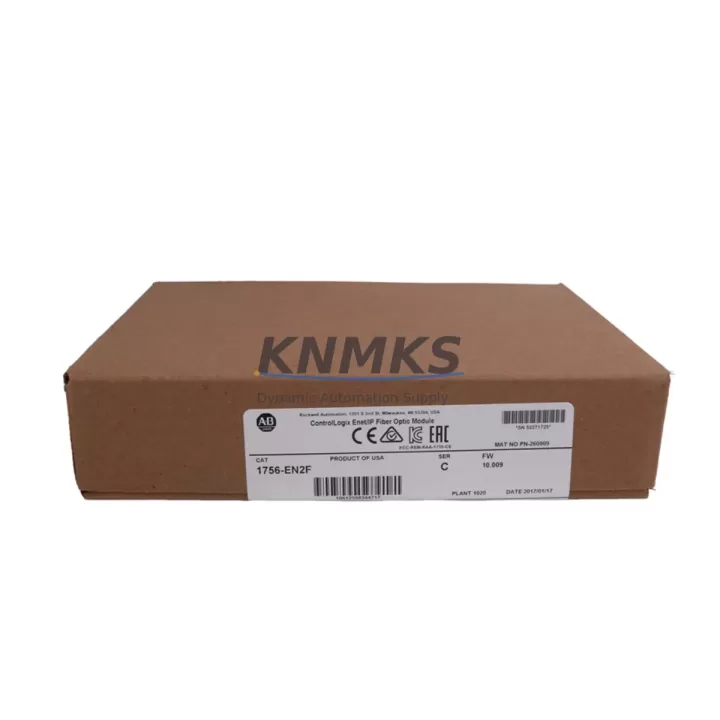
Allen-Bradley 1756-EN2F Migration-Ready EtherNet/IP Module: Legacy System Migration and Compatible Upgrade
The Allen-Bradley 1756-EN2F is a fiber-optic EtherNet/IP communication module designed for the ControlLogix 1756 platform. As legacy Rockwell Automation communication infrastructure ages and original modules approach end-of-life, the 1756-EN2F serves as a proven migration-ready replacement for aging copper-based or first-generation fiber communication modules within existing 1756 chassis environments. Whether you are managing a planned retrofit of a legacy control cabinet, recovering from an unplanned module failure, or executing a phased system modernization, the 1756-EN2F provides a reliable, specification-matched upgrade path that minimizes engineering rework and downtime exposure.
This module supports 100 Mbps full-duplex fiber communication over multi-mode fiber (MMF) connections, making it well-suited for environments where electrical noise, ground loop isolation, or long-distance segment runs make copper EtherNet/IP impractical. It installs directly into any standard 1756 ControlLogix backplane slot and is recognized natively by RSLogix 5000 and Studio 5000 Logix Designer without requiring driver updates in most firmware environments. For sites running older 1756-L55, 1756-L61, or 1756-L63 controllers, the 1756-EN2F integrates without modification to the existing ladder logic or function block programs, provided the module slot address is correctly mapped in the I/O tree.
Migration Compatibility Table
| Parameter | Details |
|---|---|
| SKU / Part Number | 1756-EN2F |
| Series | ControlLogix 1756 |
| Communication Protocol | EtherNet/IP (IEEE 802.3, 100BASE-FX) |
| Physical Interface | Fiber Optic (Multi-Mode, SC connector) |
| Backplane Interface | 1756 ControlLogix Backplane (any slot) |
| Chassis Compatibility | 1756-A4, 1756-A7, 1756-A10, 1756-A13, 1756-A17 |
| Controller Compatibility | 1756-L55, 1756-L61, 1756-L63, 1756-L71, 1756-L73, 1756-L83E |
| Power Draw (Backplane) | 1.0 A @ 5 VDC (verify 1756-PA72 / 1756-PB72 capacity before installation) |
| Installation Space | Single-slot 1756 module width |
| Firmware Compatibility | Compatible with RSLogix 5000 v16+ and Studio 5000 v21+ |
| Legacy Replacement Targets | 1756-ENET, 1756-ENB, 1756-ENBT (copper-to-fiber migration) |
| Commissioning Tool | RSLinx Classic, Studio 5000, BootP/DHCP Server Utility |
| Support terms | 12 Months — covers manufacturing defects and functional failure under normal operating conditions |
Retrofit Planning for Existing Automation Systems
Successful integration of the 1756-EN2F into a legacy control system requires a structured pre-installation review. Before removing the existing communication module, engineers should document the current module slot assignment within the 1756 chassis and verify that the replacement module will occupy the same slot number. Any deviation in slot address will require an I/O tree update in the controller project file, which must be downloaded to the processor — a step that typically forces a controller mode change and a brief interruption to controlled outputs.
Power budget verification is a critical and frequently overlooked step. The 1756-EN2F draws 1.0 A from the 5 VDC backplane rail. Sites using a 1756-PA72 or 1756-PB72 power supply should confirm that the total backplane current draw across all installed modules — including analog I/O modules such as the 1756-IF16 or 1756-OF8, digital I/O modules, and any co-resident specialty modules — does not exceed the supply’s rated output. If the chassis is already near capacity, a second power supply or chassis redistribution may be required before the 1756-EN2F can be safely installed.
For sites migrating from copper EtherNet/IP modules such as the 1756-ENBT or the older 1756-ENB, the physical fiber infrastructure must be in place before commissioning. SC-terminated multi-mode fiber patch cables rated for 100BASE-FX are required. The fiber run length should be confirmed against the module’s maximum segment distance specification. Once the module is seated and powered, IP address assignment is performed using the BootP/DHCP Server Utility or through the module’s rotary switches, depending on the site’s network management policy.
HMI integration should also be reviewed during the retrofit planning phase. If the site operates a PanelView Plus 6 or PanelView Plus 7 terminal communicating over EtherNet/IP, the HMI project’s communication path must reference the correct module IP address. After the 1756-EN2F is commissioned with its new or retained IP address, the HMI communication path should be validated and the display tested for tag read/write integrity before returning the system to production. Similarly, any SCADA or historian connections — such as those using RSLinx Enterprise or FactoryTalk Historian — must be updated to reflect the new module’s network identity if the IP address has changed.
For systems that include remote I/O racks connected via a 1756-EN2T or 1756-EN2TR adapter module in a Device Level Ring (DLR) topology, the 1756-EN2F at the controller chassis level does not participate in the ring directly but must be confirmed as the correct gateway for EtherNet/IP explicit and implicit messaging to those remote racks. Verify that the Requested Packet Interval (RPI) settings for all I/O connections remain within acceptable limits after the module swap to avoid connection timeout faults during the first controller scan after restart.
Downtime Control During System Migration
Minimizing unplanned downtime during a communication module replacement requires preparation that begins well before the maintenance window opens. The most effective approach is to export and archive the current controller project file from Studio 5000 or RSLogix 5000 before any hardware is disturbed. This backup preserves the complete program logic, I/O configuration, tag database, and motion parameters, and serves as the recovery baseline if the commissioning process encounters unexpected issues.
Where process conditions allow, the controller should be placed in Program mode before the module is removed. This suspends output execution in a controlled manner rather than allowing the controller to fault and drop outputs unpredictably. For continuous process applications where a hard stop is not acceptable, a coordinated handoff to a redundant controller — if a 1756-RM2 redundancy module is present — should be executed before the primary chassis is disturbed.
Once the 1756-EN2F is installed and the IP address is confirmed, the controller project should be downloaded and the system brought online in a monitored state. Verify that all I/O connection status indicators in the controller’s I/O tree show green before releasing the system to automatic operation. Keep the archived project file and a spare 1756-EN2F on-site for the first 30 days following the retrofit to support rapid recovery in the event of an early-life failure. Our support terms confirmed by quotation cover the replacement unit against manufacturing defects, and our team can support expedited dispatch for critical production environments.
Retrofit Support FAQ
Q: Is the 1756-EN2F a direct drop-in replacement for the 1756-ENBT?
A: The 1756-EN2F is functionally compatible with the ControlLogix 1756 backplane and supports EtherNet/IP implicit and explicit messaging in the same manner as the 1756-ENBT. However, the 1756-EN2F uses a fiber optic interface (SC, multi-mode) rather than the copper RJ-45 interface of the 1756-ENBT. If your existing network infrastructure is copper-based, you will need to either install fiber cabling or select the 1756-EN2T (copper) variant instead. The module slot address, IP configuration, and Studio 5000 project update steps are the same for both variants.
Q: What pre-shipment testing is performed on the 1756-EN2F before dispatch?
A: Each unit undergoes functional power-on verification and communication port integrity testing prior to shipment. Units are inspected for physical damage, connector condition, and firmware version consistency. A test report is available upon request for critical infrastructure procurement. All units are shipped with support terms confirmed by quotation coverage from the date of invoice.
Q: How do I confirm the correct firmware version for my controller before installing the 1756-EN2F?
A: Open the controller properties in Studio 5000 or RSLogix 5000 and note the firmware revision of your 1756-Lxx controller. Cross-reference this against Rockwell Automation’s Product Compatibility and Download Center (PCDC) to confirm the minimum module firmware revision required for your controller version. In most cases, the 1756-EN2F shipped from current inventory is compatible with controller firmware revisions from v16 onward. If your site runs an older firmware revision, contact our technical team before ordering.
Q: What is your inventory availability and lead time for the 1756-EN2F?
A: We maintain stock of the 1756-EN2F to support urgent replacement and planned retrofit procurement. Standard orders are processed and dispatched within 1–3 business days. For large-quantity or project-based procurement, contact our sales team to confirm availability and arrange staged delivery aligned with your project schedule. All units are covered by a support terms confirmed by quotation and are available for immediate purchase through our online store.
© 2026 KNMKS. All rights reserved.
Original Source: https://knmks.com
Contact: admin@knmks.com | +86 18359268345
Product Identification
- Brand / Ecosystem
-
Allen-Bradley
Allen-Bradley - Model / Series
-
1756-EN2F
ControlLogix Series - Product Family
- PLCs & Controllers
- Availability Status
- Available on request after model and quantity confirmation
- Inquiry Type
- B2B RFQ, replacement inquiry and project spare-part request
- Pre-Quote Check
- Exact SKU, brand, series, quantity, nameplate photos and destination country are checked before quotation
System Path
Where this product fits in the KNMKS automation structure.
Specification & Inquiry Focus
- Control platform
- PLC, PAC and modular controllers
- Common needs
- CPU, rack, power and I/O expansion
- Project support
- Replacement, cabinet build and maintenance
Buyer Confirmation
Information KNMKS checks before replying.
- Exact model
- 1756-EN2F
- Brand / ecosystem
- Allen-Bradley
- Product family
- PLCs & Controllers
- Application note
- Replacement, maintenance, project build or spare-part list
- Useful photos
- Nameplate, installed unit, cabinet layout or connector side
- Delivery details
- Quantity, destination country and target schedule
Document Support
Files and notes can be confirmed during quotation.
- Product photos or nameplate confirmation when available
- Packing and delivery notes before quotation confirmation
- Support scope and delivery terms confirmed per inquiry
- Export document coordination for qualified B2B requests
Inquiry Support
- Model cross-checking before quotation
- CPU, power, rack and expansion module matching
- Support for replacement and project inquiry
What to Send Us
- Brand and exact model number: Allen-Bradley 1756-EN2F
- Quantity and required delivery time
- Application, replacement requirement or nameplate photo
- Destination country and shipping preference
RFQ Preparation
This is a product inquiry page built for RFQ communication.
Fast Model Check
Send this model to KNMKS for confirmation.
Include quantity, destination country and photos if this is a maintenance replacement. The inquiry will be saved with a reference number after submission.
Brand & Compatibility Note
KNMKS displays automation product information for well-known industrial brand ecosystems and compatible replacement references. Brand names are used for product identification and compatibility reference only; final availability and commercial terms are confirmed per quotation.
 Manufacturing
 Machine Tools
 Packaging
 Energy & Power



 HMI & Displays
 Servo Systems
 Variable Frequency Drives
 Sensors