
Overview
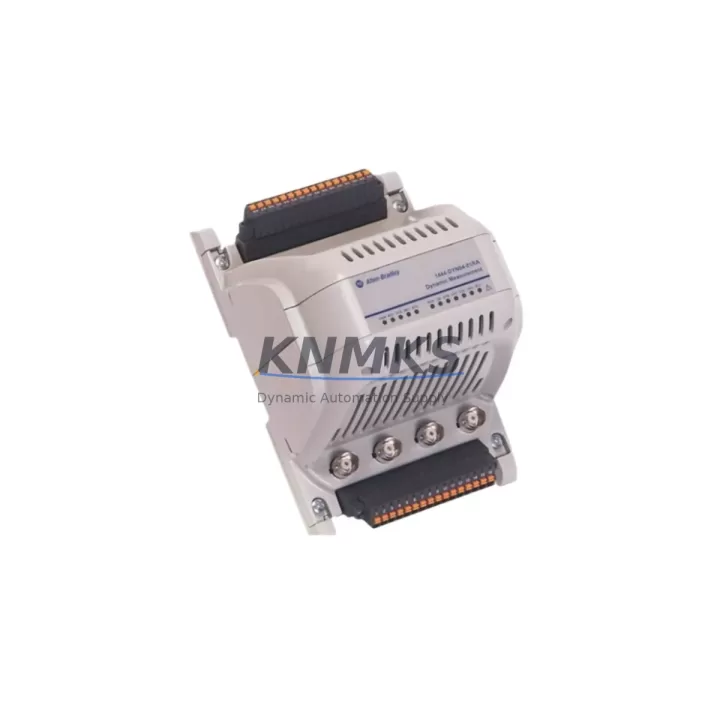
Allen-Bradley 1444-DYN04-01RA Maintenance-Proven Spare Part for Factory Uptime
The Allen-Bradley 1444-DYN04-01RA is a 4-channel dynamic measurement module from Rockwell Automation’s 1444 Series, engineered for continuous vibration and dynamic signal monitoring in demanding industrial environments. As a critical component within ControlLogix and GuardLogix control architectures, this module enables real-time condition monitoring of rotating machinery — including motors, pumps, compressors, fans, and turbines — making it an essential spare part for any maintenance program targeting zero unplanned downtime.
For maintenance engineers managing aging automation infrastructure, the 1444-DYN04-01RA represents a direct-replacement solution that preserves existing wiring, backplane addressing, and software configuration. Its compatibility with the 1444 Series backplane and ControlLogix chassis means no re-engineering is required during emergency replacement, dramatically reducing mean time to repair (MTTR) when a monitoring channel fails during production.
Procurement engineers sourcing long-cycle spare parts for multi-year maintenance contracts will find the 1444-DYN04-01RA a reliable stocking candidate. With Rockwell Automation’s product lifecycle management policies, securing verified original stock now — rather than waiting for an emergency — is the most cost-effective strategy for facilities running 24/7 continuous process operations.
Spare Maintenance Table
| Parameter | Specification |
|---|---|
| Part Number / SKU | 1444-DYN04-01RA |
| Brand / Manufacturer | Allen-Bradley (Rockwell Automation) |
| Series | 1444 Series Dynamic Measurement |
| Module Type | 4-Channel Dynamic Measurement Module |
| Input Channels | 4 dynamic (AC-coupled) signal inputs |
| Signal Types Supported | Vibration (ICP/IEPE), velocity, acceleration, proximity |
| Backplane Compatibility | 1444 Series backplane (1444-TB-A, 1444-TB-B) |
| Controller Compatibility | ControlLogix, GuardLogix (Logix5000 platform) |
| Communication | ControlNet / EtherNet/IP via 1444 Series gateway |
| Power Supply | Supplied via 1444 Series backplane (24 VDC system bus) |
| Operating Temperature | 0°C to +60°C (32°F to 140°F) |
| Storage Temperature | -40°C to +85°C |
| Relative Humidity | 5% to 95% non-condensing |
| Enclosure / Protection | IP20 (panel-mount, control cabinet installation) |
| Country of Origin | United States |
| Product Category | Industrial Automation > Condition Monitoring > Vibration Modules |
| Support terms | 12 Months — All units pre-shipment tested and verified |
| Shipping | Global express delivery; ESD-safe packaging |
Maintenance Planning for Continuous Operation
When replacing or inspecting the 1444-DYN04-01RA in the field, a thorough maintenance workflow extends beyond the module itself. The 1444 Series architecture distributes measurement, power, and communication functions across several interdependent components — all of which should be evaluated during the same maintenance window to prevent repeat failures and maximize the value of each planned outage.
Begin with the 1444 Series backplane (1444-TB-A or 1444-TB-B): inspect terminal block connections, verify torque on field wiring terminals, and check for corrosion or mechanical damage to the backplane connector. A degraded backplane can cause intermittent channel faults that mimic module failure, leading to unnecessary module replacements.
Verify the 24 VDC power supply feeding the 1444 Series chassis. Voltage ripple, transient spikes, or marginal current capacity are common root causes of dynamic measurement module instability. If the facility uses a 1606-XLP or 1606-XLS series power supply for the control cabinet, confirm output voltage under full load and check capacitor health if the unit has been in service for more than five years.
Inspect all ICP/IEPE sensor cables connected to the 1444-DYN04-01RA input channels. Cable shield continuity, connector seating, and cable routing away from high-voltage conductors are critical for signal integrity. Damaged or improperly shielded sensor cables are a leading cause of false alarms and measurement drift in vibration monitoring systems.
Review the 1444 Series gateway module (such as the 1444-ACNR15-04RD for ControlNet or the 1444-AENTR-04RD for EtherNet/IP) for firmware version compatibility with the replacement 1444-DYN04-01RA. Mismatched firmware between the gateway and measurement modules can prevent proper module recognition after replacement.
If the control system includes a 1756-EN2T or 1756-EN3TR EtherNet/IP communication module in the ControlLogix chassis, verify network connectivity and check for excessive CIP connection counts that could affect real-time data transfer from the 1444 system. Also confirm that the 1756-PA75 or 1756-PB75 power supply module in the ControlLogix chassis is within its rated load capacity after adding the 1444 gateway’s CIP connections.
For facilities with older installations, check the condition of terminal blocks and DIN rail mounting hardware within the control cabinet. Loose terminal connections on analog signal wiring can introduce ground loops that corrupt dynamic measurement data, making the module appear faulty when the actual issue is in the field wiring infrastructure.
Site Replacement Workflow
Step 1 — Pre-replacement verification: Before removing the existing module, document the current channel configuration, alarm setpoints, and measurement parameters from the Logix Designer project file. Export the 1444 Series configuration using RSLogix 5000 or Studio 5000 to ensure the replacement module can be restored to identical settings without manual re-entry.
Step 2 — Safe isolation: Place the ControlLogix controller in Program mode to inhibit active fault responses. Do not power down the entire 1444 chassis unless required — the 1444 Series supports hot-swap of individual measurement modules, allowing replacement without disrupting other monitoring channels on the same backplane.
Step 3 — Module removal and inspection: Remove the 1444-DYN04-01RA by releasing the module locking tab and sliding it from the backplane slot. Inspect the backplane connector pins for damage or contamination. Clean with isopropyl alcohol if necessary before inserting the replacement unit.
Step 4 — Replacement installation: Insert the new 1444-DYN04-01RA into the same backplane slot. The module will automatically inherit the slot-based configuration stored in the ControlLogix project, provided the module catalog number matches exactly. Confirm the module status LED transitions from flashing red to solid green within 30 seconds of insertion.
Step 5 — Functional verification: Return the controller to Run mode and verify all four measurement channels are reporting valid engineering unit values. Compare readings against baseline trend data to confirm sensor connectivity and signal quality. Update the maintenance log with the replacement date, module serial number, and post-replacement readings.
This workflow is applicable to both emergency breakdown replacements and planned annual overhaul scenarios, and is compatible with facilities operating under ISO 55000 asset management or IEC 62061 functional safety frameworks.
Spare Parts Support FAQ
Q1: Is the 1444-DYN04-01RA a direct drop-in replacement for an existing installed unit?
Yes. The 1444-DYN04-01RA is a slot-compatible replacement for any existing 1444-DYN04-01RA installed in a 1444 Series backplane. The ControlLogix project configuration is stored in the controller, not the module, so the replacement unit will automatically assume the correct channel configuration upon insertion. No software changes are required provided the catalog number is identical.
Q2: What pre-shipment testing is performed on each unit?
Every 1444-DYN04-01RA is powered-on tested prior to shipment. Functional verification includes backplane communication check, channel input impedance verification, and LED status confirmation. Units are shipped in ESD-safe packaging with individual test records available upon request. All units carry a support terms confirmed by quotation from the date of shipment.
Q3: Can you support long-term supply agreements for multi-site maintenance programs?
Yes. We support blanket purchase orders and scheduled delivery agreements for facilities requiring guaranteed spare parts availability over 12–36 month horizons. Long-term supply contracts include price protection, priority allocation, and dedicated account management. Contact admin@knmks.com to discuss volume requirements and delivery schedules.
Q4: How do I verify compatibility if my installed 1444 Series system uses an older firmware revision?
Compatibility between the 1444-DYN04-01RA and the 1444 Series gateway module is determined by firmware revision. We recommend providing your gateway module catalog number and current firmware version when placing your order. Our technical team will confirm compatibility and, where necessary, supply a module pre-loaded with the appropriate firmware revision to ensure seamless integration without field firmware updates.
© 2026 KNMKS. All rights reserved.
Original Source: https://knmks.com
Contact: admin@knmks.com | +86 18359268345
Product Identification
- Brand / Ecosystem
-
Allen-Bradley
Allen-Bradley - Model / Series
-
1444-DYN04-01RA
ControlLogix Series - Product Family
- PLCs & Controllers
- Availability Status
- Available on request after model and quantity confirmation
- Inquiry Type
- B2B RFQ, replacement inquiry and project spare-part request
- Pre-Quote Check
- Exact SKU, brand, series, quantity, nameplate photos and destination country are checked before quotation
System Path
Where this product fits in the KNMKS automation structure.
Specification & Inquiry Focus
- Control platform
- PLC, PAC and modular controllers
- Common needs
- CPU, rack, power and I/O expansion
- Project support
- Replacement, cabinet build and maintenance
Buyer Confirmation
Information KNMKS checks before replying.
- Exact model
- 1444-DYN04-01RA
- Brand / ecosystem
- Allen-Bradley
- Product family
- PLCs & Controllers
- Application note
- Replacement, maintenance, project build or spare-part list
- Useful photos
- Nameplate, installed unit, cabinet layout or connector side
- Delivery details
- Quantity, destination country and target schedule
Document Support
Files and notes can be confirmed during quotation.
- Product photos or nameplate confirmation when available
- Packing and delivery notes before quotation confirmation
- Support scope and delivery terms confirmed per inquiry
- Export document coordination for qualified B2B requests
Inquiry Support
- Model cross-checking before quotation
- CPU, power, rack and expansion module matching
- Support for replacement and project inquiry
What to Send Us
- Brand and exact model number: Allen-Bradley 1444-DYN04-01RA
- Quantity and required delivery time
- Application, replacement requirement or nameplate photo
- Destination country and shipping preference
RFQ Preparation
This is a product inquiry page built for RFQ communication.
Fast Model Check
Send this model to KNMKS for confirmation.
Include quantity, destination country and photos if this is a maintenance replacement. The inquiry will be saved with a reference number after submission.
Brand & Compatibility Note
KNMKS displays automation product information for well-known industrial brand ecosystems and compatible replacement references. Brand names are used for product identification and compatibility reference only; final availability and commercial terms are confirmed per quotation.
 Manufacturing
 Machine Tools
 Packaging
 Energy & Power


 HMI & Displays
 Servo Systems
 Variable Frequency Drives
 Sensors