
Overview
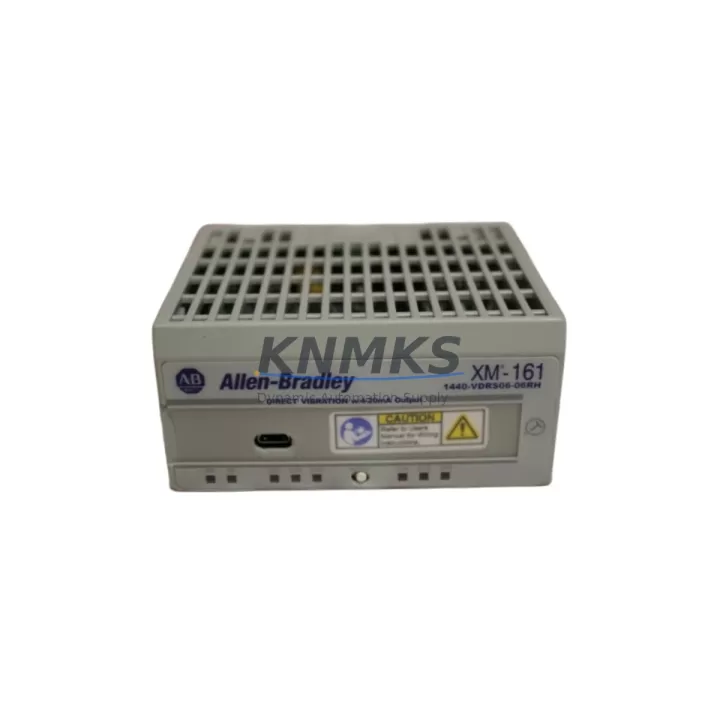
Allen-Bradley 1440-VDRS06-06RH Migration-Ready Vibration Module for Legacy Control Systems
The Allen-Bradley 1440-VDRS06-06RH is a 6-channel vibration relay output module from the XM Series condition monitoring platform, designed for continuous machinery protection in rotating equipment applications. As legacy vibration monitoring systems reach end-of-life or become difficult to source, the 1440-VDRS06-06RH provides a validated migration path that preserves existing wiring infrastructure, relay logic, and DIN rail mounting configurations — minimizing retrofit risk and reducing planned downtime windows.
This module is widely deployed in petrochemical plants, power generation facilities, compressor stations, and heavy industrial environments where unplanned machinery trips carry significant operational and financial consequences. Its 6-channel relay output architecture supports direct integration with existing protection relay panels, PLC input cards, and DCS alarm systems without requiring full rewiring or panel redesign.
Migration Compatibility Table
| Parameter | Specification / Retrofit Detail |
|---|---|
| Part Number | 1440-VDRS06-06RH |
| Series | Allen-Bradley XM Series |
| Module Type | 6-Channel Vibration Relay Output Module |
| Output Type | Relay (6 independent relay outputs) |
| Mounting | DIN Rail (35 mm), compatible with XM Series DIN rail base |
| Communication | DeviceNet (via XM Series expansion bus) |
| Power Supply | Supplied via XM Series backplane / base module |
| Relay Contact Rating | Refer to OEM datasheet; typically 2A @ 30 VDC / 0.5A @ 125 VAC |
| Legacy Replacement | Direct drop-in for same-series relay output modules in XM condition monitoring racks |
| Protocol Compatibility | DeviceNet; integrates with ControlLogix, CompactLogix via 1756-DNB or 1769-SDN scanner |
| Installation Space | Standard XM DIN rail base slot; verify base module type before ordering |
| Firmware Compatibility | Compatible with existing XM Series firmware; no firmware upgrade required for drop-in replacement |
| Country of Origin | United States |
| Support terms | 12 Months — Covered from date of shipment |
| Pre-Shipment Testing | Functional verification completed before dispatch |
Retrofit Planning for Existing Automation Systems
Replacing the 1440-VDRS06-06RH in an active XM Series condition monitoring rack requires a structured approach to avoid disrupting machinery protection logic. Before removing the existing module, maintenance engineers should document all relay output assignments, alarm setpoints, and trip thresholds stored in the XM configuration. These parameters are typically managed through RSLogix 5000 or Studio 5000 Logix Designer using the XM Series Add-On Profile (AOP), and should be exported and backed up prior to any hardware swap.
The relay outputs of the 1440-VDRS06-06RH connect directly to field wiring terminals on the XM DIN rail base. Engineers should verify terminal block assignments against the existing wiring diagram before disconnecting any field cables. In many installations, these relay outputs feed into 1756-IB16 or 1756-IA16 digital input modules on the ControlLogix backplane, or into standalone protection relay panels. Confirming the downstream input card type and its voltage rating prevents mismatches during recommissioning.
For systems using a 1440-VST02-01RA XM-120 standard dynamic measurement module or 1440-ACNR9-04RC XM-440 master trip module as the primary signal processor, the relay output module operates as an expansion device on the shared XM bus. Verify that the base module firmware version supports the relay output expansion before installation. In older XM racks, a 1440-TB-A terminal base may need to be inspected for contact wear or corrosion, particularly in high-humidity or chemically aggressive environments.
Communication continuity is critical during migration. The XM Series communicates over DeviceNet, and the network scanner — typically a 1756-DNB DeviceNet Bridge module or 1769-SDN CompactLogix scanner — must remain online during the swap to avoid triggering false trip conditions in the PLC program. Where possible, place the affected machinery in a safe maintenance state and inhibit the relevant DeviceNet node in RSNetWorx before removing the module.
After installation, perform a full relay output functional test by simulating alarm and trip conditions through the XM configuration software. Verify that each of the 6 relay channels responds correctly to its assigned setpoint, and confirm that the PLC program receives the expected digital input states. Log all test results as part of the site maintenance record before returning the machinery to service.
Downtime Control During System Migration
Minimizing downtime during a vibration module retrofit begins with pre-staging. Having the replacement 1440-VDRS06-06RH on-site and pre-verified before the maintenance window opens eliminates the most common source of extended outages — waiting for parts. KNMKS ships all modules after functional pre-shipment testing, so engineers can proceed directly to installation without bench verification delays.
Where the existing XM rack contains multiple modules — such as a combination of dynamic measurement modules, relay output modules, and a master trip module — it is advisable to inspect all modules during the same maintenance window. Modules of similar age in the same rack often share failure modes, and replacing only the failed unit while leaving aging neighbors in place increases the probability of a repeat outage within the same maintenance cycle.
For sites with strict change management requirements, the 1440-VDRS06-06RH supports a configuration-restore workflow: export the existing XM configuration before removal, install the new module, and restore the configuration via the AOP in Studio 5000. This approach preserves all alarm setpoints, relay assignments, and trip logic without manual re-entry, reducing commissioning time and the risk of parameter entry errors.
Maintaining a small buffer stock of critical XM Series relay output modules — alongside associated terminal bases and DeviceNet scanner cards — is a proven strategy for sites with multiple rotating machines under continuous protection. A 12-month rolling inventory review aligned with annual shutdown schedules ensures that replacement modules are available when needed, without tying up excessive capital in slow-moving spares.
Retrofit Support FAQ
Q1: Is the 1440-VDRS06-06RH a direct drop-in replacement for the existing relay output module in my XM rack?
In most cases, yes — provided the existing module occupies the same XM Series DIN rail base type. Confirm the base module part number (e.g., 1440-TB-A or equivalent) and verify that the relay output channel count and wiring assignments match your existing configuration before ordering.
Q2: Do I need to update firmware or reconfigure the XM system after installing the replacement module?
For a like-for-like replacement within the same XM Series generation, firmware updates are generally not required. However, if the existing rack firmware is significantly older, Rockwell Automation recommends verifying AOP compatibility in Studio 5000 before installation. KNMKS can provide firmware version guidance based on your system details upon request.
Q3: How is the module tested before shipment, and what does the support terms confirmed by quotation cover?
Every 1440-VDRS06-06RH shipped by KNMKS undergoes functional verification prior to dispatch, including relay output actuation testing. The support terms confirmed by quotation cover manufacturing defects and functional failures under normal operating conditions, commencing from the date of shipment. Support requests are supported with direct technical assistance and priority replacement.
Q4: Can KNMKS supply multiple units for a multi-machine retrofit project or long-term spare parts program?
Yes. KNMKS maintains inventory of XM Series modules to support both single-unit emergency replacements and multi-unit procurement for planned retrofit projects. Volume orders and long-term supply agreements are available. Contact our team to discuss project quantities, lead times, and consolidated shipping options.
© 2026 KNMKS. All rights reserved.
Original Source: https://knmks.com
Contact: admin@knmks.com | +86 18359268345
Product Identification
- Brand / Ecosystem
-
Allen-Bradley
Allen-Bradley - Model / Series
-
1440-VDRS06-06RH
ControlLogix Series - Product Family
- PLCs & Controllers
- Availability Status
- Available on request after model and quantity confirmation
- Inquiry Type
- B2B RFQ, replacement inquiry and project spare-part request
- Pre-Quote Check
- Exact SKU, brand, series, quantity, nameplate photos and destination country are checked before quotation
System Path
Where this product fits in the KNMKS automation structure.
Specification & Inquiry Focus
- Control platform
- PLC, PAC and modular controllers
- Common needs
- CPU, rack, power and I/O expansion
- Project support
- Replacement, cabinet build and maintenance
Buyer Confirmation
Information KNMKS checks before replying.
- Exact model
- 1440-VDRS06-06RH
- Brand / ecosystem
- Allen-Bradley
- Product family
- PLCs & Controllers
- Application note
- Replacement, maintenance, project build or spare-part list
- Useful photos
- Nameplate, installed unit, cabinet layout or connector side
- Delivery details
- Quantity, destination country and target schedule
Document Support
Files and notes can be confirmed during quotation.
- Product photos or nameplate confirmation when available
- Packing and delivery notes before quotation confirmation
- Support scope and delivery terms confirmed per inquiry
- Export document coordination for qualified B2B requests
Inquiry Support
- Model cross-checking before quotation
- CPU, power, rack and expansion module matching
- Support for replacement and project inquiry
What to Send Us
- Brand and exact model number: Allen-Bradley 1440-VDRS06-06RH
- Quantity and required delivery time
- Application, replacement requirement or nameplate photo
- Destination country and shipping preference
RFQ Preparation
This is a product inquiry page built for RFQ communication.
Fast Model Check
Send this model to KNMKS for confirmation.
Include quantity, destination country and photos if this is a maintenance replacement. The inquiry will be saved with a reference number after submission.
Brand & Compatibility Note
KNMKS displays automation product information for well-known industrial brand ecosystems and compatible replacement references. Brand names are used for product identification and compatibility reference only; final availability and commercial terms are confirmed per quotation.
 Manufacturing
 Machine Tools
 Packaging
 Energy & Power


 HMI & Displays
 Servo Systems
 Variable Frequency Drives
 Sensors