
Overview
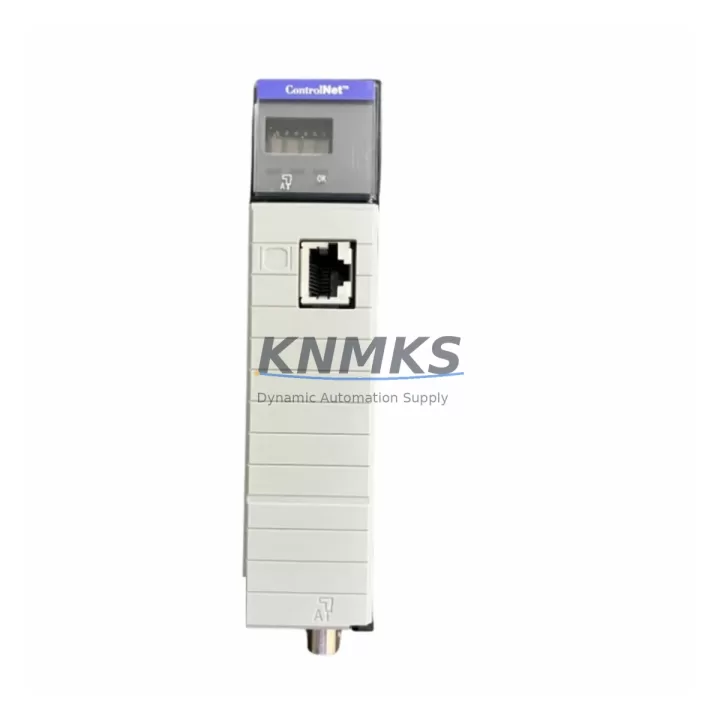
Allen-Bradley 1756-CNB/D Migration-Ready ControlNet Bridge for Legacy Control Systems
The Allen-Bradley 1756-CNB/D is a ControlNet Bridge Module designed for the ControlLogix 1756 backplane platform. As legacy ControlNet infrastructure ages and original spare parts become increasingly difficult to source, the 1756-CNB/D serves as a critical migration-ready replacement for facilities operating discontinued ControlNet communication architectures. Whether you are upgrading a legacy PLC-5 or SLC 500 network to a modern ControlLogix chassis, or maintaining an existing 1756-series rack during a phased migration, this module provides the communication continuity required to preserve production uptime and protect existing program logic investments.
The 1756-CNB/D occupies a standard 1756 backplane slot and bridges the ControlLogix controller to a ControlNet network segment, supporting both scheduled and unscheduled messaging. It is fully compatible with RSNetWorx for ControlNet configuration software and integrates seamlessly with Logix5000 controller families including the 1756-L61, 1756-L62, 1756-L63, and 1756-L71 processors. During retrofit planning, engineers must verify the ControlNet network update time (NUT), node address assignments, and scheduled connection counts to ensure the replacement module meets the original network design parameters without requiring a full re-commissioning of the ControlNet segment.
For facilities transitioning from older 1756-CNB or 1756-CNB/E revisions, the 1756-CNB/D maintains backward-compatible node addressing and scheduled connection behavior, significantly reducing the risk of communication disruption during hot-swap replacement procedures. Terminal wiring on the ControlNet coaxial tap connectors (BNC or RG-6 media) remains unchanged, and the module’s front-panel LED diagnostics provide immediate visual confirmation of network health, node status, and scheduled data transfer activity.
Migration Compatibility Table
| Parameter | Details |
|---|---|
| Module SKU | 1756-CNB/D |
| Platform | ControlLogix 1756 Backplane |
| Network Protocol | ControlNet (Scheduled & Unscheduled) |
| Replaces / Compatible With | 1756-CNB, 1756-CNB/B, 1756-CNB/C, 1756-CNB/E |
| Backplane Interface | 1756 standard backplane slot (any slot position) |
| ControlNet Media | Coaxial RG-6 / BNC tap connectors (dual-port redundant media) |
| Node Address Range | 1–99 (configurable via RSNetWorx for ControlNet) |
| Scheduled Connections | Up to 64 scheduled connections per module |
| Power Consumption | Verify 1756 chassis power supply (e.g., 1756-PA72, 1756-PB72) capacity before installation |
| Firmware Compatibility | Verify firmware revision matches RSNetWorx project file; update via ControlFLASH if required |
| Installation Space | Single 1756 backplane slot; confirm chassis slot availability before ordering |
| Commissioning Tool | RSNetWorx for ControlNet; RSLogix 5000 / Studio 5000 Logix Designer |
| Support terms | 12 Months – Covers hardware defects; includes pre-shipment functional test report |
Retrofit Planning for Existing Automation Systems
Successful integration of the 1756-CNB/D into an existing ControlNet architecture requires a structured pre-installation audit. Begin by documenting the current ControlNet network topology using RSNetWorx for ControlNet, capturing all node addresses, scheduled connection maps, and NUT settings. This baseline is essential for verifying that the replacement module will assume the same node address and scheduled connection profile as the outgoing unit without triggering a network reconfiguration event.
Power budget verification is a mandatory step. The 1756 chassis power supply — commonly the 1756-PA72 (120/240 VAC) or 1756-PB72 (24 VDC) — must have sufficient remaining capacity to support the 1756-CNB/D alongside co-installed modules such as the 1756-EN2T EtherNet/IP bridge, 1756-IB16 digital input modules, 1756-OB16E digital output modules, and any 1756-IF8 analog input modules present in the same chassis. Exceeding the chassis power budget is a common cause of intermittent communication faults during post-replacement commissioning.
For systems that include a 1756-RM redundancy module pair, the ControlNet bridge replacement must be performed in coordination with the redundancy switchover procedure to avoid unplanned controller failover. In mixed-network environments where the ControlLogix chassis also hosts a 1756-ENBT or 1756-EN2T module for EtherNet/IP connectivity, the ControlNet and EtherNet/IP network segments must be treated as independent communication paths during the migration, with separate verification steps for each protocol layer.
If the retrofit involves migrating from a legacy PLC-5/40C or PLC-5/60C ControlNet controller to a ControlLogix platform, a 1756-CNB/D combined with a 1756-DHRIO Data Highway Plus / Remote I/O bridge may be required to maintain backward compatibility with existing remote I/O drops during the transition period. Confirm all I/O module addresses, rack sizes, and baud rate settings before decommissioning the legacy controller.
Downtime Control During System Migration
Minimizing production downtime during a ControlNet bridge replacement requires advance preparation of a verified spare module, a current RSNetWorx network configuration backup, and a Studio 5000 project file export. Before removing the existing 1756-CNB/D, record the module’s node address, scheduled connection count, and NUT value from the RSNetWorx online view. These parameters must be replicated exactly on the replacement module to avoid a full network re-commissioning cycle.
Where the production schedule permits only a narrow maintenance window, a pre-staged replacement strategy is recommended: configure the replacement 1756-CNB/D offline using the saved RSNetWorx project file, verify the firmware revision matches the existing network configuration, and prepare all coaxial tap connections in advance. Physical installation and network re-join can then be completed within a single planned outage window, typically under 30 minutes for a single-node replacement in a stable ControlNet segment.
For critical continuous-process applications, consider implementing a temporary ControlNet media bypass using a ControlNet repeater or media coupler to isolate the replacement node from the live network segment during the physical swap. This approach preserves scheduled data transfer on all other network nodes while the replacement module is being installed and verified, reducing the risk of a full network fault propagating to the controller and triggering an unplanned shutdown.
All replacement modules supplied by KNMKS undergo a pre-shipment functional test that verifies backplane communication, ControlNet port integrity, and LED diagnostic behavior. A test report is included with each shipment, providing documented evidence of module functionality prior to installation — a requirement for many regulated manufacturing and process industries.
Retrofit Support FAQ
Q1: Is the 1756-CNB/D a direct drop-in replacement for the 1756-CNB/E?
Yes. The 1756-CNB/D is backward compatible with earlier 1756-CNB revisions including /B, /C, and /E. Node addressing, scheduled connection behavior, and ControlNet media connections are identical. No changes to the RSNetWorx project file or controller program are required for a like-for-like node replacement.
Q2: What commissioning steps are required after installing the replacement module?
After physical installation, use RSNetWorx for ControlNet to verify the module has joined the network at the correct node address and that all scheduled connections have been re-established. Confirm the NUT has not changed and that all I/O modules on the ControlNet segment are reporting healthy status in the Logix controller’s I/O tree. A full I/O force test is recommended before returning the system to automatic operation.
Q3: How do I verify wiring and media compatibility before installation?
The 1756-CNB/D uses standard ControlNet coaxial tap connectors compatible with RG-6 coaxial cable and BNC-style taps. Inspect the existing coaxial cable for physical damage, verify tap termination resistance (75 Ω at each end of the segment), and confirm the cable segment length does not exceed ControlNet media specifications. No rewiring is required if the existing media infrastructure is in good condition.
Q4: What does the support terms confirmed by quotation cover, and what is the stock availability?
The support terms confirmed by quotation cover all hardware defects identified under normal operating conditions within the specified ControlLogix backplane environment. KNMKS maintains in-stock inventory of the 1756-CNB/D to support urgent replacement requirements with short lead times. Each unit is shipped with a pre-shipment functional test report. Contact admin@knmks.com or +86 18359268345 to confirm current stock levels and lead time before placing an order.
© 2026 KNMKS. All rights reserved.
Original Source: https://knmks.com
Contact: admin@knmks.com | +86 18359268345
Product Identification
- Brand / Ecosystem
-
Allen-Bradley
Allen-Bradley - Model / Series
-
1756-CNB/D
ControlLogix Series - Product Family
- PLCs & Controllers
- Availability Status
- Available on request after model and quantity confirmation
- Inquiry Type
- B2B RFQ, replacement inquiry and project spare-part request
- Pre-Quote Check
- Exact SKU, brand, series, quantity, nameplate photos and destination country are checked before quotation
System Path
Where this product fits in the KNMKS automation structure.
Specification & Inquiry Focus
- Control platform
- PLC, PAC and modular controllers
- Common needs
- CPU, rack, power and I/O expansion
- Project support
- Replacement, cabinet build and maintenance
Buyer Confirmation
Information KNMKS checks before replying.
- Exact model
- 1756-CNB/D
- Brand / ecosystem
- Allen-Bradley
- Product family
- PLCs & Controllers
- Application note
- Replacement, maintenance, project build or spare-part list
- Useful photos
- Nameplate, installed unit, cabinet layout or connector side
- Delivery details
- Quantity, destination country and target schedule
Document Support
Files and notes can be confirmed during quotation.
- Product photos or nameplate confirmation when available
- Packing and delivery notes before quotation confirmation
- Support scope and delivery terms confirmed per inquiry
- Export document coordination for qualified B2B requests
Inquiry Support
- Model cross-checking before quotation
- CPU, power, rack and expansion module matching
- Support for replacement and project inquiry
What to Send Us
- Brand and exact model number: Allen-Bradley 1756-CNB/D
- Quantity and required delivery time
- Application, replacement requirement or nameplate photo
- Destination country and shipping preference
RFQ Preparation
This is a product inquiry page built for RFQ communication.
Fast Model Check
Send this model to KNMKS for confirmation.
Include quantity, destination country and photos if this is a maintenance replacement. The inquiry will be saved with a reference number after submission.
Brand & Compatibility Note
KNMKS displays automation product information for well-known industrial brand ecosystems and compatible replacement references. Brand names are used for product identification and compatibility reference only; final availability and commercial terms are confirmed per quotation.
 Manufacturing
 Machine Tools
 Packaging
 Energy & Power



 HMI & Displays
 Servo Systems
 Variable Frequency Drives
 Sensors