
Overview
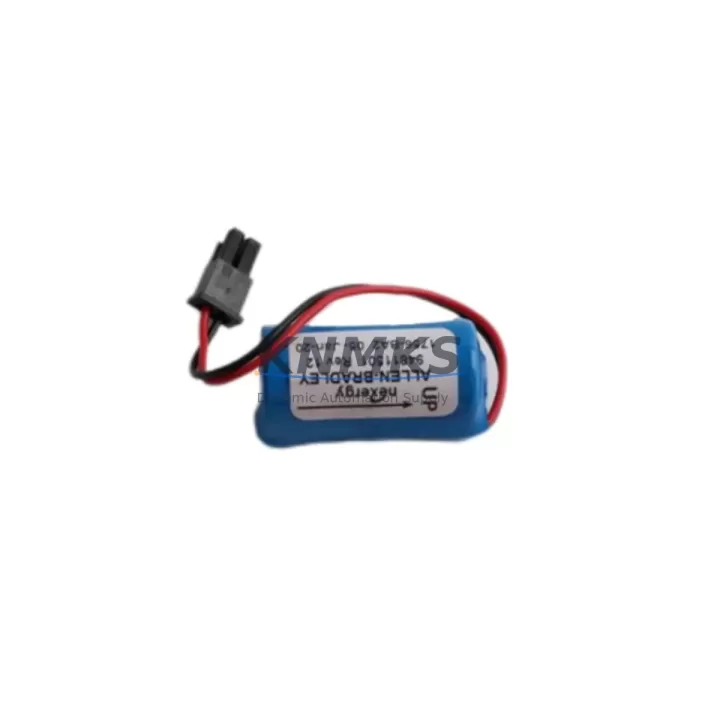
Allen-Bradley 1756-BA1 Spare Battery for ControlLogix — Maintenance-Proven Spare Part for Factory Uptime
The Allen-Bradley 1756-BA1 is the factory-specified backup battery for the ControlLogix 1756 series programmable logic controller platform — one of the most widely deployed control architectures in discrete manufacturing, process automation, and critical infrastructure worldwide. For maintenance engineers responsible for keeping production lines running, the 1756-BA1 is not a peripheral accessory; it is a frontline spare that directly protects program memory, I/O configuration data, and real-time clock integrity across the entire ControlLogix chassis.
When a 1756-BA1 battery reaches end of life or fails unexpectedly, the consequences extend well beyond a simple module swap. Without a charged backup battery, the 1756-L6x or 1756-L7x controller processor loses its ability to retain user program data during a power interruption. This means that an unplanned power outage — even a brief one — can result in a cold-start condition, forcing maintenance teams to reload programs from a backup source, reconfigure I/O maps, and re-establish communication links before production can resume. In facilities running 24/7 operations, this scenario translates directly into unplanned downtime, production loss, and potential safety incidents.
Proactive battery management is therefore a core element of any ControlLogix preventive maintenance schedule. The 1756-BA1 should be inspected during every scheduled control cabinet audit. Maintenance engineers should cross-reference the battery status indicator on the 1756-L series processor faceplate and log replacement intervals in the site CMMS. When planning a battery replacement, it is equally important to verify the condition of adjacent components in the same chassis: the 1756-A7 or 1756-A17 backplane should be inspected for corrosion or loose module seating, and the 1756-PA72 or 1756-PB72 power supply module should be load-tested to confirm it is delivering stable 1.2 V DC to the battery circuit. A degraded power supply can accelerate battery drain and lead to premature failure even with a new 1756-BA1 installed.
From a procurement engineering perspective, the 1756-BA1 is a high-velocity spare that should be stocked in multiples at any facility running ControlLogix-based control systems. Recommended practice is to maintain a minimum of two to four units per chassis in the site spare parts inventory, with rotation based on manufacturer-specified shelf life. When sourcing replacement batteries, buyers should confirm that the unit has been stored within the specified temperature range and has not exceeded its rated shelf life, as lithium batteries are sensitive to storage conditions. Each 1756-BA1 supplied by KNMKS is tested prior to shipment and covered by a support terms confirmed by quotation, providing procurement teams with a reliable, auditable supply chain for this critical consumable.
During a site replacement, the workflow is straightforward but must be executed carefully to avoid inadvertent program loss. Before removing the depleted battery, confirm that the controller is powered and that the user program is resident in flash memory or has been backed up to a 1784-CF64 CompactFlash card or equivalent non-volatile storage device. This step is critical: if the program exists only in volatile RAM and the battery is removed while the controller is de-energized, the program will be lost. Once the new 1756-BA1 is installed and the battery connector is seated securely, verify the battery status LED on the processor faceplate clears the low-battery fault. Log the replacement date and the new battery’s serial number in the site maintenance record.
For facilities managing multiple ControlLogix chassis across a plant network, battery replacement should be coordinated with the broader control system inspection cycle. This includes checking the 1756-EN2T or 1756-EN3TR EtherNet/IP communication module for firmware currency, verifying that the 1756-DNB DeviceNet bridge module (where installed) is communicating correctly with field devices, and confirming that any connected PanelView Plus HMI terminals are displaying accurate system status. A battery failure that causes a controller restart can disrupt HMI data subscriptions and require operators to manually re-acknowledge alarms and re-establish display connections.
Spare Maintenance Table
| Parameter | Specification / Detail |
|---|---|
| SKU / Part Number | 1756-BA1 |
| Brand / Series | Allen-Bradley / ControlLogix 1756 |
| Battery Chemistry | Lithium (Li-SOCI₂) |
| Nominal Voltage | 3.0 V DC |
| Compatible Controllers | 1756-L6x, 1756-L7x series processors |
| Compatible Chassis | 1756-A4, 1756-A7, 1756-A10, 1756-A13, 1756-A17 |
| Installation | Direct plug-in to processor battery connector; no tools required |
| Replacement Trigger | Low-battery fault on processor faceplate LED / RSLogix 5000 fault code |
| Maintenance Interval | Inspect every 6 months; replace per manufacturer schedule or on fault |
| Storage Condition | 0–40°C, dry environment, away from direct sunlight |
| Origin | United States |
| Pre-shipment Testing | Yes — voltage and capacity verified before dispatch |
| Support terms | 12 Months |
Maintenance Planning for Continuous Operation
Effective maintenance planning for a ControlLogix installation requires a systems-level view that goes beyond replacing the 1756-BA1 battery in isolation. When a maintenance engineer opens the control cabinet for a scheduled battery inspection, the same visit should be used to audit the full chassis assembly. The 1756-PA72 power supply should be checked for output voltage stability and fan operation; a failing power supply is one of the most common root causes of premature battery drain and unexpected controller faults. If the facility runs redundant power configurations, the 1756-PB72 DC-input power supply should be inspected in parallel.
The 1756-A7 or 1756-A17 backplane should be visually inspected for dust accumulation, module seating integrity, and any signs of thermal stress on the backplane connector pins. Loose modules in a high-vibration environment can cause intermittent I/O faults that are difficult to diagnose remotely. While the cabinet is open, maintenance teams should also verify the condition of the 1756-EN2T EtherNet/IP communication module — checking for firmware version currency and confirming that the module’s activity LEDs indicate normal network traffic. In plants using DeviceNet for field device communication, the 1756-DNB bridge module should be checked for active fault codes.
For facilities that rely on PanelView Plus operator terminals for process visualization, a controller battery replacement event is a good opportunity to confirm that the HMI is correctly subscribed to all required controller tags and that alarm history logs are being archived as expected. Signal isolators and terminal blocks in the same cabinet should also be inspected for loose wiring, particularly on analog input channels where signal drift can indicate a wiring or grounding issue rather than a sensor fault.
Site Replacement Workflow
Replacing the 1756-BA1 on an active ControlLogix system is a low-risk procedure when the correct sequence is followed. Begin by confirming that the controller is in RUN or PROGRAM mode and that the user program is saved to non-volatile flash memory or an external backup device. Do not de-energize the controller before installing the new battery — the replacement should be performed with the system powered to avoid any risk of program loss from volatile RAM.
Locate the battery connector on the front face of the 1756-L series processor module. Disconnect the old 1756-BA1 by pressing the connector latch and pulling the battery assembly clear. Insert the new battery connector firmly until the latch clicks into place. Observe the processor faceplate: the battery fault LED should extinguish within a few seconds of installing a fully charged replacement unit. If the fault LED remains illuminated, verify that the battery connector is fully seated and that the replacement unit has not exceeded its shelf life.
After replacement, update the site maintenance log with the replacement date, the technician’s name, and the new battery’s lot code. Schedule the next inspection interval in the CMMS. For multi-chassis installations, repeat the procedure for each processor in the plant, prioritizing controllers that manage safety-critical or high-throughput production processes. Downtime during a battery swap is effectively zero when the procedure is performed on a powered system, making this one of the lowest-risk maintenance interventions in the ControlLogix maintenance cycle.
Spare Parts Support FAQ
Q1: Is the 1756-BA1 a direct replacement for all ControlLogix 1756-L series processors?
A: The 1756-BA1 is compatible with the 1756-L6x and 1756-L7x processor families. Verify your specific processor model number before ordering. Some earlier L5x-series processors use a different battery form factor — confirm compatibility against the processor’s installation manual or contact our technical team before purchase.
Q2: Can the battery be replaced without shutting down the controller?
A: Yes. Allen-Bradley recommends replacing the 1756-BA1 with the controller powered and the user program saved to flash memory. Hot-swapping the battery on a powered system eliminates the risk of program loss from volatile RAM and allows the replacement to be completed without any production interruption.
Q3: How do I verify the replacement battery is functioning correctly after installation?
A: After installing the new 1756-BA1, observe the battery status LED on the processor faceplate. A healthy battery will cause the low-battery fault indicator to clear within seconds. You can also verify battery status in RSLogix 5000 / Studio 5000 Logix Designer under the controller properties diagnostics tab. Each unit shipped by KNMKS is pre-tested for voltage and capacity before dispatch.
Q4: What is the recommended stocking quantity and support terms coverage?
A: For facilities with multiple ControlLogix chassis, we recommend stocking a minimum of two to four 1756-BA1 units per chassis as part of a proactive spare parts program. All units supplied by KNMKS carry a support terms confirmed by quotation covering manufacturing defects and premature capacity loss. Long-term supply agreements are available for facilities requiring scheduled replenishment.
© 2026 KNMKS. All rights reserved.
Original Source: https://knmks.com
Contact: admin@knmks.com | +86 18359268345
Product Identification
- Brand / Ecosystem
-
Allen-Bradley
Allen-Bradley - Model / Series
-
1756-BA1
ControlLogix Series - Product Family
- PLCs & Controllers
- Availability Status
- Available on request after model and quantity confirmation
- Inquiry Type
- B2B RFQ, replacement inquiry and project spare-part request
- Pre-Quote Check
- Exact SKU, brand, series, quantity, nameplate photos and destination country are checked before quotation
System Path
Where this product fits in the KNMKS automation structure.
Specification & Inquiry Focus
- Control platform
- PLC, PAC and modular controllers
- Common needs
- CPU, rack, power and I/O expansion
- Project support
- Replacement, cabinet build and maintenance
Buyer Confirmation
Information KNMKS checks before replying.
- Exact model
- 1756-BA1
- Brand / ecosystem
- Allen-Bradley
- Product family
- PLCs & Controllers
- Application note
- Replacement, maintenance, project build or spare-part list
- Useful photos
- Nameplate, installed unit, cabinet layout or connector side
- Delivery details
- Quantity, destination country and target schedule
Document Support
Files and notes can be confirmed during quotation.
- Product photos or nameplate confirmation when available
- Packing and delivery notes before quotation confirmation
- Support scope and delivery terms confirmed per inquiry
- Export document coordination for qualified B2B requests
Inquiry Support
- Model cross-checking before quotation
- CPU, power, rack and expansion module matching
- Support for replacement and project inquiry
What to Send Us
- Brand and exact model number: Allen-Bradley 1756-BA1
- Quantity and required delivery time
- Application, replacement requirement or nameplate photo
- Destination country and shipping preference
RFQ Preparation
This is a product inquiry page built for RFQ communication.
Fast Model Check
Send this model to KNMKS for confirmation.
Include quantity, destination country and photos if this is a maintenance replacement. The inquiry will be saved with a reference number after submission.
Brand & Compatibility Note
KNMKS displays automation product information for well-known industrial brand ecosystems and compatible replacement references. Brand names are used for product identification and compatibility reference only; final availability and commercial terms are confirmed per quotation.
 Manufacturing
 Machine Tools
 Packaging
 Energy & Power



 HMI & Displays
 Servo Systems
 Variable Frequency Drives
 Sensors