
Overview
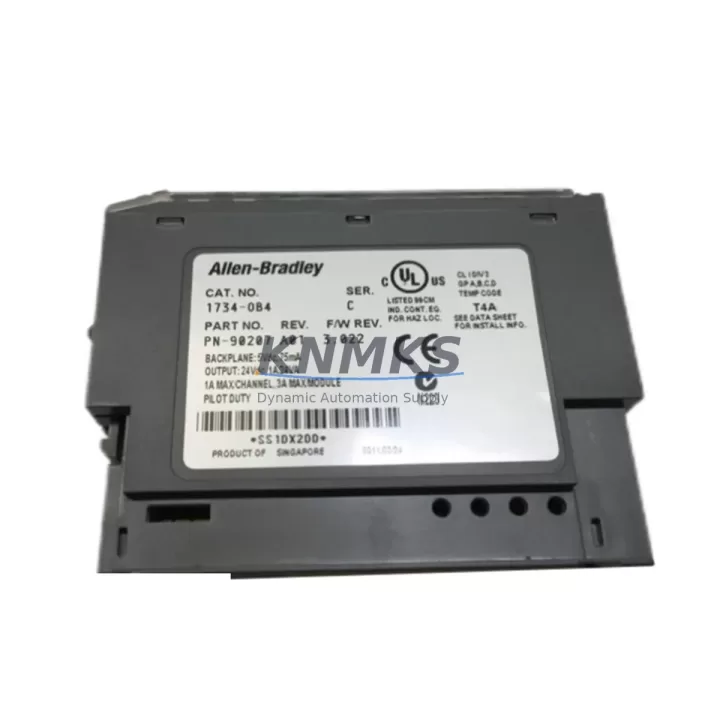
Allen-Bradley 1734-OB4 Migration-Ready Digital Output for Legacy POINT I/O Systems
The Allen-Bradley 1734-OB4 is a 4-channel sourcing digital output module designed for the POINT I/O platform, operating at 24VDC with a maximum load current of 0.5A per channel. As legacy control architectures face end-of-life pressures and discontinued spare parts cycles, the 1734-OB4 has become a critical retrofit component for engineers tasked with modernizing aging production lines without full system replacement.
In retrofit and migration projects, the 1734-OB4 is typically used to replace older discrete output modules that no longer meet current safety or communication standards. Before installation, engineers must verify the existing POINT I/O adapter — such as the 1734-AENT or 1734-ACNR — to confirm that the module address assignment and rack configuration remain consistent with the original program logic. Mismatched slot addressing is one of the most common causes of extended downtime during I/O module replacement, and pre-staging the module in a test rack before field installation is strongly recommended.
Power budget verification is essential when adding or replacing modules on an existing POINT I/O base. The 1734-OB4 draws power from the system bus, and the total load across all installed modules must remain within the capacity of the installed 1734-EP24DC power supply or equivalent. In systems where the power supply is already near capacity — common in legacy cabinets that have been expanded incrementally — a supplemental power tap may be required before the replacement module can be safely commissioned.
Terminal wiring on the 1734-OB4 uses the standard POINT I/O removable terminal block, which simplifies field replacement without rewiring. However, engineers should confirm that the existing terminal block style (cage clamp vs. screw-type) matches the replacement module’s included hardware. In some legacy installations, the terminal block may have been sourced separately and may not be compatible with newer module revisions. Retaining the original terminal block from the removed module is often the fastest path to maintaining wiring continuity.
Migration Compatibility Table
| Parameter | Specification / Recommendation |
|---|---|
| Module Type | 4-Channel Sourcing Digital Output, 24VDC |
| Platform Compatibility | POINT I/O (1734 series); compatible with ControlLogix, CompactLogix, and SoftLogix via 1734-AENT / 1734-ACNR adapters |
| Backplane Interface | POINT I/O internal bus; single-slot footprint |
| Terminal Block | Removable POINT I/O terminal block (verify cage clamp vs. screw type against existing installation) |
| Communication Compatibility | EtherNet/IP via 1734-AENT; ControlNet via 1734-ACNR; DeviceNet via 1734-ADN |
| Replacement Candidates | Legacy 1734-OB4 (earlier firmware revisions), 1734-OB4E (verify output type), discontinued discrete output modules in same rack |
| Installation Space | Single POINT I/O slot; confirm available slot count on existing 1734-TB or 1734-TBS mounting base |
| Firmware Compatibility | Verify adapter firmware revision supports current module catalog number; update 1734-AENT firmware if required before commissioning |
| Commissioning Focus | Slot address verification, power budget check, terminal block continuity, output tag mapping in Studio 5000 / RSLogix 5000 |
| Support terms | support terms confirmed by quotation | Tested before shipment | Ships from verified stock |
Retrofit Planning for Existing Automation Systems
Successful integration of the 1734-OB4 into a legacy control cabinet requires a structured pre-migration checklist. Begin by auditing the existing POINT I/O rack layout and documenting the current slot assignments for all installed modules. In systems running RSLogix 5000 or Studio 5000, export the current I/O configuration and confirm that the output tag associated with the failed or replaced module maps correctly to the new 1734-OB4 slot position.
If the control system uses a 1734-AENT EtherNet/IP adapter, verify the adapter’s firmware version against the module compatibility matrix published for the 1734-OB4 catalog revision being installed. Older adapter firmware may not correctly enumerate newer module revisions, resulting in a faulted I/O tree that prevents the controller from entering Run mode. In such cases, updating the 1734-AENT firmware offline — using ControlFLASH or Studio 5000 Logix Designer — before installing the replacement module eliminates this risk.
For systems that also require I/O expansion during the retrofit, the 1734-OB4 is commonly deployed alongside 1734-IB8 digital input modules and 1734-IE4C analog input modules to complete a mixed I/O upgrade within the same rack. Where signal isolation is required between the PLC output and field devices — particularly in legacy installations with long cable runs or mixed voltage environments — inline signal isolators should be specified before finalizing the wiring design.
In control cabinets that include an HMI panel running FactoryTalk View ME or a third-party operator interface, confirm that any output status tags displayed on HMI screens are remapped after the module replacement. Tag name changes introduced during the migration — even minor revision differences — can cause HMI display faults that are often misdiagnosed as hardware failures. Locking tag names to the original program structure before beginning the physical swap is the most reliable way to maintain HMI continuity without screen-by-screen verification.
Where the retrofit also involves communication protocol migration — for example, transitioning from a legacy DeviceNet segment to EtherNet/IP — the 1734-OB4 supports both adapter types, allowing the module to remain in service across the protocol transition without hardware replacement. This flexibility is particularly valuable in phased migration projects where sections of the plant are upgraded sequentially rather than in a single shutdown event.
Downtime Control During System Migration
Minimizing unplanned downtime during a POINT I/O module replacement requires preparation that begins well before the maintenance window. The most effective approach is to pre-configure the replacement 1734-OB4 on a bench rack using the same adapter type as the production system, verify that the module enumerates correctly, and confirm output channel function using a 24VDC test load before the module is brought to the production floor.
During the physical swap, the removable terminal block design of the POINT I/O platform allows the field wiring to remain connected to the terminal block while the module body is exchanged. This eliminates the need to re-terminate individual conductors and significantly reduces the time the output circuit is de-energized. In applications where output continuity is critical — such as conveyor interlocks or safety-adjacent circuits — coordinate the swap timing with the process control team to ensure the affected outputs are in a safe de-energized state before removal.
After installation, perform a controlled power-up sequence: energize the POINT I/O adapter first, confirm module enumeration in the I/O tree, then place the controller in Run mode and verify output channel response against the HMI or SCADA display. Document the as-found and as-left configuration, including firmware versions, slot assignments, and terminal block torque values, to support future maintenance cycles and reduce diagnostic time if a fault recurs.
For sites with strict change management requirements, the 1734-OB4 replacement can be completed within a standard 2–4 hour maintenance window when pre-staging and documentation are completed in advance. Unplanned replacements without pre-staging typically require 6–8 hours due to firmware verification, tag mapping confirmation, and HMI testing — making advance inventory of critical spare modules a measurable operational risk reduction.
Retrofit Support FAQ
Q: Is the 1734-OB4 a direct drop-in replacement for earlier revisions of the same catalog number?
A: In most cases, yes. The 1734-OB4 maintains backward compatibility across POINT I/O adapter generations. However, if the installed adapter firmware is below the minimum revision required for the current module catalog revision, a firmware update is required before the module will enumerate correctly. Always verify the adapter firmware revision against the module’s release notes before installation.
Q: What wiring changes are required when replacing a failed 1734-OB4?
A: If the original removable terminal block is intact and undamaged, no rewiring is required. Remove the terminal block from the failed module, install it on the replacement 1734-OB4, and re-seat the module in the rack. If the terminal block is damaged or missing, re-terminate field wiring to a new terminal block using the original wiring diagram. Confirm conductor torque values per the module installation instructions.
Q: How is the 1734-OB4 tested before shipment?
A: Each unit is functionally tested prior to shipment, including output channel activation verification and backplane communication confirmation. Units are shipped with a support terms confirmed by quotation covering manufacturing defects and functional failures under normal operating conditions. Test records are available upon request for critical spare applications.
Q: What is the typical lead time and stock availability?
A: The 1734-OB4 is maintained in verified stock for immediate shipment. Standard orders ship within 1–3 business days. For urgent maintenance requirements or bulk retrofit projects requiring multiple units, contact our sales team directly to confirm available quantity and expedited shipping options.
© 2026 KNMKS. All rights reserved.
Original Source: https://knmks.com
Contact: admin@knmks.com | +86 18359268345
Product Identification
- Brand / Ecosystem
-
Allen-Bradley
Allen-Bradley - Model / Series
-
1734-OB4
ControlLogix Series - Product Family
- PLCs & Controllers
- Availability Status
- Available on request after model and quantity confirmation
- Inquiry Type
- B2B RFQ, replacement inquiry and project spare-part request
- Pre-Quote Check
- Exact SKU, brand, series, quantity, nameplate photos and destination country are checked before quotation
System Path
Where this product fits in the KNMKS automation structure.
Specification & Inquiry Focus
- Control platform
- PLC, PAC and modular controllers
- Common needs
- CPU, rack, power and I/O expansion
- Project support
- Replacement, cabinet build and maintenance
Buyer Confirmation
Information KNMKS checks before replying.
- Exact model
- 1734-OB4
- Brand / ecosystem
- Allen-Bradley
- Product family
- PLCs & Controllers
- Application note
- Replacement, maintenance, project build or spare-part list
- Useful photos
- Nameplate, installed unit, cabinet layout or connector side
- Delivery details
- Quantity, destination country and target schedule
Document Support
Files and notes can be confirmed during quotation.
- Product photos or nameplate confirmation when available
- Packing and delivery notes before quotation confirmation
- Support scope and delivery terms confirmed per inquiry
- Export document coordination for qualified B2B requests
Inquiry Support
- Model cross-checking before quotation
- CPU, power, rack and expansion module matching
- Support for replacement and project inquiry
What to Send Us
- Brand and exact model number: Allen-Bradley 1734-OB4
- Quantity and required delivery time
- Application, replacement requirement or nameplate photo
- Destination country and shipping preference
RFQ Preparation
This is a product inquiry page built for RFQ communication.
Fast Model Check
Send this model to KNMKS for confirmation.
Include quantity, destination country and photos if this is a maintenance replacement. The inquiry will be saved with a reference number after submission.
Brand & Compatibility Note
KNMKS displays automation product information for well-known industrial brand ecosystems and compatible replacement references. Brand names are used for product identification and compatibility reference only; final availability and commercial terms are confirmed per quotation.
 Manufacturing
 Machine Tools
 Packaging
 Energy & Power



 HMI & Displays
 Servo Systems
 Variable Frequency Drives
 Sensors