
Overview
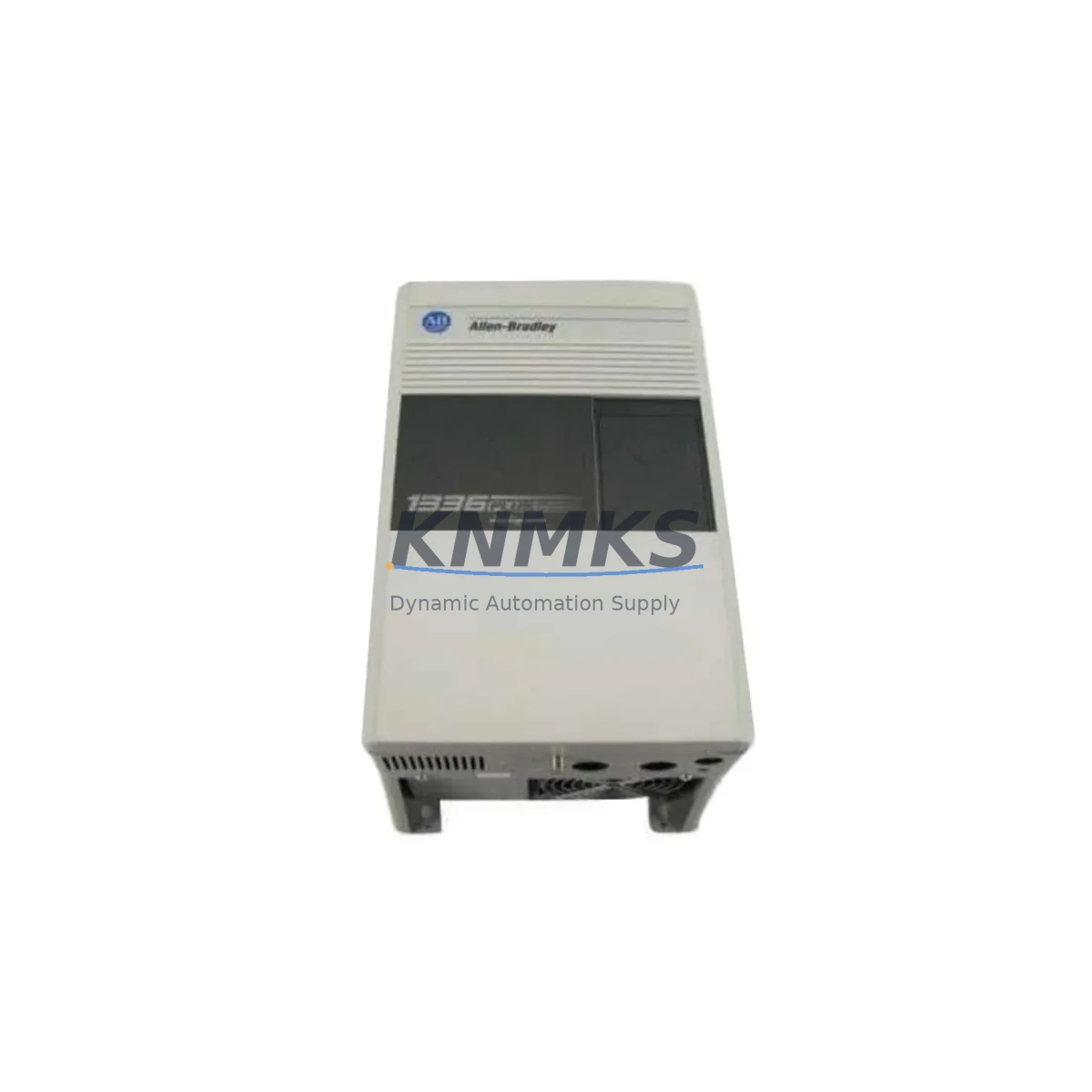
Allen-Bradley 1336F-BRF75-AE-DE Migration-Ready VFD for Legacy Control Systems
The Allen-Bradley 1336F-BRF75-AE-DE is a 75HP AC variable frequency drive from the 1336 FORCE series, purpose-built for demanding industrial environments where legacy control infrastructure must be preserved while drive technology is modernized. As the 1336 PLUS II platform approaches end-of-life and spare parts become increasingly scarce, the 1336F-BRF75-AE-DE has become a critical migration-ready replacement for facilities operating aging 1336 PLUS II drives in continuous-process, conveyor, pump, fan, and compressor applications.
Migrating from a 1336 PLUS II to the 1336F-BRF75-AE-DE requires careful pre-installation planning. Engineers must verify the incoming power supply capacity — the 1336F-BRF75-AE-DE operates on 380–480V AC three-phase input and draws up to 144A at full load, so the existing panel bus and upstream breaker sizing must be confirmed before the swap. Terminal wiring layouts between the 1336 PLUS II and the 1336 FORCE series differ at the control I/O terminal block: analog reference inputs (0–10V or 4–20mA), digital enable signals, and fault relay outputs may require re-termination or the use of a wiring adapter kit. The drive’s parameter set — including accel/decel ramps, current limits, speed references, and PID tuning — must be re-entered manually or migrated via DriveExplorer or Studio 5000 Logix Designer if the original parameter file was archived.
Backplane and enclosure compatibility is another key consideration. The 1336F-BRF75-AE-DE ships as a standalone chassis-mount drive and does not share a common backplane with ControlLogix or CompactLogix rack systems, but it communicates natively over DeviceNet using the 1336-GM6 DeviceNet communication module, or over Remote I/O using the 1336-GM1 adapter — both of which are commonly retained from the original 1336 PLUS II installation. If the existing control system uses a 1747-SDN DeviceNet Scanner in an SLC 500 rack, or a 1756-DNB scanner in a ControlLogix chassis, the node address and I/O mapping must be verified and updated in the scanner’s configuration table to match the 1336F-BRF75-AE-DE’s device profile. Where the legacy system uses a 1336-GM2 Remote I/O adapter, the rack/group/slot addressing must be re-mapped in the PLC-5 or SLC 500 program to reflect the new drive’s I/O image.
For facilities running PanelView or PanelView Plus HMI terminals, the drive status tags — run/stop, speed feedback, fault codes, and output current — must be re-mapped in the HMI project if the tag names or data file addresses have changed as a result of the migration. This is particularly relevant when upgrading from a PLC-5 program using integer files (N7, F8) to a ControlLogix program using structured tags, where the HMI project must be re-linked to the new tag database. The 1336F-BRF75-AE-DE’s fault history and diagnostic data are accessible via the HIM (Human Interface Module) keypad or remotely through the communication adapter, which simplifies commissioning and reduces the need for a laptop connection at the drive during initial startup.
Installation space must be confirmed before ordering. The 1336F-BRF75-AE-DE at 75HP requires a minimum enclosure depth of 400mm and adequate ventilation clearance above and below the drive. If the existing enclosure housed a 1336 PLUS II of equivalent horsepower, the physical footprint is generally compatible, but the mounting hole pattern and conduit entry points should be verified against the 1336 FORCE installation drawing (publication 1336F-IN001). Where space is constrained, the drive’s internal EMC filter and dynamic braking resistor connections should be planned in advance to avoid field modifications after installation.
Firmware compatibility is a common source of commissioning delays. The 1336F-BRF75-AE-DE ships with a specific firmware revision that determines which communication adapters and parameter sets are supported. Before installation, confirm the firmware version of any existing 1336-GM6 or 1336-GM1 communication modules, as older adapter firmware may not be compatible with newer drive firmware revisions. Rockwell Automation’s Product Compatibility and Download Center (PCDC) is the authoritative source for firmware cross-reference, but our technical team can assist with compatibility verification prior to shipment.
Every 1336F-BRF75-AE-DE unit supplied by KNMKS undergoes pre-shipment functional testing including power-on verification, parameter default load, and communication adapter handshake confirmation where applicable. Units are supplied with a support terms confirmed by quotation covering manufacturing defects and are shipped with original or equivalent packaging to prevent transit damage. Stock availability is confirmed at time of order, and expedited shipping is available for critical breakdown situations.
Migration Compatibility Table
| Parameter | 1336 PLUS II (Legacy) | 1336F-BRF75-AE-DE (Replacement) | Migration Note |
|---|---|---|---|
| Power Rating | 75HP / 55kW | 75HP / 55kW | Direct horsepower match; verify input breaker sizing |
| Input Voltage | 380–480V AC, 3-phase | 380–480V AC, 3-phase | Compatible; confirm bus voltage tolerance |
| Control I/O Terminals | TB1/TB2 terminal block | TB1/TB2 terminal block (revised layout) | Re-termination required; use wiring adapter kit |
| Communication | DeviceNet (1336-GM6) / Remote I/O (1336-GM1) | DeviceNet (1336-GM6) / Remote I/O (1336-GM1) | Adapters retained; re-map node address and I/O image |
| Mounting | Chassis-mount, standalone | Chassis-mount, standalone | Verify mounting hole pattern and enclosure depth ≥400mm |
| Parameter Migration | DriveExplorer / manual | DriveExplorer / Studio 5000 | Re-enter or upload archived parameter file |
| HMI Tag Remapping | PanelView / PanelView Plus | PanelView / PanelView Plus | Update drive status tags in HMI project |
| Firmware Compatibility | Legacy firmware | Current firmware revision | Verify adapter firmware version before installation |
| Commissioning Tool | HIM keypad / DriveExplorer | HIM keypad / DriveExplorer / Studio 5000 | Remote diagnostics available via communication adapter |
| Support terms | — | 12 Months | Covers manufacturing defects; pre-shipment tested |
Retrofit Planning for Existing Automation Systems
A successful retrofit of the 1336F-BRF75-AE-DE into an existing automation system begins with a thorough audit of the control cabinet. In most legacy installations, the 1336 PLUS II drive shares a panel with a 1747-L553 SLC 5/05 processor or a 1756-L63 ControlLogix controller, connected via a 1747-SDN DeviceNet Scanner or a 1756-DNB scanner module. The scanner’s I/O mapping table must be updated to reflect the 1336F-BRF75-AE-DE’s device profile, and the PLC program’s rung logic referencing the drive’s status bits — particularly the Run, Fault, and At-Speed bits — must be verified against the new drive’s I/O image word layout.
Power distribution within the cabinet also warrants attention. The 1336F-BRF75-AE-DE’s 24VDC control power supply must be confirmed as adequate for the drive’s control board and any installed communication adapters. If the existing 1606-XLP power supply is undersized, a replacement or supplemental unit should be planned before the retrofit begins. Similarly, the dynamic braking resistor — if used for overhauling load applications such as hoists or winders — must be sized for the 1336F-BRF75-AE-DE’s braking transistor rating, which differs from the 1336 PLUS II’s braking circuit specifications.
Signal integrity during the retrofit is protected by maintaining the existing shielded cable runs between the drive and the motor, and by verifying that the motor’s insulation resistance is adequate for the drive’s output switching frequency. Where the legacy installation used a 1321-3R line reactor for harmonic mitigation, the same reactor can typically be retained with the 1336F-BRF75-AE-DE, reducing the scope of the retrofit and preserving the existing conduit routing. The 1336-MOD-L11 programming cable or a 1203-USB DPI/SCANport adapter can be used for initial parameter configuration and firmware verification before the drive is energized in the field.
Downtime Control During System Migration
Minimizing unplanned downtime during a 1336 PLUS II to 1336F-BRF75-AE-DE migration requires a structured cutover plan. The most effective approach is to pre-configure the replacement drive on the bench — loading the archived parameter file, setting the node address, and confirming communication adapter handshake — before the legacy drive is removed from service. This bench commissioning step reduces the in-cabinet installation window to a mechanical swap and wiring re-termination, typically achievable within a planned 4–8 hour maintenance window.
To protect the original PLC program logic, a full backup of the SLC 500 or ControlLogix program — including the scanner configuration and HMI project — should be archived before any changes are made to the control system. If the migration involves a controller upgrade from SLC 500 to ControlLogix, the program conversion should be completed and tested in simulation before the physical drive swap, using Rockwell’s SLC-to-Logix migration tools to preserve rung logic and data file mappings. The 1336F-BRF75-AE-DE’s built-in fault logging and diagnostic LEDs provide immediate feedback during first energization, allowing the commissioning engineer to identify and resolve wiring or parameter issues without extended troubleshooting delays.
Field control continuity is maintained by keeping the motor in a safe, de-energized state throughout the swap and by using the drive’s Safe Torque Off (STO) input — where available — to provide a hardware-level safety interlock during the commissioning phase. Once the drive is energized and communication is confirmed, a no-load run at reduced speed verifies motor rotation direction and speed reference tracking before the process load is re-engaged. This staged commissioning approach reduces the risk of process upsets and protects both the drive and the connected mechanical equipment during the initial startup period.
Retrofit Support FAQ
Q: Is the 1336F-BRF75-AE-DE a direct drop-in replacement for the 1336 PLUS II at 75HP?
A: The 1336F-BRF75-AE-DE is a functional replacement for the 1336 PLUS II at equivalent horsepower and voltage ratings. The power terminals and input/output voltage specifications are compatible, but the control I/O terminal layout differs and re-termination is required. Communication adapters (1336-GM6 DeviceNet, 1336-GM1 Remote I/O) are shared between the two platforms and can be retained, but node address and I/O image re-mapping in the PLC scanner is necessary.
Q: What wiring changes are required at the control terminal block?
A: The analog reference inputs, digital enable signals, and fault relay outputs must be re-terminated to match the 1336F-BRF75-AE-DE’s terminal block layout. A wiring adapter kit is available for installations where the original wiring harness cannot be easily re-routed. We recommend downloading the 1336 FORCE wiring diagram (publication 1336F-IN001) and comparing it against the existing 1336 PLUS II wiring documentation before beginning the retrofit.
Q: How is pre-shipment testing conducted, and what does the support terms confirmed by quotation cover?
A: Every unit undergoes power-on functional testing, parameter default load verification, and communication adapter handshake confirmation before shipment. The support terms confirmed by quotation cover manufacturing defects in the drive hardware and firmware. It does not cover damage resulting from incorrect installation, overvoltage events, or environmental conditions outside the drive’s rated specifications. Support requests are processed through KNMKS with a target response time of 2 business days.
Q: Is stock available for immediate shipment, and what lead times apply?
A: Stock availability is confirmed at time of order inquiry. For critical breakdown situations, expedited same-day or next-day dispatch is available subject to stock confirmation. Standard orders are processed within 1–2 business days. Contact our sales team at admin@knmks.com or +86 18359268345 to confirm current stock levels and shipping options for your location.
© 2026 KNMKS. All rights reserved.
Original Source: https://knmks.com
Contact: admin@knmks.com | +86 18359268345
Product Identification
- Brand / Ecosystem
-
Allen-Bradley
Allen-Bradley - Model / Series
-
1336F-BRF75-AE-DE
Legacy Control Series - Product Family
- Variable Frequency Drives
- Availability Status
- Available on request after model and quantity confirmation
- Inquiry Type
- B2B RFQ, replacement inquiry and project spare-part request
- Pre-Quote Check
- Exact SKU, brand, series, quantity, nameplate photos and destination country are checked before quotation
System Path
Where this product fits in the KNMKS automation structure.
Specification & Inquiry Focus
- Drive range
- AC drives, VFDs and accessories
- Common needs
- Voltage, kW/HP and load type
- Project support
- Motor control, energy saving and spares
Buyer Confirmation
Information KNMKS checks before replying.
- Exact model
- 1336F-BRF75-AE-DE
- Brand / ecosystem
- Allen-Bradley
- Product family
- Variable Frequency Drives
- Application note
- Replacement, maintenance, project build or spare-part list
- Useful photos
- Nameplate, installed unit, cabinet layout or connector side
- Delivery details
- Quantity, destination country and target schedule
Document Support
Files and notes can be confirmed during quotation.
- Product photos or nameplate confirmation when available
- Packing and delivery notes before quotation confirmation
- Support scope and delivery terms confirmed per inquiry
- Export document coordination for qualified B2B requests
Inquiry Support
- Input/output voltage and kW/HP confirmation
- Energy-saving motor control inquiry
- Accessory and spare-unit support
What to Send Us
- Brand and exact model number: Allen-Bradley 1336F-BRF75-AE-DE
- Quantity and required delivery time
- Application, replacement requirement or nameplate photo
- Destination country and shipping preference
RFQ Preparation
This is a product inquiry page built for RFQ communication.
Fast Model Check
Send this model to KNMKS for confirmation.
Include quantity, destination country and photos if this is a maintenance replacement. The inquiry will be saved with a reference number after submission.
Brand & Compatibility Note
KNMKS displays automation product information for well-known industrial brand ecosystems and compatible replacement references. Brand names are used for product identification and compatibility reference only; final availability and commercial terms are confirmed per quotation.
 Manufacturing
 Machine Tools
 Packaging
 Energy & Power
 PLCs & Controllers
 HMI & Displays
 Servo Systems
 Sensors