
Overview
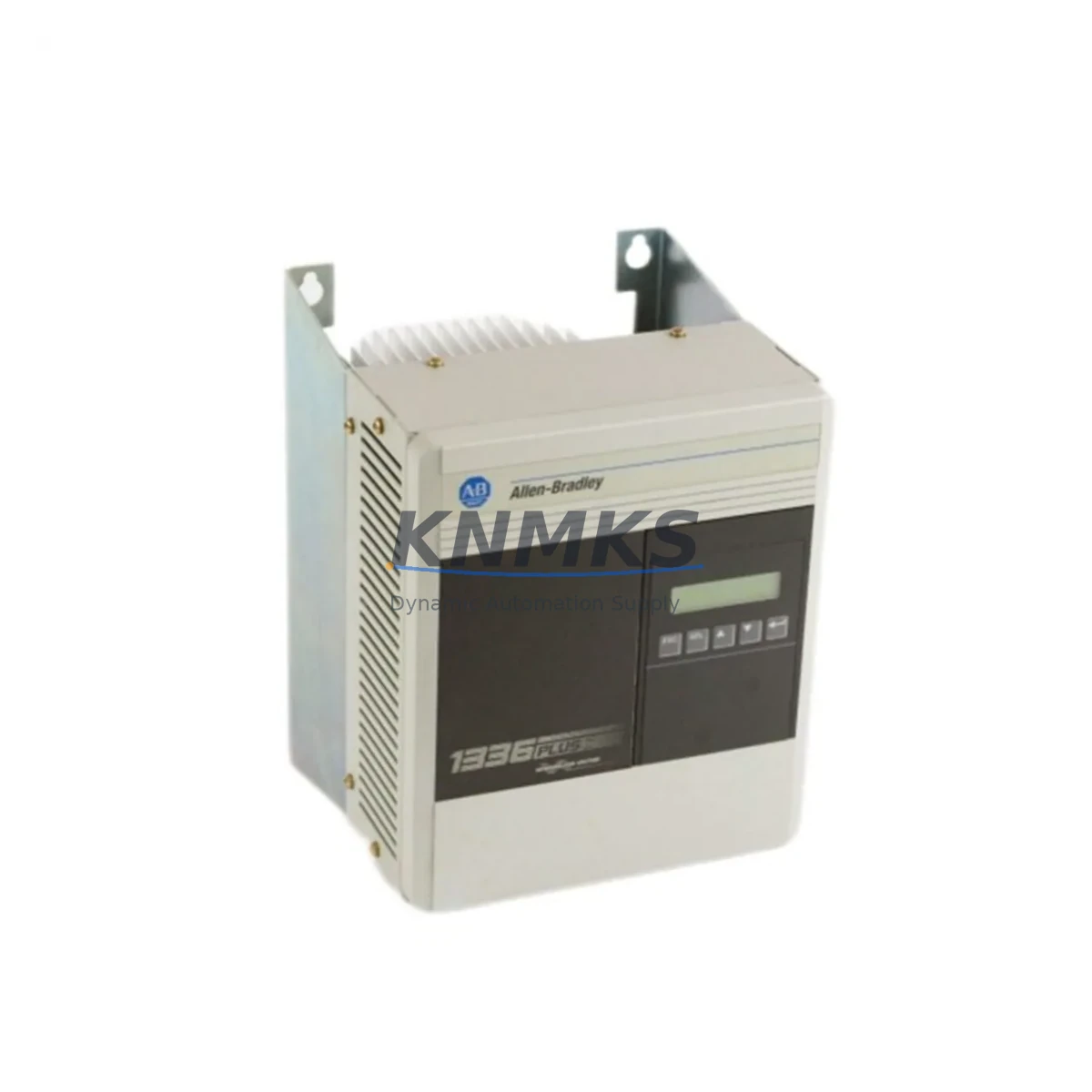
Allen-Bradley 1336F-BRF20-AE-EN-L5E Migration-Ready AC Drive for Legacy Control Systems
The Allen-Bradley 1336F-BRF20-AE-EN-L5E is a 2HP, 480V AC variable frequency drive from the 1336 FORCE series, engineered for direct integration into legacy 1336 PLUS and 1336 PLUS II control architectures. As original 1336 PLUS II drives approach end-of-life and spare parts become increasingly scarce, the 1336F-BRF20-AE-EN-L5E provides a validated migration path that preserves existing panel layouts, terminal wiring, and DeviceNet communication topology. For plant engineers managing aging automation infrastructure, this unit eliminates the need for full control cabinet redesigns while delivering modern drive performance and diagnostics.
The drive supports DeviceNet fieldbus communication via its onboard EN (DeviceNet) adapter, making it directly compatible with existing ControlLogix and SLC 500 controller networks without requiring gateway devices or protocol converters. The L5E firmware variant is factory-configured for enhanced I/O compatibility, supporting both analog and digital command references from legacy PLC output modules. Engineers replacing failed 1336 PLUS II units can retain existing RSLogix 5000 or RSLogix 500 program logic with minimal parameter remapping, significantly reducing commissioning time and unplanned downtime risk.
Before installation, retrofit planners should verify the following critical compatibility checkpoints: power supply capacity at the MCC or panel bus (minimum 480V ±10%, 3-phase), terminal block pitch and wire gauge compatibility with existing conduit runs, backplane slot availability if the drive is rack-mounted in a 1336 FORCE chassis configuration, and DeviceNet node address assignment to avoid MAC ID conflicts on the existing network segment. The drive’s physical footprint matches the 1336 PLUS II frame size for 2HP ratings, allowing direct panel cutout reuse in most retrofit scenarios.
For systems using a 1336 PLUS II with an external 1203-GU6 DeviceNet communication module, the 1336F-BRF20-AE-EN-L5E integrates the equivalent communication function onboard, eliminating one external component and reducing wiring complexity. When migrating from older 1336 IMPACT or 1336 REGEN drives in the same control cabinet, engineers should also audit the 1321-3R power conditioning reactor and 1321-3RA line reactor specifications to confirm harmonic filtering remains within system design limits. The 1336F series is compatible with existing 1336-MOD-L10 and 1336-MOD-L11 operator interface modules, allowing HMI screen reuse without reprogramming display logic.
For I/O-intensive retrofit projects, the drive’s analog input and output terminals are pin-compatible with standard 1492-IFM interface modules, supporting direct connection to existing terminal block assemblies. Systems that rely on a 1336-BRD-SP1 dynamic braking resistor can retain the existing braking circuit, as the 1336F-BRF20-AE-EN-L5E supports external braking resistor connection through the standard DB terminal pair. Firmware version L5E has been validated for compatibility with RSNetWorx for DeviceNet EDS file registration, ensuring seamless integration into existing network configuration tools without manual parameter entry.
All units are pre-tested under load prior to shipment, with parameter defaults verified against factory specifications. In-stock inventory is available for immediate dispatch, supporting urgent breakdown replacement scenarios where production continuity is critical. Each unit is covered by a support terms confirmed by quotation against manufacturing defects, with technical support available for commissioning assistance.
Migration Compatibility Table
| Parameter | 1336 PLUS II (Legacy) | 1336F-BRF20-AE-EN-L5E (Replacement) | Retrofit Note |
|---|---|---|---|
| Power Rating | 2HP / 1.5kW | 2HP / 1.5kW | Direct match — no panel derating required |
| Input Voltage | 480V AC, 3-Phase | 480V AC, 3-Phase | Verify bus voltage tolerance ±10% |
| Communication | DeviceNet (external module) | DeviceNet (onboard EN adapter) | Remove legacy 1203-GU6; reassign MAC ID |
| Terminal Wiring | Standard 1336 PLUS II terminal layout | Compatible terminal pitch and labeling | Verify wire gauge; reuse existing conduit |
| Mounting / Frame | Frame B (2HP 480V) | Frame B equivalent | Panel cutout reuse confirmed for most cabinets |
| HMI Compatibility | 1336-MOD-L10 / L11 | Compatible with 1336-MOD-L10 / L11 | Retain existing HMI; no screen reprogramming |
| Firmware | Legacy 1336 PLUS II firmware | L5E (factory default) | EDS file registration via RSNetWorx required |
| Braking Resistor | 1336-BRD-SP1 (external) | External DB resistor supported | Retain existing braking circuit |
| Support terms | — | support terms confirmed by quotation | Covers manufacturing defects from ship date |
Retrofit Planning for Existing Automation Systems
A successful retrofit begins with a full audit of the control cabinet before any hardware is removed. Start by documenting the existing 1336 PLUS II parameter file using DriveExplorer or DriveExecutive software — this baseline file will serve as the reference for remapping parameters to the 1336F-BRF20-AE-EN-L5E. Confirm that the ControlLogix or SLC 500 controller’s DeviceNet scanner module (such as a 1756-DNB or 1747-SDN) has an available node address for the replacement drive, and update the RSNetWorx for DeviceNet configuration file accordingly.
For cabinets that also house a 1336 FORCE power supply module or a shared 1321-3R line reactor, verify that the reactor’s impedance rating remains appropriate for the replacement drive’s input current draw. If the cabinet includes a 1492-IFM interface module for analog signal termination, confirm that the wiring from the existing process transmitters to the drive’s analog input terminals (terminals 1–4) is within the 0–10V or 4–20mA range supported by the L5E firmware configuration. For systems using a 1336-GM1 or 1336-GM2 operator station, the existing keypad assembly can typically be retained without modification.
When the control system includes multiple drives on the same DeviceNet segment, schedule the replacement during a planned maintenance window to avoid disrupting other nodes. After physical installation, use RSNetWorx to perform an online network scan, verify the new drive’s EDS file is correctly registered, and confirm polled I/O connection status before releasing the system to production. For cabinets with limited depth, confirm the 1336F-BRF20-AE-EN-L5E’s depth dimension against available clearance behind the panel door, particularly if a 1336-BRD-SP1 braking resistor assembly is mounted in the same enclosure.
Downtime Control During System Migration
Minimizing production downtime during a drive replacement requires preparation that begins before the maintenance window opens. Pre-stage the 1336F-BRF20-AE-EN-L5E with the correct DeviceNet node address configured and the parameter file pre-loaded using DriveExecutive offline programming. This allows the physical swap to proceed as a direct hardware exchange rather than a full commissioning event, reducing on-site intervention time to under two hours in most cases.
To protect existing PLC program logic, place the ControlLogix or SLC 500 controller in program mode before disconnecting the legacy drive, and inhibit the DeviceNet scanner’s connection to the affected node to prevent fault propagation to other I/O modules on the same network. After the replacement drive is installed and powered, restore the scanner connection, verify drive ready status via the controller’s I/O tree, and perform a no-load jog test before returning the motor to process control. This sequence preserves the original ladder logic and function block programming without modification, maintaining control continuity across the migration event.
For critical production lines where even brief interruptions carry significant cost, consider pre-installing the replacement drive in a parallel test panel to validate parameter settings, HMI communication, and motor response before the scheduled cutover. This approach allows the actual panel swap to be completed in a single shift, with the validated configuration transferred directly to the production cabinet.
Retrofit Support FAQ
Q: Is the 1336F-BRF20-AE-EN-L5E a direct drop-in replacement for the 1336 PLUS II 2HP 480V unit?
A: Yes, for the same power and voltage rating. The frame size, terminal layout, and DeviceNet communication are compatible. You will need to reassign the DeviceNet MAC ID and re-register the EDS file in RSNetWorx. Existing PLC program logic does not require modification in most applications.
Q: What commissioning steps are required after installation?
A: Power up the drive and verify input voltage at terminals L1, L2, L3. Connect to the drive using DriveExecutive or DriveExplorer, load the pre-configured parameter file, and confirm DeviceNet connection status via the controller’s scanner module. Perform a no-load jog test, verify motor rotation direction, and confirm analog reference signal levels before returning to automatic control.
Q: Can I reuse the existing terminal wiring from the 1336 PLUS II installation?
A: In most cases, yes. The terminal pitch and signal assignments are compatible. Verify wire gauge against the 1336F-BRF20-AE-EN-L5E terminal specifications and confirm that shielded cable grounding is maintained at the drive end to prevent noise interference on analog input signals.
Q: What does the support terms confirmed by quotation cover, and is pre-shipment testing included?
A: The support terms confirmed by quotation cover manufacturing defects from the date of shipment. All units undergo pre-shipment load testing with parameter verification against factory specifications. In-stock units are available for same-day or next-day dispatch to support urgent breakdown replacement requirements.
© 2026 KNMKS. All rights reserved.
Original Source: https://knmks.com
Contact: admin@knmks.com | +86 18359268345
Product Identification
- Brand / Ecosystem
-
Allen-Bradley
Allen-Bradley - Model / Series
-
1336F-BRF20-AE-EN-L5E
Legacy Control Series - Product Family
- Variable Frequency Drives
- Availability Status
- Available on request after model and quantity confirmation
- Inquiry Type
- B2B RFQ, replacement inquiry and project spare-part request
- Pre-Quote Check
- Exact SKU, brand, series, quantity, nameplate photos and destination country are checked before quotation
System Path
Where this product fits in the KNMKS automation structure.
Specification & Inquiry Focus
- Drive range
- AC drives, VFDs and accessories
- Common needs
- Voltage, kW/HP and load type
- Project support
- Motor control, energy saving and spares
Buyer Confirmation
Information KNMKS checks before replying.
- Exact model
- 1336F-BRF20-AE-EN-L5E
- Brand / ecosystem
- Allen-Bradley
- Product family
- Variable Frequency Drives
- Application note
- Replacement, maintenance, project build or spare-part list
- Useful photos
- Nameplate, installed unit, cabinet layout or connector side
- Delivery details
- Quantity, destination country and target schedule
Document Support
Files and notes can be confirmed during quotation.
- Product photos or nameplate confirmation when available
- Packing and delivery notes before quotation confirmation
- Support scope and delivery terms confirmed per inquiry
- Export document coordination for qualified B2B requests
Inquiry Support
- Input/output voltage and kW/HP confirmation
- Energy-saving motor control inquiry
- Accessory and spare-unit support
What to Send Us
- Brand and exact model number: Allen-Bradley 1336F-BRF20-AE-EN-L5E
- Quantity and required delivery time
- Application, replacement requirement or nameplate photo
- Destination country and shipping preference
RFQ Preparation
This is a product inquiry page built for RFQ communication.
Fast Model Check
Send this model to KNMKS for confirmation.
Include quantity, destination country and photos if this is a maintenance replacement. The inquiry will be saved with a reference number after submission.
Brand & Compatibility Note
KNMKS displays automation product information for well-known industrial brand ecosystems and compatible replacement references. Brand names are used for product identification and compatibility reference only; final availability and commercial terms are confirmed per quotation.
 Manufacturing
 Machine Tools
 Packaging
 Energy & Power
 PLCs & Controllers
 HMI & Displays
 Servo Systems
 Sensors