
Overview
ABB TK821V020 Migration-Ready Battery Cable for AC800M: Legacy System Retrofit and Upgrade Guide
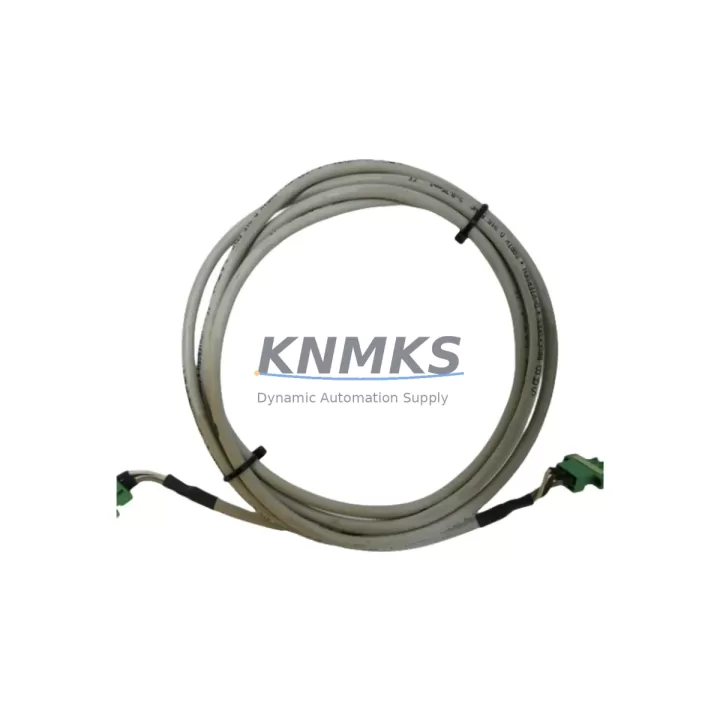
The ABB TK821V020 is a dedicated battery cable designed for the AC800M Distributed Control System platform, serving as a direct replacement for the discontinued 3BSC950202R1 cable assembly. In aging control cabinets where the original battery backup wiring has degraded, corroded, or become mechanically compromised, the TK821V020 restores reliable power continuity to the PM800-series processor modules — a critical requirement for maintaining SRAM data retention and safe controller shutdown sequences during power interruptions.
For facilities managing legacy ABB 800xA or Symphony Plus environments, sourcing a verified TK821V020 is often the first step in a broader retrofit campaign. Engineers planning a control system migration must confirm that the battery cable interfaces correctly with the PM856, PM860, or PM861 processor modules installed in the S800 I/O rack or AC800M controller chassis. The cable’s connector pinout, insulation rating, and length must match the original specification to avoid introducing ground loops or intermittent battery faults that can trigger nuisance alarms or unplanned shutdowns.
Before installation, technicians should verify the firmware version running on the target PM8xx module. Certain firmware revisions introduced changes to battery charge management logic, and an incompatible cable assembly — even one that appears physically identical — may cause the controller to report a battery fault condition. Cross-referencing the TK821V020 part number against the AC800M Hardware Unit Installation and Replacement guide (document 3BSE036351) is strongly recommended prior to any field replacement.
Migration Compatibility Table
| Parameter | TK821V020 (Replacement) | 3BSC950202R1 (Legacy / Discontinued) |
|---|---|---|
| Compatible Controllers | PM856, PM860, PM861 (AC800M) | PM856, PM860 (AC800M) |
| Connector Interface | Proprietary ABB battery header, 2-pin keyed | Proprietary ABB battery header, 2-pin keyed |
| Installation Requirement | Controller powered down; battery disconnected first | Same procedure |
| Communication Compatibility | No protocol dependency; passive power cable | No protocol dependency |
| Replacement Recommendation | Direct drop-in replacement; verify cable routing clearance | Discontinued — source TK821V020 as approved substitute |
| Commissioning Focus | Confirm battery charge indicator in AC800M diagnostic tool after installation | N/A |
| Support terms | support terms confirmed by quotation | Pre-Shipment Tested | No longer available from OEM |
Retrofit Planning for Existing Automation Systems
A TK821V020 replacement is rarely an isolated task. In most retrofit scenarios, the battery cable failure is a symptom of broader aging in the control cabinet. A thorough retrofit plan should account for the condition of the TB820V2 communication interface module, which handles PROFIBUS DP connectivity between the AC800M controller and field devices. If the TB820V2 shows intermittent communication faults alongside the battery issue, both components should be addressed in the same maintenance window to avoid a second unplanned outage.
Similarly, engineers should inspect the SD821 or SD822 power supply modules feeding the controller rack. A degraded power supply can mask itself as a battery cable fault, since the controller’s battery monitoring circuit relies on a stable reference voltage from the main supply rail. Replacing the TK821V020 without verifying the SD821 output voltage may result in a recurring fault condition within weeks of the repair.
For sites running S800 I/O modules — such as the AI810 analog input module or the DO810 digital output module — connected to the AC800M via the CI854 PROFIBUS DP interface, the retrofit window is also an appropriate time to audit the backplane connectors and module seating. Loose or oxidized backplane contacts are a common source of intermittent I/O faults in systems that have been in service for more than ten years. Addressing these during the same planned outage minimizes total downtime and avoids the need for a second maintenance shutdown.
If the site is also planning a migration from the legacy AC800M platform to a newer control architecture, the TK821V020 replacement can serve as a bridge measure — extending the operational life of the existing system while the migration project is scoped, budgeted, and scheduled. In this context, maintaining a verified spare of the TK821V020 in the site’s critical spare parts inventory is a prudent risk management decision, particularly for facilities with 12-to-36-month procurement lead times on legacy ABB components.
Downtime Control During System Migration
Replacing the TK821V020 battery cable requires the AC800M controller to be taken offline, which means the process segment controlled by that CPU must be transferred to manual mode or handed off to a redundant controller if the system architecture supports it. For non-redundant AC800M installations, the replacement window should be coordinated with the operations team to align with a scheduled production break or a planned maintenance shutdown.
Before disconnecting the battery cable, the engineer should perform a full backup of the controller application using ABB’s Control Builder M software. This backup captures the current program logic, configuration parameters, and I/O mapping, ensuring that the controller can be restored to its exact pre-maintenance state if the replacement procedure encounters any complications. The backup file should be stored on a local engineering workstation as well as a network share, not solely on the controller’s internal memory.
After installing the TK821V020 and reconnecting the battery, the controller should be powered up in a controlled sequence: main supply first, then battery connection confirmed, then application download verified. The AC800M diagnostic interface will display the battery status within approximately 30 seconds of startup. If the battery charge indicator shows a fault immediately after installation, the most common causes are a reversed connector orientation or a battery cell that has reached end-of-life and requires replacement independently of the cable. Confirming battery cell voltage with a multimeter before installation eliminates this variable from the troubleshooting process.
For sites where HMI screens built on ABB’s 800xA Operations interface display battery status as a process alarm, the alarm suppression list should be updated before the maintenance window begins to prevent nuisance notifications from reaching the control room during the replacement procedure. Restoring the alarm to active status after the replacement is complete and the battery status has been confirmed healthy is a mandatory step in the close-out checklist.
Retrofit Support FAQ
Q1: Is the TK821V020 a direct replacement for the discontinued 3BSC950202R1 battery cable?
Yes. The TK821V020 is the current ABB-approved substitute for the 3BSC950202R1. The connector interface, cable length, and electrical specification are equivalent. No wiring modifications or adapter hardware are required for a standard replacement on PM856, PM860, or PM861 processor modules.
Q2: What commissioning steps are required after installing the TK821V020?
After installation, power up the AC800M controller and confirm the battery status indicator in Control Builder M or the 800xA diagnostic view. The battery should show a charging or healthy status within 60 seconds. If a fault persists, verify connector seating, check battery cell voltage independently, and confirm that the PM8xx firmware version is compatible with the current battery management specification.
Q3: Can the TK821V020 be installed while the controller is running?
No. The battery cable must be replaced with the controller powered down and the main supply disconnected. Hot-swapping the battery cable risks introducing a transient voltage spike on the processor board’s power rail, which can corrupt SRAM data or damage the battery charge circuit. Always follow the lockout/tagout procedure applicable to your site before beginning the replacement.
Q4: What support terms and pre-shipment testing does KNMKS provide for the TK821V020?
Every TK821V020 unit shipped by KNMKS carries a support terms confirmed by quotation covering manufacturing defects and electrical performance. Each unit undergoes pre-shipment continuity and insulation testing before dispatch. In-stock units are typically available for same-day or next-business-day shipment. For sites requiring long-term supply agreements covering 12 to 36 months of forward inventory, contact the KNMKS sales team to discuss dedicated stock allocation and priority fulfillment terms.
© 2026 KNMKS. All rights reserved.
Original Source: https://knmks.com
Contact: admin@knmks.com | +86 18359268345
Product Identification
- Brand / Ecosystem
-
ABB
ABB - Model / Series
-
TK821V020
AC800M Series - Product Family
- Cables & Connectors
- Availability Status
- Available on request after model and quantity confirmation
- Inquiry Type
- B2B RFQ, replacement inquiry and project spare-part request
- Pre-Quote Check
- Exact SKU, brand, series, quantity, nameplate photos and destination country are checked before quotation
System Path
Where this product fits in the KNMKS automation structure.
Specification & Inquiry Focus
- Cable range
- Sensor, servo, network and circular connectors
- Common needs
- Length, pin count, shielding and plug type
- Project support
- Machine wiring and installation kits
Buyer Confirmation
Information KNMKS checks before replying.
- Exact model
- TK821V020
- Brand / ecosystem
- ABB
- Product family
- Cables & Connectors
- Application note
- Replacement, maintenance, project build or spare-part list
- Useful photos
- Nameplate, installed unit, cabinet layout or connector side
- Delivery details
- Quantity, destination country and target schedule
Document Support
Files and notes can be confirmed during quotation.
- Product photos or nameplate confirmation when available
- Packing and delivery notes before quotation confirmation
- Support scope and delivery terms confirmed per inquiry
- Export document coordination for qualified B2B requests
Inquiry Support
- Cable length and connector type confirmation
- Servo, sensor and network cable inquiry
- Accessory kits for installation teams
What to Send Us
- Brand and exact model number: ABB TK821V020
- Quantity and required delivery time
- Application, replacement requirement or nameplate photo
- Destination country and shipping preference
RFQ Preparation
This is a product inquiry page built for RFQ communication.
Fast Model Check
Send this model to KNMKS for confirmation.
Include quantity, destination country and photos if this is a maintenance replacement. The inquiry will be saved with a reference number after submission.
Brand & Compatibility Note
KNMKS displays automation product information for well-known industrial brand ecosystems and compatible replacement references. Brand names are used for product identification and compatibility reference only; final availability and commercial terms are confirmed per quotation.
 Manufacturing
 Machine Tools
 Packaging
 Energy & Power
 PLCs & Controllers
 HMI & Displays
 Servo Systems
 Variable Frequency Drives