
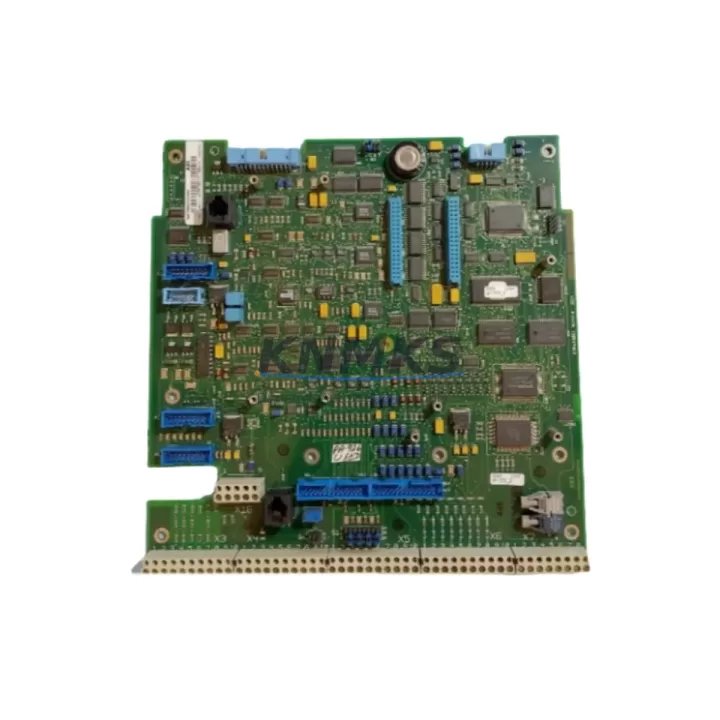
Overview
ABB SDCS-COM-81 3ADT314900R1502 Migration-Ready Fieldbus Board: Legacy DCS800 System Upgrade & Retrofit
The ABB SDCS-COM-81 (part number 3ADT314900R1502) is a fieldbus communication option board engineered for the DCS800 series DC drive platform. As legacy automation systems face end-of-life pressures, the SDCS-COM-81 has become a critical component in retrofit projects where engineers must preserve existing PROFIBUS DP or DeviceNet communication architectures while upgrading aging drive hardware. Whether you are replacing a failed communication board in a running production line or planning a phased migration from an older DCS500 or DCS400 platform to the DCS800 series, this module provides a validated, drop-in compatible upgrade path that minimises engineering risk and commissioning time.
In retrofit scenarios, the SDCS-COM-81 slots directly into the option slot of the DCS800 drive, restoring fieldbus connectivity without requiring changes to the PLC program or SCADA configuration. Engineers migrating from older ABB drives should verify the option slot assignment (typically Slot 1 or Slot 2 on the DCS800 control board SDCS-CON-4) and confirm that the fieldbus master — whether a Siemens S7-300 DP master, an Allen-Bradley ControlLogix with DeviceNet scanner, or an ABB AC500 PLC — recognises the GSD file associated with the SDCS-COM-81. In most cases, the existing GSD or EDS file from the predecessor module remains compatible, eliminating the need to re-configure the network topology or re-download the PLC project.
Migration Compatibility Table
| Parameter | Detail |
|---|---|
| SKU / Part Number | SDCS-COM-81 / 3ADT314900R1502 |
| Compatible Drive Platform | ABB DCS800 Series DC Drive |
| Predecessor / Replaced Module | SDCS-COM-8 (DCS500 platform), SDCS-COM-80 |
| Supported Fieldbus Protocols | PROFIBUS DP, DeviceNet (protocol determined by firmware variant) |
| Installation Interface | Option slot on SDCS-CON-4 control board; no additional wiring harness required |
| Communication Compatibility | Compatible with existing GSD / EDS files in most migration scenarios |
| Retrofit Recommendation | Confirm option slot assignment and firmware version on SDCS-CON-4 before installation |
| Commissioning Focus | Node address DIP switch setting, baud rate auto-detection, cyclic data mapping verification |
| Power Supply | Powered via option slot; no external 24 VDC supply required |
| Support terms | support terms confirmed by quotation — all units shipped after full functional test |
Retrofit Planning for Existing Automation Systems
A successful SDCS-COM-81 retrofit begins well before the module arrives on site. The first step is an audit of the existing control cabinet to confirm available option slots on the SDCS-CON-4 control board. In multi-drive installations — for example, a paper mill with four DCS800 drives on a common DC bus — each drive requires its own SDCS-COM-81 if individual fieldbus addressing is needed. Engineers should also check whether the existing SDCS-POW-4 power supply board is rated for the additional option board load; in most standard DCS800 configurations this is not a constraint, but it is worth confirming in high-density cabinets.
Terminal wiring for the fieldbus connector on the SDCS-COM-81 follows the standard 9-pin D-sub (DB9) pinout for PROFIBUS DP or the 5-pin open-style connector for DeviceNet. If the existing cable was terminated for an older SDCS-COM-8 module on a DCS500 drive, the physical connector type may differ and a short adapter or re-termination will be required. This is a common oversight in fast-turnaround retrofits and should be confirmed during the pre-shutdown planning phase.
For sites running ABB Drives Windows (DriveWindow) or the newer Drive Composer Pro software, the SDCS-COM-81 parameters are accessible via the standard parameter group 51 (Fieldbus Adapter) on the DCS800. Engineers migrating from a DCS500 platform should map the equivalent parameter groups from the older drive’s parameter list to the DCS800 structure — ABB’s migration guide for DCS500-to-DCS800 provides a parameter cross-reference table that significantly reduces commissioning time. The SDCS-FIO-01 I/O extension module and SDCS-FIO-11 analogue I/O board are frequently installed alongside the SDCS-COM-81 in retrofit projects where additional digital or analogue I/O points are needed to replicate the signal architecture of the legacy system.
HMI screen updates are another area that requires attention. If the existing operator panel — whether an ABB CDP312R control panel or a third-party HMI connected via the drive’s RS-485 port — displays drive status using parameter addresses specific to the DCS500, those addresses must be remapped to the DCS800 parameter structure. In most cases this is a straightforward find-and-replace in the HMI project, but it should be validated in a bench test before the live cutover. The SDCS-CON-4 control board’s onboard memory retains the drive application program, so if the DCS800 control board itself is being replaced as part of the retrofit, the application program must be backed up using DriveWindow or Drive Composer Pro before the old board is removed.
Downtime Control During System Migration
Minimising unplanned downtime is the primary concern in any live-system retrofit. For the SDCS-COM-81 replacement, the physical swap takes less than five minutes once the drive is de-energised and the option slot is accessible — the module is secured by a single retaining screw and the fieldbus connector is plug-in. The critical time investment is in pre-commissioning: verifying the node address DIP switch settings against the fieldbus master configuration, confirming baud rate settings, and running a short cyclic communication test before the drive is returned to automatic mode.
Where production schedules do not permit a full shutdown, a staged approach is possible in multi-drive systems. The fieldbus master can be temporarily configured to skip the node address of the drive under maintenance, allowing the remaining drives to continue operating while the SDCS-COM-81 is replaced and re-commissioned on the isolated drive. Once communication is restored and verified, the master configuration is updated to re-include the node, and the drive is returned to service — typically within a single shift.
To protect the original program logic during the retrofit, always export a full parameter backup from the DCS800 using Drive Composer Pro before beginning any hardware work. Store the backup file off-site or on a network share, not only on the local engineering laptop. If the retrofit also involves a firmware update on the SDCS-CON-4 — for example, to resolve a known compatibility issue with a newer PLC firmware version — the firmware update should be performed and validated before the fieldbus module is installed, to isolate variables during commissioning. Keeping a tested spare SDCS-COM-81 in the site’s spare parts inventory is strongly recommended for critical drives where unplanned downtime carries significant production cost.
Retrofit Support FAQ
Q1: Is the SDCS-COM-81 a direct replacement for the SDCS-COM-8 used in DCS500 drives?
The SDCS-COM-81 is designed for the DCS800 platform and is not mechanically or electrically interchangeable with the SDCS-COM-8 used in DCS500 drives. However, in a DCS500-to-DCS800 migration project, the SDCS-COM-81 provides equivalent PROFIBUS DP or DeviceNet functionality on the new drive, allowing the existing fieldbus network topology and PLC program to be retained with minimal modification.
Q2: What commissioning steps are required after installing the SDCS-COM-81?
After physical installation, set the node address using the DIP switches on the module, power up the drive, and verify that the fieldbus master detects the node. Check parameter group 51 in the DCS800 to confirm the fieldbus adapter is active and that cyclic data (process data words) are mapped correctly. Run a short test cycle under manual control before returning the drive to automatic mode. Full commissioning typically takes 30–90 minutes depending on the complexity of the cyclic data mapping.
Q3: How do I confirm the SDCS-COM-81 is compatible with my current DCS800 firmware version?
Check the firmware version displayed on the CDP312R control panel or in Drive Composer Pro (parameter 33.01). Cross-reference this against ABB’s SDCS-COM-81 firmware compatibility matrix in the module’s hardware manual (document 3ADW000379). Units supplied by KNMKS are tested against current DCS800 firmware releases prior to shipment. If you are running a legacy firmware version, contact our technical team with your firmware version number for a compatibility confirmation before ordering.
Q4: What does the support terms confirmed by quotation cover, and what is the lead time for in-stock units?
All SDCS-COM-81 units supplied by KNMKS carry a support terms confirmed by quotation covering manufacturing defects and functional failures under normal operating conditions. Each unit undergoes a full functional test — including fieldbus communication verification — before shipment. In-stock units are typically dispatched within 1–2 business days. For urgent retrofit requirements, same-day dispatch may be available; contact admin@knmks.com or call +86 18359268345 to confirm current stock availability and lead time.
© 2026 KNMKS. All rights reserved.
Original Source: https://knmks.com
Contact: admin@knmks.com | +86 18359268345
Product Identification
- Brand / Ecosystem
-
ABB
ABB - Model / Series
-
SDCS-COM-81 3ADT314900R1502
S800 Series - Product Family
- Communication Modules
- Availability Status
- Available on request after model and quantity confirmation
- Inquiry Type
- B2B RFQ, replacement inquiry and project spare-part request
- Pre-Quote Check
- Exact SKU, brand, series, quantity, nameplate photos and destination country are checked before quotation
System Path
Where this product fits in the KNMKS automation structure.
Specification & Inquiry Focus
- Network range
- Ethernet, fieldbus and gateway modules
- Common needs
- Protocol, port and controller family
- Project support
- Machine networking and data integration
Buyer Confirmation
Information KNMKS checks before replying.
- Exact model
- SDCS-COM-81 3ADT314900R1502
- Brand / ecosystem
- ABB
- Product family
- Communication Modules
- Application note
- Replacement, maintenance, project build or spare-part list
- Useful photos
- Nameplate, installed unit, cabinet layout or connector side
- Delivery details
- Quantity, destination country and target schedule
Document Support
Files and notes can be confirmed during quotation.
- Product photos or nameplate confirmation when available
- Packing and delivery notes before quotation confirmation
- Support scope and delivery terms confirmed per inquiry
- Export document coordination for qualified B2B requests
Inquiry Support
- Industrial Ethernet and fieldbus module inquiry
- Protocol compatibility review
- Integration project inquiry support
What to Send Us
- Brand and exact model number: ABB SDCS-COM-81 3ADT314900R1502
- Quantity and required delivery time
- Application, replacement requirement or nameplate photo
- Destination country and shipping preference
RFQ Preparation
This is a product inquiry page built for RFQ communication.
Fast Model Check
Send this model to KNMKS for confirmation.
Include quantity, destination country and photos if this is a maintenance replacement. The inquiry will be saved with a reference number after submission.
Brand & Compatibility Note
KNMKS displays automation product information for well-known industrial brand ecosystems and compatible replacement references. Brand names are used for product identification and compatibility reference only; final availability and commercial terms are confirmed per quotation.
 Manufacturing
 Machine Tools
 Packaging
 Energy & Power
 PLCs & Controllers
 HMI & Displays
 Servo Systems
 Variable Frequency Drives