
Overview
ABB FMBT-21 Migration-Ready Modbus/TCP Adapter: Legacy System Migration and Compatible Upgrade
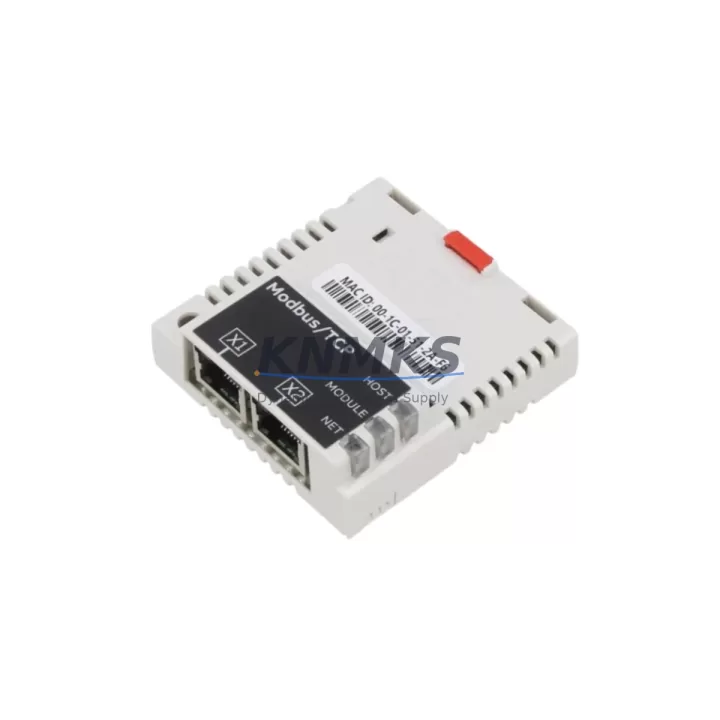
The ABB FMBT-21 is a Modbus/TCP fieldbus adapter module designed for direct integration with ABB ACS series variable speed drives, including the ACS550, ACS800, and ACS880 platforms. As a verified replacement for the discontinued FDPI-02 Modbus adapter, the FMBT-21 is the preferred migration path for facilities managing aging drive communication infrastructure. Whether you are upgrading a legacy control cabinet, extending the service life of existing ACS drives, or migrating from proprietary fieldbus protocols to open Ethernet-based Modbus/TCP, the FMBT-21 delivers the compatibility and reliability that industrial maintenance teams require.
In retrofit scenarios, the FMBT-21 mounts directly into the FDPI slot on compatible ACS drive frames, eliminating the need for external signal converters or custom wiring harnesses. Before installation, engineers should verify the drive firmware version to confirm FMBT-21 support — ACS880 drives running firmware 2.x or later are fully compatible, while earlier ACS800 units may require a firmware update via the DriveStudio programming tool. The module communicates over standard RJ45 Ethernet, integrating seamlessly with Modbus/TCP-capable PLCs, SCADA systems, and DCS platforms from Siemens, Rockwell, Honeywell, and ABB’s own AC500 controller series.
Terminal wiring during migration is straightforward: the FMBT-21 uses the drive’s internal FDPI-02 connector, so no additional terminal block rewiring is required at the control cabinet level. However, if the existing installation used external Modbus RTU-to-TCP converters in conjunction with the FDPI-02, those converters can be decommissioned once the FMBT-21 is in place, simplifying the cabinet layout and reducing potential failure points. IP address assignment is handled via the drive’s control panel or through the DriveStudio configuration interface, and the module supports both static IP and DHCP addressing modes.
For facilities running multi-drive systems, the FMBT-21 supports Modbus/TCP polling from a single master controller to multiple drive nodes, making it suitable for coordinated motor control applications such as conveyor lines, pump stations, and compressor arrays. When migrating from an older FDPI-02-based network, the Modbus register map remains consistent, meaning existing PLC ladder logic and SCADA tag databases typically require no modification — a critical advantage for minimizing engineering hours and validation time during planned maintenance windows.
In control system upgrade projects where the ACS800 or ACS550 drives are being retained while the supervisory layer is modernized — for example, migrating from a legacy Modbus RTU serial network to a Modbus/TCP Ethernet backbone — the FMBT-21 serves as the bridge component that makes the transition possible without drive replacement. This approach preserves capital investment in existing drive hardware while enabling integration with modern HMI panels, OPC-UA gateways, and cloud-connected SCADA platforms. Related components commonly specified alongside the FMBT-21 in such projects include the ABB RDNA-01 DeviceNet adapter (for parallel protocol support), the RAIO-01 analog I/O extension module, the RBIO-01 digital I/O extension, and the RPBA-01 PROFIBUS-DP adapter for sites with mixed fieldbus environments. The ACS880 primary control unit (PCU) and the BCON-11 backup controller are also frequently referenced in multi-drive migration planning documents.
Each FMBT-21 unit supplied by KNMKS undergoes pre-shipment functional testing, including Modbus/TCP communication verification, register read/write validation, and physical connector inspection. Units are dispatched with a support terms confirmed by quotation covering manufacturing defects and communication failures under normal operating conditions. Stock is maintained across multiple regional warehouses to support emergency replacement requirements with rapid dispatch timelines.
Migration Compatibility Table
| Parameter | FMBT-21 (Current) | FDPI-02 (Legacy / Discontinued) |
|---|---|---|
| Protocol | Modbus/TCP (Ethernet) | Modbus RTU (Serial RS-485) |
| Physical Interface | RJ45 Ethernet | RS-485 Terminal Block |
| Drive Slot Compatibility | FDPI Slot (ACS550 / ACS800 / ACS880) | FDPI Slot (ACS550 / ACS800) |
| ACS880 Support | Yes (Firmware 2.x+) | No |
| IP Addressing | Static / DHCP | N/A |
| Register Map Compatibility | Consistent with FDPI-02 Modbus map | Reference baseline |
| Configuration Tool | DriveStudio / Drive Panel | Drive Panel only |
| Installation Space | Same FDPI slot footprint — no cabinet modification required | FDPI slot |
| Replacement Recommendation | Direct drop-in for FDPI-02 in ACS550/ACS800; preferred upgrade for ACS880 | Discontinued — no longer available |
| Commissioning Focus | Firmware version check, IP assignment, Modbus master polling configuration | Baud rate, parity, node address |
| Support terms | 12 Months (KNMKS) | N/A |
Retrofit Planning for Existing Automation Systems
Successful FMBT-21 integration into an existing automation system begins with a structured pre-retrofit assessment. The first step is confirming the drive firmware version using DriveStudio or the ACS drive’s local control panel — this determines whether a firmware update is required before the FMBT-21 can be recognized. In ACS800 installations, the RMIO-11 main control board firmware must be at a compatible revision level; in ACS880 systems, the primary control unit (PCU) firmware governs adapter slot recognition.
Cabinet space assessment is the next priority. The FMBT-21 occupies the same FDPI slot as the FDPI-02, so no additional DIN rail space or panel cutouts are required. However, if the retrofit also involves adding an RAIO-01 analog I/O extension or an RBIO-01 digital I/O extension to expand the drive’s I/O capacity, the available extension module slots on the drive frame must be inventoried before ordering. In multi-drive cabinets, the BCON-11 backup controller and the ACS880 PCU should also be checked for slot availability if parallel communication redundancy is planned.
Communication link planning is critical when migrating from serial Modbus RTU to Modbus/TCP. The existing Ethernet switch infrastructure must support the additional node, and VLAN segmentation should be reviewed to ensure the drive network segment is accessible from the PLC or SCADA master. If the site uses an ABB AC500 PLC as the Modbus/TCP master, the polling cycle time should be configured to match the drive’s response timeout settings to avoid communication faults during high-load periods. For sites with mixed fieldbus environments — where some drives use PROFIBUS-DP via the RPBA-01 adapter and others are being migrated to Modbus/TCP — careful network topology planning prevents address conflicts and ensures deterministic communication across all drive nodes.
Downtime Control During System Migration
Minimizing unplanned downtime during FMBT-21 installation requires a structured changeover procedure. The recommended approach is to pre-configure the FMBT-21 IP address and Modbus node parameters offline using DriveStudio before the maintenance window begins. This allows the physical swap — removing the FDPI-02 and inserting the FMBT-21 — to be completed in under five minutes, with the drive returning to operational status immediately after power restoration.
Existing PLC ladder logic and SCADA tag databases do not require modification when migrating from FDPI-02 to FMBT-21, because the Modbus register map is consistent between the two adapters. This means the control program logic, HMI screen bindings, and historian tag references remain valid after the swap, eliminating the need for a full system re-validation cycle. Only the communication layer configuration — changing from serial COM port to Ethernet IP address in the PLC Modbus master configuration — requires updating.
For critical production lines where even brief interruptions are unacceptable, a parallel commissioning approach is recommended: install and configure the FMBT-21 in a test drive of the same model offline, verify full Modbus/TCP communication with the PLC master, and then execute the live swap during a scheduled micro-shutdown. This approach reduces live commissioning time to under 15 minutes and provides a verified configuration baseline before the production drive is touched. KNMKS pre-shipment testing ensures that each FMBT-21 arrives in a known-good communication state, further reducing on-site commissioning risk.
Retrofit Support FAQ
Q: Is the FMBT-21 a direct replacement for the FDPI-02 in ACS550 and ACS800 drives?
A: Yes. The FMBT-21 installs in the same FDPI slot and uses the same Modbus register map as the FDPI-02. The primary difference is the communication interface — Modbus/TCP over Ethernet instead of Modbus RTU over RS-485. No cabinet rewiring is required, but the PLC Modbus master must be reconfigured to use the Ethernet IP address instead of the serial COM port.
Q: What firmware version is required on the ACS880 for FMBT-21 compatibility?
A: ACS880 drives running primary control unit (PCU) firmware version 2.x or later are fully compatible with the FMBT-21. Drives on earlier firmware versions should be updated via DriveStudio before installation. For ACS800 drives, the RMIO-11 main control board firmware must be at a compatible revision — contact KNMKS technical support for the specific revision matrix.
Q: Does KNMKS provide pre-shipment testing for the FMBT-21?
A: Yes. Every FMBT-21 unit undergoes pre-shipment functional testing including Modbus/TCP communication verification, register read/write validation, and physical connector inspection. Units are supplied with a support terms confirmed by quotation covering manufacturing defects and communication failures under normal operating conditions.
Q: What is the typical lead time and stock availability for the FMBT-21?
A: KNMKS maintains multi-region stock of the FMBT-21 to support emergency replacement requirements. Standard orders are dispatched within 1–3 business days. For urgent requirements, expedited dispatch options are available — contact admin@knmks.com or call +86 18359268345 to confirm current stock levels and lead times.
© 2026 KNMKS. All rights reserved.
Original Source: https://knmks.com
Contact: admin@knmks.com | +86 18359268345
Product Identification
- Brand / Ecosystem
-
ABB
ABB - Model / Series
-
FMBT-21
S800 Series - Product Family
- Communication Modules
- Availability Status
- Available on request after model and quantity confirmation
- Inquiry Type
- B2B RFQ, replacement inquiry and project spare-part request
- Pre-Quote Check
- Exact SKU, brand, series, quantity, nameplate photos and destination country are checked before quotation
System Path
Where this product fits in the KNMKS automation structure.
Specification & Inquiry Focus
- Network range
- Ethernet, fieldbus and gateway modules
- Common needs
- Protocol, port and controller family
- Project support
- Machine networking and data integration
Buyer Confirmation
Information KNMKS checks before replying.
- Exact model
- FMBT-21
- Brand / ecosystem
- ABB
- Product family
- Communication Modules
- Application note
- Replacement, maintenance, project build or spare-part list
- Useful photos
- Nameplate, installed unit, cabinet layout or connector side
- Delivery details
- Quantity, destination country and target schedule
Document Support
Files and notes can be confirmed during quotation.
- Product photos or nameplate confirmation when available
- Packing and delivery notes before quotation confirmation
- Support scope and delivery terms confirmed per inquiry
- Export document coordination for qualified B2B requests
Inquiry Support
- Industrial Ethernet and fieldbus module inquiry
- Protocol compatibility review
- Integration project inquiry support
What to Send Us
- Brand and exact model number: ABB FMBT-21
- Quantity and required delivery time
- Application, replacement requirement or nameplate photo
- Destination country and shipping preference
RFQ Preparation
This is a product inquiry page built for RFQ communication.
Fast Model Check
Send this model to KNMKS for confirmation.
Include quantity, destination country and photos if this is a maintenance replacement. The inquiry will be saved with a reference number after submission.
Brand & Compatibility Note
KNMKS displays automation product information for well-known industrial brand ecosystems and compatible replacement references. Brand names are used for product identification and compatibility reference only; final availability and commercial terms are confirmed per quotation.
 Manufacturing
 Machine Tools
 Packaging
 Energy & Power
 PLCs & Controllers
 HMI & Displays
 Servo Systems
 Variable Frequency Drives