
Overview
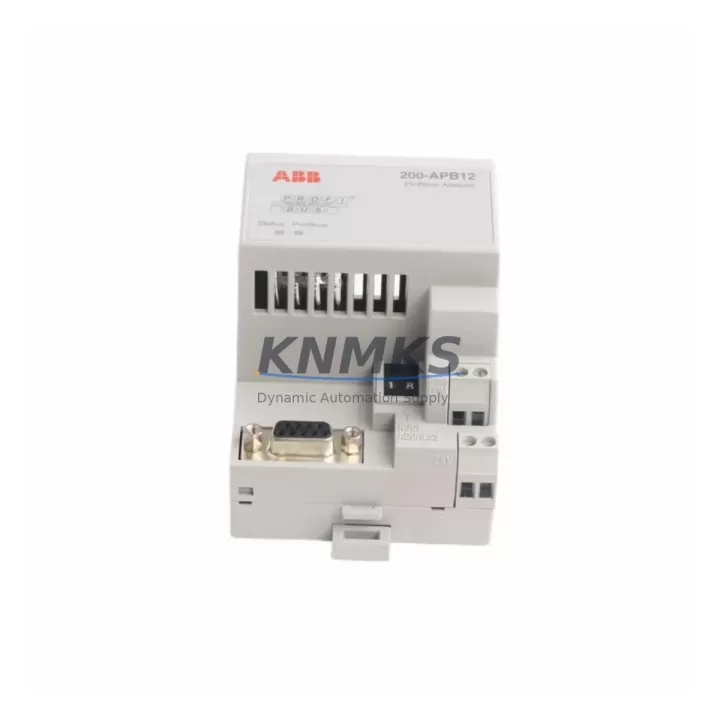
ABB 200-APB12 Migration-Ready PROFIBUS DP Adapter: Legacy System Retrofit & Compatibility Upgrade
The ABB 200-APB12 is a PROFIBUS DP fieldbus adapter module designed for the ABB ACS800 series variable frequency drives. As industrial facilities continue to modernize aging control architectures, the 200-APB12 plays a critical role in bridging legacy PROFIBUS DP networks with current drive platforms — enabling seamless communication migration without requiring a full drive replacement or PLC reprogramming cycle.
For maintenance engineers and system integrators managing retrofit projects, the 200-APB12 provides a verified drop-in replacement path for discontinued or end-of-life fieldbus adapter variants previously installed in ACS800 drive cabinets. Before proceeding with installation, engineers should confirm the following: drive firmware version compatibility with the adapter’s PROFIBUS DP profile, available slot position on the ACS800 option board bay, node address configuration via DIP switches or parameter settings, and GSD file version alignment with the PROFIBUS master (typically a Siemens S7-300/400 or S7-1500 PLC, or an ABB AC500 controller). Verifying the master’s cycle time and watchdog timeout settings against the adapter’s response characteristics is essential to avoid nuisance faults during commissioning.
In legacy panel upgrades where the original RDCO-02 or RDCO-03 communication option boards are no longer available, the 200-APB12 provides a supported migration path that preserves the existing PROFIBUS segment topology. This is particularly valuable in multi-drive systems where replacing the entire communication backbone would require extensive rewiring of the DP trunk cable, termination resistors, and repeater units. The adapter’s 9-pin Sub-D connector interface is fully compatible with standard PROFIBUS DP cabling, and its parameter mapping aligns with the ACS800 standard application program’s process data (PD) word structure — meaning existing PLC function blocks and HMI screen variable bindings typically require no modification.
Migration Compatibility Table
| Parameter | Details |
|---|---|
| Compatible Drive Series | ABB ACS800 (single drive and multidrive) |
| Fieldbus Protocol | PROFIBUS DP (EN 50170 / IEC 61158) |
| Connector Interface | 9-pin Sub-D (DB9), standard PROFIBUS pinout |
| Installation Slot | ACS800 option board slot (Slot 1 or Slot 2 depending on drive frame) |
| Node Address Range | 0–125 (configurable via drive parameters) |
| Communication Speed | 9.6 kbps to 12 Mbps (auto-detected) |
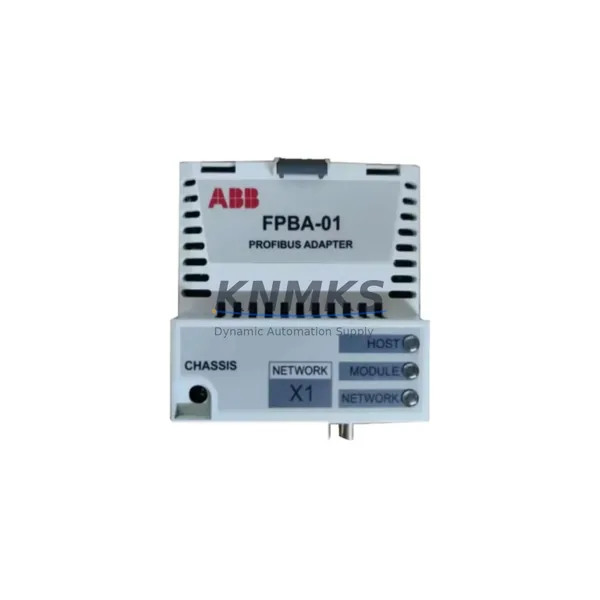
| Replaces / Substitutes | Legacy RPBA-01, FPBA-01 in equivalent retrofit scenarios |
| GSD File Required | Yes — must match master configuration |
| Firmware Compatibility | Verify ACS800 firmware version before installation |
| Commissioning Tool | DriveWindow Light or DriveStudio via RUSB-02 / RDNA-01 |
| Support terms | 12 Months from date of shipment |
| Pre-shipment Testing | Function-tested before dispatch |
Retrofit Planning for Existing Automation Systems
Successful integration of the 200-APB12 into an existing control system requires a structured retrofit plan. In a typical ACS800 cabinet upgrade, the adapter is installed alongside other option modules — for example, an RAIO-01 analog I/O extension module for process feedback signals, or an RDIO-01 digital I/O module for run/fault interlock wiring. Where the drive is part of a larger distributed control system, the PROFIBUS DP segment may also include remote I/O stations such as ABB S800 I/O modules or Siemens ET 200S distributed I/O, all sharing the same DP trunk.
Power supply integrity is a prerequisite for stable fieldbus communication. Before commissioning the 200-APB12, verify that the 24 VDC auxiliary supply feeding the ACS800 control board meets the current budget requirements with the adapter installed. In multi-drive panels, a shared SPSU-01 or equivalent panel power supply unit should be assessed for total load capacity. Terminal block wiring for the PROFIBUS cable shield should follow IEC 61158 grounding recommendations — single-point shield grounding at the master end, with the shield connected to the PE rail at the drive cabinet entry point.
For systems where the original programming was developed using DriveWindow or an older version of DriveStudio, the parameter backup should be exported before the adapter swap. The RUSB-02 USB-to-drive adapter or the RDNA-01 DeviceNet adapter (if present) can be used to access the drive’s parameter set for backup and restoration. After installing the 200-APB12, the PROFIBUS node address must be set in parameter group 51 (FIELDBUS ADAPTER), and the process data word mapping in group 52 must be verified against the PLC’s data block structure to ensure correct speed reference, torque reference, and status word alignment.
HMI screen updates are often overlooked during fieldbus adapter replacements. If the existing HMI (such as an ABB CP600 panel or a third-party SCADA system) reads drive status via the PROFIBUS master, the data word offsets and scaling factors should be cross-checked after the adapter is commissioned. In most ACS800 standard application configurations, the process data structure is preserved across adapter generations, but this should be confirmed during the factory acceptance test (FAT) or pre-commissioning verification phase.
Downtime Control During System Migration
Minimizing unplanned downtime is the primary concern in any live production environment retrofit. For the 200-APB12 installation, the recommended approach is to perform the adapter swap during a scheduled maintenance window, with the drive in a safe, de-energized state following LOTO (Lockout/Tagout) procedures. The physical installation takes approximately 10–15 minutes; however, the commissioning and verification phase — including PROFIBUS node address setting, GSD file loading at the master, cyclic data verification, and fault-free run test — should be allocated a minimum of 60–90 minutes per drive.
To protect the original program logic, a full parameter backup of the ACS800 should be completed before the adapter is removed. This backup, stored on a laptop running DriveStudio or on a compatible memory unit, ensures that the drive’s application program, motor data, and control macro settings can be restored in the event of an unexpected fault during commissioning. The PROFIBUS master’s diagnostic buffer should be monitored during the first powered test to confirm that the new adapter is recognized at the correct node address and that cyclic communication is established without bus errors.
Where production continuity is critical, a parallel commissioning strategy can be employed: the replacement drive with the 200-APB12 pre-installed and pre-configured is prepared offline, tested on a bench PROFIBUS segment, and then swapped into the panel during the maintenance window. This approach reduces live commissioning time to under 30 minutes and significantly lowers the risk of extended downtime due to configuration errors.
Retrofit Support FAQ
Q1: Is the ABB 200-APB12 a direct replacement for the RPBA-01 PROFIBUS adapter?
The 200-APB12 and RPBA-01 serve similar functions but are designed for different drive platforms. The RPBA-01 is used with ACS550 and ACS350 drives, while the 200-APB12 is specific to the ACS800 option board architecture. Confirm your drive model before ordering to ensure slot and parameter compatibility.
Q2: What commissioning steps are required after installing the 200-APB12?
After physical installation, set the PROFIBUS node address in parameter 51.01, configure the process data words in group 52, load the correct GSD file at the PROFIBUS master, and perform a cyclic communication test. Verify that the drive’s status word and speed actual value are correctly received at the PLC before returning the drive to automatic control.
Q3: Can the 200-APB12 be used in a multidrive system with a shared DC bus?
Yes. In ACS800 multidrive configurations, each inverter unit can be equipped with its own 200-APB12 adapter, each assigned a unique PROFIBUS node address. The shared DC bus and common rectifier unit do not affect the fieldbus adapter’s operation, provided the control board power supply is stable and the PROFIBUS cable is correctly routed and terminated.
Q4: What support terms and pre-shipment testing does KNMKS provide for the 200-APB12?
All 200-APB12 units supplied by KNMKS are function-tested prior to dispatch and covered by a support terms confirmed by quotation from the date of shipment. In-stock units are available for same-week dispatch. For urgent retrofit requirements, contact our technical sales team to confirm availability and lead time.
© 2026 KNMKS. All rights reserved.
Original Source: https://knmks.com
Contact: admin@knmks.com | +86 18359268345
Product Identification
- Brand / Ecosystem
-
ABB
ABB - Model / Series
-
200-APB12 200APB12
S800 Series - Product Family
- Communication Modules
- Availability Status
- Available on request after model and quantity confirmation
- Inquiry Type
- B2B RFQ, replacement inquiry and project spare-part request
- Pre-Quote Check
- Exact SKU, brand, series, quantity, nameplate photos and destination country are checked before quotation
System Path
Where this product fits in the KNMKS automation structure.
Specification & Inquiry Focus
- Network range
- Ethernet, fieldbus and gateway modules
- Common needs
- Protocol, port and controller family
- Project support
- Machine networking and data integration
Buyer Confirmation
Information KNMKS checks before replying.
- Exact model
- 200-APB12 200APB12
- Brand / ecosystem
- ABB
- Product family
- Communication Modules
- Application note
- Replacement, maintenance, project build or spare-part list
- Useful photos
- Nameplate, installed unit, cabinet layout or connector side
- Delivery details
- Quantity, destination country and target schedule
Document Support
Files and notes can be confirmed during quotation.
- Product photos or nameplate confirmation when available
- Packing and delivery notes before quotation confirmation
- Support scope and delivery terms confirmed per inquiry
- Export document coordination for qualified B2B requests
Inquiry Support
- Industrial Ethernet and fieldbus module inquiry
- Protocol compatibility review
- Integration project inquiry support
What to Send Us
- Brand and exact model number: ABB 200-APB12 200APB12
- Quantity and required delivery time
- Application, replacement requirement or nameplate photo
- Destination country and shipping preference
RFQ Preparation
This is a product inquiry page built for RFQ communication.
Fast Model Check
Send this model to KNMKS for confirmation.
Include quantity, destination country and photos if this is a maintenance replacement. The inquiry will be saved with a reference number after submission.
Brand & Compatibility Note
KNMKS displays automation product information for well-known industrial brand ecosystems and compatible replacement references. Brand names are used for product identification and compatibility reference only; final availability and commercial terms are confirmed per quotation.
 Manufacturing
 Machine Tools
 Packaging
 Energy & Power
 PLCs & Controllers
 HMI & Displays
 Servo Systems
 Variable Frequency Drives