
Overview
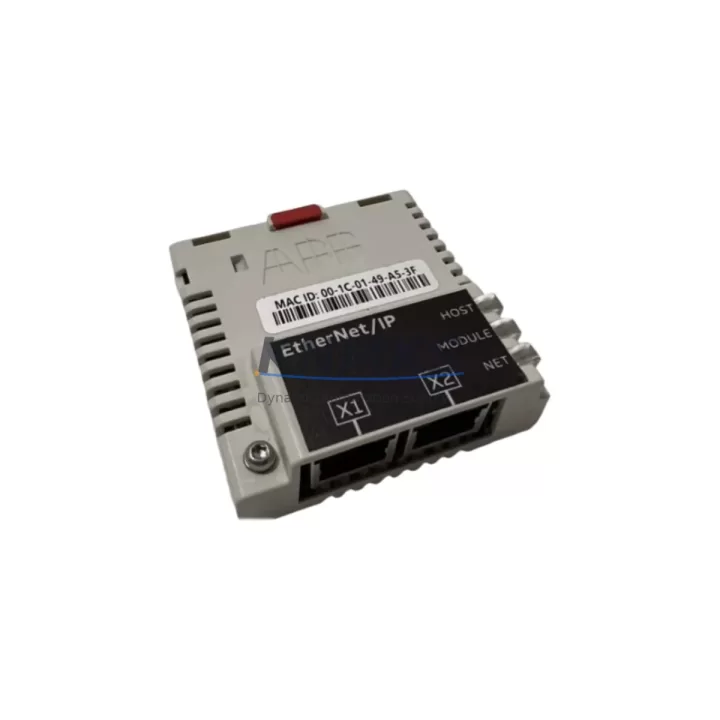
ABB FEIP-21 Maintenance-Proven Spare Part for Factory Uptime
The ABB FEIP-21 is an original EtherNet/IP communication adapter module designed for the ABB ACS800 series variable frequency drives. As a field-proven industrial spare part, the FEIP-21 enables seamless integration of ACS800 drives into EtherNet/IP-based control networks — including Allen-Bradley ControlLogix, CompactLogix, and other Rockwell Automation PLC platforms. For maintenance engineers managing aging drive systems or executing planned overhauls, stocking a verified FEIP-21 replacement is a critical step in reducing unplanned downtime and protecting production continuity.
In modern industrial facilities, communication adapter failures are among the most disruptive fault categories. When an ACS800 drive loses its EtherNet/IP link, the entire process loop — from speed reference to torque feedback — is interrupted. The FEIP-21 restores that link with a direct, drop-in replacement that requires no firmware re-flashing or parameter re-mapping when installed in the same drive slot. This makes it an ideal candidate for emergency spare kits, annual maintenance budgets, and long-term supply agreements.
KNMKS supplies the ABB FEIP-21 as a tested, original-source spare with a support terms confirmed by quotation, pre-shipment functional verification, and documented compatibility with ACS800 drive firmware versions in active field use. Global shipping is supported, with stock available for immediate dispatch to minimize your facility’s mean time to repair (MTTR).
Spare Maintenance Table
| Parameter | Specification |
|---|---|
| SKU / Part Number | FEIP-21 |
| Brand | ABB |
| Series Compatibility | ACS800 (Single Drive & Multi-Drive) |
| Communication Protocol | EtherNet/IP (CIP) |
| Network Interface | RJ-45, 10/100 Mbps |
| Slot Type | ACS800 Option Module Slot (RDCO-compatible bay) |
| Supply Voltage | Powered via drive backplane (no external supply required) |
| Operating Temperature | 0 °C to +55 °C |
| Enclosure / IP Rating | IP20 (installed inside drive enclosure) |
| Origin | Finland (ABB Drives) |
| HS Code | 8537.10.90 |
| Weight | Approx. 400 g |
| Replacement Compatibility | Direct drop-in for FEIP-21 in ACS800 drives; verify drive firmware revision before installation |
| Maintenance Recommendation | Inspect connector pins and fiber optic links annually; replace if communication errors exceed threshold |
| Support terms | 12 Months — Covers manufacturing defects; includes pre-shipment functional test report |
Maintenance Planning for Continuous Operation
When replacing the FEIP-21 in an ACS800 drive, a thorough site inspection of the surrounding electrical environment is essential to prevent repeat failures and ensure long-term system stability. Maintenance engineers should treat the adapter swap as an opportunity to audit the full drive communication chain.
Begin with the ACS800 RDCO-02 or RDCO-04 optical communication module — the FEIP-21 interfaces with the drive’s internal DDCS fiber optic ring, and any degraded fiber connections or contaminated optical ports will cause intermittent communication faults even after a new adapter is installed. Inspect all fiber patch cables for bend radius violations and connector cleanliness.
Next, verify the ACS800 AINT-02 or AINT-14 inverter control board power supply rails. Communication adapter failures are sometimes symptomatic of upstream 24 VDC auxiliary power instability. Check the drive’s internal SMPS output and, where applicable, the external ABB UNS0003A or equivalent 24 VDC panel power supply feeding the control section.
For drives integrated into a Rockwell Automation ControlLogix or CompactLogix system, confirm that the 1756-EN2T or 1756-EN3TR EtherNet/IP bridge module on the PLC rack is operating within its connection count limits. An overloaded scanner can cause the FEIP-21 to drop off the network, mimicking an adapter hardware fault.
Inspect the terminal block wiring and I/O signal cables connected to the ACS800 standard I/O board (RMIO). Loose analog reference signals or degraded digital I/O wiring can cause drive parameter conflicts that manifest as communication instability. Torque all terminal screws to specification and verify cable shielding continuity.
Finally, review the ACS800 panel-mounted HMI (CDP312R or DriveWindow Light) connection. If the HMI is sharing the DDCS ring with the FEIP-21, a faulty HMI cable or panel door flex damage can introduce ring errors that are incorrectly attributed to the communication adapter. Isolating the HMI during commissioning of the new FEIP-21 is a recommended diagnostic step.
For facilities running multiple ACS800 drives in a multi-drive cabinet, also inspect the NDBU-95 or NDBU-12 branching unit for optical port integrity and verify that the DDCS ring topology is correctly terminated after the adapter replacement.
Site Replacement Workflow
Step 1 — Pre-Replacement Backup: Using DriveWindow or the CDP312R panel, export the full parameter set of the ACS800 drive to a PC or memory unit. Record the active EtherNet/IP node address, subnet mask, and gateway configured in the existing FEIP-21 before powering down.
Step 2 — Safe Isolation: Follow LOTO (Lockout/Tagout) procedures. Confirm that the DC bus voltage has discharged below 50 VDC before opening the drive cabinet. The ACS800 DC bus capacitors require a minimum 5-minute discharge period after main power removal.
Step 3 — Module Removal: Disconnect the RJ-45 Ethernet cable and any fiber optic connections from the FEIP-21. Release the module retention latch and slide the adapter out of the option slot. Inspect the slot connector for bent pins or contamination.
Step 4 — New Module Installation: Insert the replacement FEIP-21 firmly into the option slot until the retention latch clicks. Reconnect the RJ-45 and fiber optic cables. Verify cable routing does not create strain on connectors.
Step 5 — Parameter Restore and Network Commissioning: Power up the drive and restore the saved parameter set. Navigate to the FEIP-21 parameter group and confirm the IP address, subnet, and gateway settings. Verify that the drive appears on the EtherNet/IP scanner’s connection list and that cyclic I/O data is exchanging correctly.
Step 6 — Functional Test: Issue a test run command from the PLC and confirm speed reference, actual speed feedback, and fault status words are transmitting correctly. Log the commissioning date and new module serial number in the site maintenance record.
This workflow minimizes drive downtime to under 2 hours for a prepared maintenance team and ensures full system compatibility is verified before returning the drive to production service.
Spare Parts Support FAQ
Q1: Is the FEIP-21 supplied by KNMKS an original ABB part or a compatible replacement?
All FEIP-21 units supplied by KNMKS are original ABB-manufactured modules sourced from authorized distribution and verified surplus channels. Each unit undergoes pre-shipment functional testing and is supplied with a test report. No third-party compatible or counterfeit substitutes are offered.
Q2: What is the support terms coverage and what does it include?
KNMKS provides a support terms confirmed by quotation from the date of shipment. The support terms covers manufacturing defects and functional failures under normal operating conditions. It includes free replacement or refund at KNMKS’s discretion. Physical damage caused by incorrect installation, overvoltage, or environmental contamination is excluded.
Q3: How do I confirm compatibility with my specific ACS800 drive variant before ordering?
Provide your ACS800 drive type code (found on the drive nameplate, e.g., ACS800-01-0016-3) and current firmware version to admin@knmks.com. Our technical team will confirm FEIP-21 compatibility and advise on any firmware update requirements before shipment.
Q4: Can KNMKS support long-term or blanket order agreements for FEIP-21 spares?
Yes. KNMKS supports annual blanket purchase orders and long-term supply agreements for the FEIP-21 and related ACS800 spare parts. This is recommended for facilities operating multiple ACS800 drives, as it locks in pricing, ensures priority stock allocation, and reduces emergency procurement lead times. Contact admin@knmks.com to discuss terms.
© 2026 KNMKS. All rights reserved.
Original Source: https://knmks.com
Contact: admin@knmks.com | +86 18359268345
Product Identification
- Brand / Ecosystem
-
ABB
ABB - Model / Series
-
FEIP-21
S800 Series - Product Family
- Communication Modules
- Availability Status
- Available on request after model and quantity confirmation
- Inquiry Type
- B2B RFQ, replacement inquiry and project spare-part request
- Pre-Quote Check
- Exact SKU, brand, series, quantity, nameplate photos and destination country are checked before quotation
System Path
Where this product fits in the KNMKS automation structure.
Specification & Inquiry Focus
- Network range
- Ethernet, fieldbus and gateway modules
- Common needs
- Protocol, port and controller family
- Project support
- Machine networking and data integration
Buyer Confirmation
Information KNMKS checks before replying.
- Exact model
- FEIP-21
- Brand / ecosystem
- ABB
- Product family
- Communication Modules
- Application note
- Replacement, maintenance, project build or spare-part list
- Useful photos
- Nameplate, installed unit, cabinet layout or connector side
- Delivery details
- Quantity, destination country and target schedule
Document Support
Files and notes can be confirmed during quotation.
- Product photos or nameplate confirmation when available
- Packing and delivery notes before quotation confirmation
- Support scope and delivery terms confirmed per inquiry
- Export document coordination for qualified B2B requests
Inquiry Support
- Industrial Ethernet and fieldbus module inquiry
- Protocol compatibility review
- Integration project inquiry support
What to Send Us
- Brand and exact model number: ABB FEIP-21
- Quantity and required delivery time
- Application, replacement requirement or nameplate photo
- Destination country and shipping preference
RFQ Preparation
This is a product inquiry page built for RFQ communication.
Fast Model Check
Send this model to KNMKS for confirmation.
Include quantity, destination country and photos if this is a maintenance replacement. The inquiry will be saved with a reference number after submission.
Brand & Compatibility Note
KNMKS displays automation product information for well-known industrial brand ecosystems and compatible replacement references. Brand names are used for product identification and compatibility reference only; final availability and commercial terms are confirmed per quotation.
 Manufacturing
 Machine Tools
 Packaging
 Energy & Power
 PLCs & Controllers
 HMI & Displays
 Servo Systems
 Variable Frequency Drives