
Overview
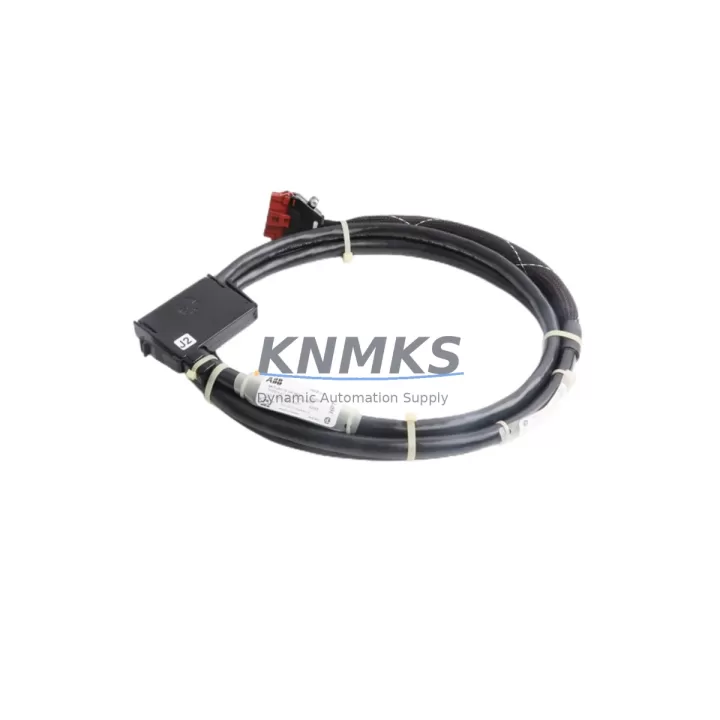
ABB NKTU01-10 Migration-Ready I/O Termination Cable: Legacy Control System Retrofit & Upgrade
The ABB NKTU01-10 is a field-proven I/O termination cable engineered for the ABB S800 I/O series, widely deployed across DCS, PLC, and hybrid control architectures in process industries including oil & gas, power generation, chemical processing, and pulp & paper. As legacy S800 installations approach end-of-life or require capacity expansion, the NKTU01-10 remains a critical interface component — bridging field wiring to S800 I/O modules such as the AI810, AO810, DI810, and DO810 without requiring panel rewiring or terminal block replacement.
For engineers managing brownfield retrofit projects, the NKTU01-10 eliminates one of the most time-consuming steps in I/O migration: re-terminating field cables. Its standardized connector footprint mates directly with S800 module bases, preserving existing field wiring while enabling module-level swap-outs. This is particularly valuable when replacing discontinued S800 variants or upgrading to current-generation equivalents within the same rack and backplane infrastructure.
Migration Compatibility Table
| Parameter | Specification / Retrofit Guidance |
|---|---|
| Compatible Platform | ABB S800 I/O Series (AI810, AO810, DI810, DO810, DI811, AI820, AO820) |
| Connector Interface | Standard S800 module base connector — no adapter required |
| Installation Requirement | Mounts to S800 module base; verify base model (TB820, TB840, TB845) before ordering |
| Communication Compatibility | Compatible with PROFIBUS DP, FOUNDATION Fieldbus H1, and Modbus RTU backplane configurations |
| Replacement Recommendation | Direct drop-in for legacy NKTU01-10 units; verify cable length and connector orientation |
| Commissioning Focus | Confirm terminal block wiring map, module address assignment, and I/O channel mapping in engineering station before hot-swap |
| Firmware Dependency | No firmware update required for cable replacement; verify module firmware if upgrading I/O module simultaneously |
| Installation Space | Standard S800 DIN-rail cabinet footprint; confirm cable routing clearance in existing control cabinet |
| Support terms | support terms confirmed by quotation — covers manufacturing defects and verified compatibility failures |
Retrofit Planning for Existing Automation Systems
A successful S800 I/O retrofit begins well before the maintenance window opens. When the NKTU01-10 is part of a broader control system modernization, engineers must account for the full signal chain — from field instrument to controller. In a typical S800 rack, the termination cable connects the field wiring terminal block to the I/O module, which in turn communicates with the S800 module bus via the TB820 or TB840 module termination unit. If the termination unit itself is being replaced alongside the cable, both components must be verified for mutual compatibility before installation.
In projects involving communication protocol migration — for example, transitioning from a proprietary S800 backplane to a PROFIBUS DP or FOUNDATION Fieldbus H1 topology — the CI854 or CI801 communication interface modules must be confirmed as operational before I/O module replacement begins. Signal isolation requirements should also be reviewed: where legacy installations used passive terminal blocks, modern retrofit designs may incorporate signal isolators or barriers to meet updated functional safety standards, particularly in hazardous area classifications.
Power budget verification is another non-negotiable step. The S800 I/O bus is powered through the PS800 power supply module, and adding replacement modules or expanding I/O capacity requires confirming that the existing power supply can support the updated load. If the retrofit includes additional AI820 analog input modules or DI811 digital input modules, the power consumption of each new module must be summed and compared against the PS800’s rated output before commissioning.
For projects that include HMI updates alongside I/O replacement, the operator station graphics linked to specific I/O channel tags must be reviewed. Tag names, engineering units, and alarm limits configured in the ABB 800xA or Freelance DCS engineering environment must remain consistent with the physical I/O channel assignments after the NKTU01-10 and associated modules are reinstalled. Discrepancies between the HMI tag database and the physical I/O map are a leading cause of extended commissioning time in retrofit projects.
Downtime Control During System Migration
Minimizing unplanned downtime during an S800 I/O retrofit requires a structured pre-outage preparation protocol. Before the maintenance window, all field wiring should be documented with as-built drawings verified against the current terminal block layout. The NKTU01-10 cable routing, connector seating, and strain relief should be photographed to ensure exact reinstallation geometry. Module addresses and I/O channel assignments should be exported from the engineering station and stored offline as a reference baseline.
During the outage, the recommended sequence is: de-energize the I/O segment, disconnect the NKTU01-10 from the module base, remove the I/O module, install the replacement module, reconnect the NKTU01-10, and restore power before performing a channel-by-channel functional verification. If the project involves a simultaneous module firmware update, this should be completed before reconnecting field instruments to avoid spurious output signals during the firmware flash cycle.
For critical process loops where control continuity is required, a parallel installation strategy using a temporary bypass panel can maintain field signal integrity while the primary I/O segment is offline. This approach is particularly effective in applications where the S800 I/O interfaces with safety instrumented systems or interlock circuits that cannot tolerate signal interruption. All replacement NKTU01-10 cables supplied by KNMKS are pre-tested for continuity and connector integrity before shipment, reducing the risk of installation-related failures during the commissioning phase.
Retrofit Support FAQ
Q1: Is the NKTU01-10 a direct replacement for all S800 I/O module bases?
The NKTU01-10 is designed for specific S800 module base variants. Before ordering, confirm the module base model number (TB820, TB840, or TB845) and the I/O module type (AI810, DI810, AO810, etc.) to ensure connector and cable length compatibility. KNMKS technical support can assist with cross-reference verification based on your existing installation drawings.
Q2: What commissioning steps are required after installing the NKTU01-10?
After physical installation, perform a continuity check on all field wiring connections at the terminal block. Power up the I/O segment and verify that the module status LED indicates normal operation. In the engineering station (ABB 800xA or Freelance), confirm that all I/O channels report expected values before returning the loop to automatic control. Document the as-installed configuration for future maintenance reference.
Q3: Can the NKTU01-10 be used in a mixed S800 and AC800M controller environment?
Yes. The S800 I/O series, including the NKTU01-10 termination cable, is fully compatible with the AC800M controller platform via the S800 I/O bus. In mixed environments where AC800M controllers interface with legacy S800 I/O racks, the NKTU01-10 functions identically to its role in a standalone S800 configuration. Verify that the CI854 or CI801 communication interface module firmware is current before integrating replacement I/O modules into an AC800M-controlled system.
Q4: What does the support terms confirmed by quotation cover, and how does KNMKS handle stock availability?
All NKTU01-10 units supplied by KNMKS carry a support terms confirmed by quotation covering manufacturing defects and verified compatibility failures under normal operating conditions. Each unit undergoes pre-shipment continuity and connector integrity testing. KNMKS maintains dedicated inventory of S800 series components to support urgent retrofit and breakdown replacement requirements. For lead-time confirmation or bulk order inquiries, contact the sales team directly.
© 2026 KNMKS. All rights reserved.
Original Source: https://knmks.com
Contact: admin@knmks.com | +86 18359268345
Product Identification
- Brand / Ecosystem
-
ABB
ABB - Model / Series
-
NKTU01-10
S800 Series - Product Family
- Cables & Connectors
- Availability Status
- Available on request after model and quantity confirmation
- Inquiry Type
- B2B RFQ, replacement inquiry and project spare-part request
- Pre-Quote Check
- Exact SKU, brand, series, quantity, nameplate photos and destination country are checked before quotation
System Path
Where this product fits in the KNMKS automation structure.
Specification & Inquiry Focus
- Cable range
- Sensor, servo, network and circular connectors
- Common needs
- Length, pin count, shielding and plug type
- Project support
- Machine wiring and installation kits
Buyer Confirmation
Information KNMKS checks before replying.
- Exact model
- NKTU01-10
- Brand / ecosystem
- ABB
- Product family
- Cables & Connectors
- Application note
- Replacement, maintenance, project build or spare-part list
- Useful photos
- Nameplate, installed unit, cabinet layout or connector side
- Delivery details
- Quantity, destination country and target schedule
Document Support
Files and notes can be confirmed during quotation.
- Product photos or nameplate confirmation when available
- Packing and delivery notes before quotation confirmation
- Support scope and delivery terms confirmed per inquiry
- Export document coordination for qualified B2B requests
Inquiry Support
- Cable length and connector type confirmation
- Servo, sensor and network cable inquiry
- Accessory kits for installation teams
What to Send Us
- Brand and exact model number: ABB NKTU01-10
- Quantity and required delivery time
- Application, replacement requirement or nameplate photo
- Destination country and shipping preference
RFQ Preparation
This is a product inquiry page built for RFQ communication.
Fast Model Check
Send this model to KNMKS for confirmation.
Include quantity, destination country and photos if this is a maintenance replacement. The inquiry will be saved with a reference number after submission.
Brand & Compatibility Note
KNMKS displays automation product information for well-known industrial brand ecosystems and compatible replacement references. Brand names are used for product identification and compatibility reference only; final availability and commercial terms are confirmed per quotation.
 Manufacturing
 Machine Tools
 Packaging
 Energy & Power
 PLCs & Controllers
 HMI & Displays
 Servo Systems
 Variable Frequency Drives