
Overview
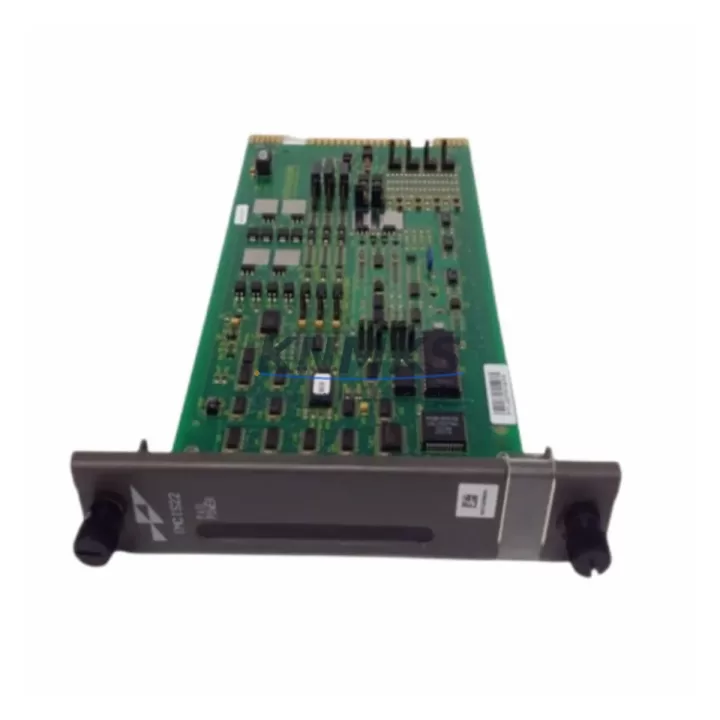
ABB IMCIS22 Migration-Ready Slave Interface for Legacy DCS
The ABB IMCIS22 is a PROFIBUS DP slave interface module designed for integration within the ABB AC800M Distributed Control System platform. As legacy automation infrastructure reaches end-of-support milestones, engineering teams managing brownfield sites increasingly require verified, migration-ready replacements that eliminate the risk of extended downtime, unplanned outages, and costly re-engineering. The IMCIS22 addresses this need directly — offering a pre-tested, drop-in compatible solution for facilities transitioning away from discontinued ABB communication modules.
Manufactured in Germany and supplied with a support terms confirmed by quotation, each IMCIS22 unit undergoes pre-shipment functional testing to confirm PROFIBUS DP communication integrity, backplane slot compatibility, and module addressing before dispatch. Multi-region stock availability supports both emergency replacement scenarios and scheduled outage windows, with fast global dispatch to minimize control system downtime.
For sites running the AC800M controller family, the IMCIS22 integrates directly into the S800 I/O system architecture. Engineers replacing aging CI858 PROFIBUS DP Link modules or decommissioning CI801 AF100 fieldbus interfaces will find the IMCIS22 a reliable migration anchor — maintaining existing PROFIBUS segment topology while the broader control cabinet is modernized. Terminal wiring from the legacy module can typically be preserved, reducing field rewiring time and the risk of signal mapping errors during cutover.
Power supply compatibility is a critical verification step in any IMCIS22 retrofit. The module draws from the AC800M backplane power rail; sites using older SD821 or SD822 power supply units should confirm available rail capacity before installation, particularly where additional I/O modules such as AI810 analog input or DI810 digital input cards have been added to the same rack. Backplane slot addressing must be reconfigured in Control Builder M to reflect the new module position if the physical slot assignment changes during the retrofit.
Program logic compatibility is preserved in most AC800M migration scenarios. Existing function block libraries and IEC 61131-3 structured text programs referencing the PROFIBUS DP slave address do not require recompilation provided the slave address and GSD file configuration remain consistent. HMI screen bindings in ABB 800xA or third-party SCADA systems referencing the IMCIS22 data objects should be validated post-installation to confirm tag mapping integrity. Communication link continuity between the AC800M CPU module and downstream PROFIBUS field devices — including valve positioners, motor drives, and remote I/O stations — must be verified during commissioning using PROFIBUS diagnostic tools before returning the loop to automatic control.
Installation space confirmation is recommended for control cabinets where the original module footprint may differ from current rack configurations. The IMCIS22 occupies a standard S800 I/O module slot; no additional mounting hardware is required for direct backplane installation. Firmware version alignment between the IMCIS22 and the AC800M controller firmware should be confirmed against ABB’s compatibility matrix prior to energization to avoid initialization faults.
Migration Compatibility Table
| Parameter | Detail |
|---|---|
| SKU | IMCIS22 |
| Brand / Series | ABB / AC800M |
| Module Type | PROFIBUS DP Slave Interface |
| Communication Protocol | PROFIBUS DP (EN 50170) |
| Backplane Interface | S800 I/O Backplane (standard slot) |
| Replaces / Compatible With | CI858, CI801 (AF100), legacy PROFIBUS slave modules in AC800M racks |
| Power Supply Requirement | Backplane rail (verify SD821/SD822 capacity before installation) |
| Installation Space | Standard S800 I/O module slot — no additional hardware required |
| Firmware Compatibility | Verify against AC800M controller firmware compatibility matrix |
| Programming Environment | ABB Control Builder M (IEC 61131-3) |
| HMI / SCADA Integration | ABB 800xA; third-party SCADA via PROFIBUS DP tag mapping |
| Origin | Germany (DE) |
| Pre-Shipment Testing | Yes — PROFIBUS DP communication and backplane integrity verified |
| Support terms | 12 Months |
| Stock Availability | Multi-region; fast global dispatch |
Retrofit Planning for Existing Automation Systems
A successful IMCIS22 retrofit begins with a structured pre-outage audit of the existing control cabinet. Engineers should document the current PROFIBUS DP slave address assigned to the legacy module, the GSD file version loaded in the master configuration, and the physical slot position within the S800 I/O rack. Where the AC800M rack also houses AI810 analog input modules, DI810 digital input modules, or AO810 analog output modules sharing the same backplane, power rail loading must be recalculated to confirm the IMCIS22 addition does not exceed the SD821 or SD822 supply unit’s rated output.
Communication module sequencing within the rack affects module addressing in Control Builder M. If the IMCIS22 is installed in a different slot than the module it replaces, the hardware configuration tree must be updated and a new application download performed. For sites where the AC800M communicates upstream to an ABB 800xA system via the CI854 Ethernet fieldbus interface, the PROFIBUS DP segment served by the IMCIS22 should be isolated and tested independently before reconnecting to the live 800xA server to avoid alarm floods during commissioning.
Signal isolation requirements should be assessed where the PROFIBUS segment spans long cable runs or crosses electrical noise sources. In such cases, PROFIBUS repeaters or signal isolators may be required to maintain segment integrity after the IMCIS22 is installed. Programming cable access to the AC800M CPU — typically via the CI873 PROFINET interface or a direct serial connection — should be confirmed available during the maintenance window to support any required firmware updates or application re-downloads.
Downtime Control During System Migration
Minimizing control system downtime during an IMCIS22 replacement requires a disciplined pre-outage preparation sequence. Before the maintenance window opens, the existing application program should be backed up from the AC800M controller using Control Builder M, and the current PROFIBUS DP configuration — including slave addresses, GSD file assignments, and segment termination settings — should be documented and archived. This backup ensures that if commissioning of the replacement module encounters unexpected issues, the original configuration can be restored rapidly without relying on memory or incomplete site records.
During the physical swap, the PROFIBUS DP segment served by the IMCIS22 should be placed in manual override at the field device level where process safety permits, maintaining last-known output states on valve positioners, motor drives, and other actuators connected to the segment. This approach protects original program logic and preserves field control continuity while the module is exchanged and the backplane connection is re-established.
Post-installation commissioning should follow a structured sequence: confirm module recognition in Control Builder M, verify PROFIBUS DP slave communication status for each device on the segment, validate HMI tag bindings in the 800xA operator station, and perform a controlled return to automatic control loop by loop. Functional testing against the pre-outage baseline — including analog signal accuracy on AI810 inputs and digital output response on DI810 cards — confirms retrofit success before the maintenance window is closed. Total planned downtime for a single IMCIS22 replacement in a prepared environment is typically achievable within a two- to four-hour maintenance window.
Retrofit Support FAQ
Q1: Is the IMCIS22 a direct drop-in replacement for the CI858 PROFIBUS DP Link module in an AC800M rack?
The IMCIS22 and CI858 serve related but distinct roles within the AC800M architecture. The IMCIS22 functions as a PROFIBUS DP slave interface within the S800 I/O system, while the CI858 operates as a PROFIBUS DP master link. Confirm the exact module function and slot assignment in your existing hardware configuration before ordering. Our technical team can assist with compatibility verification based on your Control Builder M hardware tree export.
Q2: Does the IMCIS22 require a firmware update before installation in an existing AC800M system?
Firmware compatibility depends on the AC800M controller firmware version currently running at your site. ABB publishes a firmware compatibility matrix for S800 I/O modules; we recommend confirming the IMCIS22 firmware version against this matrix before installation. Each unit supplied by KNMKS is pre-tested and dispatched with firmware verified for compatibility with current AC800M controller releases. If your site runs an older controller firmware version, our team can advise on the appropriate firmware baseline.
Q3: Can the existing PROFIBUS DP wiring and termination be reused after the IMCIS22 is installed?
In most retrofit scenarios, existing PROFIBUS DP segment wiring, bus connectors, and termination resistors can be reused without modification, provided cable condition and segment length are within PROFIBUS DP specification. Terminal wiring at the module backplane connection point should be inspected for insulation condition and connector seating before re-energization. Segment termination at both ends of the PROFIBUS cable must remain active; confirm termination switch settings on bus connectors at the first and last devices on the segment after the module swap.
Q4: What does the support terms confirmed by quotation cover, and is pre-shipment testing included?
Every IMCIS22 unit supplied by KNMKS includes a support terms confirmed by quotation covering manufacturing defects and functional failures under normal operating conditions. Pre-shipment testing confirms PROFIBUS DP communication integrity and backplane interface function before dispatch. Units are supplied with test documentation on request. In the event of a support terms claim, KNMKS provides replacement dispatch from multi-region stock to minimize site downtime. Contact admin@knmks.com for support terms registration and claim procedures.
© 2026 KNMKS. All rights reserved.
Original Source: https://knmks.com
Contact: admin@knmks.com | +86 18359268345
Product Identification
- Brand / Ecosystem
-
ABB
ABB - Model / Series
-
IMCIS22
AC800M Series - Product Family
- Relays & Interface
- Availability Status
- Available on request after model and quantity confirmation
- Inquiry Type
- B2B RFQ, replacement inquiry and project spare-part request
- Pre-Quote Check
- Exact SKU, brand, series, quantity, nameplate photos and destination country are checked before quotation
System Path
Where this product fits in the KNMKS automation structure.
Specification & Inquiry Focus
- Interface range
- Relays, isolation and signal modules
- Common needs
- Coil voltage and contact rating
- Project support
- Panel wiring and signal protection
Buyer Confirmation
Information KNMKS checks before replying.
- Exact model
- IMCIS22
- Brand / ecosystem
- ABB
- Product family
- Relays & Interface
- Application note
- Replacement, maintenance, project build or spare-part list
- Useful photos
- Nameplate, installed unit, cabinet layout or connector side
- Delivery details
- Quantity, destination country and target schedule
Document Support
Files and notes can be confirmed during quotation.
- Product photos or nameplate confirmation when available
- Packing and delivery notes before quotation confirmation
- Support scope and delivery terms confirmed per inquiry
- Export document coordination for qualified B2B requests
Inquiry Support
- Relay base and module matching
- Signal isolation and protection options
- Panel accessory inquiry support
What to Send Us
- Brand and exact model number: ABB IMCIS22
- Quantity and required delivery time
- Application, replacement requirement or nameplate photo
- Destination country and shipping preference
RFQ Preparation
This is a product inquiry page built for RFQ communication.
Fast Model Check
Send this model to KNMKS for confirmation.
Include quantity, destination country and photos if this is a maintenance replacement. The inquiry will be saved with a reference number after submission.
Brand & Compatibility Note
KNMKS displays automation product information for well-known industrial brand ecosystems and compatible replacement references. Brand names are used for product identification and compatibility reference only; final availability and commercial terms are confirmed per quotation.
 Manufacturing
 Machine Tools
 Packaging
 Energy & Power
 PLCs & Controllers
 HMI & Displays
 Servo Systems
 Variable Frequency Drives