
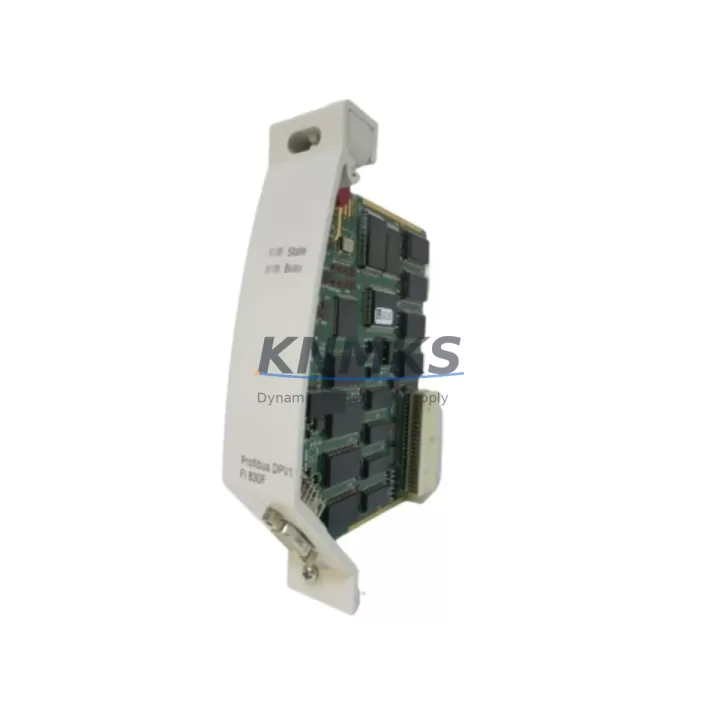
Overview
ABB FI830F 3BDH000032R Migration-Ready Fieldbus Interface for Legacy Control Systems
The ABB FI830F (part number 3BDH000032R) is a high-integrity fieldbus interface module designed for the AC800M controller platform, one of ABB’s most widely deployed process automation controllers in petrochemical, power generation, water treatment, and mining facilities worldwide. As ABB progressively phases out legacy communication hardware, the FI830F has become a critical spare part and retrofit component for plants operating aging AC800M-based control systems that must maintain PROFIBUS DP or FOUNDATION Fieldbus H1 connectivity without a full DCS migration.
For facilities managing long-cycle spare parts strategies — particularly those planning 12- to 36-month maintenance windows — stocking a validated FI830F unit significantly reduces the risk of unplanned downtime caused by fieldbus communication failures. Each unit supplied by KNMKS undergoes pre-shipment functional verification, including backplane interface continuity checks, communication link initialization, and firmware version confirmation, ensuring the module is ready for immediate installation upon arrival.
Migration Compatibility Table
| Parameter | FI830F (3BDH000032R) | Retrofit Notes |
|---|---|---|
| Supported Controller | AC800M (PM851, PM856, PM860, PM861) | Verify controller firmware ≥ 5.1 for full compatibility |
| Communication Protocols | PROFIBUS DP, FOUNDATION Fieldbus H1 | Confirm segment topology and termination resistors before swap |
| Backplane Interface | AC800M S800 I/O bus | Module address must be re-assigned in Control Builder M after installation |
| Power Supply Requirement | 24 VDC via backplane (no external supply) | Verify PM8xx power module capacity before adding fieldbus segments |
| Installation Form Factor | S800 I/O rail-mount, standard DIN rail compatible | Confirm available slot count in existing S800 I/O station |
| Firmware Compatibility | Supports ABB Control Builder M 5.x / 6.x | Download latest FI830F firmware from ABB Library before commissioning |
| Replacement for | FI810F, FI820F (discontinued) | GSD file update required; re-import device descriptions in PROFIBUS master |
| Support terms | support terms confirmed by quotation — all units pre-tested before shipment | |
Retrofit Planning for Existing Automation Systems
Replacing a failed or end-of-life fieldbus interface in an operating AC800M system requires careful pre-work to avoid extended process interruptions. Before removing the existing FI830F or its predecessor FI820F, engineers should export the full hardware configuration from ABB Control Builder M, documenting the module slot address, PROFIBUS master parameters, and all connected device GSD assignments. This configuration backup is essential for restoring communication links after the new module is seated on the S800 I/O backplane.
In many retrofit scenarios, the FI830F is installed alongside or as a replacement for the TB820V2 ModuleBus Optical Port, which handles internal communication between the AC800M controller and remote S800 I/O clusters. When upgrading fieldbus topology — for example, migrating from a single PROFIBUS segment to a redundant FF H1 architecture — the FI830F must be paired with appropriate segment couplers and power conditioners. Plants using the LD800HSE High-Speed Ethernet linking device for FOUNDATION Fieldbus HSE-to-H1 bridging should verify that the FI830F’s H1 port configuration aligns with the existing HSE subnet addressing scheme.
For control cabinets housing multiple AC800M racks, the physical installation space must be confirmed before ordering. The FI830F occupies one slot in the S800 I/O station; if the existing station is fully populated, an additional TB807 or TB840A I/O base unit may be required to accommodate the module. Wiring adaptation is typically straightforward — the FI830F uses standard PROFIBUS DB9 or terminal block connectors depending on the segment coupler in use — but terminal labeling and cable shielding practices should be reviewed against ABB’s fieldbus installation guidelines to prevent noise-induced communication errors.
Plants running Yokogawa CENTUM VP or Emerson DeltaV systems in parallel with ABB AC800M controllers in hybrid control architectures should pay particular attention to PROFIBUS segment isolation. In these environments, the FI830F’s galvanic isolation capability is a key advantage, preventing ground loop interference between control domains. Similarly, facilities migrating from older Siemens S5 or S7-300 PROFIBUS masters to an AC800M-based architecture will find the FI830F’s broad GSD compatibility reduces the effort required to re-commission field devices such as Endress+Hauser Promag flowmeters, Rosemount pressure transmitters, and ABB TZID-C positioners already on the existing PROFIBUS segment.
Downtime Control During System Migration
Minimizing process interruption during a fieldbus interface replacement is the primary concern for operations teams. The recommended approach is a hot-standby swap procedure: with the AC800M controller in manual mode and all PROFIBUS devices set to their last valid output values, the FI830F can be removed and replaced within a single maintenance window — typically under 30 minutes for an experienced commissioning engineer familiar with Control Builder M.
Before initiating the swap, the original application program should be backed up from the PM8xx controller module using Control Builder M’s online download function. This preserves all function block configurations, signal assignments, and HMI tag mappings, ensuring that the SCADA or DCS operator screens — whether running on ABB 800xA System or a third-party HMI — continue to display correct process values immediately after the new FI830F is commissioned. Communication links to upstream OPC DA or OPC UA servers should be monitored during the restart sequence to confirm that no tag subscriptions are lost.
For plants where even a 30-minute interruption is unacceptable, a parallel commissioning approach is recommended: install the new FI830F in an adjacent available slot, configure it with a temporary module address, validate all PROFIBUS device communications in parallel with the existing module, then perform a rapid address swap and remove the old unit. This approach keeps the fieldbus segment live throughout the procedure and is particularly effective in continuous process industries such as refining, LNG, and power generation where process safety systems — including any connected ABB HIMA or Pilz safety PLCs on the same control network — must remain operational.
KNMKS ships all FI830F units with a pre-shipment test report confirming backplane communication, PROFIBUS DP master initialization, and FF H1 link active status. This documentation supports your site acceptance test (SAT) procedure and provides traceability for maintenance records.
Retrofit Support FAQ
Q: Is the FI830F 3BDH000032R a direct drop-in replacement for the FI820F?
A: Functionally yes — the FI830F supports the same PROFIBUS DP and FF H1 protocols and fits the same S800 I/O slot. However, the GSD file version differs, so you must update the PROFIBUS master configuration in Control Builder M and re-import device descriptions after installation. No rewiring is required if the existing segment coupler and cable termination are retained.
Q: What firmware version should the FI830F be running before installation?
A: ABB recommends aligning the FI830F firmware with your Control Builder M version. For CBM 6.x environments, firmware 3.2 or later is recommended. KNMKS can confirm the firmware version on your unit prior to shipment and, upon request, provide the ABB Library firmware download link for your reference.
Q: Do you hold stock of the FI830F 3BDH000032R for immediate shipment?
A: Yes. KNMKS maintains inventory of the FI830F 3BDH000032R for same-week dispatch. All units are pre-tested before shipment and covered by a support terms confirmed by quotation. Contact admin@knmks.com or +86 18359268345 to confirm current stock availability and lead time for your region.
Q: Can the FI830F be used in a redundant fieldbus configuration?
A: Yes. The FI830F supports redundant PROFIBUS DP master operation when paired with a second FI830F module in the same S800 I/O station, using ABB’s standard redundancy configuration in Control Builder M. For FF H1 redundancy, a compatible segment coupler with redundant port support is required. KNMKS can supply matched pairs of FI830F units tested for redundant operation upon request.
© 2026 KNMKS. All rights reserved.
Original Source: https://knmks.com
Contact: admin@knmks.com | +86 18359268345
Product Identification
- Brand / Ecosystem
-
ABB
ABB - Model / Series
-
FI830F 3BDH000032R
AC800M Series - Product Family
- Relays & Interface
- Availability Status
- Available on request after model and quantity confirmation
- Inquiry Type
- B2B RFQ, replacement inquiry and project spare-part request
- Pre-Quote Check
- Exact SKU, brand, series, quantity, nameplate photos and destination country are checked before quotation
System Path
Where this product fits in the KNMKS automation structure.
Specification & Inquiry Focus
- Interface range
- Relays, isolation and signal modules
- Common needs
- Coil voltage and contact rating
- Project support
- Panel wiring and signal protection
Buyer Confirmation
Information KNMKS checks before replying.
- Exact model
- FI830F 3BDH000032R
- Brand / ecosystem
- ABB
- Product family
- Relays & Interface
- Application note
- Replacement, maintenance, project build or spare-part list
- Useful photos
- Nameplate, installed unit, cabinet layout or connector side
- Delivery details
- Quantity, destination country and target schedule
Document Support
Files and notes can be confirmed during quotation.
- Product photos or nameplate confirmation when available
- Packing and delivery notes before quotation confirmation
- Support scope and delivery terms confirmed per inquiry
- Export document coordination for qualified B2B requests
Inquiry Support
- Relay base and module matching
- Signal isolation and protection options
- Panel accessory inquiry support
What to Send Us
- Brand and exact model number: ABB FI830F 3BDH000032R
- Quantity and required delivery time
- Application, replacement requirement or nameplate photo
- Destination country and shipping preference
RFQ Preparation
This is a product inquiry page built for RFQ communication.
Fast Model Check
Send this model to KNMKS for confirmation.
Include quantity, destination country and photos if this is a maintenance replacement. The inquiry will be saved with a reference number after submission.
Brand & Compatibility Note
KNMKS displays automation product information for well-known industrial brand ecosystems and compatible replacement references. Brand names are used for product identification and compatibility reference only; final availability and commercial terms are confirmed per quotation.
 Manufacturing
 Machine Tools
 Packaging
 Energy & Power
 PLCs & Controllers
 HMI & Displays
 Servo Systems
 Variable Frequency Drives