
Overview
ABB DP820 Migration-Ready PROFIBUS DP MTU for Legacy DCS: Retrofit and Upgrade for Aging Control Systems
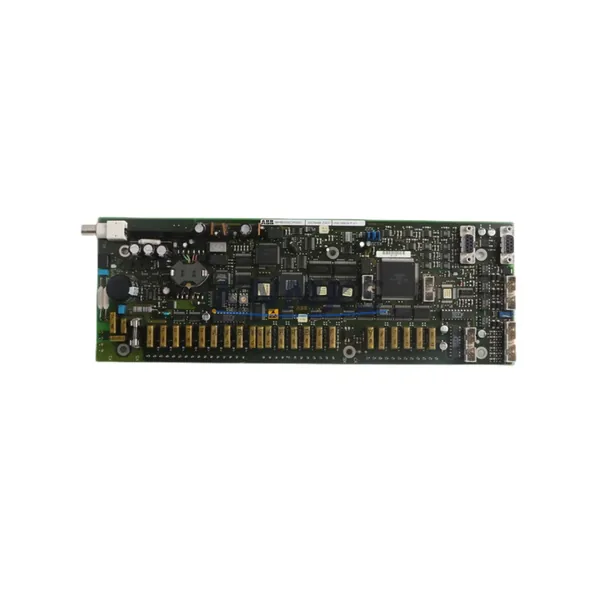
The ABB DP820 is a PROFIBUS DP Slave Master Terminal Unit (MTU) designed for integration within the ABB AC800M Distributed Control System platform. As industrial facilities face mounting pressure to modernize aging automation infrastructure, the DP820 has become a critical component in legacy system migration projects — bridging the gap between discontinued hardware generations and current control architectures. Whether you are replacing a failed unit in an existing AC800M rack, upgrading a PROFIBUS DP segment to support expanded I/O, or executing a phased DCS modernization, the DP820 provides a verified, in-stock replacement path with minimal engineering risk.
Facilities running legacy ABB Advant OCS, MOD 300, or early-generation AC800M configurations frequently encounter obsolescence challenges: discontinued spare parts, unsupported firmware, and incompatible communication stacks. The DP820 addresses these challenges directly by maintaining backward-compatible PROFIBUS DP protocol support (IEC 61158 / EN 50170), allowing it to interface with existing field devices, remote I/O stations, and third-party PROFIBUS slaves without requiring full network reconfiguration. This makes it particularly valuable in brownfield retrofit scenarios where replacing the entire communication backbone is not operationally or financially viable.
Before deploying the DP820 as a replacement unit, engineers should verify several critical parameters. Power supply capacity within the existing S800 I/O rack or PM865 controller cabinet must be confirmed — the DP820 draws from the backplane bus, and adding or replacing modules in a loaded rack may require a review of the PM856 or PM861 power module ratings. Terminal wiring for the PROFIBUS DP connector (9-pin D-sub, RS-485) should be mapped against the existing cable shield grounding scheme to prevent signal integrity issues on long cable runs. Backplane slot addressing must be confirmed in the AC800M hardware configuration tool (Control Builder M) to ensure the replacement module is recognized at the correct logical address without triggering a hardware mismatch alarm.
Program compatibility is a key concern in any DP820 swap. If the existing application program references the module by its hardware unit address, a slot-for-slot replacement will typically preserve program logic without modification. However, if the GSD file version differs between the original and replacement unit, the PROFIBUS master configuration may require a GSD re-import and re-download to the controller. HMI screens built on ABB 800xA or Freelance that reference DP820 diagnostic variables should be validated post-swap to confirm that alarm and status tags remain correctly mapped. Communication link continuity between the DP820 and downstream PROFIBUS slaves — including ABB S800 I/O modules, CI854 PROFIBUS interface modules, and third-party field devices — should be verified using a PROFIBUS diagnostic tool before returning the segment to service.
Installation space confirmation is straightforward: the DP820 occupies a standard S800 I/O module slot and is mechanically interchangeable with other modules in the same form factor family. Firmware version compatibility should be checked against the AC800M controller firmware baseline — ABB publishes compatibility matrices in the DP820 product manual (document 3BSE018369) that define supported controller firmware ranges. Field commissioning should include a full PROFIBUS segment scan, slave address verification, and a live data check against the process historian or DCS trend display before handover.
Migration Compatibility Table
| Parameter | DP820 Specification | Retrofit / Replacement Notes |
|---|---|---|
| Communication Protocol | PROFIBUS DP (IEC 61158, EN 50170) | Compatible with existing PROFIBUS DP segments; GSD file re-import may be required if firmware version differs |
| Host Platform | ABB AC800M (PM856, PM861, PM865 controllers) | Slot-for-slot replacement in S800 I/O rack; verify hardware unit address in Control Builder M |
| Physical Interface | 9-pin D-sub PROFIBUS DP connector (RS-485) | Confirm cable shield grounding and termination resistor placement on segment ends |
| Backplane Interface | S800 I/O backplane bus | Verify power budget on PM856/PM861 power module before installation |
| Module Addressing | Configured via Control Builder M hardware editor | Slot address must match original configuration; mismatch triggers hardware alarm |
| Firmware Compatibility | Refer to ABB compatibility matrix (doc 3BSE018369) | Match controller firmware baseline before deployment; field firmware update may be required |
| HMI Integration | ABB 800xA, Freelance, or third-party SCADA | Validate diagnostic tag mapping post-swap; re-test alarm and status displays |
| Installation Footprint | Standard S800 I/O module slot | Mechanically interchangeable with same-family modules; no panel modification required |
| Replacement Scope | Direct replacement for legacy DP820 units | Also applicable as upgrade path from CI854 in mixed PROFIBUS/FOUNDATION Fieldbus environments |
| Support terms | support terms confirmed by quotation | Covers manufacturing defects; pre-shipment functional test included |
Retrofit Planning for Existing Automation Systems
A successful DP820 retrofit begins with a thorough audit of the existing control cabinet and rack configuration. In a typical AC800M installation, the DP820 shares backplane space with PM865 processor modules, TB820V2 termination units, and SD802 or SD812 power distribution modules. Before pulling the failed or obsolete DP820, document the current slot layout and photograph the terminal wiring on the associated TB820V2 termination unit — this provides a reliable reference for reconnection and reduces the risk of wiring errors during the swap.
For facilities migrating from older Advant OCS or MOD 300 platforms, the DP820 often serves as the PROFIBUS DP gateway that allows legacy field devices — including ABB HART multiplexers, Yokogawa transmitters, and Siemens ET 200 remote I/O stations — to remain in service while the host controller is upgraded. In these scenarios, the CI854 PROFIBUS interface module may already be present in the rack as a companion to the DP820, handling FOUNDATION Fieldbus segments in parallel. Confirming that both modules are correctly addressed and that their respective GSD and DD files are loaded in the engineering workstation is essential before any live cutover.
Power supply integrity is a recurring issue in aging control cabinets. The SD802 24 VDC power supply module feeding the S800 I/O rack should be load-tested before the retrofit to confirm it can support the DP820 alongside other active modules. If the rack is near its power budget limit, a supplementary SD812 power module may be required. Signal isolation between the PROFIBUS DP segment and the control room wiring should also be reviewed — in high-noise industrial environments, a PROFIBUS repeater or optical isolator may be needed to maintain signal quality across long cable runs or across electrical isolation boundaries.
Programming cable access is another practical consideration. The ABB TK212A or TK210 programming cable, used to connect a laptop running Control Builder M to the PM865 controller, should be available on-site during the retrofit. After the DP820 is installed and the hardware configuration is downloaded, a full online diagnostic check — including PROFIBUS segment scan, slave status verification, and I/O data exchange confirmation — should be completed before the process is returned to automatic control.
Downtime Control During System Migration
Minimizing unplanned downtime during a DP820 replacement requires a structured pre-outage preparation protocol. Before the maintenance window opens, the existing application program should be backed up from the PM865 controller to the engineering workstation using Control Builder M. This backup preserves the full hardware configuration, function block program, and communication parameter set, providing a reliable restore point if the replacement module introduces unexpected behavior.
Where process continuity is critical, consider placing the affected PROFIBUS DP segment in a degraded or manual control mode before removing the DP820. This prevents the controller from generating spurious process alarms or initiating automatic safety responses during the module swap. If the facility uses ABB 800xA as its operator interface, the relevant process graphics should be placed in maintenance mode to suppress alarm floods during the cutover window.
The physical swap itself — removing the old DP820, seating the replacement unit, and reconnecting the TB820V2 termination wiring — typically takes under 30 minutes for an experienced technician. The longer portion of the maintenance window is consumed by the software steps: hardware configuration download, PROFIBUS segment re-scan, slave address verification, and live data validation against the process historian. Planning for a 2–4 hour total maintenance window, including pre-outage preparation and post-swap verification, is a realistic target for a single DP820 replacement in a well-documented AC800M installation.
Pre-shipment functional testing of the DP820 unit — conducted before dispatch from our warehouse — confirms that the module powers up correctly, passes internal diagnostics, and communicates on the PROFIBUS DP bus. This reduces the risk of receiving a non-functional unit and shortens the on-site troubleshooting phase. All units are shipped with a support terms confirmed by quotation covering manufacturing defects, providing additional assurance for facilities operating under tight maintenance budgets.
Retrofit Support FAQ
Q: Can the DP820 directly replace an older CI854 PROFIBUS interface module in an AC800M rack?
A: The DP820 and CI854 serve different roles — the DP820 is a PROFIBUS DP Slave MTU, while the CI854 is a PROFIBUS DP Master interface. They are not direct slot-for-slot replacements. However, in migration projects where the control architecture is being restructured, the DP820 may be introduced alongside or in place of a CI854 depending on the revised network topology. Confirm the intended PROFIBUS role (master vs. slave) with your system integrator before ordering.
Q: What wiring changes are required when replacing a failed DP820 with a new unit?
A: In a standard slot-for-slot replacement, the PROFIBUS DP cable connects to the same 9-pin D-sub port on the new module, and the TB820V2 termination unit wiring remains unchanged. No new terminal connections are required. Verify that the cable shield is correctly grounded at one end of the segment and that termination resistors are active only at the two physical ends of the PROFIBUS bus.
Q: Is pre-shipment testing included, and what does the support terms confirmed by quotation cover?
A: Yes — every DP820 unit undergoes a pre-shipment functional test covering power-on diagnostics and PROFIBUS DP communication verification before dispatch. The support terms confirmed by quotation cover manufacturing defects identified under normal operating conditions. It does not cover damage resulting from incorrect installation, overvoltage, or environmental conditions outside the module’s rated specifications.
Q: How quickly can a DP820 unit be dispatched, and is stock available?
A: Units are held availability confirmed by RFQ and are available for same-day or next-business-day dispatch depending on order confirmation time. For urgent plant breakdown situations, contact our sales team directly to confirm current stock levels and expedited shipping options. We maintain buffer inventory specifically to support emergency replacement scenarios with minimal lead time.
© 2026 KNMKS. All rights reserved.
Original Source: https://knmks.com
Contact: admin@knmks.com | +86 18359268345
Product Identification
- Brand / Ecosystem
-
ABB
ABB - Model / Series
-
DP820
AC800M Series - Product Family
- Relays & Interface
- Availability Status
- Available on request after model and quantity confirmation
- Inquiry Type
- B2B RFQ, replacement inquiry and project spare-part request
- Pre-Quote Check
- Exact SKU, brand, series, quantity, nameplate photos and destination country are checked before quotation
System Path
Where this product fits in the KNMKS automation structure.
Specification & Inquiry Focus
- Interface range
- Relays, isolation and signal modules
- Common needs
- Coil voltage and contact rating
- Project support
- Panel wiring and signal protection
Buyer Confirmation
Information KNMKS checks before replying.
- Exact model
- DP820
- Brand / ecosystem
- ABB
- Product family
- Relays & Interface
- Application note
- Replacement, maintenance, project build or spare-part list
- Useful photos
- Nameplate, installed unit, cabinet layout or connector side
- Delivery details
- Quantity, destination country and target schedule
Document Support
Files and notes can be confirmed during quotation.
- Product photos or nameplate confirmation when available
- Packing and delivery notes before quotation confirmation
- Support scope and delivery terms confirmed per inquiry
- Export document coordination for qualified B2B requests
Inquiry Support
- Relay base and module matching
- Signal isolation and protection options
- Panel accessory inquiry support
What to Send Us
- Brand and exact model number: ABB DP820
- Quantity and required delivery time
- Application, replacement requirement or nameplate photo
- Destination country and shipping preference
RFQ Preparation
This is a product inquiry page built for RFQ communication.
Fast Model Check
Send this model to KNMKS for confirmation.
Include quantity, destination country and photos if this is a maintenance replacement. The inquiry will be saved with a reference number after submission.
Brand & Compatibility Note
KNMKS displays automation product information for well-known industrial brand ecosystems and compatible replacement references. Brand names are used for product identification and compatibility reference only; final availability and commercial terms are confirmed per quotation.
 Manufacturing
 Machine Tools
 Packaging
 Energy & Power
 PLCs & Controllers
 HMI & Displays
 Servo Systems
 Variable Frequency Drives