
Overview
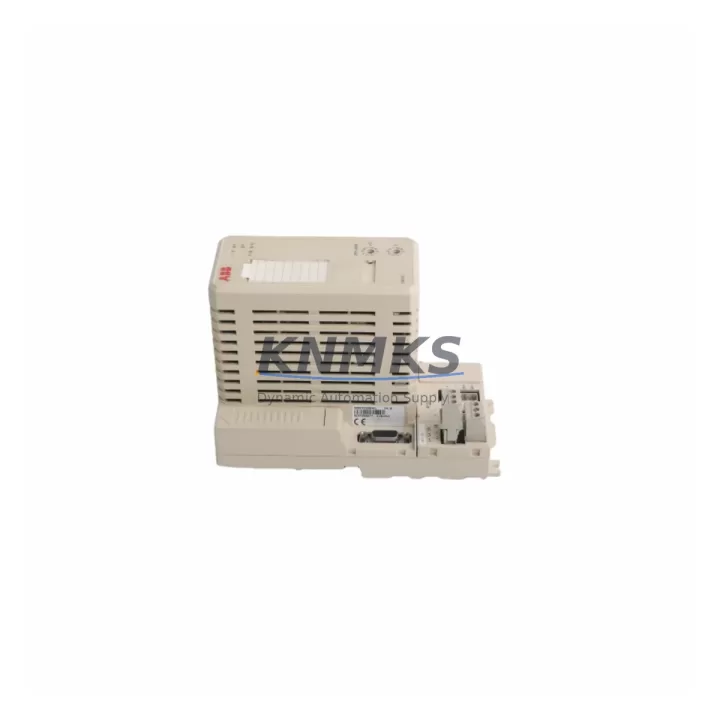
ABB CI810V1 3BSE008584R1 Maintenance-Proven Spare Part: Profibus DP Master Interface for AC800M Factory Uptime
The ABB CI810V1 (catalog reference 3BSE008584R1) is a Profibus DP Master Interface Module engineered for the AC800M Distributed Control System platform — one of ABB’s most widely deployed DCS architectures in power generation, oil & gas, pulp & paper, and chemical processing facilities. As a Profibus DP master, the CI810V1 manages cyclic and acyclic communication between the AC800M controller and field devices including variable-speed drives, remote I/O stations, valve positioners, and intelligent field instruments. Its role in the control loop makes it a high-priority spare: a failed or degraded CI810V1 can isolate entire Profibus segments, triggering unplanned shutdowns and extended recovery windows.
Maintaining a verified, pre-tested CI810V1 in your spare parts inventory is a recognized best practice for any facility running AC800M-based automation. Original modules sourced through qualified channels carry full firmware compatibility with the AC800M controller family and require no re-parameterization of the Profibus network when used as a direct replacement. Each unit dispatched from our stock undergoes pre-shipment functional testing and is covered by a support terms confirmed by quotation, giving maintenance engineers and procurement teams confidence in both quality and supply continuity.
Spare Maintenance Table
| Part Number | CI810V1 |
| Catalog Reference | 3BSE008584R1 |
| Manufacturer | ABB (Sweden) |
| Product Type | Profibus DP Master Interface Module |
| Compatible Platform | AC800M DCS (PM851, PM856, PM860, PM861, PM864, PM866 series) |
| Communication Protocol | Profibus DP (EN 50170 / IEC 61158) |
| Profibus Role | Class 1 DP Master |
| Max Slave Devices | Up to 125 Profibus DP slaves per segment |
| Baud Rate Support | 9.6 kbps – 12 Mbps (auto-negotiated) |
| Connector Type | DB9 (RS-485 Profibus standard) |
| Backplane Interface | AC800M S800 I/O backplane / CEX bus |
| Power Supply | Supplied via AC800M controller backplane (no external PSU required) |
| Operating Temperature | 0°C to +55°C |
| Humidity | 5% to 95% RH, non-condensing |
| Mounting | DIN rail / AC800M controller rack |
| Firmware Compatibility | AC800M RobotWare / Control Builder M compatible |
| Origin | Sweden |
| Pre-Shipment Testing | Yes — functional communication and protocol verification |
| Support terms | 12 Months |
| Dispatch | Rapid global dispatch from multi-region stock |
Maintenance Planning for Continuous Operation
When scheduling a CI810V1 replacement or conducting a control cabinet inspection, maintenance engineers should treat the Profibus segment as a system — not just a single module. The CI810V1 interfaces directly with the AC800M processor module (such as the PM864A or PM866K02), and any degradation in the processor’s CEX bus communication will manifest as intermittent Profibus faults even after a module swap. Verifying processor module health before and after replacement is a standard step in fault isolation.
The Profibus cable infrastructure itself is a frequent source of recurring faults. Termination resistors at both ends of the Profibus segment must be correctly set; a missing or double termination causes reflection errors that mimic module failure. Inspect Profibus DP connectors (DB9 type) and shielded twisted-pair cable runs for mechanical damage, especially in high-vibration environments. Where segment lengths approach the 1,200-metre limit at lower baud rates, signal quality should be verified with a Profibus tester before declaring the CI810V1 at fault.
Power supply integrity is equally critical. The AC800M rack is typically fed by an ABB SD831 or SD832 24 VDC power supply module. A sagging rail voltage — even within nominal tolerance — can cause the CI810V1 to drop off the Profibus network under load. Include power supply output voltage and ripple checks in your pre-replacement checklist. If the facility uses redundant power feeds, verify that the changeover relay or diode module is functioning correctly.
For facilities with mixed Profibus segments connecting both S800 I/O stations (such as the AI810, AO810, DI810, or DO810 I/O modules) and third-party field devices, confirm that GSD files for all slave devices are correctly loaded in Control Builder M after the CI810V1 is replaced. A module swap does not automatically restore slave parameterization if the project database is not synchronized. Annual maintenance windows should include a full Profibus network scan and slave status audit.
Where the AC800M system includes CI854A Ethernet communication modules or CI857 INSUM communication interfaces in the same controller rack, ensure that rack slot assignments are documented before removal. Slot conflicts after re-insertion can cause controller faults unrelated to the Profibus segment. Maintain an up-to-date rack layout drawing as part of your site documentation package.
Site Replacement Workflow
Step 1 — Isolate and document. Before removing the CI810V1, export the current Profibus configuration from ABB Control Builder M and record all slave addresses, baud rate settings, and watchdog timer values. Take a photograph of the module’s LED status indicators to document the fault state for post-incident analysis.
Step 2 — Safe removal. Place the AC800M controller in manual or safe state via the DCS operator station. The CI810V1 can typically be hot-swapped in AC800M systems with redundant controller configurations, but in simplex configurations a controlled shutdown of the Profibus segment is recommended to prevent slave device faults from propagating to the process.
Step 3 — Verify the replacement module. Confirm that the replacement CI810V1 carries the same hardware revision as the removed unit, or verify firmware compatibility in the ABB hardware compatibility matrix. Modules with mismatched hardware revisions may require a Control Builder M project update before the Profibus network will initialize correctly.
Step 4 — Re-insert and commission. Insert the replacement module into the correct rack slot. Power up the controller and monitor the CI810V1 LED indicators: the RUN LED should illuminate green and the BF (Bus Fault) LED should extinguish within the Profibus watchdog timeout period (typically 10–100 ms depending on slave configuration). Use Control Builder M’s online diagnostics to confirm all slaves are in DATA_EXCHANGE state.
Step 5 — Post-replacement validation. Run a full I/O check on all Profibus-connected field devices. Verify that process values are updating correctly at the DCS operator station. Document the replacement in the site maintenance log, including module serial number, date, and technician name. Update the spare parts inventory to trigger a replenishment order for the next CI810V1 unit.
Spare Parts Support FAQ
Q1: Is the CI810V1 (3BSE008584R1) still available as a new original part, or only as refurbished stock?
The CI810V1 is an established AC800M platform component. We maintain stock of original and migration-ready units sourced through qualified industrial channels. Each unit is individually tested prior to dispatch. Contact our sales team to confirm current stock status and lead time for your region.
Q2: How do I verify compatibility between the CI810V1 and my specific AC800M controller version?
Compatibility is determined by the AC800M processor module generation and the Control Builder M software version in use at your site. The CI810V1 is compatible with the full AC800M family (PM8xx series). For sites running older firmware versions, we recommend confirming the hardware revision of the replacement module against ABB’s hardware compatibility documentation before installation.
Q3: What is included in the pre-shipment testing process?
Each CI810V1 unit undergoes functional communication testing to verify Profibus DP master initialization, slave polling capability, and backplane interface integrity. Units that do not pass testing are not dispatched. A test report is available upon request for quality-critical procurement processes.
Q4: What does the support terms confirmed by quotation cover, and what is the process for a support terms claim?
The support terms confirmed by quotation cover manufacturing defects and functional failures under normal operating conditions. It does not cover damage resulting from incorrect installation, overvoltage events, or physical mishandling. To initiate a support terms claim, contact our sales team with the module serial number, purchase date, and a description of the fault. Replacement or repair will be arranged based on stock availability and fault assessment.
© 2026 KNMKS. All rights reserved.
Original Source: https://knmks.com
Contact: admin@knmks.com | +86 18359268345
Product Identification
- Brand / Ecosystem
-
ABB
ABB - Model / Series
-
CI810V1-3BSE008584R1
AC800M Series - Product Family
- Relays & Interface
- Availability Status
- Available on request after model and quantity confirmation
- Inquiry Type
- B2B RFQ, replacement inquiry and project spare-part request
- Pre-Quote Check
- Exact SKU, brand, series, quantity, nameplate photos and destination country are checked before quotation
System Path
Where this product fits in the KNMKS automation structure.
Specification & Inquiry Focus
- Interface range
- Relays, isolation and signal modules
- Common needs
- Coil voltage and contact rating
- Project support
- Panel wiring and signal protection
Buyer Confirmation
Information KNMKS checks before replying.
- Exact model
- CI810V1-3BSE008584R1
- Brand / ecosystem
- ABB
- Product family
- Relays & Interface
- Application note
- Replacement, maintenance, project build or spare-part list
- Useful photos
- Nameplate, installed unit, cabinet layout or connector side
- Delivery details
- Quantity, destination country and target schedule
Document Support
Files and notes can be confirmed during quotation.
- Product photos or nameplate confirmation when available
- Packing and delivery notes before quotation confirmation
- Support scope and delivery terms confirmed per inquiry
- Export document coordination for qualified B2B requests
Inquiry Support
- Relay base and module matching
- Signal isolation and protection options
- Panel accessory inquiry support
What to Send Us
- Brand and exact model number: ABB CI810V1-3BSE008584R1
- Quantity and required delivery time
- Application, replacement requirement or nameplate photo
- Destination country and shipping preference
RFQ Preparation
This is a product inquiry page built for RFQ communication.
Fast Model Check
Send this model to KNMKS for confirmation.
Include quantity, destination country and photos if this is a maintenance replacement. The inquiry will be saved with a reference number after submission.
Brand & Compatibility Note
KNMKS displays automation product information for well-known industrial brand ecosystems and compatible replacement references. Brand names are used for product identification and compatibility reference only; final availability and commercial terms are confirmed per quotation.
 Manufacturing
 Machine Tools
 Packaging
 Energy & Power
 PLCs & Controllers
 HMI & Displays
 Servo Systems
 Variable Frequency Drives