
Overview
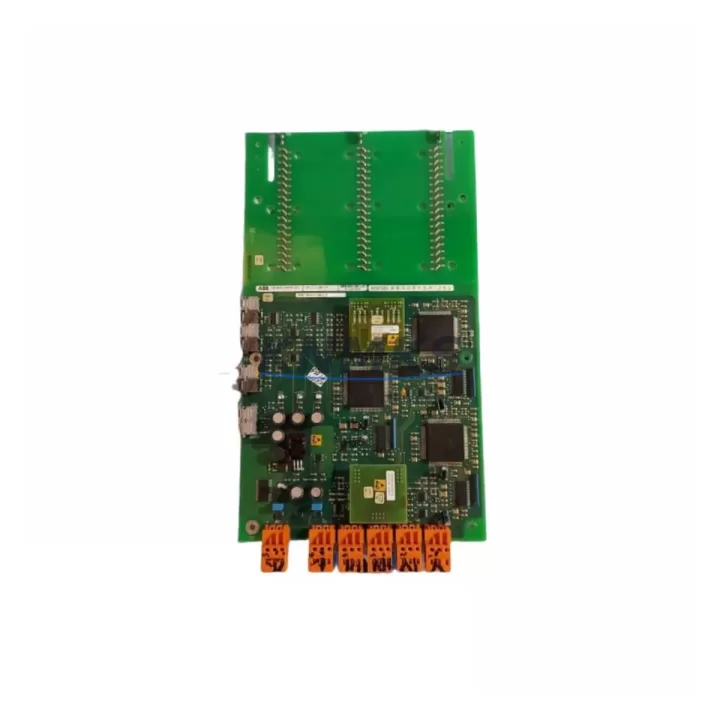
ABB 3BHE021889R0101 UF 21 BE101 Migration-Ready Interface for AC800M Legacy Control Systems
The ABB 3BHE021889R0101, designated UF 21 BE101, is a communication and interface board engineered for the AC800M distributed control system platform. As legacy DCS installations age beyond their original design life, plant engineers face increasing pressure to source verified replacement modules that maintain system continuity without triggering full-platform migrations. The UF 21 BE101 addresses this challenge directly: it is a drop-in compatible interface module that preserves existing I/O wiring, backplane slot assignments, and communication link configurations while restoring full controller functionality.
In retrofit scenarios, the UF 21 BE101 typically serves as a direct replacement for failed or end-of-life interface boards within AC800M controller cabinets. Before installation, engineers must confirm the backplane slot address, verify that the existing PM891 or PM865 processor module firmware version is compatible with the replacement board revision, and check that the Modulebus or PROFIBUS segment addressing remains unchanged. Terminal wiring on the associated S800 I/O modules does not require modification when the UF 21 BE101 is installed as a like-for-like replacement, significantly reducing commissioning time and minimizing the risk of wiring errors during the changeover.
Power budget verification is a critical pre-installation step. The AC800M cabinet power supply — commonly the SD821 or SD822 — must have sufficient headroom to support the replacement board alongside existing modules. Engineers should document the current draw of all installed modules before the swap and confirm that the replacement UF 21 BE101 falls within the same power envelope as the original. If the cabinet is operating near its power limit, a staged replacement approach is recommended, with the new board installed during a planned maintenance window rather than an emergency shutdown.
Communication link integrity is equally important. The UF 21 BE101 interfaces with the AC800M controller over the internal Modulebus, and any disruption to the bus topology — such as incorrect termination or a missing bus connector — will prevent the controller from recognizing the module after restart. Prior to the replacement, the existing bus configuration should be documented, including termination resistor positions and the physical order of modules on the backplane. After installation, the Control Builder M engineering tool should be used to perform a hardware scan and confirm that the module address matches the project configuration before the controller is returned to automatic mode.
For plants running Freelance 800F or Symphony Plus control architectures alongside AC800M systems, the UF 21 BE101 replacement workflow is compatible with mixed-platform environments. Engineers migrating from older AC450 or Master controllers to the AC800M platform will find that the UF 21 BE101 supports the same Modulebus communication standard, simplifying the transition and reducing the need for protocol conversion gateways. In these migration projects, the TB820 Modulebus modem and CI854 PROFIBUS interface module are commonly installed alongside the UF 21 BE101 to bridge legacy field devices to the updated controller platform.
HMI screen updates are a frequently overlooked aspect of interface board replacements. If the original board was mapped to specific tag addresses in the 800xA or Freelance operator station, the replacement must carry the same module address to avoid tag remapping in the HMI project. In cases where the address cannot be preserved — for example, when migrating from a different board variant — the HMI project must be updated and tested in a simulation environment before the live cutover. This step is particularly important in continuous process plants where operator visibility must be maintained throughout the migration.
Firmware compatibility should be verified before the replacement board is powered on. ABB periodically releases firmware updates for AC800M modules, and a mismatch between the controller firmware and the replacement board revision can result in a module fault on startup. The current firmware version of the PM891 or PM865 processor should be recorded before the swap, and the replacement UF 21 BE101 should be confirmed to be compatible with that firmware version. If a firmware update is required, it should be performed in a controlled environment with a backup of the existing controller project.
All units supplied are pre-shipment tested under simulated operating conditions to verify communication link establishment, power-on self-test completion, and I/O channel integrity. Each module is backed by a support terms confirmed by quotation covering manufacturing defects and functional failures. Stock is maintained across multiple regional warehouses to support emergency replacement requirements, with same-day dispatch available for in-stock units.
Migration Compatibility Table
| Parameter | Details |
|---|---|
| Part Number | 3BHE021889R0101 |
| Designation | UF 21 BE101 |
| Compatible Platform | ABB AC800M DCS |
| Compatible Controllers | PM891, PM865, PM864 |
| Communication Interface | Modulebus (internal backplane bus) |
| PROFIBUS Compatibility | Compatible via CI854 interface module |
| Backplane Interface | AC800M standard backplane slot |
| Power Supply Compatibility | SD821 / SD822 (verify cabinet power budget) |
| Firmware Requirement | Verify PM891/PM865 firmware revision before installation |
| HMI Compatibility | 800xA, Freelance Operator Station (verify tag addressing) |
| Engineering Tool | Control Builder M |
| Installation Type | Direct slot replacement (no wiring modification required) |
| Origin | Germany |
| Pre-Shipment Test | Yes — communication link, power-on self-test, I/O channel verification |
| Support terms | 12 Months |
| Dispatch | Same-day for in-stock units; global shipping available |
Retrofit Planning for Existing Automation Systems
A successful UF 21 BE101 retrofit begins with a complete audit of the existing AC800M cabinet. Engineers should document the slot positions of all installed modules — including the PM891 processor, TB820 Modulebus modem, CI854 PROFIBUS interface, and any S800 I/O modules connected via the Modulebus — before any hardware is disturbed. This documentation forms the baseline for post-installation verification and ensures that the replacement board is installed in the correct slot position with the correct address configuration.
In cabinets where the UF 21 BE101 is being replaced as part of a broader system upgrade — for example, a migration from AC450 to AC800M — the retrofit plan should include a review of the existing field wiring termination on the S800 I/O modules, confirmation that the new controller platform supports the existing I/O channel types, and a test of the communication link between the AC800M controller and the field devices before the cutover. The CI854 PROFIBUS interface module and the TB820 Modulebus modem are commonly involved in these broader migration projects and should be included in the pre-installation compatibility check.
Signal isolators installed between the field devices and the I/O modules should also be reviewed during the retrofit planning phase. In older installations, signal isolators may be calibrated to specific channel ranges that differ from the replacement module’s default configuration. Recalibration of these isolators — or replacement with modern equivalents — may be required to maintain measurement accuracy after the UF 21 BE101 is installed.
Downtime Control During System Migration
Minimizing unplanned downtime during a UF 21 BE101 replacement requires a structured pre-outage preparation process. The existing controller project should be backed up to a secure location using Control Builder M before any hardware changes are made. The backup should include the full hardware configuration, I/O channel assignments, and communication link settings, so that the project can be restored quickly if the replacement board does not initialize correctly on first power-on.
Where process conditions permit, a hot-standby or redundant controller configuration should be used to maintain field control continuity during the board swap. In non-redundant installations, the replacement should be timed to coincide with a planned process shutdown or a low-demand period to minimize the impact on production. The replacement procedure should be rehearsed in a staging environment — using a spare AC800M cabinet or a hardware-in-the-loop simulator — before the live cutover to identify any unexpected compatibility issues.
After the replacement board is installed and the controller is restarted, the commissioning engineer should verify that all I/O channels are reading correctly, that the communication link to the field devices is established, and that the HMI operator station is displaying the correct process values before the controller is returned to automatic mode. Any discrepancies should be investigated and resolved before the process is restarted to avoid control upsets.
Retrofit Support FAQ
Q: Is the 3BHE021889R0101 a direct replacement for the original UF 21 BE101 installed in my AC800M cabinet?
A: Yes, the 3BHE021889R0101 is the ABB part number for the UF 21 BE101 interface board and is designed as a direct slot replacement for the AC800M platform. Verify the backplane slot address and firmware compatibility before installation.
Q: Do I need to modify the field wiring or I/O channel configuration when replacing the UF 21 BE101?
A: In a like-for-like replacement, no wiring modification is required. The S800 I/O modules connected via the Modulebus retain their existing terminal wiring and channel assignments. If the replacement is part of a broader platform migration, a wiring review is recommended.
Q: How do I confirm that the replacement board is compatible with my current PM891 or PM865 firmware version?
A: Record the current firmware version from the Control Builder M hardware configuration before the swap. Contact our technical team with the firmware version and the replacement board revision number to confirm compatibility before installation.
Q: What support terms and testing does the supplied unit include?
A: Each 3BHE021889R0101 unit is pre-shipment tested for communication link establishment, power-on self-test completion, and I/O channel integrity. All units are covered by a support terms confirmed by quotation against manufacturing defects and functional failures from the date of dispatch.
© 2026 KNMKS. All rights reserved.
Original Source: https://knmks.com
Contact: admin@knmks.com | +86 18359268345
Product Identification
- Brand / Ecosystem
-
ABB
ABB - Model / Series
-
UF 21 BE101 3BHE021889R0101
AC800M Series - Product Family
- Relays & Interface
- Availability Status
- Available on request after model and quantity confirmation
- Inquiry Type
- B2B RFQ, replacement inquiry and project spare-part request
- Pre-Quote Check
- Exact SKU, brand, series, quantity, nameplate photos and destination country are checked before quotation
System Path
Where this product fits in the KNMKS automation structure.
Specification & Inquiry Focus
- Interface range
- Relays, isolation and signal modules
- Common needs
- Coil voltage and contact rating
- Project support
- Panel wiring and signal protection
Buyer Confirmation
Information KNMKS checks before replying.
- Exact model
- UF 21 BE101 3BHE021889R0101
- Brand / ecosystem
- ABB
- Product family
- Relays & Interface
- Application note
- Replacement, maintenance, project build or spare-part list
- Useful photos
- Nameplate, installed unit, cabinet layout or connector side
- Delivery details
- Quantity, destination country and target schedule
Document Support
Files and notes can be confirmed during quotation.
- Product photos or nameplate confirmation when available
- Packing and delivery notes before quotation confirmation
- Support scope and delivery terms confirmed per inquiry
- Export document coordination for qualified B2B requests
Inquiry Support
- Relay base and module matching
- Signal isolation and protection options
- Panel accessory inquiry support
What to Send Us
- Brand and exact model number: ABB UF 21 BE101 3BHE021889R0101
- Quantity and required delivery time
- Application, replacement requirement or nameplate photo
- Destination country and shipping preference
RFQ Preparation
This is a product inquiry page built for RFQ communication.
Fast Model Check
Send this model to KNMKS for confirmation.
Include quantity, destination country and photos if this is a maintenance replacement. The inquiry will be saved with a reference number after submission.
Brand & Compatibility Note
KNMKS displays automation product information for well-known industrial brand ecosystems and compatible replacement references. Brand names are used for product identification and compatibility reference only; final availability and commercial terms are confirmed per quotation.
 Manufacturing
 Machine Tools
 Packaging
 Energy & Power
 PLCs & Controllers
 HMI & Displays
 Servo Systems
 Variable Frequency Drives