
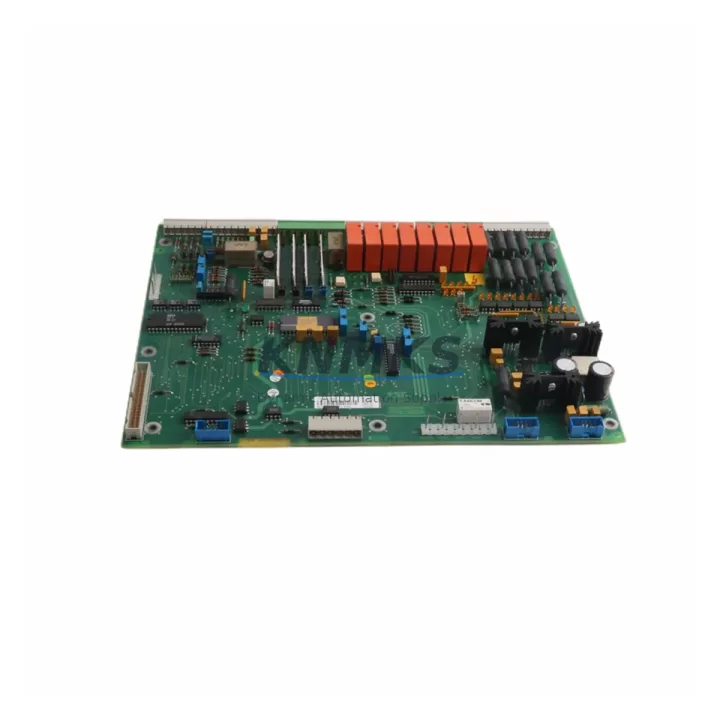
Overview
ABB YPQ202A YT204001-KB Maintenance-Proven Spare Part for Factory Uptime
The ABB YPQ202A (YT204001-KB) is a genuine digital I/O module engineered for the ABB AC800M Distributed Control System — one of the most widely deployed DCS platforms in process industries including oil & gas, power generation, pulp & paper, and chemical manufacturing. Sourced from verified industrial supply channels and electrically tested before shipment, this original spare part restores control system integrity with minimal downtime and maximum confidence.
For maintenance engineers managing aging AC800M cabinets, the YPQ202A is a critical line-replaceable unit (LRU). Its role in digital signal acquisition and output control makes it a high-priority item on any preventive maintenance checklist. When a YPQ202A fails or degrades, the impact is immediate: field signals are lost, process visibility drops, and production continuity is at risk. Stocking a verified spare eliminates the lead-time gap that turns a minor fault into a multi-day outage.
Procurement engineers sourcing this module should confirm compatibility with the installed AC800M controller firmware version and backplane slot assignment. KNMKS supplies this module with full pre-shipment electrical testing, original ABB labeling, and a support terms confirmed by quotation covering manufacturing defects and functional failure under normal operating conditions.
Spare Maintenance Table
| Part Number | YPQ202A |
| Reference / Label | YT204001-KB |
| Brand | ABB |
| Series | AC800M DCS |
| Module Type | Digital I/O Module |
| Product Type | DCS I/O Module |
| Country of Origin | Germany (DE) |
| Weight | 640 g |
| Compatibility | ABB AC800M controller family; S800 I/O backplane architecture |
| Installation | DIN-rail / backplane slot mount; hot-swap capable on supported firmware |
| Operating Environment | Industrial control cabinet; 0–55 °C operating range (per AC800M platform spec) |
| Signal Type | Digital input / output channels with field-side isolation |
| Maintenance Recommendation | Inspect connector pins and backplane contacts during annual shutdown; replace if channel fault LED persists after reset |
| Pre-Shipment Testing | Functional electrical test performed before dispatch |
| Support terms | 12 months from date of shipment |
| Supply Condition | Original spare — long-term stock available |
Maintenance Planning for Continuous Operation
Replacing the YPQ202A in an AC800M cabinet is rarely an isolated task. A disciplined maintenance engineer uses the replacement event as an opportunity to audit the surrounding electrical environment and reduce the risk of repeat failures. The following components should be inspected or verified concurrently:
S800 I/O Backplane and Rack: The YPQ202A seats into the S800 I/O backplane. Inspect backplane connector contacts for oxidation, mechanical damage, or intermittent seating. A degraded backplane can cause recurring module faults even after a new YPQ202A is installed.
AC800M Controller Module (PM8xx series): Confirm the controller firmware is compatible with the replacement YPQ202A hardware revision. Mismatched firmware can suppress channel diagnostics or prevent proper module recognition. If the PM8xx controller module shows elevated cycle time or memory warnings, schedule it for parallel inspection.
Field Terminal Units (TB820 / TB840 series): The YPQ202A connects to field wiring through dedicated terminal units. Check terminal screw torque, wire insulation condition, and shield grounding continuity. Loose field terminals are a leading cause of intermittent digital signal faults that are often misdiagnosed as module failure.
24 VDC Field Power Supply: Digital I/O modules depend on stable 24 VDC field power. Measure supply voltage under load and verify ripple is within specification. An aging or undersized power supply can cause false digital input readings or output switching failures that mimic a faulty YPQ202A.
Communication Interface Module (CI858 / CI801 series): If the AC800M system uses PROFIBUS or FOUNDATION Fieldbus communication, inspect the relevant communication interface module for error counters and bus termination integrity. Communication faults can cascade into I/O module alarms that are not caused by the I/O module itself.
Cabinet Fusing and Protection: Verify that field-side fuses protecting the digital output channels are intact and correctly rated. Blown fuses on output circuits are a common consequence of field wiring short circuits that may have contributed to the original YPQ202A failure. Replace fuses with correctly rated types and document the event in the maintenance log.
Stocking one spare YPQ202A per AC800M cabinet cluster is a widely adopted practice in process plants with high availability requirements. For facilities operating multiple AC800M systems, a centralized spare parts inventory covering the YPQ202A alongside PM8xx controller modules, TB820 terminal units, and CI858 communication modules provides the fastest path to fault recovery without emergency procurement delays.
Site Replacement Workflow
Step 1 — Fault Confirmation: Use the AC800M engineering workstation (Control Builder M) to confirm the YPQ202A channel fault. Check module status LEDs: a steady red fault LED with no field wiring fault indicates module-level failure. Export the current I/O configuration for reference before removal.
Step 2 — Safe Isolation: Follow site lockout/tagout (LOTO) procedures. De-energize the field-side 24 VDC supply to the affected terminal unit. Do not remove the module under live field power unless the system is confirmed hot-swap capable and the procedure is approved by the site safety plan.
Step 3 — Module Removal: Release the module locking lever on the S800 backplane. Slide the YPQ202A out of the slot. Inspect the backplane connector for damage before inserting the replacement unit.
Step 4 — Replacement Installation: Insert the new YPQ202A into the same backplane slot. Confirm the locking lever engages fully. Re-energize the field-side supply and observe the module status LED sequence — a green RUN LED indicates successful initialization.
Step 5 — Configuration Verification: In Control Builder M, confirm the replacement module is recognized with the correct hardware type and revision. Verify all channel assignments match the exported configuration. Perform a forced I/O test on critical channels before returning the loop to automatic control.
Step 6 — Documentation: Record the replacement in the site CMMS with the new module serial number, date, and technician ID. Update the spare parts inventory to trigger reorder of the consumed YPQ202A unit.
This workflow applies equally to planned annual maintenance replacements and emergency fault recovery scenarios. The structured approach reduces re-work risk and ensures the replaced module is correctly commissioned before production resumes.
Spare Parts Support FAQ
Q1: Is the YPQ202A (YT204001-KB) an original ABB spare or a compatible replacement?
A: KNMKS supplies the YPQ202A as an original ABB spare part sourced from verified industrial supply channels. Each unit carries original ABB labeling and part markings. We do not supply counterfeit, refurbished-without-disclosure, or third-party compatible substitutes for this module.
Q2: How do I verify compatibility with my installed AC800M system before ordering?
A: Confirm your AC800M controller firmware version and the hardware revision of the existing YPQ202A (visible on the module label). Share your system configuration details with our technical team at admin@knmks.com and we will confirm compatibility before shipment. We recommend cross-referencing the ABB AC800M Hardware Configuration manual for slot and revision requirements.
Q3: What does the support terms confirmed by quotation cover, and what is the return process?
A: The support terms confirmed by quotation cover manufacturing defects and functional failure under normal operating and storage conditions. It does not cover damage caused by incorrect installation, field wiring faults, overvoltage events, or unauthorized modification. To initiate a support terms claim, contact admin@knmks.com with the order reference, module serial number, and a description of the fault. We will arrange return shipping and provide a replacement or refund within the agreed resolution timeline.
Q4: Can KNMKS support long-term supply for multiple YPQ202A units across a multi-year maintenance contract?
A: Yes. KNMKS maintains standing inventory of the YPQ202A and can support blanket purchase orders, scheduled delivery programs, and multi-site procurement contracts. For facilities managing AC800M systems across multiple plants, we offer consolidated invoicing and priority allocation for contracted customers. Contact our sales team to discuss volume pricing and supply continuity agreements.
© 2026 KNMKS. All rights reserved.
Original Source: https://knmks.com
Contact: admin@knmks.com | +86 18359268345
Product Identification
- Brand / Ecosystem
-
ABB
ABB - Model / Series
-
YPQ202A YT204001-KB
AC800M Series - Product Family
- PLCs & Controllers
- Availability Status
- Available on request after model and quantity confirmation
- Inquiry Type
- B2B RFQ, replacement inquiry and project spare-part request
- Pre-Quote Check
- Exact SKU, brand, series, quantity, nameplate photos and destination country are checked before quotation
System Path
Where this product fits in the KNMKS automation structure.
Specification & Inquiry Focus
- Control platform
- PLC, PAC and modular controllers
- Common needs
- CPU, rack, power and I/O expansion
- Project support
- Replacement, cabinet build and maintenance
Buyer Confirmation
Information KNMKS checks before replying.
- Exact model
- YPQ202A YT204001-KB
- Brand / ecosystem
- ABB
- Product family
- PLCs & Controllers
- Application note
- Replacement, maintenance, project build or spare-part list
- Useful photos
- Nameplate, installed unit, cabinet layout or connector side
- Delivery details
- Quantity, destination country and target schedule
Document Support
Files and notes can be confirmed during quotation.
- Product photos or nameplate confirmation when available
- Packing and delivery notes before quotation confirmation
- Support scope and delivery terms confirmed per inquiry
- Export document coordination for qualified B2B requests
Inquiry Support
- Model cross-checking before quotation
- CPU, power, rack and expansion module matching
- Support for replacement and project inquiry
What to Send Us
- Brand and exact model number: ABB YPQ202A YT204001-KB
- Quantity and required delivery time
- Application, replacement requirement or nameplate photo
- Destination country and shipping preference
RFQ Preparation
This is a product inquiry page built for RFQ communication.
Fast Model Check
Send this model to KNMKS for confirmation.
Include quantity, destination country and photos if this is a maintenance replacement. The inquiry will be saved with a reference number after submission.
Brand & Compatibility Note
KNMKS displays automation product information for well-known industrial brand ecosystems and compatible replacement references. Brand names are used for product identification and compatibility reference only; final availability and commercial terms are confirmed per quotation.
 Manufacturing
 Machine Tools
 Packaging
 Energy & Power



 HMI & Displays
 Servo Systems
 Variable Frequency Drives
 Sensors