
Overview
SST 5136-PFB-PCI Maintenance-Proven Spare Part for Factory Uptime
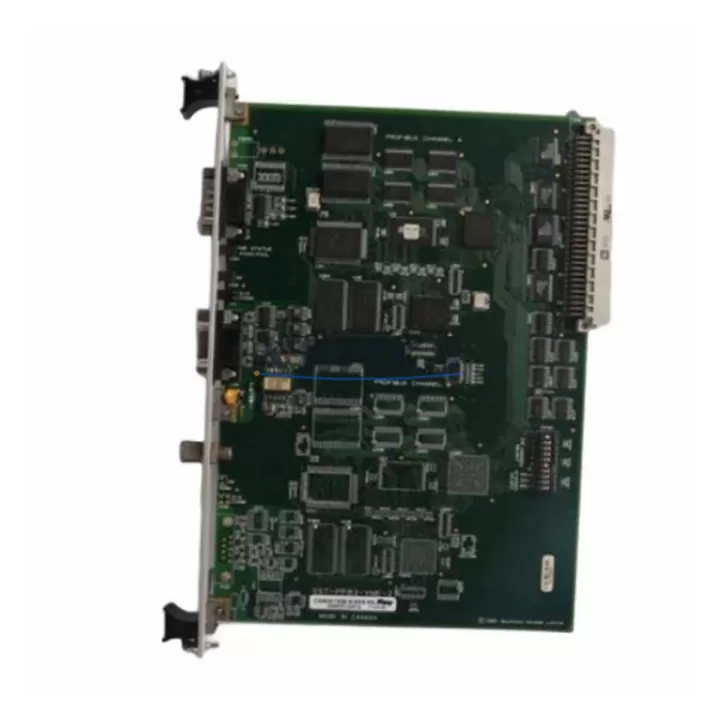
The SST 5136-PFB-PCI is a PROFIBUS-DP Master PCI communication card designed for industrial automation environments where continuous operation and rapid fault recovery are non-negotiable. Originally manufactured by SST (Woodhead / Molex), this card provides a reliable hardware interface between host PCs or industrial workstations and PROFIBUS-DP field networks — making it a critical component in legacy DCS, SCADA, and PLC-based control architectures. For maintenance engineers managing aging automation infrastructure, holding a verified spare of the 5136-PFB-PCI availability confirmed by RFQ is a proven strategy to minimize mean time to repair (MTTR) and protect production continuity.
The 5136-PFB-PCI supports PROFIBUS-DP Class 1 and Class 2 master functionality, enabling full cyclic and acyclic data exchange with field devices including Siemens ET 200 distributed I/O, Siemens S7-300/S7-400 PLCs, variable frequency drives, intelligent motor controllers, and third-party PROFIBUS slaves. Its PCI bus interface ensures compatibility with a wide range of industrial PCs and operator workstations running Windows-based SCADA or HMI platforms. When this card fails in a live production environment, the downstream impact can cascade across the entire PROFIBUS segment — halting I/O communication, triggering safety shutdowns, and forcing unplanned downtime that can cost thousands per hour in lost output.
Procurement engineers sourcing this part should verify the card revision and firmware version against their existing system configuration. SST released multiple hardware revisions of the 5136-PFB-PCI series; confirming compatibility with the installed driver stack and operating system before deployment prevents integration delays. Each unit supplied through KNMKS undergoes pre-shipment functional verification and is backed by a support terms confirmed by quotation, providing assurance for both emergency replacement and planned maintenance stock programs.
Spare Maintenance Table
| SKU / Part Number | 5136-PFB-PCI |
| Brand / Manufacturer | SST (Woodhead / Molex) |
| Series | 5136 PROFIBUS Interface Card Series |
| Product Type | PROFIBUS-DP Master PCI Communication Card |
| Bus Interface | PCI (32-bit, 33 MHz) |
| Protocol | PROFIBUS-DP (EN 50170), Class 1 & Class 2 Master |
| Baud Rate | 9.6 kbps – 12 Mbps (auto-detect) |
| Max Slave Nodes | Up to 125 PROFIBUS-DP slaves per segment |
| Connector | DB-9 Female (PROFIBUS standard) |
| OS Compatibility | Windows XP / 7 / 10 (32/64-bit); driver-dependent |
| Operating Temperature | 0°C to +60°C |
| Power Consumption | Supplied via PCI slot (3.3V / 5V) |
| Weight | 140 g |
| Origin | United States |
| Compatibility | Siemens S7-300/400, ET 200 I/O, legacy DCS PROFIBUS segments, SCADA workstations |
| Application Environment | Industrial control cabinets, SCADA/HMI workstations, DCS engineering stations |
| Pre-Shipment Testing | Functional verification completed before dispatch |
| Support terms | 12 Months |
Maintenance Planning for Continuous Operation
When replacing or stocking the SST 5136-PFB-PCI, a thorough inspection of the surrounding control architecture is essential to prevent repeat failures and ensure a clean restoration of PROFIBUS communications. Maintenance engineers should begin by auditing the PROFIBUS cable segment — verifying that termination resistors are correctly enabled at both ends of the bus, that cable shielding is properly grounded, and that DB-9 connectors show no signs of corrosion or mechanical damage. A degraded PROFIBUS cable or improperly terminated segment can cause intermittent communication faults that are often misdiagnosed as card failures.
The host industrial PC or workstation housing the 5136-PFB-PCI should also be evaluated. Check the PCI slot for physical damage, inspect the power supply unit for voltage stability (particularly the 5V and 3.3V rails that feed PCI peripherals), and confirm that the system BIOS correctly enumerates the card after installation. In environments running Siemens STEP 7 or WinCC, verify that the hardware configuration in the project matches the installed card’s GSD file and station address settings.
For broader system resilience, maintenance planners should consider stocking complementary components alongside the 5136-PFB-PCI. PROFIBUS-DP repeaters and bus segment isolators protect the network from ground loops and extend cable reach in large plant layouts. Siemens ET 200S or ET 200M distributed I/O modules that interface directly with the PROFIBUS segment should be included in the spare parts register, as their failure can be confused with master card issues during fault isolation. DP/PA segment couplers used in process plants to bridge PROFIBUS-DP and PROFIBUS-PA instrumentation loops are another high-priority spare. Additionally, the industrial PC’s network interface card (for SCADA connectivity), UPS modules protecting the workstation, and PROFIBUS diagnostic tools such as the Softing PB-T3 or similar bus analyzers are valuable additions to a complete maintenance kit. Fuse protection for the control cabinet’s 24 VDC supply rail feeding field devices should also be inspected and restocked as part of any planned maintenance cycle.
Site Replacement Workflow
Replacing the SST 5136-PFB-PCI in a live production environment requires a structured approach to minimize downtime and avoid configuration errors. Begin by documenting the current PROFIBUS network topology — record all slave station addresses, GSD file versions, and the master’s configured baud rate. This information is critical for restoring communication after the card swap and should be archived in the plant’s maintenance management system.
Before removing the failed card, place the PROFIBUS master in a safe stop state and notify downstream control systems to prevent spurious alarms or safety interlock trips. Power down the host workstation following proper ESD precautions, remove the defective 5136-PFB-PCI, and install the replacement unit in the same PCI slot where possible. After securing the card, reconnect the PROFIBUS cable and power up the system. Install or confirm the correct SST driver version for the operating system in use, then reload the PROFIBUS hardware configuration in the engineering software (e.g., Siemens STEP 7 HW Config or equivalent). Perform a bus scan to verify that all previously configured slave devices are detected and communicating correctly before returning the system to automatic operation.
For sites transitioning away from legacy PCI-based PROFIBUS masters, the 5136-PFB-PCI can serve as a bridge solution while a longer-term migration to PCIe or USB-based PROFIBUS interfaces is planned. This approach preserves existing software investments and avoids the cost and risk of a full system re-engineering during an unplanned outage.
Spare Parts Support FAQ
Q1: Is the SST 5136-PFB-PCI still available for long-term supply?
Yes. KNMKS maintains stock of the 5136-PFB-PCI to support legacy PROFIBUS installations that cannot be immediately migrated to newer hardware. Long-term supply commitments are available for customers with annual maintenance contracts or multi-unit procurement requirements. Contact our sales team to discuss scheduled delivery programs.
Q2: How is compatibility with my existing PROFIBUS system verified before shipment?
Each unit is tested for basic PROFIBUS-DP master functionality prior to dispatch. For site-specific compatibility verification, customers should confirm the card hardware revision, required driver version, and host OS version. KNMKS can provide documentation support to assist with pre-installation compatibility checks.
Q3: What does the support terms confirmed by quotation cover?
The support terms confirmed by quotation cover hardware defects and functional failures under normal operating conditions. It does not cover damage resulting from incorrect installation, ESD mishandling, overvoltage events, or physical impact. Support requests are processed with priority to minimize plant downtime — contact admin@knmks.com with the order reference and fault description.
Q4: Can I use the 5136-PFB-PCI as a direct replacement for older SST PROFIBUS cards?
The 5136-PFB-PCI is the standard replacement within the SST 5136 series for PCI-slot PROFIBUS-DP master applications. It is compatible with the same driver stack and GSD-based configuration tools used by earlier revisions in the series. Minor firmware differences between hardware revisions may require a driver update — verify the installed SST driver version against the card’s hardware revision label before deployment.
© 2026 KNMKS. All rights reserved.
Original Source: https://knmks.com
Contact: admin@knmks.com | +86 18359268345
Product Identification
- Brand / Ecosystem
-
Other Brands
Assorted Brands - Model / Series
-
5136-PFB-PCI
Assorted Series - Product Family
- Communication Modules
- Availability Status
- Available on request after model and quantity confirmation
- Inquiry Type
- B2B RFQ, replacement inquiry and project spare-part request
- Pre-Quote Check
- Exact SKU, brand, series, quantity, nameplate photos and destination country are checked before quotation
System Path
Where this product fits in the KNMKS automation structure.
Specification & Inquiry Focus
- Network range
- Ethernet, fieldbus and gateway modules
- Common needs
- Protocol, port and controller family
- Project support
- Machine networking and data integration
Buyer Confirmation
Information KNMKS checks before replying.
- Exact model
- 5136-PFB-PCI
- Brand / ecosystem
- Other Brands
- Product family
- Communication Modules
- Application note
- Replacement, maintenance, project build or spare-part list
- Useful photos
- Nameplate, installed unit, cabinet layout or connector side
- Delivery details
- Quantity, destination country and target schedule
Document Support
Files and notes can be confirmed during quotation.
- Product photos or nameplate confirmation when available
- Packing and delivery notes before quotation confirmation
- Support scope and delivery terms confirmed per inquiry
- Export document coordination for qualified B2B requests
Inquiry Support
- Industrial Ethernet and fieldbus module inquiry
- Protocol compatibility review
- Integration project inquiry support
What to Send Us
- Brand and exact model number: Other Brands 5136-PFB-PCI
- Quantity and required delivery time
- Application, replacement requirement or nameplate photo
- Destination country and shipping preference
RFQ Preparation
This is a product inquiry page built for RFQ communication.
Fast Model Check
Send this model to KNMKS for confirmation.
Include quantity, destination country and photos if this is a maintenance replacement. The inquiry will be saved with a reference number after submission.
Brand & Compatibility Note
KNMKS displays automation product information for well-known industrial brand ecosystems and compatible replacement references. Brand names are used for product identification and compatibility reference only; final availability and commercial terms are confirmed per quotation.
 Manufacturing
 Machine Tools
 Packaging
 Energy & Power
 PLCs & Controllers
 HMI & Displays
 Servo Systems
 Variable Frequency Drives