
Overview
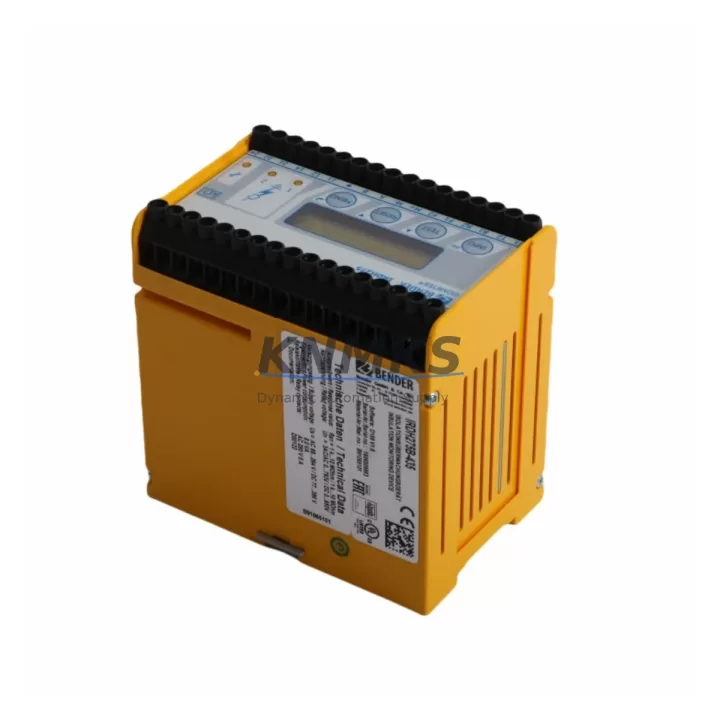
BENDER IRDH275B-427: Migration-Ready Insulation Monitoring for Legacy IT System Upgrades
The BENDER IRDH275B-427 is a high-performance Insulation Monitoring Device (IMD) engineered specifically for engineers and maintenance teams undertaking legacy control system migrations, discontinued equipment replacements, and control cabinet modernization projects. As older BENDER IR series units reach end-of-life or become unavailable as spare parts, the IRDH275B-427 provides a validated, drop-in compatible upgrade path that preserves existing wiring infrastructure, minimizes downtime, and maintains continuous insulation monitoring across ungrounded IT power systems.
Whether you are replacing a discontinued IRDH275B, IRDH375, or an earlier-generation ISOMETER unit, the IRDH275B-427 is designed to slot into existing panel cutouts and terminal configurations with minimal rework. Its onboard Modbus RTU interface over RS-485 ensures seamless integration into existing SCADA, BMS, or PLC communication architectures without requiring protocol converters or gateway modules.
Migration Compatibility Table
| Parameter | IRDH275B-427 (New) | Legacy IR Series (Replaced) | Migration Notes |
|---|---|---|---|
| Mounting Format | Panel mount, DIN rail optional | Panel mount | Same cutout dimensions; no panel modification required |
| Terminal Wiring | Screw terminals, compatible pitch | Screw terminals | Verify terminal labeling; re-use existing cable runs |
| Communication | Modbus RTU / RS-485 | Varies (analog / proprietary) | Update PLC/SCADA driver; confirm baud rate and address |
| Supply Voltage | 24–240 V AC/DC | 110–240 V AC | Wide-range input covers most legacy supply configurations |
| Alarm Relay Output | 2 × relay (NO/NC) | 1–2 × relay | Map relay assignments to existing alarm logic in PLC program |
| Response Frequency | 0–400 Hz | 50/60 Hz fixed | Suitable for VFD-fed IT systems; confirm with site engineer |
| Installation Space | Standard 96 × 96 mm front face | 96 × 96 mm | Direct replacement; check depth clearance behind panel |
| Firmware / Config | Front-panel keypad + software | DIP switch / potentiometer | Re-enter threshold values; document original settings before removal |
| Support terms | 12 Months | — | Covered from date of shipment; includes functional test certificate |
Retrofit Planning for Existing Automation Systems
A successful retrofit begins well before the IRDH275B-427 arrives on site. During the planning phase, engineers should pull the existing wiring diagram for the legacy IMD and cross-reference terminal assignments against the IRDH275B-427 connection diagram. In most IR series installations, the L1/L2 measurement inputs, PE connection, and alarm relay terminals follow a consistent layout, allowing direct re-termination without splicing new cable.
Power supply capacity is a critical checkpoint. The IRDH275B-427 draws a modest burden from the monitored IT system, but the control cabinet’s 24 V DC auxiliary rail — often shared with the BENDER COM465IP communication module or a CP915 coupling device — must be verified to have sufficient headroom. If the cabinet also houses an ISOMETER isoHR685W for high-resistance applications or an IRDH375 for a parallel IT segment, confirm that each device is assigned a unique Modbus node address before commissioning to avoid bus conflicts.
For sites running older PROFIBUS or hardwired alarm panels, the RS-485 Modbus RTU output of the IRDH275B-427 may require a protocol gateway. In many modernization projects, this is the ideal moment to upgrade the communication backbone alongside the IMD replacement, integrating the new device directly into the site’s existing Siemens S7 or Allen-Bradley ControlLogix PLC via a standard Modbus function block. HMI screens that previously displayed analog fault indicators will need to be updated to reflect the new register map — a task that typically takes one to two hours with the PLC programmer on site.
Backplane and rack considerations apply when the IRDH275B-427 is installed alongside modular I/O systems. Ensure that the alarm relay wiring does not share a conduit with high-voltage motor control cables, as induced noise can cause spurious fault indications. Signal isolation barriers or shielded twisted-pair cable are recommended for RS-485 runs exceeding 20 meters. Where the legacy installation used a BENDER EDS460 earth fault detection system in parallel, verify that the two systems do not interfere with each other’s measurement cycles by staggering their test intervals in software.
Downtime Control During System Migration
Minimizing production downtime is the primary concern for any live-system IMD replacement. The recommended approach is to pre-configure the IRDH275B-427 on the bench before the scheduled maintenance window: set the insulation resistance alarm threshold (typically 50 kΩ for medical IT or 100 kΩ for industrial IT), configure the Modbus address and baud rate, and verify relay operation using a test load. This bench pre-commissioning step reduces on-site configuration time to under 15 minutes.
During the switchover, the sequence should be: isolate the IT system segment, remove the legacy IMD, install the IRDH275B-427, re-terminate wiring in order (PE first, then L1/L2, then supply, then communication), and restore power. The device performs a self-test on power-up and will indicate a healthy IT system within seconds if insulation resistance is above the alarm threshold. The PLC program logic — including latching alarm outputs, reset sequences, and HMI fault page navigation — should be tested against the new register map before handing the system back to operations.
For critical facilities where any interruption is unacceptable, a temporary bypass relay can be used to maintain alarm continuity during the physical swap, provided the site safety plan permits this approach. Document the original IMD’s measured insulation resistance value immediately before removal and compare it with the first reading from the IRDH275B-427 to confirm measurement continuity and validate the replacement.
Retrofit Support FAQ
Q: Is the IRDH275B-427 a direct replacement for the IRDH275B and IRDH375?
A: Yes. The IRDH275B-427 is the current production successor to the IRDH275B and is dimensionally and functionally compatible with most IRDH375 installations. Terminal pinouts are largely consistent; however, always verify the wiring diagram for your specific cabinet revision before re-terminating.
Q: What commissioning steps are required after installation?
A: After physical installation, set the Modbus node address and baud rate via the front-panel keypad, enter the site-specific alarm threshold, and perform a relay function test. Update the PLC Modbus driver with the new register map and confirm that the HMI alarm page reflects the correct fault status. Total commissioning time is typically 30–60 minutes for an experienced technician.
Q: Do you provide a functional test certificate with each unit?
A: Yes. Every IRDH275B-427 shipped from our inventory is accompanied by a functional test certificate confirming that the unit has been tested against BENDER factory specifications. This supports your incoming inspection process and provides traceability documentation for regulated industries.
Q: What does the support terms confirmed by quotation cover?
A: The support terms confirmed by quotation cover manufacturing defects and functional failures under normal operating conditions from the date of shipment. It does not cover damage resulting from incorrect installation, overvoltage events, or unauthorized modification. Support requests are processed via admin@knmks.com with the original order reference and a description of the fault.
© 2026 KNMKS. All rights reserved.
Original Source: https://knmks.com
Contact: admin@knmks.com | +86 18359268345
Product Identification
- Brand / Ecosystem
-
Other Brands
Assorted Brands - Model / Series
-
IRDH275B-427
Assorted Series - Product Family
- Communication Modules
- Availability Status
- Available on request after model and quantity confirmation
- Inquiry Type
- B2B RFQ, replacement inquiry and project spare-part request
- Pre-Quote Check
- Exact SKU, brand, series, quantity, nameplate photos and destination country are checked before quotation
System Path
Where this product fits in the KNMKS automation structure.
Specification & Inquiry Focus
- Network range
- Ethernet, fieldbus and gateway modules
- Common needs
- Protocol, port and controller family
- Project support
- Machine networking and data integration
Buyer Confirmation
Information KNMKS checks before replying.
- Exact model
- IRDH275B-427
- Brand / ecosystem
- Other Brands
- Product family
- Communication Modules
- Application note
- Replacement, maintenance, project build or spare-part list
- Useful photos
- Nameplate, installed unit, cabinet layout or connector side
- Delivery details
- Quantity, destination country and target schedule
Document Support
Files and notes can be confirmed during quotation.
- Product photos or nameplate confirmation when available
- Packing and delivery notes before quotation confirmation
- Support scope and delivery terms confirmed per inquiry
- Export document coordination for qualified B2B requests
Inquiry Support
- Industrial Ethernet and fieldbus module inquiry
- Protocol compatibility review
- Integration project inquiry support
What to Send Us
- Brand and exact model number: Other Brands IRDH275B-427
- Quantity and required delivery time
- Application, replacement requirement or nameplate photo
- Destination country and shipping preference
RFQ Preparation
This is a product inquiry page built for RFQ communication.
Fast Model Check
Send this model to KNMKS for confirmation.
Include quantity, destination country and photos if this is a maintenance replacement. The inquiry will be saved with a reference number after submission.
Brand & Compatibility Note
KNMKS displays automation product information for well-known industrial brand ecosystems and compatible replacement references. Brand names are used for product identification and compatibility reference only; final availability and commercial terms are confirmed per quotation.
 Manufacturing
 Machine Tools
 Packaging
 Energy & Power
 PLCs & Controllers
 HMI & Displays
 Servo Systems
 Variable Frequency Drives