
Overview
Siemens 6GK7443-5DX03-0XE0 Migration-Ready CP for S7-400: Legacy System Upgrade & PROFIBUS DP Retrofit
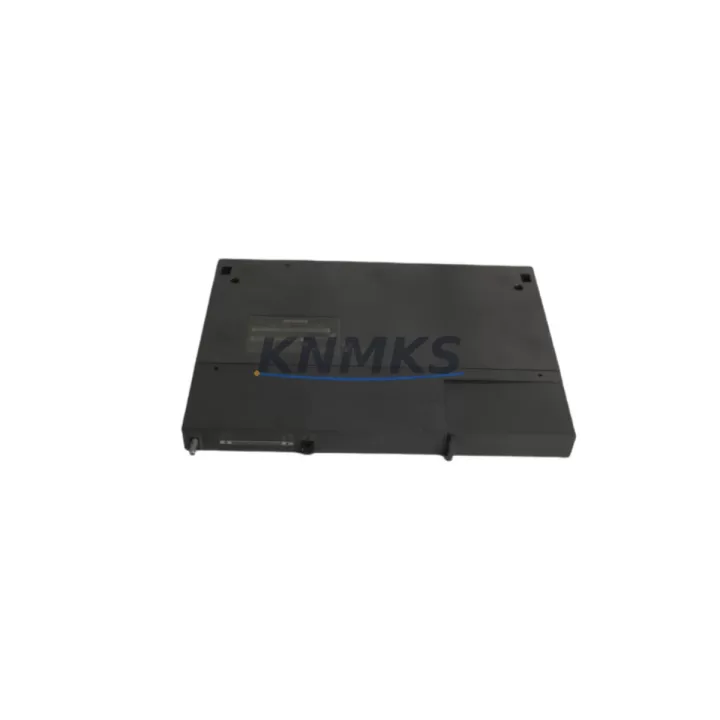
The Siemens 6GK7443-5DX03-0XE0 is the CP 443-5 Extended communications processor designed for the SIMATIC S7-400 rack. As legacy S7-400 installations approach end-of-support milestones and original CP 443-5 units become increasingly difficult to source, the 6GK7443-5DX03-0XE0 serves as the primary migration-ready replacement for discontinued predecessors including the 6GK7443-5DX02-0XE0 and earlier CP 443-5 Basic variants. This module maintains backward compatibility with existing PROFIBUS DP network topologies, preserving segment addressing, DP slave configurations, and GSD file assignments without requiring a full network redesign.
For plants operating mixed Siemens S7-400 and S7-300 environments, the 6GK7443-5DX03-0XE0 integrates seamlessly into the existing CR3 or UR2 rack infrastructure. Engineers replacing a failed or end-of-life CP 443-5 unit must verify the slot assignment in STEP 7 HW Config, confirm the module order number matches the configured hardware catalog entry, and re-download the system data block to the CPU — typically a 6ES7414 or 6ES7416 series — before resuming PROFIBUS DP communication. The module occupies a standard S7-400 slot and draws power from the PS 407 or PS 405 power supply rail; confirming available rack current budget is a mandatory pre-installation step, particularly in densely populated racks where FM 450 function modules or CP 443-1 Ethernet processors share the same backplane.
In retrofit scenarios where the control cabinet is being upgraded from a legacy S5-115U or S5-135U platform to S7-400, the 6GK7443-5DX03-0XE0 enables PROFIBUS DP master functionality that bridges the old I/O field devices — including ET 200M distributed I/O stations and DP-compatible drives — to the new S7-400 CPU without replacing field wiring. The DP interface supports up to 125 slaves per segment, and the module’s extended firmware supports DPV1 acyclic services required for modern HART-over-PROFIBUS field instruments. During migration, engineers should document the existing DP segment baud rate (typically 1.5 Mbit/s or 12 Mbit/s), verify termination resistor status at both segment ends, and confirm that the new module’s DP address matches the master address previously held by the replaced unit.
When the 6GK7443-5DX03-0XE0 is used to replace a CP 443-5 Basic (6GK7443-5DX00-0XE0 or 6GK7443-5DX01-0XE0), the extended variant introduces additional diagnostic buffer capacity and DPV1 support. Project engineers must update the STEP 7 hardware configuration to reflect the new order number, regenerate the system data, and perform a full download to avoid configuration mismatch faults on the CPU. HMI screens built in WinCC or SIMATIC Panel that reference DP diagnostic addresses should be reviewed to confirm alarm mapping remains consistent after the module swap. If the plant uses S7 communication over PROFIBUS for peer-to-peer data exchange with other S7-400 or S7-300 stations, the connection table in NetPro must be re-verified and re-compiled after the hardware change.
For installations migrating toward PROFINET while retaining legacy PROFIBUS field devices, the 6GK7443-5DX03-0XE0 can coexist in the same rack with a CP 443-1 Advanced Ethernet module, allowing a phased migration strategy where PROFIBUS DP field segments remain operational while new PROFINET I/O devices are commissioned in parallel. This dual-network approach reduces total downtime during the transition and allows the plant to validate new I/O segments before decommissioning legacy DP slaves. Firmware version compatibility between the CP 443-5 Extended and the S7-400 CPU operating system should be confirmed in the Siemens compatibility matrix prior to installation.
All units supplied are pre-shipment tested under powered conditions, verifying DP communication establishment, diagnostic LED behavior, and backplane interface integrity. Stock is maintained for immediate dispatch to support emergency replacement scenarios where unplanned CP failures have caused production line stoppages. A support terms confirmed by quotation is included on every unit.
Migration Compatibility Table
| Parameter | Details |
|---|---|
| SKU / Order Number | 6GK7443-5DX03-0XE0 |
| Module Type | CP 443-5 Extended – PROFIBUS DP Communications Processor |
| Compatible Platform | SIMATIC S7-400 (CR3, UR2, UR1 racks) |
| Replaces / Supersedes | 6GK7443-5DX02-0XE0, 6GK7443-5DX01-0XE0, 6GK7443-5DX00-0XE0 (CP 443-5 Basic) |
| Communication Interface | PROFIBUS DP (Master/Slave), DPV1 acyclic services supported |
| Max DP Slaves per Segment | Up to 125 |
| Supported Baud Rates | 9.6 kbit/s – 12 Mbit/s |
| Rack Power Draw | Verify available current on PS 407 / PS 405 before installation |
| Backplane Interface | S7-400 standard backplane bus (K-bus) |
| Configuration Tool | STEP 7 V5.x / TIA Portal (with legacy support package) |
| HMI Compatibility | WinCC, SIMATIC Panels via DP diagnostic address mapping |
| Firmware Compatibility | Verify CPU OS version against Siemens compatibility matrix |
| Installation Space | 1 standard S7-400 slot |
| Origin | Germany |
| Pre-Shipment Testing | Powered functional test – DP communication, LED diagnostics, backplane interface |
| Support terms | 12 Months |
Retrofit Planning for Existing Automation Systems
A successful retrofit of the 6GK7443-5DX03-0XE0 into an existing S7-400 control cabinet requires a structured pre-installation audit. Begin by documenting the current rack layout: record the slot positions of the CPU (6ES7414 or 6ES7416 series), the PS 407 power supply, any installed FM 450 function modules, and the existing CP 443-5 unit being replaced. Confirm the rack type — CR3, UR2, or UR1 — as slot count and backplane bus segment boundaries differ between rack variants.
Next, export the current STEP 7 project and archive the hardware configuration before making any changes. In HW Config, delete the existing CP 443-5 entry and insert the 6GK7443-5DX03-0XE0 from the hardware catalog, ensuring the slot number matches the physical installation position. Regenerate the system data and perform a full download to the CPU. If the rack also contains a CP 443-1 Advanced for Ethernet connectivity, verify that the new CP 443-5 Extended does not conflict with the existing S7 connection table entries in NetPro.
For plants using ET 200M distributed I/O stations on the PROFIBUS DP segment, confirm that each IM 153 interface module retains its configured DP address and that the GSD files for all connected slaves are present in the STEP 7 project. If the legacy installation included DP-compatible variable-speed drives or signal isolators on the segment, verify that DPV1 acyclic read/write services are correctly parameterized in the new module configuration. Review WinCC or SIMATIC Panel HMI screens that display DP diagnostic information to confirm alarm tag addresses remain valid after the hardware swap.
Where the retrofit is part of a broader migration from S5 to S7-400, the 6GK7443-5DX03-0XE0 enables the new S7-400 CPU to assume the PROFIBUS DP master role previously held by an S5 CP 5431 or CP 5434 module, preserving field device wiring and segment topology. In this scenario, a programming cable connection to the new CPU for initial commissioning and a parallel run period — where both old and new systems are powered simultaneously — is strongly recommended to validate I/O data consistency before final cutover.
Downtime Control During System Migration
Minimizing unplanned downtime during a CP 443-5 replacement requires preparation before the maintenance window begins. Prior to shutdown, capture a full backup of the S7-400 CPU program, including all data blocks, organization blocks, and the current hardware configuration archive. Verify that the replacement 6GK7443-5DX03-0XE0 unit is on-site and has passed pre-shipment testing before scheduling the outage.
During the swap, the physical replacement of the CP module in the S7-400 rack takes under five minutes. The majority of the maintenance window is consumed by the STEP 7 hardware reconfiguration, system data download, and PROFIBUS DP segment re-initialization. To protect the original program logic, never perform a memory reset on the CPU during the CP replacement — only download the updated system data block. After the download, monitor the DP diagnostic buffer in STEP 7 for any slave communication faults and confirm that all ET 200M stations and field devices return to cyclic data exchange within the expected initialization time.
If the plant operates a redundant S7-400H configuration, the CP replacement can be performed on one CPU subsystem while the other maintains control, eliminating process interruption entirely. For non-redundant installations, coordinating the maintenance window with production scheduling and pre-staging all configuration files on the programming laptop reduces total downtime to the minimum achievable. Post-commissioning, retain the replaced module for failure analysis and update the plant’s spare parts inventory record to reflect the new installed unit.
Retrofit Support FAQ
Q: Is the 6GK7443-5DX03-0XE0 a direct drop-in replacement for the CP 443-5 Basic (6GK7443-5DX00-0XE0)?
A: The 6GK7443-5DX03-0XE0 (CP 443-5 Extended) is physically compatible with the same S7-400 rack slot and PROFIBUS DP wiring. However, the hardware configuration in STEP 7 must be updated to reflect the new order number, and a system data download to the CPU is required. The Extended variant adds DPV1 acyclic service support not present in the Basic version, which may require minor configuration adjustments if DPV1 services are to be utilized.
Q: What pre-shipment testing is performed on each unit?
A: Every 6GK7443-5DX03-0XE0 unit undergoes powered functional testing prior to dispatch. This includes verification of PROFIBUS DP communication establishment, backplane interface integrity, and diagnostic LED behavior under normal operating conditions. Test records are retained and available upon request.
Q: How do I confirm firmware compatibility between the CP 443-5 Extended and my S7-400 CPU?
A: Firmware compatibility is determined by the CPU operating system version and the CP firmware version. Consult the Siemens compatibility matrix for the 6GK7443-5DX03-0XE0 and cross-reference with your installed CPU order number and firmware revision, visible in the STEP 7 module properties dialog. If compatibility is uncertain, contact our technical team with your CPU order number and current firmware version for confirmation before ordering.
Q: What is the support terms coverage and stock availability?
A: All units carry a support terms confirmed by quotation covering manufacturing defects and functional failures under normal operating conditions. Stock is maintained across multiple locations for immediate dispatch, supporting emergency replacement requirements. Lead time for in-stock units is typically 1–3 business days to most destinations.
© 2026 KNMKS. All rights reserved.
Original Source: https://knmks.com
Contact: admin@knmks.com | +86 18359268345
Product Identification
- Brand / Ecosystem
-
Siemens
Siemens - Model / Series
-
6GK7443-5DX03-0XE0
SIMATIC Series - Product Family
- PLCs & Controllers
- Availability Status
- Available on request after model and quantity confirmation
- Inquiry Type
- B2B RFQ, replacement inquiry and project spare-part request
- Pre-Quote Check
- Exact SKU, brand, series, quantity, nameplate photos and destination country are checked before quotation
System Path
Where this product fits in the KNMKS automation structure.
Specification & Inquiry Focus
- Control platform
- PLC, PAC and modular controllers
- Common needs
- CPU, rack, power and I/O expansion
- Project support
- Replacement, cabinet build and maintenance
Buyer Confirmation
Information KNMKS checks before replying.
- Exact model
- 6GK7443-5DX03-0XE0
- Brand / ecosystem
- Siemens
- Product family
- PLCs & Controllers
- Application note
- Replacement, maintenance, project build or spare-part list
- Useful photos
- Nameplate, installed unit, cabinet layout or connector side
- Delivery details
- Quantity, destination country and target schedule
Document Support
Files and notes can be confirmed during quotation.
- Product photos or nameplate confirmation when available
- Packing and delivery notes before quotation confirmation
- Support scope and delivery terms confirmed per inquiry
- Export document coordination for qualified B2B requests
Inquiry Support
- Model cross-checking before quotation
- CPU, power, rack and expansion module matching
- Support for replacement and project inquiry
What to Send Us
- Brand and exact model number: Siemens 6GK7443-5DX03-0XE0
- Quantity and required delivery time
- Application, replacement requirement or nameplate photo
- Destination country and shipping preference
RFQ Preparation
This is a product inquiry page built for RFQ communication.
Fast Model Check
Send this model to KNMKS for confirmation.
Include quantity, destination country and photos if this is a maintenance replacement. The inquiry will be saved with a reference number after submission.
Brand & Compatibility Note
KNMKS displays automation product information for well-known industrial brand ecosystems and compatible replacement references. Brand names are used for product identification and compatibility reference only; final availability and commercial terms are confirmed per quotation.
 Manufacturing
 Machine Tools
 Packaging
 Energy & Power



 HMI & Displays
 Servo Systems
 Variable Frequency Drives
 Sensors