
Overview
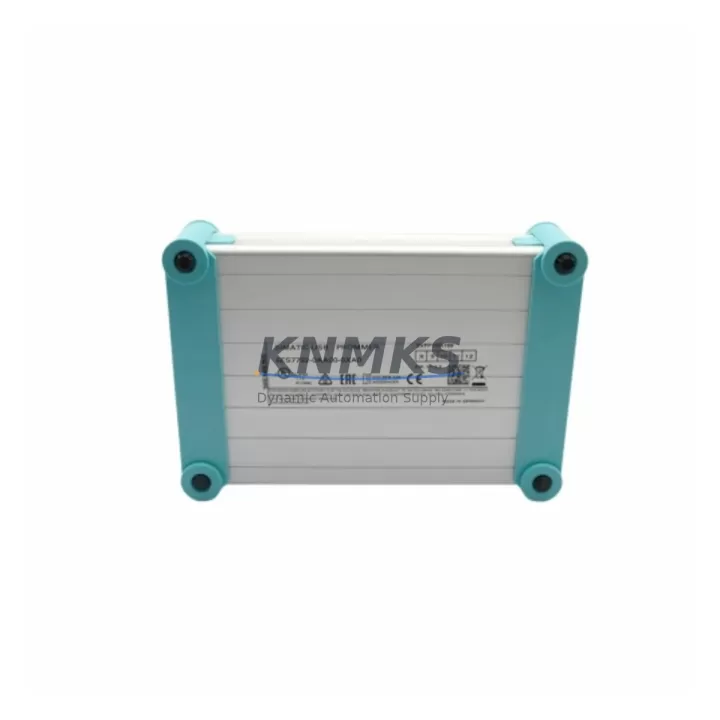
Siemens 6ES7 792-0AA00-0XA0 Migration-Ready USB-Prommer for Legacy S7-200 Control Systems
The Siemens 6ES7 792-0AA00-0XA0 USB-Prommer is the essential programming interface for engineers managing legacy S7-200 PLC installations across petrochemical plants, water treatment facilities, power generation stations, and manufacturing lines. As the S7-200 series reaches end-of-life and spare parts become increasingly scarce, maintaining a reliable programming cable is critical to sustaining control continuity, executing firmware updates, and completing program backups before any planned migration to newer platforms such as the S7-1200 or S7-1500 series.
This USB-Prommer connects directly to the RS-485 PPI port on S7-200 CPUs — including the CPU 221, CPU 222, CPU 224, CPU 224XP, and CPU 226 — and communicates via the Point-to-Point Interface (PPI) protocol using STEP 7 Micro/WIN software. It is fully compatible with Windows 7, Windows 10, and Windows 11 operating environments, requiring only the standard USB driver installation before commissioning. No additional hardware adapters or protocol converters are needed for standard single-master PPI configurations.
Migration Compatibility Table
| Parameter | Details |
|---|---|
| SKU / Part Number | 6ES7 792-0AA00-0XA0 |
| Compatible CPUs | S7-200: CPU 221, 222, 224, 224XP, 226 |
| Communication Protocol | PPI (Point-to-Point Interface), RS-485 |
| Host Interface | USB Type-A (PC side) |
| Device Interface | RS-485 / DB9 (PLC side) |
| Software Compatibility | STEP 7 Micro/WIN V4.0 and above |
| OS Support | Windows 7 / 10 / 11 (32-bit & 64-bit) |
| Baud Rate | 9.6 kbps – 187.5 kbps (auto-negotiated) |
| Installation Space | Standard USB port; no rack slot required |
| Replacement Recommendation | Direct drop-in for OEM 6ES7 792-0AA00-0XA0 |
| Commissioning Notes | Install USB driver, set COM port in Micro/WIN, verify PPI address |
| Support terms | support terms confirmed by quotation, pre-shipment tested |
Retrofit Planning for Existing Automation Systems
When planning a retrofit or upgrade of an S7-200-based control system, the programming cable is often the first tool required on-site. Before any CPU swap, I/O expansion, or communication upgrade can begin, engineers must establish a live programming connection to read out the existing ladder logic, document the current program structure, and verify the memory utilization of the installed CPU module.
In many legacy control cabinets, the S7-200 CPU is paired with expansion modules such as the EM 221 digital input module, EM 222 digital output module, or EM 231 analog input module. These I/O modules communicate over the internal S7-200 expansion bus, and their configuration data is stored within the CPU program. Backing up this configuration via the USB-Prommer before any hardware change is a non-negotiable step in any responsible retrofit workflow.
For sites migrating toward Profibus or Ethernet-based architectures, the USB-Prommer also plays a role in the transition phase. Engineers frequently use it to extract the original PPI-based program logic before porting it to a new platform. In parallel, components such as the CP 243-1 Ethernet module or the EM 277 Profibus-DP module may be introduced to extend the S7-200’s communication capability during a phased migration, allowing the legacy CPU to remain operational while new infrastructure is commissioned alongside it.
Power supply compatibility should also be verified during retrofit planning. The S7-200 CPU typically operates on 24 VDC, and the existing power supply module — often a PS 307 or equivalent third-party 24 VDC DIN-rail unit — must be confirmed to have sufficient current capacity to support any additional expansion modules added during the upgrade. The USB-Prommer itself draws power from the USB host port and places no additional load on the PLC power rail.
For HMI-connected systems, the TD 200 text display or OP 73 operator panel connected via PPI must be accounted for in the network address scheme. The USB-Prommer operates as a master on the PPI network during programming sessions; engineers should confirm that no address conflicts exist between the programming device, HMI, and any other PPI masters before initiating a live connection on a running system.
Downtime Control During System Migration
Minimizing unplanned downtime is the primary concern in any legacy PLC migration. The 6ES7 792-0AA00-0XA0 USB-Prommer enables engineers to perform a full program upload from the existing CPU before any physical hardware change takes place. This backup preserves the original ladder logic, data block values, system block configuration, and symbol table — all of which are essential for restoring control functionality if the migration encounters unexpected issues.
For sites operating continuous processes — such as chemical dosing systems, conveyor lines, or pump control stations — the recommended approach is to complete the program backup during a scheduled maintenance window, then perform the hardware swap and program download in a single coordinated sequence. The USB-Prommer supports this workflow by providing a stable, low-latency connection that allows rapid program transfer even on older PC hardware.
Where a full CPU replacement is planned, engineers should also verify the firmware version of the replacement CPU module before installation. Some S7-200 program features — particularly those using the PID control loop or high-speed counter functions — may behave differently across firmware revisions. The USB-Prommer allows firmware version readback via STEP 7 Micro/WIN, enabling pre-installation compatibility checks without powering down the production line.
All units supplied by KNMKS are pre-shipment tested for USB enumeration, driver compatibility, and PPI communication integrity. This verification step eliminates the risk of receiving a non-functional cable on a time-critical retrofit job. Stock is maintained to support immediate dispatch, reducing lead time risk for urgent maintenance scenarios.
Retrofit Support FAQ
Q1: Is the 6ES7 792-0AA00-0XA0 a direct replacement for the original Siemens USB-Prommer?
Yes. This unit is a validated drop-in replacement for the OEM 6ES7 792-0AA00-0XA0. It uses the same USB-to-RS-485 conversion circuit, supports the same PPI protocol stack, and is recognized by STEP 7 Micro/WIN without any software modification. No changes to the PLC program or hardware configuration are required.
Q2: What commissioning steps are required after connecting the USB-Prommer?
Install the USB driver on the programming PC, then open STEP 7 Micro/WIN and navigate to the Communications settings. Select the correct COM port assigned to the USB-Prommer, set the baud rate to match the PLC network (typically 9.6 kbps for default configurations), and confirm the PPI station address. Once the connection is established, perform a program upload to verify communication integrity before making any program changes.
Q3: Can this cable be used on a PPI network that also has an HMI connected?
Yes, provided that each device on the PPI network has a unique station address. The USB-Prommer operates as a master during programming sessions. Ensure the programming PC address (default: address 0) does not conflict with the HMI or any other master device on the network. For multi-master configurations, it is advisable to connect during a low-traffic period to avoid communication collisions.
Q4: What support terms and pre-shipment testing does KNMKS provide?
All 6ES7 792-0AA00-0XA0 units supplied by KNMKS carry a support terms confirmed by quotation covering manufacturing defects and communication failures. Each unit undergoes pre-shipment testing including USB enumeration verification, driver installation check, and PPI loopback communication test. In-stock units are available for same-day or next-business-day dispatch to minimize downtime on urgent retrofit projects.
© 2026 KNMKS. All rights reserved.
Original Source: https://knmks.com
Contact: admin@knmks.com | +86 18359268345
Product Identification
- Brand / Ecosystem
-
Siemens
Siemens - Model / Series
-
6ES7 792-0AA00-0XA0
SIMATIC Series - Product Family
- PLCs & Controllers
- Availability Status
- Available on request after model and quantity confirmation
- Inquiry Type
- B2B RFQ, replacement inquiry and project spare-part request
- Pre-Quote Check
- Exact SKU, brand, series, quantity, nameplate photos and destination country are checked before quotation
System Path
Where this product fits in the KNMKS automation structure.
Specification & Inquiry Focus
- Control platform
- PLC, PAC and modular controllers
- Common needs
- CPU, rack, power and I/O expansion
- Project support
- Replacement, cabinet build and maintenance
Buyer Confirmation
Information KNMKS checks before replying.
- Exact model
- 6ES7 792-0AA00-0XA0
- Brand / ecosystem
- Siemens
- Product family
- PLCs & Controllers
- Application note
- Replacement, maintenance, project build or spare-part list
- Useful photos
- Nameplate, installed unit, cabinet layout or connector side
- Delivery details
- Quantity, destination country and target schedule
Document Support
Files and notes can be confirmed during quotation.
- Product photos or nameplate confirmation when available
- Packing and delivery notes before quotation confirmation
- Support scope and delivery terms confirmed per inquiry
- Export document coordination for qualified B2B requests
Inquiry Support
- Model cross-checking before quotation
- CPU, power, rack and expansion module matching
- Support for replacement and project inquiry
What to Send Us
- Brand and exact model number: Siemens 6ES7 792-0AA00-0XA0
- Quantity and required delivery time
- Application, replacement requirement or nameplate photo
- Destination country and shipping preference
RFQ Preparation
This is a product inquiry page built for RFQ communication.
Fast Model Check
Send this model to KNMKS for confirmation.
Include quantity, destination country and photos if this is a maintenance replacement. The inquiry will be saved with a reference number after submission.
Brand & Compatibility Note
KNMKS displays automation product information for well-known industrial brand ecosystems and compatible replacement references. Brand names are used for product identification and compatibility reference only; final availability and commercial terms are confirmed per quotation.
 Manufacturing
 Machine Tools
 Packaging
 Energy & Power


 HMI & Displays
 Servo Systems
 Variable Frequency Drives
 Sensors