
Overview
Siemens 6GK7443-1EX30-0XE0 Maintenance-Proven Spare Part for Factory Uptime
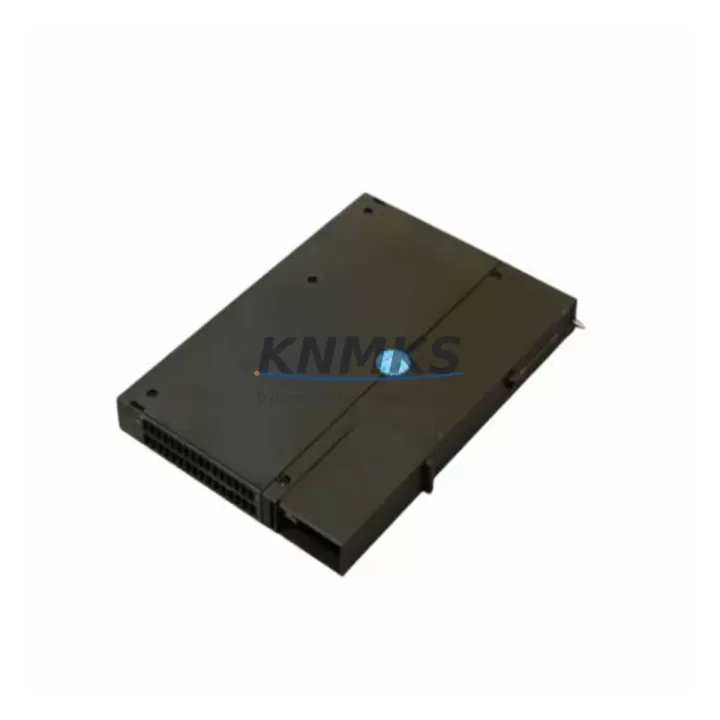
The Siemens 6GK7443-1EX30-0XE0 is the CP 443-1 Communications Processor module designed for the SIMATIC S7-400 programmable logic controller platform. As a critical network interface component, this module enables Industrial Ethernet connectivity between the S7-400 CPU rack and supervisory SCADA systems, HMI panels, and distributed I/O networks. For maintenance engineers managing aging S7-400 installations in petrochemical plants, power generation facilities, water treatment stations, and heavy manufacturing lines, maintaining a verified stock of the 6GK7443-1EX30-0XE0 is a fundamental element of any proactive spare parts strategy.
The CP 443-1 module supports standard TCP/IP, ISO-on-TCP, and S7 communication protocols, making it the backbone of real-time data exchange in S7-400 control architectures. When this module fails or degrades, the entire supervisory communication layer is disrupted — operators lose visibility, SCADA alarms go silent, and production lines may halt without warning. Rapid replacement with a pre-tested, original-specification spare is the fastest path to restoring full system communication and resuming normal operations.
Spare Maintenance Table
| Parameter | Specification |
|---|---|
| SKU / Part Number | 6GK7443-1EX30-0XE0 |
| Module Type | CP 443-1 Communications Processor |
| Compatible Platform | SIMATIC S7-400 (all CPU variants) |
| Communication Interface | Industrial Ethernet (RJ45), 10/100 Mbit/s |
| Supported Protocols | TCP/IP, ISO-on-TCP, S7 Communication, FETCH/WRITE |
| Max. Connections | 64 configurable connections |
| Supply Voltage | Via S7-400 backplane bus (5 VDC) |
| Operating Temperature | 0 °C to +60 °C |
| Mounting | S7-400 rack slot (any CP slot) |
| Origin | Germany |
| Weight | Approx. 800 g |
| Support terms | 12 Months — KNMKS Quality Guarantee |
| Pre-Shipment Testing | Full functional verification before dispatch |
| Condition | Original spare, refurbished to OEM specification |
Maintenance Planning for Continuous Operation
When scheduling replacement of the 6GK7443-1EX30-0XE0 during a planned shutdown or emergency callout, maintenance engineers should treat the event as an opportunity to inspect the broader communication and power infrastructure within the S7-400 control cabinet. The CP 443-1 module draws its operating power from the S7-400 rack backplane, so the condition of the PS 407 or PS 405 power supply module should be verified — a degraded power supply can cause intermittent communication faults that mimic CP module failure and lead to unnecessary replacements.
The Ethernet patch cable and managed switch port connected to the 6GK7443-1EX30-0XE0 should be inspected for physical damage, excessive bend radius, and connector oxidation. Industrial-grade Cat5e or Cat6 shielded cables are recommended in environments with high electromagnetic interference. If the plant uses a SCALANCE X series industrial Ethernet switch to aggregate S7-400 communications, verify that the switch port configuration — speed, duplex, and VLAN assignment — matches the CP module’s network parameters before powering up the replacement unit.
For S7-400 systems running distributed I/O via PROFIBUS DP, the CP 443-5 DP module installed in adjacent rack slots should also be checked for firmware version compatibility and connector integrity. In multi-rack S7-400 configurations, the IM 460 / IM 461 interface modules that link expansion racks to the central rack should be inspected for secure seating and clean backplane contacts. A loose interface module can cause cascading communication errors that are incorrectly attributed to the CP 443-1.
Procurement engineers sourcing the 6GK7443-1EX30-0XE0 as a long-term spare should also consider stocking the associated 6XV1840 series Industrial Ethernet cables and the 6GK1901 series RJ45 connectors, which are consumable items in high-vibration environments. For sites with multiple S7-400 racks, maintaining at least one CP 443-1 spare per control room significantly reduces mean time to repair (MTTR) during unplanned network outages.
Site Replacement Workflow
Step 1 — Pre-Replacement Verification: Before removing the faulty 6GK7443-1EX30-0XE0, use STEP 7 or TIA Portal to document all configured network connections, IP address assignments, and communication partner settings. Export the hardware configuration (HW Config) to a backup file. This ensures the replacement module can be configured identically without relying on memory or incomplete documentation.
Step 2 — Safe Removal: Place the S7-400 CPU in STOP mode via the mode selector switch or STEP 7 online interface. Power down the rack using the PS 407/PS 405 power supply switch. Remove the Ethernet cable from the CP 443-1 front connector. Release the module locking mechanism and slide the 6GK7443-1EX30-0XE0 out of its rack slot. Note the slot position for reinstallation reference.
Step 3 — Module Installation: Insert the replacement 6GK7443-1EX30-0XE0 into the same rack slot. Ensure the module engages the backplane bus connector fully and the locking tab clicks into position. Reconnect the Ethernet cable to the front RJ45 port. Power up the rack and allow the module to complete its self-test sequence — the SF LED should extinguish within 30 seconds under normal conditions.
Step 4 — Configuration Download: Using STEP 7 or TIA Portal, download the previously backed-up hardware configuration to the CPU. The CP 443-1 will receive its network parameters, connection table, and protocol settings automatically. Verify online connectivity by checking the module status in the hardware diagnostics view — all configured connections should show as established.
Step 5 — Functional Validation: Confirm SCADA data exchange is restored by monitoring live process values at the HMI or operator station. Check that all S7 communication partners — remote PLCs, SCADA servers, and data historians — are receiving cyclic data without timeout errors. Log the replacement event in the plant maintenance management system (CMMS) with the module serial number and test results.
Spare Parts Support FAQ
Q1: Is the 6GK7443-1EX30-0XE0 compatible with all S7-400 CPU variants?
Yes. The CP 443-1 module is compatible with all SIMATIC S7-400 CPU variants, including the CPU 412, CPU 414, CPU 416, and CPU 417 families. It occupies any CP-designated slot in the S7-400 rack and is configured via STEP 7 V5.x or TIA Portal V13 and above. No hardware modification is required for installation in existing S7-400 racks.
Q2: What pre-shipment testing is performed on the 6GK7443-1EX30-0XE0?
Every unit undergoes a full functional verification process before dispatch. This includes power-on self-test confirmation, Ethernet port link establishment, protocol stack initialization check, and visual inspection of the backplane bus connector and front panel connectors. Units that do not pass all test criteria are not shipped. A test report is available upon request.
Q3: What is the support terms coverage and what does it include?
All 6GK7443-1EX30-0XE0 units supplied by KNMKS carry a support terms confirmed by quotation from the date of shipment. The support terms covers functional failure under normal operating conditions and includes free replacement or repair. It does not cover damage resulting from incorrect installation, overvoltage events, or physical impact. Support requests are processed within 5 business days of fault confirmation.
Q4: Can KNMKS support long-term supply of the 6GK7443-1EX30-0XE0 for multi-site maintenance programs?
Yes. KNMKS maintains stock of the 6GK7443-1EX30-0XE0 and can support blanket purchase orders, scheduled delivery programs, and multi-site spare parts kitting for industrial maintenance contracts. For sites managing multiple S7-400 installations, consolidated procurement reduces per-unit cost and ensures consistent supply across planned maintenance cycles. Contact our technical sales team to discuss volume pricing and delivery scheduling.
© 2026 KNMKS. All rights reserved.
Original Source: https://knmks.com
Contact: admin@knmks.com | +86 18359268345
Product Identification
- Brand / Ecosystem
-
Siemens
Siemens - Model / Series
-
6GK7443-1EX30-0XE0
SIMATIC Series - Product Family
- PLCs & Controllers
- Availability Status
- Available on request after model and quantity confirmation
- Inquiry Type
- B2B RFQ, replacement inquiry and project spare-part request
- Pre-Quote Check
- Exact SKU, brand, series, quantity, nameplate photos and destination country are checked before quotation
System Path
Where this product fits in the KNMKS automation structure.
Specification & Inquiry Focus
- Control platform
- PLC, PAC and modular controllers
- Common needs
- CPU, rack, power and I/O expansion
- Project support
- Replacement, cabinet build and maintenance
Buyer Confirmation
Information KNMKS checks before replying.
- Exact model
- 6GK7443-1EX30-0XE0
- Brand / ecosystem
- Siemens
- Product family
- PLCs & Controllers
- Application note
- Replacement, maintenance, project build or spare-part list
- Useful photos
- Nameplate, installed unit, cabinet layout or connector side
- Delivery details
- Quantity, destination country and target schedule
Document Support
Files and notes can be confirmed during quotation.
- Product photos or nameplate confirmation when available
- Packing and delivery notes before quotation confirmation
- Support scope and delivery terms confirmed per inquiry
- Export document coordination for qualified B2B requests
Inquiry Support
- Model cross-checking before quotation
- CPU, power, rack and expansion module matching
- Support for replacement and project inquiry
What to Send Us
- Brand and exact model number: Siemens 6GK7443-1EX30-0XE0
- Quantity and required delivery time
- Application, replacement requirement or nameplate photo
- Destination country and shipping preference
RFQ Preparation
This is a product inquiry page built for RFQ communication.
Fast Model Check
Send this model to KNMKS for confirmation.
Include quantity, destination country and photos if this is a maintenance replacement. The inquiry will be saved with a reference number after submission.
Brand & Compatibility Note
KNMKS displays automation product information for well-known industrial brand ecosystems and compatible replacement references. Brand names are used for product identification and compatibility reference only; final availability and commercial terms are confirmed per quotation.
 Manufacturing
 Machine Tools
 Packaging
 Energy & Power



 HMI & Displays
 Servo Systems
 Variable Frequency Drives
 Sensors