
Overview
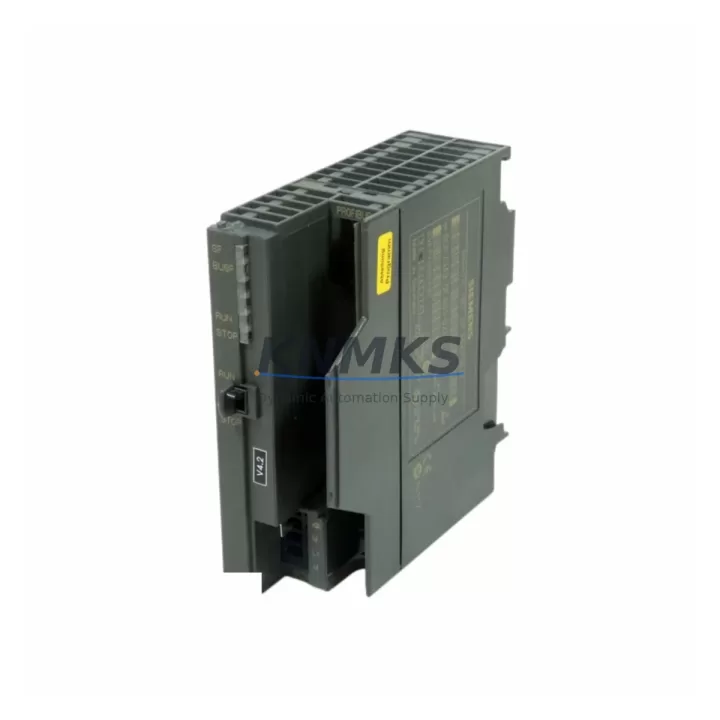
Siemens 6GK7343-5FA01-0XE0 CP 343-5 Spare Part for Factory Uptime
The Siemens 6GK7343-5FA01-0XE0 is an original CP 343-5 Communications Processor designed for the SIMATIC S7-300 PLC platform. This module enables PROFIBUS DP master/slave communication between S7-300 CPUs and distributed field devices, drives, and remote I/O stations. As a maintenance-proven spare part, the 6GK7343-5FA01-0XE0 is a critical component in sustaining continuous factory operation across automotive, chemical, food processing, and discrete manufacturing environments where PROFIBUS networks remain the backbone of process control.
Sourced directly from verified supply channels, each unit undergoes pre-shipment functional testing to confirm PROFIBUS communication integrity, module initialization, and parameter compatibility with the target S7-300 rack. Maintenance engineers and procurement teams can rely on this spare to deliver a drop-in replacement with no firmware re-engineering, minimizing mean time to repair (MTTR) and protecting production schedules.
Spare Maintenance Table
| Field | Specification |
|---|---|
| Part Number / SKU | 6GK7343-5FA01-0XE0 |
| Module Type | CP 343-5 Communications Processor |
| Compatible Platform | SIMATIC S7-300 (all standard CPU variants) |
| Communication Protocol | PROFIBUS DP (Master / Slave) |
| PROFIBUS Data Rate | 9.6 kbps – 12 Mbps (auto-negotiated) |
| Max DP Slaves | Up to 125 DP slaves per master interface |
| Supply Voltage | DC 5 V via S7-300 backplane bus |
| Power Consumption | Approx. 1.2 W (backplane) |
| Operating Temperature | 0 °C to +60 °C |
| Mounting | S7-300 DIN rail rack, standard module slot |
| Country of Origin | Germany |
| Series | CP 343-5 / SIMATIC S7-300 |
| Compatibility Verified | S7-300 CPU 312, 313, 314, 315, 316, 317, 318 series |
| Pre-Shipment Testing | PROFIBUS link-up, DP master scan, parameter load verified |
| Support terms | 12 Months from date of shipment |
Maintenance Planning for Continuous Operation
When replacing the 6GK7343-5FA01-0XE0 in a live S7-300 control cabinet, a disciplined maintenance plan significantly reduces the risk of secondary faults and unplanned downtime. The CP 343-5 sits at the intersection of the PLC backplane and the PROFIBUS field network, meaning a failure here can cascade across all connected DP slaves — including remote I/O racks, variable frequency drives, and distributed sensor clusters.
Before and after swapping the communications processor, maintenance engineers should inspect the following components in the same control cabinet and PROFIBUS segment:
- S7-300 Power Supply Module (e.g., PS 307 series): Verify DC 24 V rail stability. A degraded PS 307 power supply can cause intermittent CP resets and false PROFIBUS fault diagnostics. Check output voltage under load and inspect capacitor condition.
- S7-300 CPU Module (e.g., CPU 315-2 DP): Confirm the CPU firmware version is compatible with the CP 343-5 GSD file version. After CP replacement, reload the hardware configuration from STEP 7 or TIA Portal and perform a CPU memory reset if communication parameters were previously corrupted.
- PROFIBUS Termination Resistors and Bus Connectors: Inspect all 9-pin Sub-D PROFIBUS connectors on the segment for bent pins, loose termination switches, and cable shield continuity. A missing or double termination is a common root cause of DP communication errors that are misdiagnosed as CP module failure.
- S7-300 Signal Modules (SM 321 / SM 322 DI/DO): After restoring PROFIBUS communication, verify that all digital input and output modules in the rack are correctly addressed and that no I/O force commands remain active from the fault isolation session.
- ET 200M / ET 200S Remote I/O Stations: Confirm that distributed I/O stations on the PROFIBUS segment re-enter data exchange mode (green LED) after the CP 343-5 replacement. Stations that remain in STOP or CLEAR state may require individual DP address re-verification.
- SIMATIC HMI (e.g., TP700 Comfort or MP377): If the HMI communicates via MPI or PROFIBUS to the S7-300 CPU, verify that the HMI connection is re-established after the CP swap and that no alarm suppression masks were left active during the maintenance window.
Procurement engineers building annual spare parts kits for S7-300-based lines should consider stocking the CP 343-5 alongside the PS 307 power supply and at least one CPU module of the installed variant. This three-component kit covers the majority of unplanned downtime scenarios on legacy PROFIBUS-based production lines and supports a target MTTR of under two hours for trained maintenance personnel.
Site Replacement Workflow
Replacing the 6GK7343-5FA01-0XE0 on-site follows a structured sequence to ensure system compatibility and minimize production interruption:
- Pre-Replacement Backup: Using STEP 7 or TIA Portal, upload and archive the current hardware configuration, including the CP 343-5 parameter assignment (DP master system, slave addresses, watchdog settings). Store the backup on a local engineering laptop and a network share.
- Safe Shutdown: Place the S7-300 CPU in STOP mode. Notify the process control room and confirm that all actuators driven by PROFIBUS DP slaves are in a safe state. De-energize the control cabinet section containing the CP module.
- Module Swap: Remove the faulty 6GK7343-5FA01-0XE0 by releasing the front connector and sliding the module off the DIN rail. Insert the replacement unit — no PROFIBUS address DIP switches are required on the CP 343-5 as addressing is handled via software configuration.
- Configuration Download: Re-energize the rack. Download the archived hardware configuration to the CPU. The CP 343-5 will initialize, load its DP master parameters, and begin scanning the PROFIBUS segment automatically.
- Communication Verification: Monitor the CP 343-5 diagnostic LEDs (BF, SF, BUSF) and confirm all DP slaves enter data exchange. Use STEP 7 hardware diagnostics or a PROFIBUS analyzer to verify cycle time and error counters.
- Return to Production: Switch the CPU to RUN mode. Confirm process values on the HMI match expected states. Document the replacement in the maintenance log with the new module serial number and date.
This workflow is compatible with all S7-300 CPU variants that support the CP 343-5 and requires no hardware modification to the existing PROFIBUS cable infrastructure, preserving long-term system compatibility and reducing re-commissioning risk.
Spare Parts Support FAQ
Q1: Is the 6GK7343-5FA01-0XE0 compatible with all S7-300 CPU variants?
The CP 343-5 is compatible with the full range of standard S7-300 CPUs, including the CPU 312, 313, 314, 315-2 DP, 316, and 317 series. It occupies a standard module slot on the S7-300 DIN rail rack and is configured entirely via STEP 7 or TIA Portal hardware configuration — no hardware jumpers or address switches are required. Always verify the GSD file version matches your installed STEP 7 project before downloading the configuration.
Q2: What pre-shipment testing is performed on each unit?
Every 6GK7343-5FA01-0XE0 unit is tested for PROFIBUS DP master initialization, backplane bus communication, and parameter load acceptance before shipment. Units that fail any test stage are quarantined and not dispatched. A support terms confirmed by quotation from the date of shipment covers all verified defects in materials and workmanship under normal industrial operating conditions.
Q3: Can this spare replace an older CP 343-5 variant with a different order suffix?
The 6GK7343-5FA01-0XE0 is the current production variant of the CP 343-5. It is functionally compatible with earlier CP 343-5 variants in most S7-300 applications. However, if your existing STEP 7 project references an older GSD file, you may need to update the hardware catalog and re-download the configuration. Contact our technical team with your existing CPU firmware version and STEP 7 project version for a compatibility confirmation before ordering.
Q4: What is your long-term supply commitment for this part?
We maintain dedicated stock of the 6GK7343-5FA01-0XE0 to support customers operating legacy S7-300 PROFIBUS systems through their full service life. Orders are typically dispatched within 1–3 business days. For customers requiring guaranteed availability for annual maintenance contracts or multi-site spare parts programs, we offer reserved stock arrangements — contact admin@knmks.com or call +86 18359268345 to discuss your requirements.
© 2026 KNMKS. All rights reserved.
Original Source: https://knmks.com
Contact: admin@knmks.com | +86 18359268345
Product Identification
- Brand / Ecosystem
-
Siemens
Siemens - Model / Series
-
6GK7343-5FA01-0XE0
SIMATIC Series - Product Family
- PLCs & Controllers
- Availability Status
- Available on request after model and quantity confirmation
- Inquiry Type
- B2B RFQ, replacement inquiry and project spare-part request
- Pre-Quote Check
- Exact SKU, brand, series, quantity, nameplate photos and destination country are checked before quotation
System Path
Where this product fits in the KNMKS automation structure.
Specification & Inquiry Focus
- Control platform
- PLC, PAC and modular controllers
- Common needs
- CPU, rack, power and I/O expansion
- Project support
- Replacement, cabinet build and maintenance
Buyer Confirmation
Information KNMKS checks before replying.
- Exact model
- 6GK7343-5FA01-0XE0
- Brand / ecosystem
- Siemens
- Product family
- PLCs & Controllers
- Application note
- Replacement, maintenance, project build or spare-part list
- Useful photos
- Nameplate, installed unit, cabinet layout or connector side
- Delivery details
- Quantity, destination country and target schedule
Document Support
Files and notes can be confirmed during quotation.
- Product photos or nameplate confirmation when available
- Packing and delivery notes before quotation confirmation
- Support scope and delivery terms confirmed per inquiry
- Export document coordination for qualified B2B requests
Inquiry Support
- Model cross-checking before quotation
- CPU, power, rack and expansion module matching
- Support for replacement and project inquiry
What to Send Us
- Brand and exact model number: Siemens 6GK7343-5FA01-0XE0
- Quantity and required delivery time
- Application, replacement requirement or nameplate photo
- Destination country and shipping preference
RFQ Preparation
This is a product inquiry page built for RFQ communication.
Fast Model Check
Send this model to KNMKS for confirmation.
Include quantity, destination country and photos if this is a maintenance replacement. The inquiry will be saved with a reference number after submission.
Brand & Compatibility Note
KNMKS displays automation product information for well-known industrial brand ecosystems and compatible replacement references. Brand names are used for product identification and compatibility reference only; final availability and commercial terms are confirmed per quotation.
 Manufacturing
 Machine Tools
 Packaging
 Energy & Power



 HMI & Displays
 Servo Systems
 Variable Frequency Drives
 Sensors