
Overview
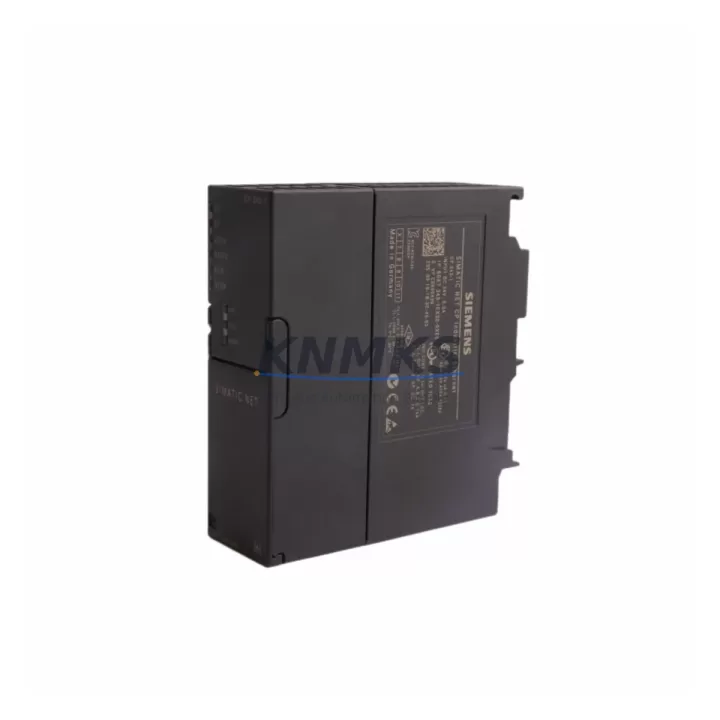
Siemens 6GK7343-1EX30-0XE0 Migration-Ready CP for Legacy S7-300 Systems
The Siemens 6GK7343-1EX30-0XE0 is the CP 343-1 Advanced Ethernet Communication Processor designed for the SIMATIC S7-300 platform. As legacy S7-300 control systems approach end-of-life and spare part availability tightens, this module has become a critical component in retrofit projects, discontinued-model replacements, and control cabinet upgrades across manufacturing, process automation, and infrastructure sectors.
This CP module enables Industrial Ethernet and PROFINET IO communication for S7-300 CPUs, supporting ISO transport, TCP/IP, UDP, and S7 communication protocols. It mounts directly onto the S7-300 DIN rail backplane and communicates via the integrated K-Bus interface — no additional interface submodule required. For engineers managing aging control architectures, the 6GK7343-1EX30-0XE0 provides a verified, drop-in-compatible path to extend system life, restore failed communication links, and bridge legacy field devices to modern SCADA and MES layers without requiring a full PLC platform migration.
Before deploying this module as a replacement, engineers should confirm the following: the S7-300 rack slot assignment and module address configuration in STEP 7 or TIA Portal; the existing Ethernet cable topology and switch compatibility (managed vs. unmanaged); the firmware version of the host CPU (e.g., CPU 315-2 PN/DP or CPU 317-2 PN/DP) to ensure CP firmware alignment; terminal wiring at the RJ45 port and any existing patch panel or cabinet feedthrough; and whether the replacement CP will inherit the existing IP address or require a new network configuration cycle. In multi-rack systems, the backplane interface slot position must match the original hardware configuration to avoid address conflicts during program restart.
Migration Compatibility Table
| Parameter | Details |
|---|---|
| SKU / Order Number | 6GK7343-1EX30-0XE0 |
| Module Designation | CP 343-1 Advanced |
| Compatible Platform | SIMATIC S7-300 |
| Communication Protocols | PROFINET IO, Industrial Ethernet, TCP/IP, ISO, UDP, S7 Communication |
| Backplane Interface | S7-300 K-Bus (integrated, no IM required) |
| Network Interface | RJ45, 10/100 Mbit/s, auto-sensing |
| Max PROFINET IO Devices | 16 IO devices (as IO Controller) |
| Power Supply | Via S7-300 backplane (no external 24 VDC required) |
| Installation | DIN rail, S7-300 standard rack, any slot except slot 1 |
| Replaces / Compatible With | 6GK7343-1EX20-0XE0, 6GK7343-1CX10-0XE0 (with firmware review) |
| Programming Environment | STEP 7 V5.x, TIA Portal V13 SP1 and above |
| Firmware Compatibility | Verify CPU firmware version before replacement; update if required |
| Commissioning Tool | Primary Setup Tool (PST) or TIA Portal Device Configuration |
| Debugging Notes | Reassign IP address post-swap; verify PROFINET device names; reload hardware configuration |
| Support terms | support terms confirmed by quotation — functional verification and burn-in tested before shipment |
Retrofit Planning for Existing Automation Systems
Successful integration of the 6GK7343-1EX30-0XE0 into an existing S7-300 control cabinet requires a structured retrofit plan. Begin by auditing the current rack layout: identify the slot occupied by the original CP module, confirm the rack type (e.g., UR1, UR2, or CR2), and verify that the power supply module — typically a PS 307 5A or PS 307 10A — can support the additional current draw of the replacement CP without exceeding rail capacity. In high-density racks where multiple SM 321 digital input modules, SM 331 analog input modules, or SM 332 analog output modules are installed, power budget recalculation is essential before swapping the communication processor.
For systems using a CP 343-1 as the primary PROFINET IO Controller, the replacement module must be configured with the same PROFINET device name and IP address as the original to avoid disrupting downstream IO devices. If the existing network includes a CP 343-1 Lean (6GK7343-1CX10-0XE0) and the upgrade path leads to the 6GK7343-1EX30-0XE0, engineers should note the expanded IO device count and additional protocol support — both of which may require a hardware configuration update in STEP 7 and a full download to the CPU.
In control cabinets where an IM 360 / IM 361 expansion interface is used to connect multiple racks, confirm that the CP module’s slot address does not conflict with the expansion rack addressing scheme. For systems with an integrated HMI panel (such as a TP700 Comfort or KTP900 Basic) communicating via S7 connections over Ethernet, the CP’s connection table must be reviewed and updated to preserve all existing HMI tag links and alarm communication paths after the module swap.
Where legacy serial field devices are bridged through a CP 341 serial communication module or a CP 340 point-to-point module in the same rack, ensure that the Ethernet CP replacement does not alter the rack’s slot numbering in the hardware configuration, as this can cause the CPU to report configuration faults on restart. A pre-tested hardware configuration backup and a staged download procedure are strongly recommended to minimize commissioning risk.
Downtime Control During System Migration
Minimizing unplanned downtime is the primary concern in any live-system CP replacement. The recommended approach is to prepare the replacement 6GK7343-1EX30-0XE0 offline: configure its IP address, PROFINET device name, and connection parameters using the Primary Setup Tool (PST) before the maintenance window begins. This eliminates the need for network configuration steps during the live swap and reduces the active downtime window to the physical module exchange and program reload sequence.
Before powering down the rack, export the current STEP 7 or TIA Portal project, including the hardware configuration and all network/connection objects. Photograph or document the existing RJ45 cable routing and any cabinet labeling. After installing the replacement CP, perform a hardware configuration download followed by a CPU restart in STOP mode. Verify that all PROFINET IO devices reconnect and that the diagnostic buffer shows no persistent faults before switching the CPU to RUN mode.
For systems where continuous process control is critical, consider deploying a temporary CP module in a parallel test rack to validate the configuration before the live cutover. This approach is particularly valuable in applications where the S7-300 controls safety-critical sequences, interlock logic, or time-sensitive process steps that cannot tolerate extended restart cycles. All replacement modules supplied by KNMKS are function-tested and burn-in verified prior to shipment, supporting a predictable and low-risk installation experience.
Retrofit Support FAQ
Q1: Is the 6GK7343-1EX30-0XE0 a direct replacement for the 6GK7343-1EX20-0XE0?
In most cases, yes. The -1EX30 revision offers expanded PROFINET IO device support and updated firmware compared to the -1EX20. A hardware configuration update in STEP 7 or TIA Portal is required, followed by a full download to the CPU. Verify that the host CPU firmware is compatible with the newer CP revision before installation.
Q2: What commissioning steps are required after swapping the CP module?
After physical installation, assign the correct IP address and PROFINET device name using PST or TIA Portal. Download the updated hardware configuration to the CPU. Confirm that all PROFINET IO devices are recognized and that S7 communication connections to HMI panels and SCADA systems are re-established. Check the CPU diagnostic buffer for any residual faults before returning the system to production.
Q3: Can this CP module be used in a rack alongside SM 321, SM 331, and SM 332 I/O modules without modification?
Yes. The 6GK7343-1EX30-0XE0 occupies a standard S7-300 slot and draws power from the backplane. It is compatible with all standard S7-300 signal modules. Confirm total rack power consumption does not exceed the PS 307 supply rating, particularly in fully populated racks.
Q4: What support terms and pre-shipment testing does KNMKS provide?
All 6GK7343-1EX30-0XE0 units supplied by KNMKS carry a support terms confirmed by quotation covering functional defects. Each unit undergoes pre-shipment functional verification and burn-in testing. In-stock units are available for immediate dispatch. Contact admin@knmks.com or +86 18359268345 for availability confirmation and lead time.
© 2026 KNMKS. All rights reserved.
Original Source: https://knmks.com
Contact: admin@knmks.com | +86 18359268345
Product Identification
- Brand / Ecosystem
-
Siemens
Siemens - Model / Series
-
6GK7343-1EX30-0XE0
SIMATIC Series - Product Family
- PLCs & Controllers
- Availability Status
- Available on request after model and quantity confirmation
- Inquiry Type
- B2B RFQ, replacement inquiry and project spare-part request
- Pre-Quote Check
- Exact SKU, brand, series, quantity, nameplate photos and destination country are checked before quotation
System Path
Where this product fits in the KNMKS automation structure.
Specification & Inquiry Focus
- Control platform
- PLC, PAC and modular controllers
- Common needs
- CPU, rack, power and I/O expansion
- Project support
- Replacement, cabinet build and maintenance
Buyer Confirmation
Information KNMKS checks before replying.
- Exact model
- 6GK7343-1EX30-0XE0
- Brand / ecosystem
- Siemens
- Product family
- PLCs & Controllers
- Application note
- Replacement, maintenance, project build or spare-part list
- Useful photos
- Nameplate, installed unit, cabinet layout or connector side
- Delivery details
- Quantity, destination country and target schedule
Document Support
Files and notes can be confirmed during quotation.
- Product photos or nameplate confirmation when available
- Packing and delivery notes before quotation confirmation
- Support scope and delivery terms confirmed per inquiry
- Export document coordination for qualified B2B requests
Inquiry Support
- Model cross-checking before quotation
- CPU, power, rack and expansion module matching
- Support for replacement and project inquiry
What to Send Us
- Brand and exact model number: Siemens 6GK7343-1EX30-0XE0
- Quantity and required delivery time
- Application, replacement requirement or nameplate photo
- Destination country and shipping preference
RFQ Preparation
This is a product inquiry page built for RFQ communication.
Fast Model Check
Send this model to KNMKS for confirmation.
Include quantity, destination country and photos if this is a maintenance replacement. The inquiry will be saved with a reference number after submission.
Brand & Compatibility Note
KNMKS displays automation product information for well-known industrial brand ecosystems and compatible replacement references. Brand names are used for product identification and compatibility reference only; final availability and commercial terms are confirmed per quotation.
 Manufacturing
 Machine Tools
 Packaging
 Energy & Power



 HMI & Displays
 Servo Systems
 Variable Frequency Drives
 Sensors