
Overview
Siemens 6GK7343-1EX21-0XE0 Migration-Ready CP for Legacy Control Systems
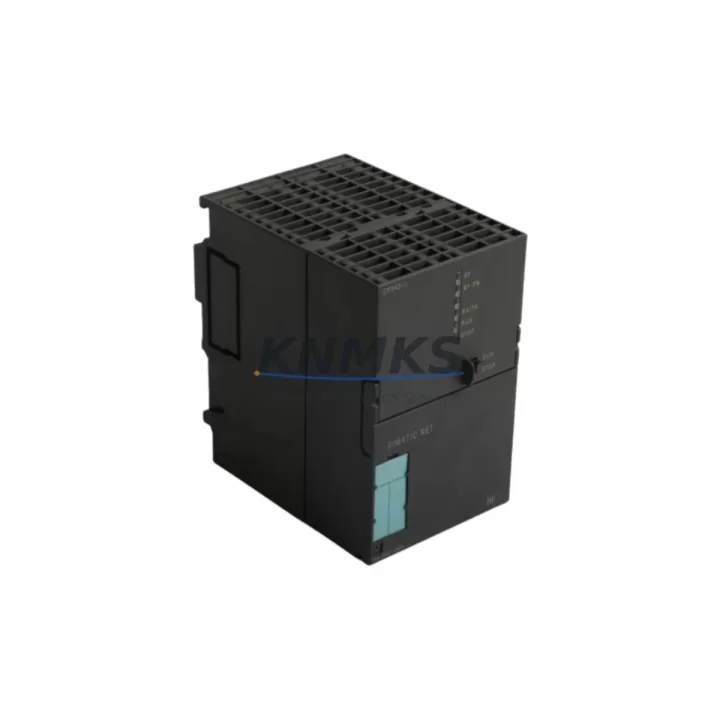
The Siemens 6GK7343-1EX21-0XE0 — commercially designated CP 343-1 EX21 — is a Communications Processor module designed for the S7-300 rack platform. As legacy S7-300 installations approach end-of-support milestones, this module has become a critical component in retrofit programs, discontinued-part replacement projects, and Industrial Ethernet migration initiatives across manufacturing, process control, and infrastructure automation environments.
This unit supports 10/100 Mbit/s Industrial Ethernet communication and is compatible with PROFINET IO, S7 communication, and ISO-on-TCP protocols. It integrates directly into the S7-300 backplane via the standard DIN rail-mounted rack, occupying a single slot and drawing power from the rack’s internal bus. For engineers managing aging control cabinets, the CP 343-1 EX21 provides a direct upgrade path from earlier CP 343-1 variants without requiring PLC CPU replacement or full rack redesign.
Migration Compatibility Table
| Parameter | Details |
|---|---|
| SKU / Order Number | 6GK7343-1EX21-0XE0 |
| Module Designation | CP 343-1 EX21 |
| Compatible Rack | S7-300 standard rack (6ES7390 series) |
| Backplane Interface | S7-300 bus connector (rear bus) |
| Communication Standard | Industrial Ethernet 10/100 Mbit/s, RJ45 |
| Supported Protocols | PROFINET IO, S7 Comm, ISO-on-TCP, UDP, TCP/IP |
| Power Supply | Via S7-300 backplane bus (no external 24 VDC required) |
| Slot Requirement | 1 slot (any slot right of CPU) |
| Firmware Compatibility | STEP 7 V5.x and TIA Portal V13 SP1 and above |
| Replaces / Upgrades From | CP 343-1 (6GK7343-1EX11-0XE0), CP 343-1 Lean |
| Installation Dimensions | Standard S7-300 module form factor |
| Commissioning Tool | STEP 7 NetPro / TIA Portal Network View |
| Support terms | 12 months from shipment date |
| Pre-Shipment Testing | Yes — functional and communication link verified |
Retrofit Planning for Existing Automation Systems
When planning a retrofit around the 6GK7343-1EX21-0XE0, engineers must account for the full scope of the control cabinet and network topology. The CP 343-1 EX21 is typically deployed alongside a Siemens CPU 315-2 PN/DP or CPU 317-2 DP as the host processor, with the CP module handling dedicated Ethernet communication tasks independently of the CPU’s own PN interface. This separation of communication load is a key advantage in high-cycle production environments where CPU scan time must be protected.
Rack configuration is a primary consideration. The S7-300 rack — commonly a 6ES7390-1AE80-0AA0 or 6ES7390-1AF30-0AA0 — must have an available slot to the right of the CPU. If the existing rack is fully populated with SM 321 digital input modules, SM 322 digital output modules, or SM 331 analog input modules, a rack expansion using an IM 360/IM 361 interface module pair may be required before the CP can be installed. Slot addressing must be reconfigured in STEP 7 or TIA Portal after any rack change.
Power budget verification is essential. The PS 307 power supply module (e.g., 6ES7307-1EA01-0AA0) feeding the rack must have sufficient current headroom to support the CP 343-1 EX21’s backplane current draw in addition to existing I/O modules. Exceeding the rack’s power budget is a common cause of intermittent faults during retrofit commissioning.
For installations migrating from a CP 343-1 Lean or an earlier CP 343-1 EX11 variant, the hardware configuration in STEP 7 must be updated to reflect the new order number. The module address (slot number) must match the physical installation. If the legacy CP was configured with fixed IP addressing, the same IP parameters can be transferred to the replacement module during commissioning using the STEP 7 NetPro tool or TIA Portal’s Device & Network editor. PROFINET device names assigned to the legacy CP must be reassigned to the new module before going online.
HMI connectivity is another area requiring attention. If a Siemens TP700 Comfort or MP377 panel communicates with the S7-300 via the CP’s Ethernet port using S7 protocol, the HMI project’s PLC connection settings must be verified to confirm the IP address and rack/slot parameters remain consistent after module replacement. Screen updates and tag communication should be validated in simulation before live commissioning.
Downtime Control During System Migration
Minimizing production downtime during a CP module replacement requires structured pre-work. Before removing the legacy CP 343-1, the existing hardware configuration should be exported from STEP 7 or TIA Portal and archived. The current module parameters — IP address, subnet mask, gateway, PROFINET device name, and S7 connection table — should be documented in full.
The replacement 6GK7343-1EX21-0XE0 should be pre-configured offline using the same STEP 7 project. The updated hardware configuration is compiled and downloaded to the CPU while the legacy CP is still in service, with the new CP configuration staged but not yet activated. This approach allows the CPU program logic to remain unchanged and reduces the live commissioning window to the physical swap and network parameter assignment steps only.
During the physical swap, the S7-300 rack must be powered down. The legacy CP is removed, the replacement module is seated in the same slot, and the bus connector is re-engaged. After power-up, the CPU will detect the new CP and the pre-loaded configuration will activate automatically if the slot assignment matches. A PROFINET device name assignment via Primary Setup Tool (PST) or TIA Portal may be required if the module does not retain the name from the previous configuration.
Post-swap validation should include confirming Ethernet link status on the CP’s LED indicators, verifying S7 connections from the HMI and SCADA system, and checking PROFINET IO device status in the CPU’s diagnostic buffer. Full functional testing under live process conditions should be completed before returning the line to production. With proper pre-work, total downtime for a single CP module replacement can typically be contained to under two hours.
Retrofit Support FAQ
Q: Is the 6GK7343-1EX21-0XE0 a direct replacement for the CP 343-1 EX11 (6GK7343-1EX11-0XE0)?
A: Yes. The CP 343-1 EX21 is the functional successor to the EX11 variant. The hardware configuration in STEP 7 must be updated to reflect the new order number, and the module’s IP and PROFINET parameters must be reassigned during commissioning. No CPU firmware changes are required for most S7-300 CPU variants.
Q: What commissioning steps are required after installing the replacement CP module?
A: After physical installation, assign the PROFINET device name using PST or TIA Portal, confirm the IP address configuration, download the updated hardware configuration to the CPU, and verify all S7 and PROFINET IO connections are active. Check the CPU diagnostic buffer for any configuration mismatch faults before resuming production.
Q: Does the unit ship tested and ready for installation?
A: Yes. Each 6GK7343-1EX21-0XE0 unit undergoes pre-shipment functional testing including power-on verification and communication link checks. Units are supplied with a support terms confirmed by quotation from the shipment date, covering manufacturing defects and functional failures under normal operating conditions.
Q: What is the stock availability and lead time?
A: Units are available from in-stock inventory and are dispatched promptly upon order confirmation. For volume requirements or scheduled delivery programs, contact the sales team directly to confirm allocation and lead-time commitments.
© 2026 KNMKS. All rights reserved.
Original Source: https://knmks.com
Contact: admin@knmks.com | +86 18359268345
Product Identification
- Brand / Ecosystem
-
Siemens
Siemens - Model / Series
-
6GK7343-1EX21-0XE0
SIMATIC Series - Product Family
- PLCs & Controllers
- Availability Status
- Available on request after model and quantity confirmation
- Inquiry Type
- B2B RFQ, replacement inquiry and project spare-part request
- Pre-Quote Check
- Exact SKU, brand, series, quantity, nameplate photos and destination country are checked before quotation
System Path
Where this product fits in the KNMKS automation structure.
Specification & Inquiry Focus
- Control platform
- PLC, PAC and modular controllers
- Common needs
- CPU, rack, power and I/O expansion
- Project support
- Replacement, cabinet build and maintenance
Buyer Confirmation
Information KNMKS checks before replying.
- Exact model
- 6GK7343-1EX21-0XE0
- Brand / ecosystem
- Siemens
- Product family
- PLCs & Controllers
- Application note
- Replacement, maintenance, project build or spare-part list
- Useful photos
- Nameplate, installed unit, cabinet layout or connector side
- Delivery details
- Quantity, destination country and target schedule
Document Support
Files and notes can be confirmed during quotation.
- Product photos or nameplate confirmation when available
- Packing and delivery notes before quotation confirmation
- Support scope and delivery terms confirmed per inquiry
- Export document coordination for qualified B2B requests
Inquiry Support
- Model cross-checking before quotation
- CPU, power, rack and expansion module matching
- Support for replacement and project inquiry
What to Send Us
- Brand and exact model number: Siemens 6GK7343-1EX21-0XE0
- Quantity and required delivery time
- Application, replacement requirement or nameplate photo
- Destination country and shipping preference
RFQ Preparation
This is a product inquiry page built for RFQ communication.
Fast Model Check
Send this model to KNMKS for confirmation.
Include quantity, destination country and photos if this is a maintenance replacement. The inquiry will be saved with a reference number after submission.
Brand & Compatibility Note
KNMKS displays automation product information for well-known industrial brand ecosystems and compatible replacement references. Brand names are used for product identification and compatibility reference only; final availability and commercial terms are confirmed per quotation.
 Manufacturing
 Machine Tools
 Packaging
 Energy & Power



 HMI & Displays
 Servo Systems
 Variable Frequency Drives
 Sensors