
Overview
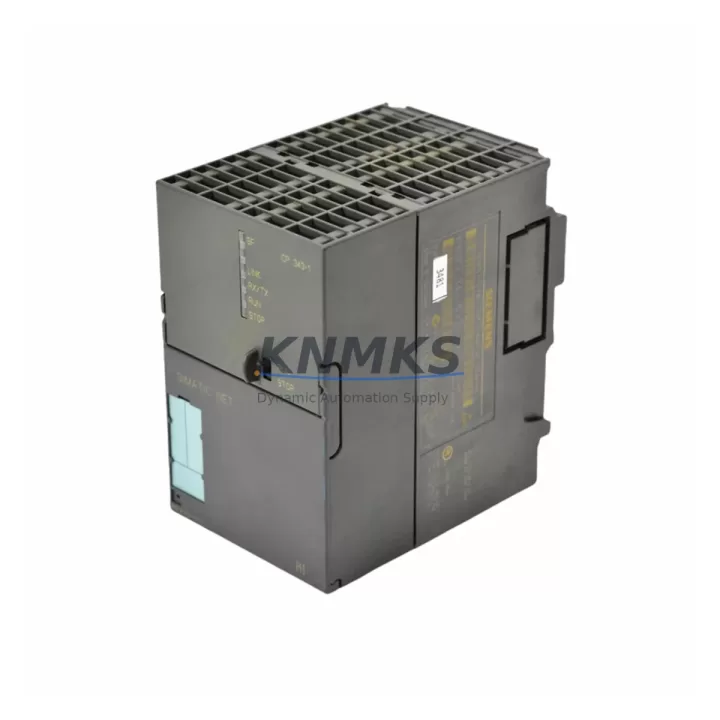
Siemens 6GK7343-1EX20-0XE0 Maintenance-Proven Spare Part for Factory Uptime
The Siemens 6GK7343-1EX20-0XE0 is the CP 343-1 EX20 Ethernet Communication Processor designed for the SIMATIC S7-300 PLC platform. As a critical network interface module, it enables Industrial Ethernet connectivity between the S7-300 CPU and plant-level SCADA, DCS, or MES systems. For maintenance engineers managing aging S7-300 control cabinets, securing a verified original spare of the 6GK7343-1EX20-0XE0 is a foundational step in any uptime protection strategy.
In high-availability production environments — including automotive assembly, chemical processing, water treatment, and discrete manufacturing — the CP 343-1 EX20 handles real-time Ethernet communication, S7 routing, and open communication via TCP/IP and ISO-on-TCP. A failure of this module can isolate the entire S7-300 rack from supervisory control, triggering unplanned downtime that cascades across dependent production lines. Stocking a pre-tested 6GK7343-1EX20-0XE0 spare eliminates the lead-time risk associated with last-minute procurement from distribution channels.
This unit is supplied as an original Siemens component, subject to pre-shipment functional verification, and backed by a support terms confirmed by quotation covering manufacturing defects and operational integrity. Global dispatch is available with expedited logistics options for emergency replacement scenarios.
Spare Maintenance Table
| SKU / Part Number | 6GK7343-1EX20-0XE0 |
| Module Designation | CP 343-1 EX20 |
| Brand / Manufacturer | Siemens (SIMATIC) |
| Compatible Platform | SIMATIC S7-300 PLC |
| Communication Standard | Industrial Ethernet (IEEE 802.3), TCP/IP, ISO-on-TCP, S7 Communication, FETCH/WRITE |
| Transmission Rate | 10/100 Mbit/s (auto-sensing) |
| Interface | RJ45 (8-pin), integrated 2-port switch |
| Supply Voltage | DC 24 V via S7-300 backplane bus |
| Power Consumption | Approx. 2.5 W (backplane) |
| Operating Temperature | 0 °C to +60 °C |
| Storage Temperature | -40 °C to +70 °C |
| Degree of Protection | IP20 |
| Country of Origin | Germany |
| Weight | Approx. 4,460 g (packaged) |
| Mounting | S7-300 DIN rail rack, slot-based installation |
| Configuration Tool | STEP 7 / TIA Portal (via HW Config) |
| Firmware Compatibility | Compatible with S7-300 CPU firmware V2.x and above |
| Support terms | 12 Months — covers manufacturing defects and functional integrity |
| Pre-Shipment Testing | Yes — functional verification performed before dispatch |
| Typical Application | SCADA integration, MES connectivity, S7 routing, open Ethernet communication |
Maintenance Planning for Continuous Operation
When replacing the 6GK7343-1EX20-0XE0 in an S7-300 control cabinet, a disciplined maintenance engineer will not limit the inspection to the CP module alone. The Ethernet communication path involves multiple interdependent components, and a thorough site assessment significantly reduces the risk of repeat failures or post-replacement faults.
Begin with the S7-300 backplane and rack assembly. Inspect the bus connector pins and rack slot contacts for oxidation, mechanical damage, or intermittent seating — a degraded backplane connection can cause the CP 343-1 EX20 to report communication errors even after a module swap. If the rack has been in service for more than five years, consider scheduling a rack inspection alongside the CP replacement.
Next, verify the 24 VDC power supply module (such as the Siemens PS 307 series) feeding the S7-300 rack. Voltage ripple, output sag under load, or aging capacitors in the PSU can cause intermittent resets of communication modules. A calibrated multimeter check of the PSU output under full rack load is recommended before commissioning the replacement CP.
Inspect the RJ45 patch cables and Ethernet switch ports connected to the CP 343-1 EX20. Industrial-grade shielded Cat5e or Cat6 cables should be used in environments with high EMI. Unshielded or damaged cables are a common root cause of CRC errors and dropped S7 connections that are often misattributed to the CP module itself.
For systems using the S7-300 CPU 315-2 PN/DP or CPU 317-2 DP alongside the CP 343-1 EX20, confirm that the CPU firmware version is compatible with the CP’s configuration parameters as defined in STEP 7 HW Config. Mismatched firmware revisions can prevent the CP from initializing correctly after replacement.
If the control cabinet includes signal isolators or surge protection devices on the Ethernet lines — particularly in outdoor substations or high-voltage environments — inspect these components for degradation. Surge arrestors have a finite clamping life and may require replacement after a lightning or switching transient event that may have contributed to the original CP failure.
Finally, review the PROFIBUS DP interface modules (such as CP 342-5 or IM 360/361 interface modules) sharing the same rack. A fault in a neighboring module can generate backplane bus errors that affect CP communication stability. A full rack diagnostic via STEP 7 online mode should be performed after the CP replacement to confirm all modules report healthy status.
Site Replacement Workflow
Step 1 — Pre-Replacement Documentation: Export the current STEP 7 or TIA Portal project and record the CP 343-1 EX20 configuration parameters: IP address, subnet mask, gateway, S7 connection table, and any open communication blocks (FC5/FC6 or similar). This ensures rapid reconfiguration after the module swap.
Step 2 — Safe Isolation: Place the S7-300 CPU in STOP mode via the mode selector switch or STEP 7 online command. Confirm all controlled outputs are in a safe state before proceeding. De-energize the rack PSU and disconnect the Ethernet cable from the CP module.
Step 3 — Module Removal: Release the bus connector from the left side of the CP 343-1 EX20 by pressing the release lever. Slide the module off the DIN rail mounting. Note the slot position — the replacement 6GK7343-1EX20-0XE0 must be installed in the same slot to preserve the HW Config slot assignment.
Step 4 — Replacement Installation: Mount the new 6GK7343-1EX20-0XE0 onto the DIN rail in the correct slot. Reconnect the bus connector firmly until it clicks. Reconnect the Ethernet cable. Re-energize the PSU and set the CPU to RUN mode.
Step 5 — Configuration Download: Using STEP 7 or TIA Portal, download the HW Config to the CPU. The CP 343-1 EX20 will receive its IP configuration and connection parameters automatically from the CPU during startup. Verify the CP’s LINK and RX/TX LEDs indicate active Ethernet communication.
Step 6 — Functional Verification: Confirm SCADA or MES connectivity is restored. Test all S7 connections and open communication channels. Review the CPU diagnostic buffer for any residual fault entries. Document the replacement date, module serial number, and post-replacement test results for maintenance records.
This workflow minimizes downtime to under 30 minutes for experienced maintenance teams and ensures the replacement 6GK7343-1EX20-0XE0 is commissioned correctly without configuration errors.
Spare Parts Support FAQ
Q1: Is the 6GK7343-1EX20-0XE0 still available as a new original spare, or only as a refurbished unit?
We supply original Siemens 6GK7343-1EX20-0XE0 units sourced from authorized distribution channels and verified factory stock. Each unit undergoes pre-shipment functional testing. Availability is confirmed at the time of order; for long-term supply planning, we recommend contacting our sales team to discuss scheduled procurement or consignment stock arrangements.
Q2: What is the support terms coverage and what does it include?
All 6GK7343-1EX20-0XE0 units are supplied with a support terms confirmed by quotation from the date of shipment. The support terms covers manufacturing defects, functional failures under normal operating conditions, and DOA (dead-on-arrival) scenarios. It does not cover damage resulting from incorrect installation, overvoltage events, or unauthorized modification. Support requests are processed with priority to minimize plant downtime.
Q3: How do I verify compatibility before installing the replacement CP 343-1 EX20 in my S7-300 system?
Compatibility verification involves three checks: (1) confirm the rack slot assignment matches the original HW Config entry in STEP 7 or TIA Portal; (2) verify the CPU firmware version supports the CP 343-1 EX20 feature set required by your application (S7 routing, open communication, etc.); (3) confirm the Ethernet network parameters (IP address, subnet, gateway) are correctly configured in the downloaded HW Config. Our technical team can assist with compatibility confirmation if you provide your CPU order number and STEP 7 project version.
Q4: Can you support emergency or expedited orders for the 6GK7343-1EX20-0XE0?
Yes. We maintain multi-region stock specifically to support emergency replacement scenarios. Expedited dispatch with same-day or next-day shipping is available for confirmed in-stock units. Contact our sales team directly at admin@knmks.com or +86 18359268345 to confirm stock availability and arrange priority logistics for your site.
© 2026 KNMKS. All rights reserved.
Original Source: https://knmks.com
Contact: admin@knmks.com | +86 18359268345
Product Identification
- Brand / Ecosystem
-
Siemens
Siemens - Model / Series
-
6GK7343-1EX20-0XE0
SIMATIC Series - Product Family
- PLCs & Controllers
- Availability Status
- Available on request after model and quantity confirmation
- Inquiry Type
- B2B RFQ, replacement inquiry and project spare-part request
- Pre-Quote Check
- Exact SKU, brand, series, quantity, nameplate photos and destination country are checked before quotation
System Path
Where this product fits in the KNMKS automation structure.
Specification & Inquiry Focus
- Control platform
- PLC, PAC and modular controllers
- Common needs
- CPU, rack, power and I/O expansion
- Project support
- Replacement, cabinet build and maintenance
Buyer Confirmation
Information KNMKS checks before replying.
- Exact model
- 6GK7343-1EX20-0XE0
- Brand / ecosystem
- Siemens
- Product family
- PLCs & Controllers
- Application note
- Replacement, maintenance, project build or spare-part list
- Useful photos
- Nameplate, installed unit, cabinet layout or connector side
- Delivery details
- Quantity, destination country and target schedule
Document Support
Files and notes can be confirmed during quotation.
- Product photos or nameplate confirmation when available
- Packing and delivery notes before quotation confirmation
- Support scope and delivery terms confirmed per inquiry
- Export document coordination for qualified B2B requests
Inquiry Support
- Model cross-checking before quotation
- CPU, power, rack and expansion module matching
- Support for replacement and project inquiry
What to Send Us
- Brand and exact model number: Siemens 6GK7343-1EX20-0XE0
- Quantity and required delivery time
- Application, replacement requirement or nameplate photo
- Destination country and shipping preference
RFQ Preparation
This is a product inquiry page built for RFQ communication.
Fast Model Check
Send this model to KNMKS for confirmation.
Include quantity, destination country and photos if this is a maintenance replacement. The inquiry will be saved with a reference number after submission.
Brand & Compatibility Note
KNMKS displays automation product information for well-known industrial brand ecosystems and compatible replacement references. Brand names are used for product identification and compatibility reference only; final availability and commercial terms are confirmed per quotation.
 Manufacturing
 Machine Tools
 Packaging
 Energy & Power



 HMI & Displays
 Servo Systems
 Variable Frequency Drives
 Sensors