
Overview
Siemens 6GK7342-5DA03-0XE0 Maintenance Spare for Factory Uptime
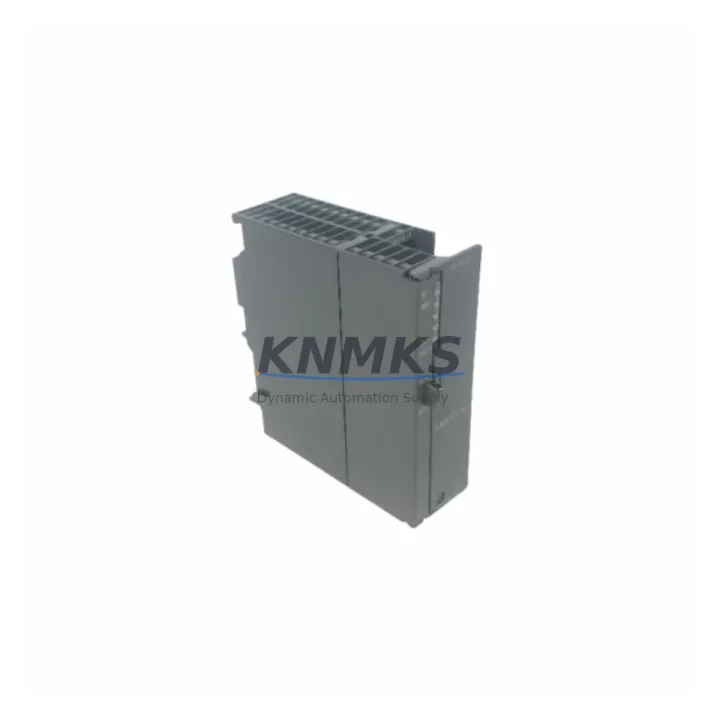
The Siemens 6GK7342-5DA03-0XE0 is a CP 342-5 Communications Processor designed for the S7-300 PLC platform, enabling Profibus DP master and slave communication in demanding industrial environments. As a maintenance-proven spare part, this module is a critical component in sustaining factory uptime across process automation, discrete manufacturing, and legacy system continuity programs. KNMKS stocks verified original units with full functional testing, support terms confirmed by quotation coverage, and fast global dispatch to support planned maintenance cycles and emergency replacement scenarios alike.
For maintenance engineers managing aging S7-300 control cabinets, the CP 342-5 handles Profibus DP network coordination independently of the CPU, offloading communication tasks and ensuring deterministic data exchange with field devices including drives, remote I/O stations, and intelligent sensors. When this module reaches end-of-life or fails in service, production lines dependent on Profibus DP topology face immediate downtime risk. Sourcing a verified replacement unit from a reliable spare parts supplier is the fastest path to restoring normal operation without redesigning the communication architecture.
Procurement engineers evaluating long-term spare parts strategy for S7-300 installations should consider stocking at least one CP 342-5 unit per critical line. Siemens has transitioned newer projects to Profinet-based architectures, making original CP 342-5 modules increasingly scarce through standard distribution channels. KNMKS maintains dedicated inventory for discontinued and hard-to-source Siemens S7-300 communication modules, providing a reliable supply channel for facilities committed to extending the operational life of existing control infrastructure.
Spare Maintenance Table
| Parameter | Specification |
|---|---|
| SKU / Part Number | 6GK7342-5DA03-0XE0 |
| Series | CP 342-5 |
| Compatible Platform | Siemens S7-300 PLC |
| Communication Protocol | Profibus DP (Master / Slave) |
| Profibus DP Speed | Up to 12 Mbit/s |
| Max DP Slaves (Master Mode) | Up to 125 |
| Interface | 9-pin Sub-D (RS-485) |
| Power Supply | Via S7-300 backplane bus |
| Operating Temperature | 0 °C to +60 °C |
| Mounting | S7-300 DIN rail, standard module slot |
| Country of Origin | Germany |
| Product Type | Communications Processor |
| Condition | Original, factory-tested |
| Support terms | 12 months from shipment date |
| Shipping | Global express, insured packaging |
Maintenance Planning for Continuous Operation
Replacing the 6GK7342-5DA03-0XE0 in a live S7-300 cabinet requires a structured approach to avoid cascading faults. Before removing the CP 342-5, maintenance engineers should verify the integrity of the Profibus DP cable and bus termination resistors — degraded shielding or incorrect termination is a common root cause of CP module failures and will cause the replacement unit to exhibit identical symptoms if not corrected first.
Inspect the S7-300 backplane (rack) for bent connector pins or oxidation on the bus connector strip. A damaged backplane can prevent the new CP 342-5 from initializing correctly and may be misdiagnosed as a module fault. If the rack shows signs of wear, consider sourcing a replacement Siemens UR2 or UR1 rack as part of the same maintenance event.
Check the PS 307 or PS 305 power supply module output voltage under load. An under-voltage condition on the 24 VDC rail will cause intermittent CP 342-5 communication errors and can shorten module lifespan. Confirm that the power supply is within specification before commissioning the replacement unit.
Review the CPU 315-2 DP or CPU 314C-2 DP (or whichever CPU is installed) hardware configuration in STEP 7 to ensure the CP 342-5 slot assignment and Profibus DP network parameters match the replacement module’s firmware version. A configuration mismatch will generate a module fault immediately after startup. Download the updated hardware configuration to the CPU after installing the new CP 342-5.
For cabinets with mixed Profibus and MPI networks, also inspect the MPI/Profibus network cable connectors and any Siemens IM 360/361 interface modules used for multi-rack expansion. These components share the same backplane communication infrastructure and should be included in the annual inspection checklist alongside the CP 342-5.
Where the S7-300 system interfaces with third-party field devices via Profibus DP, verify that GSD files for all connected slaves are correctly loaded in the STEP 7 project. After CP replacement, perform a full Profibus DP network scan to confirm all slave addresses are recognized and no diagnostic alarms are active before returning the line to production.
Site Replacement Workflow
Step 1 — Pre-replacement verification: Confirm the failed module SKU matches 6GK7342-5DA03-0XE0. Check the firmware version label on the module face. Note the current Profibus DP network address and baud rate settings from the STEP 7 hardware configuration before powering down.
Step 2 — Safe isolation: Follow site LOTO (Lockout/Tagout) procedures. Power down the S7-300 rack via the PS 307 power supply. Do not hot-swap the CP 342-5 — the module does not support hot insertion on standard S7-300 racks.
Step 3 — Physical replacement: Remove the Profibus DP Sub-D connector from the failed module. Slide out the module from the rack slot. Insert the replacement 6GK7342-5DA03-0XE0 into the same slot. Reconnect the Profibus DP cable. Restore power.
Step 4 — Configuration download: Connect the programming device via MPI or Profibus. Open the STEP 7 project and download the hardware configuration to the CPU. The CP 342-5 will initialize and establish Profibus DP master communication automatically based on the downloaded configuration.
Step 5 — Network verification: Use STEP 7 diagnostic tools or a Profibus DP network analyzer to confirm all slave devices are online and no bus errors are present. Check the CP 342-5 diagnostic buffer for any startup faults. Verify I/O data exchange is active before releasing the line to production.
Step 6 — Documentation: Record the replacement date, new module serial number, and post-replacement test results in the equipment maintenance log. Update the spare parts inventory to reflect the consumed unit and initiate a replenishment order to maintain minimum stock levels.
Spare Parts Support FAQ
Q1: Is the 6GK7342-5DA03-0XE0 a direct drop-in replacement for earlier CP 342-5 versions?
The 6GK7342-5DA03-0XE0 is the current production revision of the CP 342-5 series. It is functionally compatible with earlier hardware revisions (e.g., 6GK7342-5DA02-0XE0) in most S7-300 applications. However, firmware version differences may require a STEP 7 hardware configuration update. Always verify the hardware configuration matches the installed module revision before going live.
Q2: How does KNMKS verify the condition of spare CP 342-5 modules before shipment?
All units undergo functional power-on testing and visual inspection prior to dispatch. Modules are shipped in anti-static packaging with insured express freight. Each unit is covered by a support terms confirmed by quotation from the shipment date, covering defects in materials and workmanship under normal operating conditions.
Q3: What is the recommended spare parts stocking strategy for S7-300 Profibus DP systems?
For critical production lines, maintain a minimum of one CP 342-5 unit on-site. For multi-line facilities with multiple S7-300 racks, a ratio of one spare per three to five installed units is a common industry benchmark. Given the discontinuation trajectory of S7-300 components, procurement engineers should consider securing a multi-year buffer stock to avoid sourcing delays during emergency downtime events.
Q4: Can KNMKS support long-term supply agreements for 6GK7342-5DA03-0XE0 and related S7-300 modules?
Yes. KNMKS offers long-term supply support for discontinued and hard-to-source Siemens S7-300 components. Contact our sales team to discuss volume pricing, reserved inventory arrangements, and scheduled delivery programs tailored to your annual maintenance and capital spares budget.
© 2026 KNMKS. All rights reserved.
Original Source: https://knmks.com
Contact: admin@knmks.com | +86 18359268345
Product Identification
- Brand / Ecosystem
-
Siemens
Siemens - Model / Series
-
6GK7342-5DA03-0XE0
SIMATIC Series - Product Family
- PLCs & Controllers
- Availability Status
- Available on request after model and quantity confirmation
- Inquiry Type
- B2B RFQ, replacement inquiry and project spare-part request
- Pre-Quote Check
- Exact SKU, brand, series, quantity, nameplate photos and destination country are checked before quotation
System Path
Where this product fits in the KNMKS automation structure.
Specification & Inquiry Focus
- Control platform
- PLC, PAC and modular controllers
- Common needs
- CPU, rack, power and I/O expansion
- Project support
- Replacement, cabinet build and maintenance
Buyer Confirmation
Information KNMKS checks before replying.
- Exact model
- 6GK7342-5DA03-0XE0
- Brand / ecosystem
- Siemens
- Product family
- PLCs & Controllers
- Application note
- Replacement, maintenance, project build or spare-part list
- Useful photos
- Nameplate, installed unit, cabinet layout or connector side
- Delivery details
- Quantity, destination country and target schedule
Document Support
Files and notes can be confirmed during quotation.
- Product photos or nameplate confirmation when available
- Packing and delivery notes before quotation confirmation
- Support scope and delivery terms confirmed per inquiry
- Export document coordination for qualified B2B requests
Inquiry Support
- Model cross-checking before quotation
- CPU, power, rack and expansion module matching
- Support for replacement and project inquiry
What to Send Us
- Brand and exact model number: Siemens 6GK7342-5DA03-0XE0
- Quantity and required delivery time
- Application, replacement requirement or nameplate photo
- Destination country and shipping preference
RFQ Preparation
This is a product inquiry page built for RFQ communication.
Fast Model Check
Send this model to KNMKS for confirmation.
Include quantity, destination country and photos if this is a maintenance replacement. The inquiry will be saved with a reference number after submission.
Brand & Compatibility Note
KNMKS displays automation product information for well-known industrial brand ecosystems and compatible replacement references. Brand names are used for product identification and compatibility reference only; final availability and commercial terms are confirmed per quotation.
 Manufacturing
 Machine Tools
 Packaging
 Energy & Power



 HMI & Displays
 Servo Systems
 Variable Frequency Drives
 Sensors