
Overview
Siemens 6GK7243-1BX30-0XE0 Maintenance-Proven Spare Part for Factory Uptime
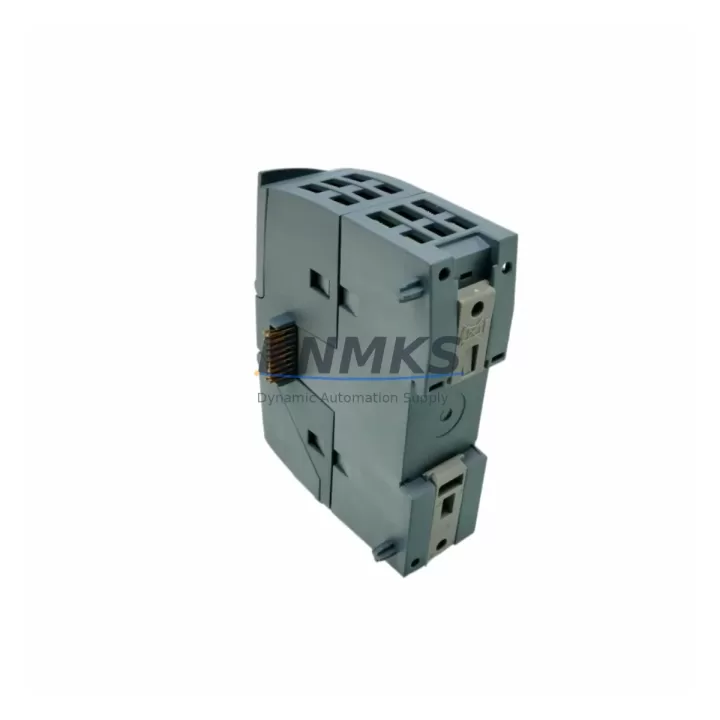
The Siemens 6GK7243-1BX30-0XE0 (CP 1243-1) is a PROFINET/Industrial Ethernet Communications Processor designed for the SIMATIC S7-1200 controller family. As a critical network interface module, it enables the S7-1200 CPU to participate in PROFINET IO networks, communicate via open Ethernet protocols (TCP/IP, ISO-on-TCP, UDP), and connect to SCADA, MES, and supervisory systems. In maintenance-driven environments — from automotive assembly lines to water treatment facilities and discrete manufacturing cells — the CP 1243-1 is a high-priority spare that directly determines whether a control node can communicate, execute remote diagnostics, or recover from a network fault within a single shift.
Sourced as an original Siemens component, the 6GK7243-1BX30-0XE0 supplied by KNMKS is individually tested before shipment and backed by a support terms confirmed by quotation. Each unit is verified for firmware compatibility and physical integrity, ensuring it can be installed directly into an existing S7-1200 rack without additional configuration overhead beyond standard TIA Portal commissioning steps.
Spare Maintenance Table
| Parameter | Specification |
|---|---|
| Part Number | 6GK7243-1BX30-0XE0 |
| Module Designation | CP 1243-1 |
| Compatible Controllers | SIMATIC S7-1200 (all CPU variants: CPU 1211C, 1212C, 1214C, 1215C, 1217C) |
| Communication Standard | PROFINET IO, Industrial Ethernet (IEEE 802.3) |
| Supported Protocols | TCP/IP, ISO-on-TCP, UDP, SNMP, DHCP, DNS, NTP |
| Interface | RJ45, 10/100 Mbit/s, auto-negotiation, auto-crossover |
| Supply Voltage | 24 V DC (via S7-1200 backplane bus) |
| Power Consumption | Max. 2.0 W (from backplane) |
| Operating Temperature | 0 °C to +60 °C (horizontal installation) |
| Protection Class | IP20 |
| Country of Origin | Germany |
| Dimensions (W×H×D) | 30 mm × 100 mm × 75 mm |
| Weight | Approx. 120 g |
| Firmware | Compatible with TIA Portal V13 SP1 and above |
| Certifications | CE, UL, cULus, ATEX Zone 2 (with appropriate housing) |
| Support terms | 12 Months — tested before shipment |
| Availability | availability confirmed by RFQ — long-term supply commitment |
Maintenance Planning for Continuous Operation
When a CP 1243-1 (6GK7243-1BX30-0XE0) fails or is flagged during a scheduled cabinet inspection, the fault typically manifests as a loss of PROFINET communication, a BF (Bus Fault) LED indication on the CPU, or a timeout alarm in the SCADA layer. Maintenance engineers should treat this event as a system-level review opportunity rather than a single-component swap.
Before or alongside replacing the 6GK7243-1BX30-0XE0, inspect the 24 V DC power supply module feeding the S7-1200 rack — a marginal or aging SITOP PSU8200 or equivalent can cause intermittent CP resets that mimic hardware failure. Verify that the S7-1200 CPU module itself (e.g., CPU 1214C DC/DC/DC) is not logging internal faults that predate the communication loss; a corrupted project or firmware mismatch can prevent the new CP from initializing correctly.
Check the Ethernet patch cable and RJ45 termination at both the CP port and the managed switch port. Industrial environments with vibration or thermal cycling frequently cause connector fatigue that is invisible to visual inspection but produces intermittent link drops. Replace with an industrial-grade Cat6 cable rated for the ambient temperature of the cabinet.
If the S7-1200 station includes a CM 1241 serial communications module for legacy RS-485 or RS-232 device integration, verify its status independently — a shared backplane fault can affect multiple communication modules simultaneously. Similarly, inspect any SM 1222 digital output modules or SM 1231 analog input modules in the same rack for error LEDs, as a backplane bus issue may have triggered the CP fault as a secondary symptom.
For installations where the S7-1200 communicates with a KTP700 or KTP900 Basic HMI panel via PROFINET, confirm that the HMI project is updated to reflect the new CP’s MAC address if the network configuration uses static IP assignment. Failure to update the HMI connection parameters is a common cause of post-replacement communication errors that delay line restart.
Procurement engineers building annual spare parts lists for S7-1200-based control systems should stock the 6GK7243-1BX30-0XE0 alongside the relevant CPU variant, at least one SITOP power supply module, and a set of pre-terminated industrial Ethernet cables. This combination covers the majority of unplanned downtime scenarios for PROFINET-connected S7-1200 nodes and supports a target mean-time-to-repair (MTTR) of under two hours for network-layer faults.
Site Replacement Workflow
Step 1 — Isolate and document. Before removing the 6GK7243-1BX30-0XE0, record the existing IP address, subnet mask, gateway, and PROFINET device name from TIA Portal or the module’s web server. Take a photograph of the wiring and cable routing for reference.
Step 2 — Power down safely. Switch off the 24 V DC supply to the S7-1200 rack. Do not hot-swap the CP 1243-1 without confirming the CPU is in STOP mode and the rack power is isolated — backplane damage can result from improper removal under power.
Step 3 — Remove and inspect. Slide the 6GK7243-1BX30-0XE0 out of the left-side expansion slot. Inspect the backplane connector for bent pins or contamination. Clean with dry compressed air if necessary.
Step 4 — Install the replacement unit. Seat the new 6GK7243-1BX30-0XE0 firmly until the latch clicks. Reconnect the Ethernet cable. Restore 24 V DC power.
Step 5 — Commission via TIA Portal. Download the existing hardware configuration to the CPU. The CP 1243-1 will adopt the configured IP address and PROFINET device name automatically. Verify the LINK and RX/TX LEDs on the CP front panel indicate active communication.
Step 6 — Functional test. Confirm PROFINET IO communication is restored, check SCADA alarm lists for cleared faults, and run a 15-minute observation period before returning the line to production. Log the replacement in the maintenance record with the new module’s serial number and the date of installation.
This workflow is compatible with all S7-1200 CPU generations and does not require a new TIA Portal project if the hardware configuration is unchanged. The 6GK7243-1BX30-0XE0 is a direct form-fit-function replacement for earlier CP 1243-1 revisions, supporting backward compatibility with existing PROFINET network topologies.
Spare Parts Support FAQ
Q1: Is the 6GK7243-1BX30-0XE0 compatible with all S7-1200 CPU variants?
Yes. The CP 1243-1 is compatible with all SIMATIC S7-1200 CPU models, including the CPU 1211C, 1212C, 1214C, 1215C, and 1217C, across DC/DC/DC, DC/DC/RLY, and AC/DC/RLY power variants. It occupies one of the three left-side communication module slots on the S7-1200 backplane.
Q2: What testing is performed before shipment?
Each 6GK7243-1BX30-0XE0 unit supplied by KNMKS undergoes individual functional testing to verify power-up behavior, Ethernet link establishment, and firmware version. Units that do not pass testing are not shipped. A support terms confirmed by quotation is provided from the date of shipment, covering manufacturing defects and functional failures under normal operating conditions.
Q3: Can this module replace an older CP 1243-1 revision without changing the TIA Portal project?
In most cases, yes. The 6GK7243-1BX30-0XE0 is the current production revision of the CP 1243-1 and is backward compatible with existing TIA Portal hardware configurations. If the project was created with an earlier firmware baseline, a firmware update via TIA Portal may be recommended but is not mandatory for basic PROFINET IO operation. Always verify the TIA Portal version compatibility matrix for your specific project before deployment.
Q4: What is the long-term supply commitment for this part?
KNMKS maintains stock of the 6GK7243-1BX30-0XE0 as part of a long-term industrial spare parts supply program. Orders are fulfilled from verified inventory, and multi-unit procurement for annual maintenance budgets is supported. For high-volume or scheduled maintenance contracts, contact the sales team to discuss lead times, quantity pricing, and reserved stock arrangements.
© 2026 KNMKS. All rights reserved.
Original Source: https://knmks.com
Contact: admin@knmks.com | +86 18359268345
Product Identification
- Brand / Ecosystem
-
Siemens
Siemens - Model / Series
-
6GK7243-1BX30-0XE0
SIMATIC Series - Product Family
- PLCs & Controllers
- Availability Status
- Available on request after model and quantity confirmation
- Inquiry Type
- B2B RFQ, replacement inquiry and project spare-part request
- Pre-Quote Check
- Exact SKU, brand, series, quantity, nameplate photos and destination country are checked before quotation
System Path
Where this product fits in the KNMKS automation structure.
Specification & Inquiry Focus
- Control platform
- PLC, PAC and modular controllers
- Common needs
- CPU, rack, power and I/O expansion
- Project support
- Replacement, cabinet build and maintenance
Buyer Confirmation
Information KNMKS checks before replying.
- Exact model
- 6GK7243-1BX30-0XE0
- Brand / ecosystem
- Siemens
- Product family
- PLCs & Controllers
- Application note
- Replacement, maintenance, project build or spare-part list
- Useful photos
- Nameplate, installed unit, cabinet layout or connector side
- Delivery details
- Quantity, destination country and target schedule
Document Support
Files and notes can be confirmed during quotation.
- Product photos or nameplate confirmation when available
- Packing and delivery notes before quotation confirmation
- Support scope and delivery terms confirmed per inquiry
- Export document coordination for qualified B2B requests
Inquiry Support
- Model cross-checking before quotation
- CPU, power, rack and expansion module matching
- Support for replacement and project inquiry
What to Send Us
- Brand and exact model number: Siemens 6GK7243-1BX30-0XE0
- Quantity and required delivery time
- Application, replacement requirement or nameplate photo
- Destination country and shipping preference
RFQ Preparation
This is a product inquiry page built for RFQ communication.
Fast Model Check
Send this model to KNMKS for confirmation.
Include quantity, destination country and photos if this is a maintenance replacement. The inquiry will be saved with a reference number after submission.
Brand & Compatibility Note
KNMKS displays automation product information for well-known industrial brand ecosystems and compatible replacement references. Brand names are used for product identification and compatibility reference only; final availability and commercial terms are confirmed per quotation.
 Manufacturing
 Machine Tools
 Packaging
 Energy & Power



 HMI & Displays
 Servo Systems
 Variable Frequency Drives
 Sensors