
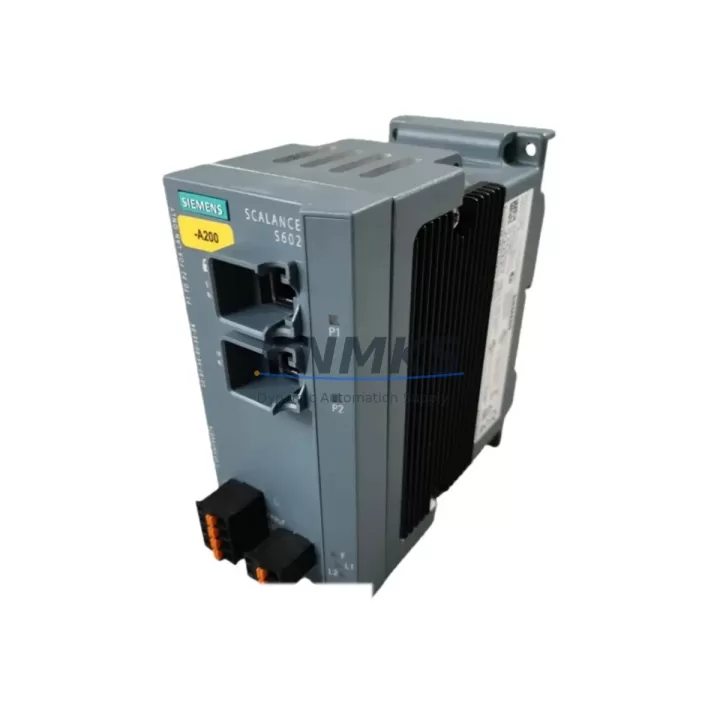
Overview
Siemens 6GK5602-0BA10-2AA3 Migration-Ready Security Module: Legacy System Retrofit & Compatibility Upgrade
The Siemens 6GK5602-0BA10-2AA3 is a SCALANCE S602 industrial network security module engineered for seamless integration into existing automation architectures. As legacy control systems approach end-of-life and original spare parts become increasingly scarce, the 6GK5602-0BA10-2AA3 serves as a validated, migration-ready replacement for discontinued S Series security modules across energy, petrochemical, manufacturing, and infrastructure sectors. Whether you are upgrading a legacy Siemens S7-300 or S7-400 control cabinet, extending the service life of an aging PROFINET segment, or hardening an existing industrial DMZ, this module provides the compatibility, form factor, and protocol support required for a controlled, low-risk transition.
Before initiating any replacement, engineers must verify several critical parameters: the existing 24 VDC power supply capacity and rail loading, terminal block wiring assignments (particularly for the external firewall rule input contacts), backplane interface compatibility with the existing DIN rail mounting arrangement, and the IP address scheme and VPN tunnel configurations carried over from the predecessor unit. For sites running legacy STEP 7 or TIA Portal projects, the module address and device name must be reassigned to match the original configuration to avoid communication faults on restart. HMI screens referencing the security module’s diagnostic OB or alarm blocks should be reviewed and updated prior to commissioning. Where the existing installation uses a SCALANCE X208 or SCALANCE X216 managed switch as the upstream network node, VLAN and port security settings must be cross-checked to ensure the new module’s firewall rules align with the switch’s access control lists.
Sites operating mixed communication environments — including legacy MPI, PROFIBUS DP, and modern PROFINET IO — will find the 6GK5602-0BA10-2AA3 particularly valuable as a protocol boundary device, isolating legacy field segments from Ethernet-based supervisory networks. In control cabinets where a CP 343-1 or CP 443-1 communications processor handles S7 routing, the security module can be inserted inline without requiring changes to the existing CP configuration, provided the IP routing table is updated accordingly. For installations using a SIMATIC S7-1500 as the replacement controller, the module’s stateful packet inspection and VPN capabilities remain fully compatible with TIA Portal V15 and later engineering environments.
Migration Compatibility Table
| Parameter | Details |
|---|---|
| SKU / Part Number | 6GK5602-0BA10-2AA3 |
| Series | SCALANCE S602 (S Series) |
| Supply Voltage | 24 VDC (18–32 VDC operating range) |
| Mounting | DIN rail (35 mm), standard control cabinet installation |
| Network Interfaces | 2× RJ45 (10/100 Mbit/s), internal + external network ports |
| Communication Protocols | PROFINET, Industrial Ethernet, VPN (IPsec), HTTPS, SNMP |
| Firewall | Stateful packet inspection, IP/MAC-based rules |
| Replaces / Compatible With | 6GK5602-0BA00-2AA3, legacy SCALANCE S601, S612 (function-level) |
| Engineering Tool | STEP 7 V5.x, TIA Portal V13–V18, Security Configuration Tool (SCT) |
| Installation Space | Verify minimum 35 mm clearance above/below for ventilation |
| Firmware Compatibility | Confirm SCT firmware version matches site security policy baseline |
| Commissioning Note | Device name and IP must be reassigned via SCT before first power-on |
| Support terms | support terms confirmed by quotation — tested and verified before shipment |
Retrofit Planning for Existing Automation Systems
A successful retrofit begins with a thorough audit of the existing control cabinet layout. In most legacy installations, the SCALANCE S602 is mounted adjacent to a SCALANCE X208 or X216 managed switch, sharing the same 24 VDC power distribution rail. Before removing the old unit, document all existing firewall rules, VPN group configurations, and IP address assignments using the Security Configuration Tool (SCT) export function — this project file will serve as the baseline for the replacement module’s initial configuration.
Terminal wiring on the 6GK5602-0BA10-2AA3 follows the same two-port topology as its predecessors: the internal port connects to the protected automation network (typically the PROFINET IO segment hosting S7 controllers, ET 200SP distributed I/O stations, and HMI panels), while the external port faces the plant Ethernet backbone or DMZ. If the existing installation uses a SITOP PSU100S or SITOP modular power supply, verify that the combined load of the security module, the managed switch, and any co-mounted CP 343-1 communications processor does not exceed the supply’s rated output current. In high-density cabinets, a supplementary SITOP buffer module may be required to maintain ride-through during brief power interruptions.
For sites with legacy PROFIBUS DP field devices that have not yet been migrated to PROFINET, the security module can be deployed at the Ethernet boundary while the existing IM 153-2 or IM 151-3 PN interface modules continue to serve as the protocol bridge. This staged approach allows the network security layer to be upgraded independently of the field device migration, reducing the scope and risk of each individual change window. Once the security module is in service, the next phase typically involves replacing aging ET 200M I/O racks with ET 200SP stations, which offer a significantly smaller footprint and native PROFINET connectivity.
Downtime Control During System Migration
Minimizing unplanned downtime during a security module replacement requires careful pre-staging and a clearly defined rollback procedure. The recommended approach is to pre-configure the replacement 6GK5602-0BA10-2AA3 offline using the SCT project file exported from the existing unit, load and verify the configuration on the bench, and then execute the physical swap during a planned maintenance window — typically targeting a changeover time of under 30 minutes for a like-for-like replacement.
To protect existing program logic, ensure that the S7 controller’s CPU (whether a CPU 315-2 PN/DP, CPU 317-2 PN/DP, or a newer CPU 1515-2 PN) is placed in STOP mode before disconnecting the security module. This prevents spurious communication timeouts from triggering OB86 (rack failure) or OB122 (I/O access error) calls that could affect the process. After the new module is installed and powered, bring the CPU back online in a controlled sequence: first verify the security module’s status LEDs indicate normal operation, then re-enable the PROFINET IO connection, and finally release the CPU to RUN mode. HMI panels connected via the internal network segment — such as a SIMATIC TP700 Comfort or TP1200 Comfort — will automatically reconnect once the module’s internal port is active, provided the IP address and device name are unchanged.
For critical continuous-process applications where even a brief interruption is unacceptable, consider deploying the replacement module in parallel with the existing unit using a temporary network bridge, allowing configuration verification under live conditions before the final cutover. All units supplied by KNMKS are pre-tested and shipped with a support terms confirmed by quotation, and our technical team can provide site-specific commissioning checklists on request.
Retrofit Support FAQ
Q1: Is the 6GK5602-0BA10-2AA3 a direct drop-in replacement for the 6GK5602-0BA00-2AA3?
The 6GK5602-0BA10-2AA3 is functionally compatible with the 6GK5602-0BA00-2AA3 and shares the same physical form factor, port layout, and DIN rail mounting dimensions. The primary difference lies in the firmware baseline and supported SCT version. The existing SCT project file can be imported and re-applied to the new module after a firmware version check. No hardware modifications to the cabinet or terminal wiring are required for a standard like-for-like swap.
Q2: What commissioning steps are required after installation?
After physical installation, connect the module to a laptop running the Security Configuration Tool (SCT). Import the previously exported project file, verify the device name and IP address assignments, and download the configuration to the module. Confirm that the status LEDs on both the internal and external ports indicate link activity, then perform a ping test from the engineering station to a device on the protected network segment. Finally, verify that any VPN tunnels to remote stations or SCADA servers re-establish correctly before returning the system to normal operation.
Q3: Can this module be used with both STEP 7 and TIA Portal projects?
Yes. The SCALANCE S602 is managed exclusively through the Security Configuration Tool (SCT), which operates independently of both STEP 7 and TIA Portal. The S7 controller’s hardware configuration in STEP 7 or TIA Portal does not need to be modified for the security module replacement, as the module is transparent to the controller’s PROFINET IO communication. Only the SCT project requires updating.
Q4: What support terms and pre-shipment testing does KNMKS provide?
All 6GK5602-0BA10-2AA3 units supplied by KNMKS are covered by a support terms confirmed by quotation from the date of shipment. Each unit undergoes functional testing prior to dispatch, including power-on verification, port link testing, and basic configuration load. Units are shipped in anti-static packaging with inspection documentation. Expedited delivery and in-stock availability can be confirmed by contacting our sales team directly.
© 2026 KNMKS. All rights reserved.
Original Source: https://knmks.com
Contact: admin@knmks.com | +86 18359268345
Product Identification
- Brand / Ecosystem
-
Siemens
Siemens - Model / Series
-
6GK5602-0BA10-2AA3
SIMATIC Series - Product Family
- PLCs & Controllers
- Availability Status
- Available on request after model and quantity confirmation
- Inquiry Type
- B2B RFQ, replacement inquiry and project spare-part request
- Pre-Quote Check
- Exact SKU, brand, series, quantity, nameplate photos and destination country are checked before quotation
System Path
Where this product fits in the KNMKS automation structure.
Specification & Inquiry Focus
- Control platform
- PLC, PAC and modular controllers
- Common needs
- CPU, rack, power and I/O expansion
- Project support
- Replacement, cabinet build and maintenance
Buyer Confirmation
Information KNMKS checks before replying.
- Exact model
- 6GK5602-0BA10-2AA3
- Brand / ecosystem
- Siemens
- Product family
- PLCs & Controllers
- Application note
- Replacement, maintenance, project build or spare-part list
- Useful photos
- Nameplate, installed unit, cabinet layout or connector side
- Delivery details
- Quantity, destination country and target schedule
Document Support
Files and notes can be confirmed during quotation.
- Product photos or nameplate confirmation when available
- Packing and delivery notes before quotation confirmation
- Support scope and delivery terms confirmed per inquiry
- Export document coordination for qualified B2B requests
Inquiry Support
- Model cross-checking before quotation
- CPU, power, rack and expansion module matching
- Support for replacement and project inquiry
What to Send Us
- Brand and exact model number: Siemens 6GK5602-0BA10-2AA3
- Quantity and required delivery time
- Application, replacement requirement or nameplate photo
- Destination country and shipping preference
RFQ Preparation
This is a product inquiry page built for RFQ communication.
Fast Model Check
Send this model to KNMKS for confirmation.
Include quantity, destination country and photos if this is a maintenance replacement. The inquiry will be saved with a reference number after submission.
Brand & Compatibility Note
KNMKS displays automation product information for well-known industrial brand ecosystems and compatible replacement references. Brand names are used for product identification and compatibility reference only; final availability and commercial terms are confirmed per quotation.
 Manufacturing
 Machine Tools
 Packaging
 Energy & Power



 HMI & Displays
 Servo Systems
 Variable Frequency Drives
 Sensors